The pandemic of 2020 not only forced people to work in the digital workspace, but created a data boom across industries. With all this new/increased data from increasing server size and data storage, what have businesses been doing to manage their data? Thomas Hazel, Founder/CTO of information and computational science innovation organization ChaosSearch, found that this influx of data presents new opportunities for organizations, but the current infrastructure—coupled with the data scientist shortage—has made it challenging for companies to extract value from data to inform business decisions. Though with any new challenge it means there are new opportunities for companies to fix things that they otherwise didn’t notice wasn’t working as efficiently before. Hazel shares these three critical goals every organization should set if they want to start leveraging data to generate more valuable business and accelerate growth.

Stop Wasting Your IT Talent. “In a recent survey, we found that IT teams spend almost as much time prepping data (6.6 hours per week) as they do analyzing it (7.2 hours per week). That’s a waste of resources because this process can be fully automated. Aside from the obvious benefit of making it easier for everyone to interact with an organization’s data, solving these data challenges with technology can help alleviate the talent shortage.”

Increase Data Retention and Access. “When organizations more effectively retain and increase access to data, they’re able to drive greater business value from that data. Data provides not only a historical representation of an organization but is also the key to future growth; the more data your organization can leverage, the more it can innovate. In order to support a strong data retention strategy, organizations need sufficient resilient infrastructure.”

Activate Your Cloud Data For Analysis. “Public cloud services like AWS provide cost-effective solutions for retaining data at scale, but most enterprises need better technology to efficiently analyze the vast amounts of data they’re generating from launching new applications, services and devices in the cloud. Before they can use all of this data, it needs to be aggregated and stored—which can become costly. Modern data lakes can house limitless amounts of data through a cloud-based infrastructure that enables users to scale as their needs grow. It’s important to keep in mind that simply having a data lake doesn’t guarantee insights, so companies should focus on solutions that can activate their lakes to derive valuable data analysis.”

Hazel concludes that you should capitalize on new opportunities when it presents. “Smart organizations are poised to maximize the opportunities available in their data. It starts with putting the right people, processes and technology in place. Integrating new technologies must be strategic and prioritized through cost optimization.”

 

For Full Article, Click Here

Rotair, Italian producers of mobile air compressors with heat engines, successfully implemented Infor CloudSuite Industrial Enterprise, powered by Amazon Web Services (AWS), to optimize processes and operations across the companies of the group. Per the press release, Rotair needed a solution that would support international expansion and be streamlined, flexible and easy to implement. Infor CloudSuite Industrial Enterprise, with the enterprise resource planning (ERP) solution Infor LN at its core, was chosen as it was designed to meet the specific needs of industrial manufacturing companies: rapid implementation, automatic updates and integration into the production department and supply chain of tools of financial management, quality, service, and orders. Implementation was done by Infor partner 2WS. In addition, key users of the system actively participated in the deployment, working side by side with the partner, bringing their knowledge and developing new skills thanks to the functions offered by the system.


For Full Article, Click Here

AS/400 (Application System/400) is the operating system made by IBM. Companies use this system for enterprise resource planning (ERP) in industries that involve extreme reliability. Below is a list of common AS/400 commands that are useful for your everyday knowledge base.


DSPMSG Displays messages in queue
DSPMSGD Displays description of messages, ie CPF messages
WRKMSGF QCPFMSG Displays contents of MONMSG file
WRKUSRPRF – Can work with specified user’s profile
WRKSBMJOB *JOB  Displays my jobs for the current session
WRKACTJOB Displays all active jobs
WRKUSRJOB Displays list of my jobs to work with
WRKOBJ Work with an object.  Use *ALLUSR in qualified name to skip Q libraries
WRKSPLF Displays spool files
WRKOUTQ Displays members in specified OUTQ
DISPLIB Displays contents of specified library
EDTLIBL Allows addition and deletion of libraries to and from list
ADDLIBLE Library Name Add library to current list
STRPDM Start PDM
STRDBG Start Debug
ADDBKP Add a break point and variables to monitor in debug
RMVBKP Remove a break point in debug
ENDDBG End Debug
STRDBU Start DBU (Database Utility) Look at and make changes to the database
DBU Qualified Name Runs DBU without the above command.  ADDLIBLE DBU41 *LAST before using
STRDFU Start DFU (Data File Utility) Many of the same functions of DBU
DSPFFD Displays file field descriptions
DSPFD Displays file description for specified file
DSPPFM Displays member of a physical file
DSPDBF Displays contents of database file.
Must add TAATOOL to library list before using this command
DSPPGMREF Display the files used in a program and which libraries the program was compiled over
PRTRNG Will allow printing a range of pages from a member in the specified OUTQ.
Must add PRTRNG to library list before using this command
OUTQ(PRINTER) Mark object in spool file with 2 for change.  Type this on the command line.
WRKJOBSCDE Look at scheduled jobs
RUNQRY QRYFILE(LIB/FILE) Run query on a file with no parameters
DSPDBR  LIB/FILE Shows logicals related to a physical file


DSPMSG Displays messages in queue
DSPMSGD Displays description of messages, ie CPF messages
WRKMSGF QCPFMSG Displays contents of MONMSG file
WRKUSRPRF – Can work with specified user’s profile
WRKSBMJOB *JOB  Displays my jobs for the current session
WRKACTJOB Displays all active jobs
WRKUSRJOB Displays list of my jobs to work with
WRKOBJ Work with an object.  Use *ALLUSR in qualified name to skip Q libraries
WRKSPLF Displays spool files
WRKOUTQ Displays members in specified OUTQ
DISPLIB Displays contents of specified library
EDTLIBL Allows addition and deletion of libraries to and from list
ADDLIBLE Library Name Add library to current list
STRPDM Start PDM
STRDBG Start Debug
ADDBKP Add a break point and variables to monitor in debug
RMVBKP Remove a break point in debug
ENDDBG End Debug
STRDBU Start DBU (Database Utility) Look at and make changes to the database
DBU Qualified Name Runs DBU without the above command.  ADDLIBLE DBU41 *LAST before using
STRDFU Start DFU (Data File Utility) Many of the same functions of DBU
DSPFFD Displays file field descriptions
DSPFD Displays file description for specified file
DSPPFM Displays member of a physical file
DSPDBF Displays contents of database file.
Must add TAATOOL to library list before using this command
DSPPGMREF Display the files used in a program and which libraries the program was compiled over
PRTRNG Will allow printing a range of pages from a member in the specified OUTQ.
Must add PRTRNG to library list before using this command
OUTQ(PRINTER) Mark object in spool file with 2 for change.  Type this on the command line.
WRKJOBSCDE Look at scheduled jobs
RUNQRY QRYFILE(LIB/FILE) Run query on a file with no parameters
DSPDBR  LIB/FILE Shows logicals related to a physical file


Hydrite, one of North America’s largest independent distributors and manufacturers of specialty and industrial chemicals, has selected Infor CloudSuite Chemicals to help manage critical business processes and transform its business. Per the press release, Hydrite will gain real-time visibility across its entire enterprise and tools to handle the complicated pricing methods associated with manufacturing and distributing commodity chemicals. A 15-year customer of Infor, Hydrite is set to continue its partnership for at least another 7 years with this long-term agreement. Further. the Infor solution will include Infor Factory Track, an end-to-end manufacturing automation solution; Infor Birst enterprise analytics; production scheduling; Infor Product Lifecycle Management (PLM); Infor Capture document management; Infor User Adoption Platform (UAP) to author and manage unique learning content; and Infor Graphical Lot Tracker (GLT) for traceability information.


For Full Article, Click Here

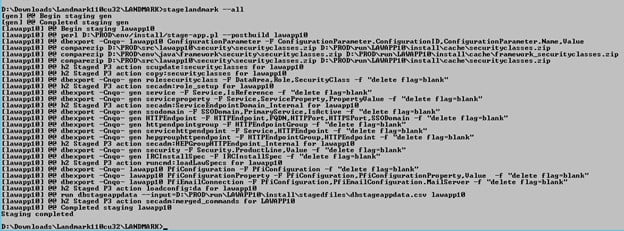
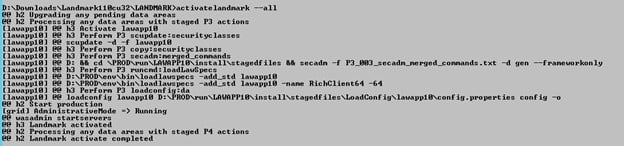
There may be some times where you need to redeploy Landmark and the applications.  This should be done with every CU maintenance, but also can be done in between if there seem to be issues with one or more applications. This process will not reinstall your Landmark and Applications, it will just stage and redeploy what is already there.

The two commands are:
stagelandmark –rebuild –all
activatelandmark –all

After staging and deploying, you will need to generate and propagate the web server plugins in IBM.  Then, you will restart the web server in ISS (do an IIS reset or restart the WWW Windows service).  Finally, you will reboot the WebSphere application server.


Implementing a new or replacement customer relationship management (CRM) system is a great way to keep your business on a competitive edge. However, we can commit costly mistakes when implementing these systems, especially if we’re replacing a current one. Not wanting to adjust to a new system, not wanting to let go of your current approach and not getting support of stakeholders and employees are some pitfalls to name a few. Tal Frankfurt, Forbes Council Member and Founder and CEO of Cloud for Good, shares an article about some common mistakes we make and need to avoid before implementing a CRM.

  1. Holding On To The Past. “Perhaps more than any other common mistake, a stubbornly strong grip on established standards of practice will sink even the most well-managed CRM implementation. This backward line of thought can pervade the CRM implementation at any and all phases. Remember, there’s a reason you’re seeking a change in the first place; don’t lose sight of this fact.”
  2. Failing To Engage The Right Stakeholders. “In the lead-up to your organization’s CRM implementation, it is of the utmost importance that the right stakeholders are engaged. Stakeholders have the unique ability to determine the success or failure of what your organization is trying to achieve with a new CRM, so receiving their buy-in and including them throughout the process of implementation is a critical component often left unnoticed.”
  3. Lack Of Empowered Product Owners. “Product owners can drastically affect the ultimate success of a CRM implementation—for good and for bad. With the right product owner empowered during an implementation, communication with stakeholders will be better facilitated, short- and long-term planning for the technology will be better supported and the overall process will be enhanced for both internal staff and the end users.”
  4. Not Having A Change Management Plan In Place. “With a progressive, open-minded approach, leadership and key stakeholders should be keenly aware that the new CRM will bring updates, upgrades and a whole host of new business practices. Staff must be prepared for the new business processes and technological changes coming their way, and this can only be achieved through intentionally designed and paced change management preparation.”
  5. Biting Off More Than You Can Chew. ” The importance of breaking up the many possible technology needs an organization might prioritize into phases cannot be understated. Determine all the technology needs your organization is seeking to fill with a new CRM implementation, then list them out in terms of importance and criticality to organizational function. Attempting to tackle every need at once will burn out your partner and frustrate internal staff.”

Frankfurt concludes that avoiding these common mistakes before implementing a new CRM can set up your organization in a better position to succeed and thrive with new technology.


For Full Article, Click Here

GPW Group, which operates the Warsaw Stock Exchange, has selected Infor Dynamic Enterprise Performance Management (d/EPM) cloud-based software to support its planning and budgeting process. Per the press release, GPW Group’s decision to use a multitenant cloud system that integrates closely with the Infor OS (Operating Services) platform. This will allow the implementation of new functionalities or innovations without disrupting daily operations. Infor Dynamic Enterprise Performance Management additionally offers full reliability and ensures world-class levels of security, which factors are particularly important for financial institutions. Further, key areas supported by Infor’s cloud solution include planning, monitoring and reporting, as well as management consolidation and procurement support in an integrated and scalable model. Cogit, one of Infor’s leading European partners, will be responsible for implementing the software within a year.


For Full Article, Click Here


Problem

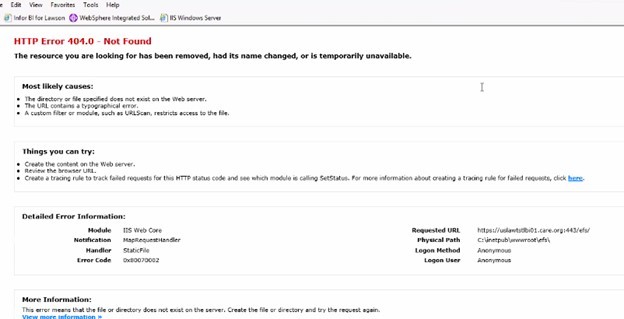
After upgrade of LBI, getting 404 errors logging into LBI

Resolution


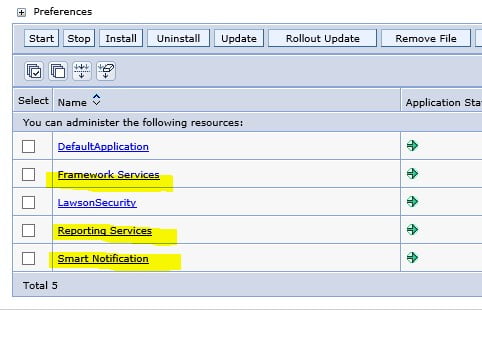
Perform the following in all LBI services:

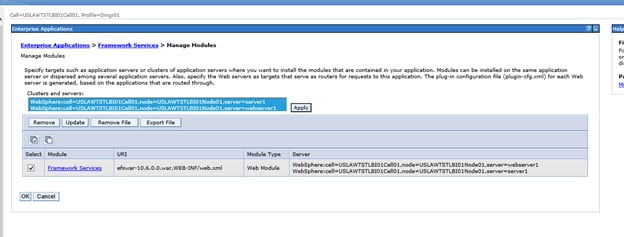
** Accessed WebSphere console > Applications > WebSphere enterprise applications > LBI service > Manage Modules > Checked the service name or module, highlighted everything in the Clusters and servers box > OK > Save

– Restarted WebSphere services
– Re-accessed LBI > no more 404 error

Details:

Go into each of these and relink LBI to WebSphere

Following these same steps:

Click on service

Click on manage modules

Select both clusters and check the box and hit apply then OK

On the next screen, hit SAVE to master

Repeat for other two.

Restart IBM in SERVICES


Bulgarian metal products manufacturer Lesto Product recently decided to migrate to Infor CloudSuite Industrial Enterprise, with the help of implementation and Infor Gold channel partner IPL Consulting, to help improve overall business processes. Per the press release, Lesto Product plans to implement Infor OS operating services cloud platform, providing integration to essential capabilities for finite production scheduling and quality control. Powered by Amazon Web Services (AWS) these cloud solutions will help the customer achieve a more efficient execution of business processes and further improve synchronization among departments. Additionally, Lesto is planning to go live with Infor CloudSuite Industrial Enterprise in July 2022. Infor CloudSuite will further help support the automation across the organization, optimizing business processes of sales and procurement, production planning and scheduling, production management, warehousing and finance management.


For Full Article, Click Here

Here is a step by step guide to reset your TF11 password on windows.


Step 1:

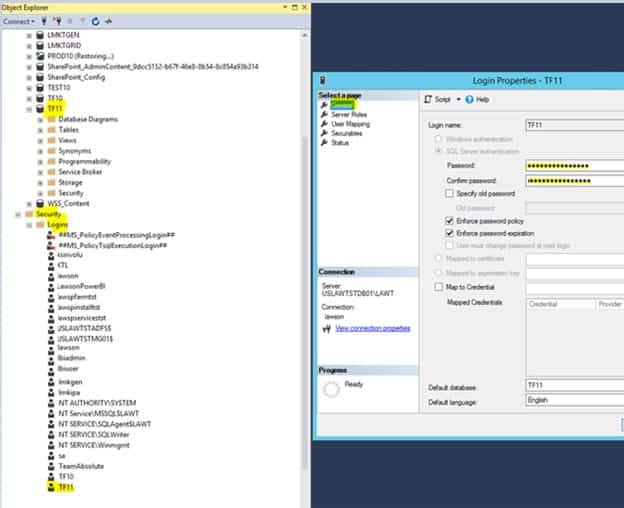
Login to MSSQL and navigate to TF11/Security/Logins/TF11 and double click to open and reset the password on the General Tab.


Step 2:

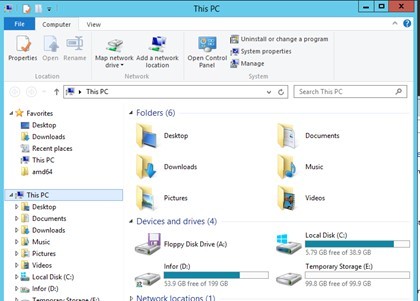
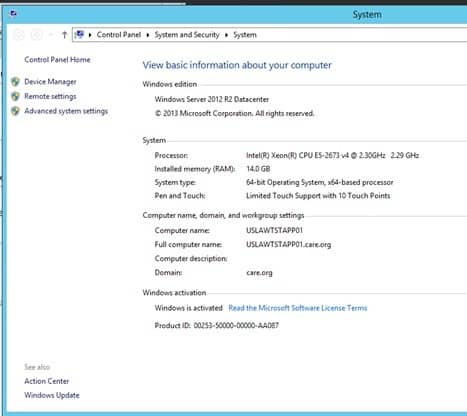
Open windows explorer and right mouse click on This PC and go to Properties


You get this screen

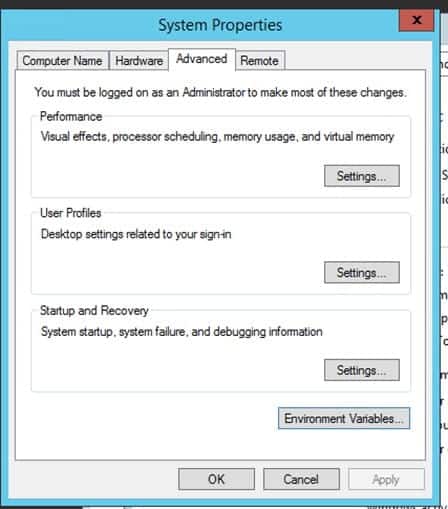
Click on Advanced System Settings

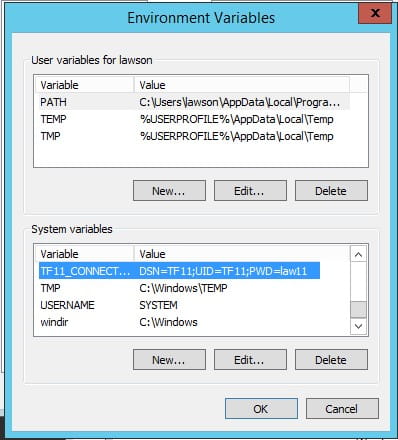
Click on Environment Variables

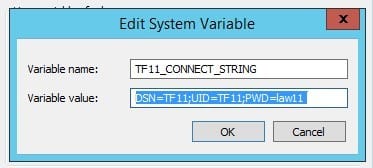
Scroll down and find TF11_Connect and select and click Edit to change the password to the new password.

Click OK all the way out to save the changes.


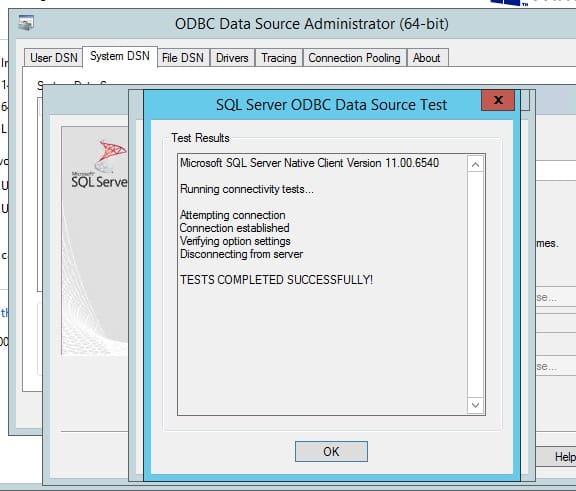
Use ODBC to validate if a TEST is successful

Go to D:\Tomcat8\PRD-11\conf\Catalina\localhost

Edit the eTF11d1#PRD.xml file and change the password to the new password.


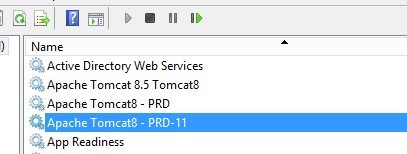
Then restart the Apache services