AI (artificial intelligence) and data are inseparable: without one, the other can’t reach its full potential. As Forbes enterprise tech contributor Joe McKendrick explains in a recent article, the latest AWS blueprint shows that in the era of large language models, what really sets companies apart is not the AI itself, but the quality, structure, and accessibility of their data. Generative AI needs more than just structured data—it thrives on unstructured and multimodal data like video, audio, and code. Yet many organizations struggle to make their data AI-ready, facing barriers in accessibility, accuracy, and completeness. The good news? AI can help fix these gaps. Tools like agentic AI and LLMs automate data profiling, quality checks, and integration, transforming passive storage into intelligent, business-aware ecosystems. This not only unlocks trapped insights but also makes data accessible to a wider audience, empowering smarter decisions across the organization. To succeed, AWS recommends an AI-first data strategy: audit and unify data, modernize architecture, build internal skills, keep humans in the loop, and measure outcomes. McKendrick summarizes when data and AI work together, businesses don’t just get smarter technology—they get a smarter, more agile organization.


For Full Article, Click Here

Learn how to debug Lawson Business Intelligence (LBI) Report prompting Database Login.


Here is an example issue when opening a report via LBI dashboard:

It prompts to a login screen and no credentials work:

To solve this, first validate the datasource of the report and validate its correct (it may resolve after you click save and test the report again)

If not, see if you can view the report with Data Refresh

If it generates data, you can grab this URL:

Edit your report from the dashboard, in this example we edit the “LP Exception Report”:

You can copy this URL:

You can either replace it complete with the top URL shown below with the HTTPS://yourorg.domain.com…. Etc.

OR

You can modify the link with just the tail end of it as shown below:

Then copy and paste this URL back in and save:

That’s it! Test it and the database login prompt should no longer show if you followed everything correctly.

If this is too complex for you and you need Lawson specialists to help manage your Lawson ERP system, Nogalis offers a team of consultants to help manage this for you under one MSP contract. Feel free to reach out to us to get a free consultation today.

Data is evolving just as fast as AI—and according to strategic business & technology advisor Bernard Marr in an article he shares on Forbes, the organizations that win in 2026 will be those that rethink how they collect, govern, and activate information.

Marr highlights eight major data trends shaping 2026:

  • Agent-Ready Data: Ensuring data is accessible, structured, and secure for AI agents.

  • GenAI for Data Engineering: Automating cleaning, formatting, ETL, and audits with natural-language-driven pipelines.

  • Data Provenance: Strengthening traceability and authenticity across all data sources.

  • Compliance & Regulation: Navigating new rules like the EU AI Act and evolving U.S. state-level laws.

  • The Agentic Edge: Moving AI agents onto devices and sensors for real-time, on-site decision-making.

  • Generative Data Democracy: Enabling everyone to access insights using natural language—supported by strong data literacy.

  • Synthetic Data: Accelerating adoption of realistic, privacy-safe AI-generated data.

  • Data Sovereignty: Managing cross-border rules, ownership, rights, and IP-safe usage.

These trends reflect a broader shift: AI agents are becoming the primary consumers and processors of enterprise data. To prepare, organizations must modernize their data infrastructure, remove silos, and adopt stronger governance frameworks. GenAI will drastically reduce the friction in data engineering, but only trustworthy, well-governed data will deliver reliable insights.

Marr’s message is clear: the data landscape of 2026 is faster, smarter, and more autonomous. Those who invest early in agent-ready systems, generative tooling, and compliance-aligned architecture will gain a sharp competitive edge—while those who wait risk being left behind in the agentic era.


For Full Article, Click Here

Business is moving faster than ever—and according to supply chain management and manufacturing expert Richard Howells and his recent article on Forbes, organizations won’t keep up unless their enterprise resource planning (ERP) foundations are ready for the artificial intelligence (AI) era. AI doesn’t magically create speed; it amplifies the quality of the data and systems it sits on. Without clean, connected, and timely data, AI risks exposing gaps rather than delivering value.

Howells reflects on lessons from the predictive analytics wave: dashboards alone couldn’t predict the future without solid data foundations. Today, ERP is evolving from a back-office ledger to a real-time decision platform, connecting operations, finance, and customer data in one intelligent system. Employees can now interact with cloud ERP that surfaces anomalies, recommends actions, and enables instant decision-making. Utilities are leading this shift. Once reactive and siloed, they now leverage AI and sensor data to predict equipment failures, optimize crew deployment, and resolve issues before customers notice. In manufacturing, machine learning adjusts chemical processes mid-run, while IoT-enabled ERP synchronizes maintenance, production, and logistics in real time. Even customer operations are benefiting: AI accelerates case management, reduces errors, and embeds intelligence directly into workflows.

Howells stresses that the challenge isn’t deploying AI—it’s preparing for it. Companies must modernize legacy systems, clean and connect data, and scale high-value use cases quickly. Those that do can turn ERP into a true engine of speed and insight, responding to market changes instantly. Those who delay risk falling behind more agile, data-ready competitors. The future of ERP isn’t just about transactions—it’s about transformation, where real-time decisions and readiness define competitive advantage.


For Full Article, Click Here

There may be some cases where you want to notify your IT or other staff that an Infor Process Automation (IPA) flow has run successfully, or has run with errors overall, in addition to internal notifications for specific events.  Follow these steps to set up notifications on an IPA process.

  1. First, log into Process Administrator.
  2. Next, navigate to Configuration > Process Definitions > User Defined Process
  3. Open your Process.
  4. On the “Notify by Email” option, select your preferred option.
  5. Once you select an email notification type, the email notification tab will open up.
  6. You can use global parameters in the email details.

You are now set up to receive notifications!

In today’s fast-evolving digital landscape, data compliance has become a growing challenge for businesses looking to leverage new technologies. In an insightful article for Technology Networks, freelance science writer RJ Mackenzie explores how artificial intelligence (AI) could be the solution to helping companies navigate the complex world of data regulations. As technologies like AI, machine learning, and big data continue to change the way businesses operate, so too do the regulations that govern data protection, such as GDPR and CCPA. Mackenzie highlights how AI could significantly ease the burden of compliance by automating tasks like monitoring sensitive data and flagging potential violations in real-time. This automation can reduce human error, improve efficiency, and provide companies with a clearer understanding of how to stay compliant with evolving laws.

However, the article also stresses the limitations of AI in the compliance realm. While AI is capable of processing large amounts of data quickly, it still requires human oversight, particularly when interpreting complex legal frameworks or making ethical decisions. Mackenzie emphasizes that a balanced approach is essential: AI can assist, but human judgment must remain central to compliance strategies. Ultimately, AI holds great potential in simplifying data compliance, but businesses must use it wisely to ensure they’re meeting regulatory requirements without sacrificing the human elements that ensure ethical and responsible decision-making.


For Full Article, Click Here

What is the best way for me to get a list of active or disabled users within the Lawson environment?


Resolution:

To see all users who are “Active” or “Disabled”, run the “RM User Attribute report” within the LSA tool. Follow these steps below.

  1. Reports
  2. Report Maintenance
  3. Click New Report
  4. Choose the “RM User Attribute Report”
  5. Add a report a name
  6. OPTIONS:
    ACTIVE USER LISTING: Create a query for the Filter Criteria  where  IsDisabled isNot YES
    or
    DISABLED USER LISTING: Create a query with the filter criteria set to  IsDisabled is YES
  7. Hit next
  8. Choose the attributes about the user you want to see, such as First Name, Last name, etc… By default isDisabled is already checked and ID will automatically show up on the report as well. Click Ok to save the report.
  9. Run the report by highlighting the report and clicking the “Run Report” button at the top of the screen, choose your report format, html, pdf or csv.
  10. Use the Refresh button at the top of the screen and wait for the status of the report to show as “completed”. Once it’s complete, make sure the report name is highlighted then choose View Report. Put a check next to the report format and click View File.


Stepping into the cloud should feel like progress for healthcare organizations—but it also comes with a new set of challenges that can’t be ignored. In a recent Forbes article, Forbes council member and Aviatrix’s chief product officer Chris McHenry breaks down why the industry needs a major shift in how it thinks about cloud security and compliance. The old “build a wall around the data center” mindset is outdated, especially when 276 million health records were breached in 2024 alone.

Healthcare systems are moving massive platforms like Epic’s EHR into the public cloud to boost performance, support telehealth and expand AI capabilities. All of that is promising, but fewer than half of IT leaders feel confident managing these new environments—meaning misconfigurations and blind spots are almost guaranteed. Regulators are tightening the rules too, with expected HIPAA updates calling for mandatory MFA, strong encryption, ongoing penetration testing and tighter network segmentation.

The core issue? Cloud environments don’t behave like on-prem networks. Workloads shift constantly, APIs connect to external partners and staff access apps from anywhere, creating a much wider attack surface. Recent incidents—like the Change Healthcare ransomware attack and Shields Healthcare Group breach—show how fast things can spiral without proper visibility and segmentation. McHenry’s take is straightforward: the future belongs to organizations that rethink security from the ground up. That means adopting zero trust, segmenting workloads, encrypting everything, automating compliance and gaining real-time insight into where PHI travels. He concludes that the cloud can absolutely transform care and innovation—but only if security evolves right along with it.


For Full Article, Click Here

In a recent TechRadar article, product marketing professional Steve Leeper argues that legacy data migration is no longer effective in today’s complex IT environments. What used to be a simple “move the files” task has become far more challenging as organizations now juggle hybrid infrastructure and massive volumes of unstructured data—over 80% of what enterprises store.

According to Leeper, the core issue is that traditional migration tools treat all data equally. They can’t interpret context, value, or risk, which often leads to companies transferring stale, irrelevant, or sensitive data into the wrong storage environments. Instead of improving operations, legacy migration can create new inefficiencies and expose organizations to unnecessary risk.

Leeper says the fix starts with rethinking the entire process. Migration shouldn’t begin with moving data—it should begin with understanding it. Organizations need clarity on what they have, who owns it, how it’s used, and whether it still matters. Modern intelligent data management platforms make this possible through metadata analysis, automated classification, and policy-driven workflows.

With automation and analytics in place, migration becomes a strategic tool. Teams can align storage investments with data value, prioritize hot data for high-performance environments, and archive or delete cold data with confidence. This approach also supports stronger governance, streamlined cloud adoption, and cleaner long-term data landscapes.

Leeper notes that successful organizations treat migration as part of broader modernization efforts, not a one-off project. They track KPIs—cost reduction, compliance, accuracy, and accessibility—to improve future migrations and avoid disruption.

Ultimately, he concludes, modern migration is about creating adaptable, well-governed data ecosystems that evolve with the business—not just moving data from point A to point B.


For Full Article, Click Here

Follow these simple steps to know how to resolve the Lawson Error, “Unable to remove object delete failed”


You may come across the following: Unable to remove object (RQRequester), delete failed. Original Exception: Role RQRequester is in use on a resource or group and cannot be deleted. (Note: there are 3 screenshots below)


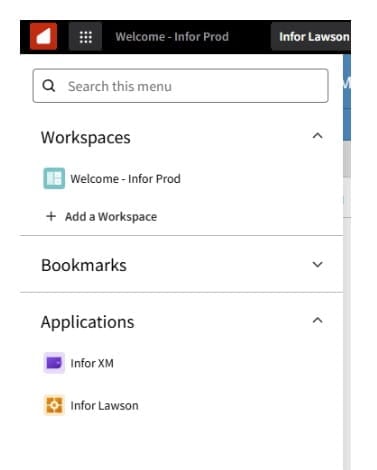
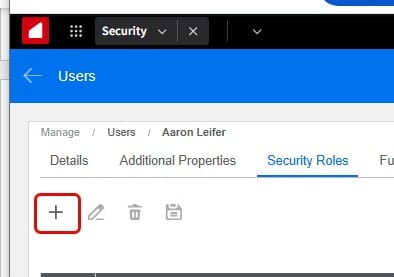
To resolve, you need to remove role from the user and try again. follow these visual guides for the role removal process: (Note: there are 2 screenshots below)


That should be it!