Follow these steps to update a user’s Database and User Roles via Infor Lawson Cloudsuite:
Login to your concierge account and go to Cloudsuite app (this assumes you have access to this else open a ticket with Infor).
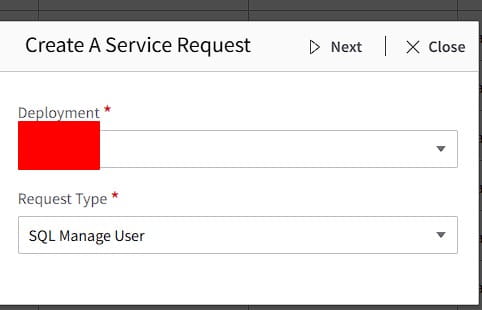
Create a Service Request
Select Deployment and Request Type: SQL Manage User
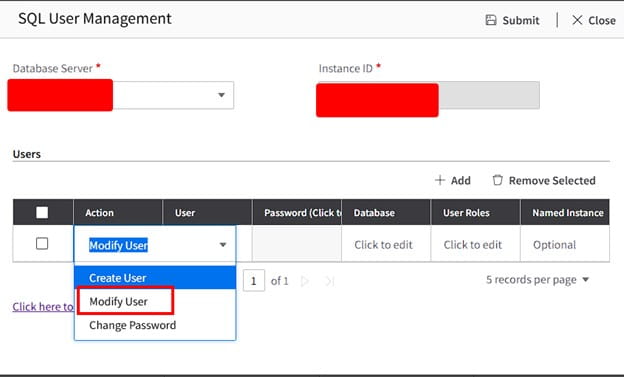
Select Database Server and in the drop down select Modify User
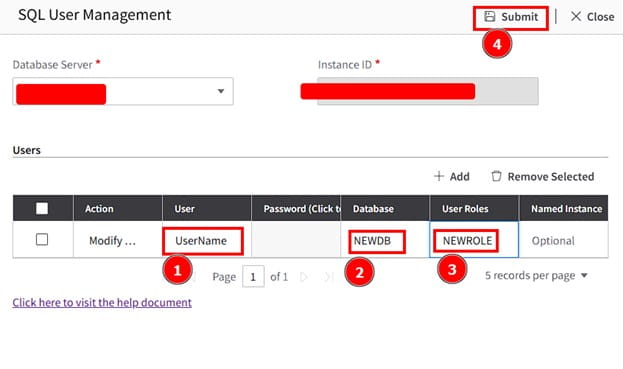
Enter username, the new database, and new role for the user, then click Submit
All done! Validate with the user. If this is something you’re need assistance managing, Nogalis offers a team of Lawson specialists within a single MSP services contract for customers. Let us know if we can assist you today.
https://www.nogalis.com/wp-content/uploads/2026/01/How-to-update-a-users-Database-and-User-Roles-via-Infor-Lawson-Cloudsuite.jpg470470Angeli Mentahttps://www.nogalis.com/wp-content/uploads/2013/04/logo-with-slogan-good.pngAngeli Menta2026-01-30 08:29:472026-01-22 12:34:17How to update a user’s Database and User Roles via Infor Lawson Cloudsuite
Enterprise Resource Planning (ERP) often gets framed as a technology decision, but at its core, it’s really about how a business runs. In a Forbes article by Deanna Laster, Forbes Council member and CEO of DeannaMichel, ERP is positioned as an operational framework first—and software second. As organizations grow and adapt to shifting markets, leaders face increasing complexity across finance, people, data, and decision-making. That complexity is what’s driving renewed interest in ERP. Rather than solving isolated problems, ERP brings structure and discipline to how core functions—from finance and HR to supply chain and customer management—work together as one system. A key theme in the article is the importance of starting with the business, not the technology. Many issues that look like “tech problems” are actually operational ones: manual processes, disconnected data, inefficient workflows, or limited visibility. Assessing business needs first helps leaders clarify what truly matters, where standardization is required, and what capabilities will be needed to compete in the future. This assessment step is critical before selecting any system. It helps organizations avoid unnecessary complexity, overspending, and disruption by clearly separating essential requirements from nice-to-haves and ensuring new tools align with long-term goals and existing systems. Ultimately, Laster argues that ERP should be viewed as an organizational operating system—one that supports clarity, consistency, and responsible growth. When approached through a business lens, ERP becomes a strategic enabler, helping people, processes, and information work together seamlessly in an increasingly fast-moving and competitive landscape.
https://www.nogalis.com/wp-content/uploads/2025/12/ERP-technology-it-enterprise-business.jpg280500Angeli Mentahttps://www.nogalis.com/wp-content/uploads/2013/04/logo-with-slogan-good.pngAngeli Menta2026-01-29 10:43:282026-01-26 12:45:43Understanding ERP: A Practical Guide For Business Leaders
Artificial Intelligence (AI) is often described as the engine of modern business transformation—but without strong data, that engine simply won’t run. In a Forbes article by senior editor David Maclean, new research shows that for today’s C-suite, data challenges are the biggest barrier to turning AI ambition into real business results. Based on the Forbes Research 2025 AI Survey of more than 1,000 executives, the findings reveal a clear disconnect. While leaders feel confident about their AI tools and readiness, their data foundations tell a different story. Nearly 60% of executives cite data privacy and security as their top concern, with data quality—accuracy, completeness, and bias—close behind at 40%. These issues now outweigh concerns about ROI, system integration, and even regulatory compliance. The pressure points vary depending on who you ask. CMOs are the most worried about data privacy, while CIOs are most concerned with data quality. Industry differences are just as telling: financial and professional services leaders are the most sensitive to privacy risks, while energy and professional services executives report the greatest data quality challenges. What’s fueling the problem is governance. Maclean found that only 57% of respondents say they’re confident their organizations have strong data governance practices in place for AI—far fewer than those who believe they have the right tools or are ready to become AI-driven. Perhaps the biggest red flag is data experts are being left out of the conversation. Just 13% of companies involve data scientists or analysts in AI decision-making, a steep drop from last year. The message is clear: without better data discipline and the right voices at the table, AI success will remain frustratingly out of reach.
https://www.nogalis.com/wp-content/uploads/2018/06/crm-data-big-data.jpg338600Angeli Mentahttps://www.nogalis.com/wp-content/uploads/2013/04/logo-with-slogan-good.pngAngeli Menta2026-01-28 11:41:332026-01-26 12:43:19The Data Dilemma: The Hurdles C-Suite Faces In Drive To Win On AI
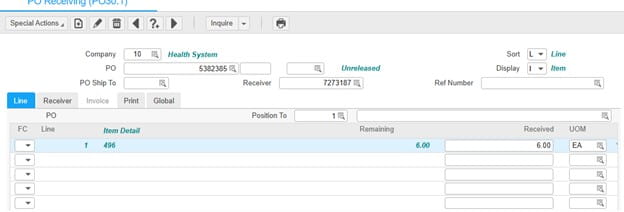
Users may encounter a receiving issue when processing a purchase order where the system prevents reprinting the ticket and does not allow backing out to PO33 to reprint. When attempting to release the item during receiving, the system displays the error message: “Line one has outstanding buyer message.” This issue typically occurs when a buyer message was entered on the purchase order line and has not yet been acknowledged or released.
RESOLUTION
To resolve this issue, navigate to PO52.1 and release the buyer message associated with the affected line.
Ensure you are working in the correct Company (10) and locate the appropriate Receiver (7273187).
Once the buyer message for Line 1 is released, return to PO30.1 and proceed with receiving and printing as expected.
Zero-loss data migration is quickly moving from an aspiration to an expectation as enterprises modernize mission-critical systems. In an article for The AI Journal, tech writer David Kepler examines why traditional migration approaches continue to fail—and how automation-driven methods are reshaping industry standards. Most data migrations still fail, run over budget, or miss deadlines, largely due to manual processes that introduce human error. As Kepler points out, even a single corrupted record can disrupt operations or trigger costly compliance issues, especially in regulated industries. Accepting some level of data loss may have been common in the past, but it’s no longer viable when enterprise data is this critical. A key example highlighted by the author is the work of Manikanteswara Yasaswi Kurra, who developed an automated, metadata-driven migration approach while handling sensitive healthcare R&D data. By breaking migrations into smaller, verifiable units and layering automated validation before, during, and after transfer, the process achieved zero data loss while cutting approval and processing times by more than 60%.
Beyond migration itself, Kepler emphasizes how automation unlocked broader value. Integrated validation, governance, and reporting reduced duplicate data entry, improved accuracy, and gave leaders real-time visibility across global operations—all while embedding security, auditability, and Zero Trust principles into the process. As Kepler concludes, the move toward zero-loss migration reflects a larger shift in mindset. With the right automation and design, organizations no longer have to trade data integrity for speed or scale. Instead, zero-loss migration is emerging as a practical, repeatable standard for modern enterprise transformation.
https://www.nogalis.com/wp-content/uploads/2017/02/data-analytics.jpg640960Angeli Mentahttps://www.nogalis.com/wp-content/uploads/2013/04/logo-with-slogan-good.pngAngeli Menta2026-01-26 12:41:062026-01-26 12:41:06When Zero-Loss Data Migration Becomes the New Industry Standard
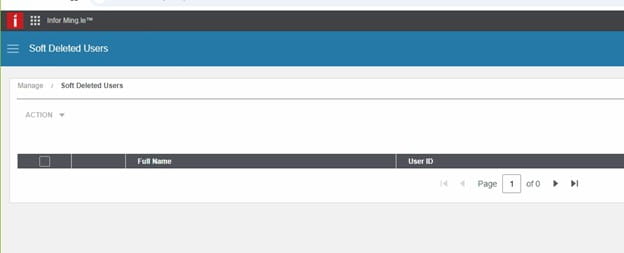
The user does not appear on the Soft Deleted Users page until being deleted from the Users page.
If Soft Delete is the user deletion method, to delete a user:
While logged in as a user with a UserAdmin role, click the profile icon in the top right corner of the screen to access the profile panel.
Click User Management on the profile panel.
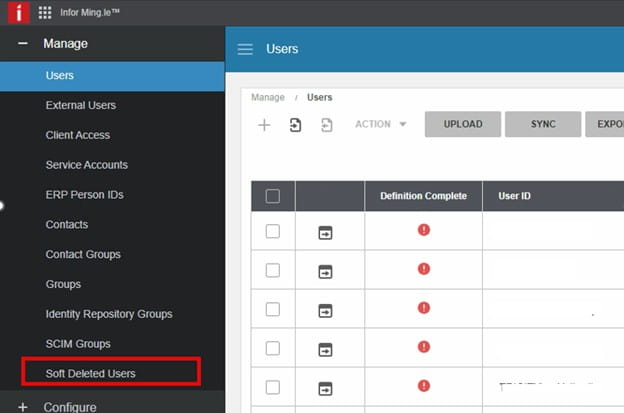
Click Soft Deleted Users under Manage.
On the Soft Deleted Users screen, enter the name of the user to be deleted in the search box on the right and press Enter.
Click the Soft Deleted Users table and select the check box next to the name of the user to be deleted.
Select Action > Delete.
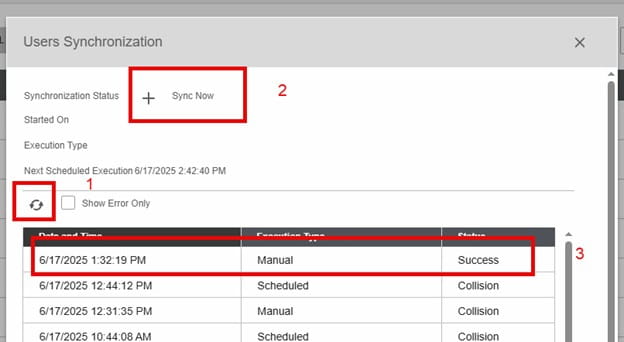
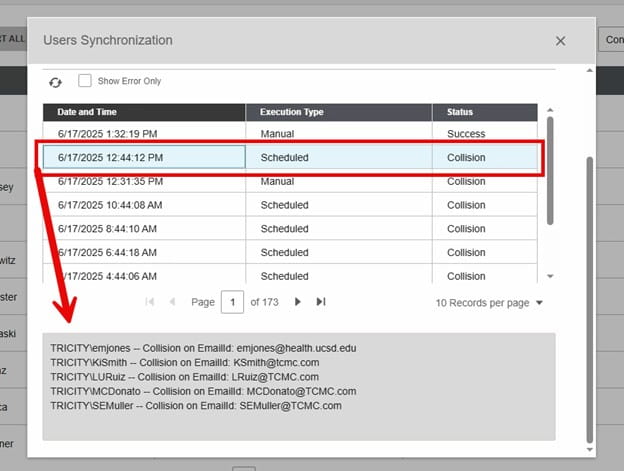
Click on the refresh button to see if the sync completes. It is complete when the + is not grayed out. Also, you will see the manual execution and status of success.
To troubleshoot, highlight a collision one and scroll down to the bottom of the page to see the errors.
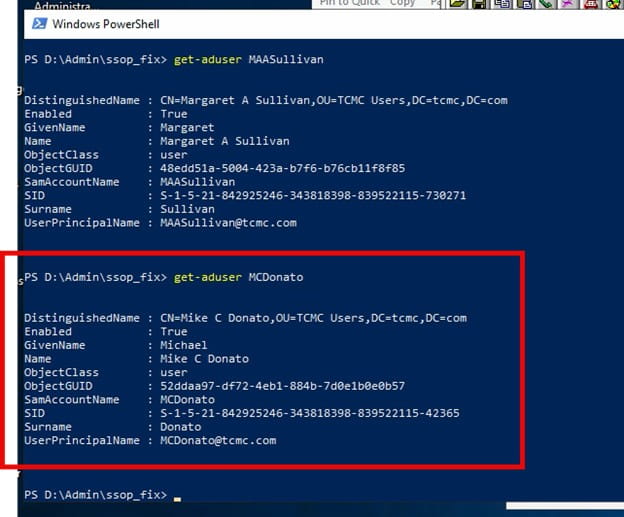
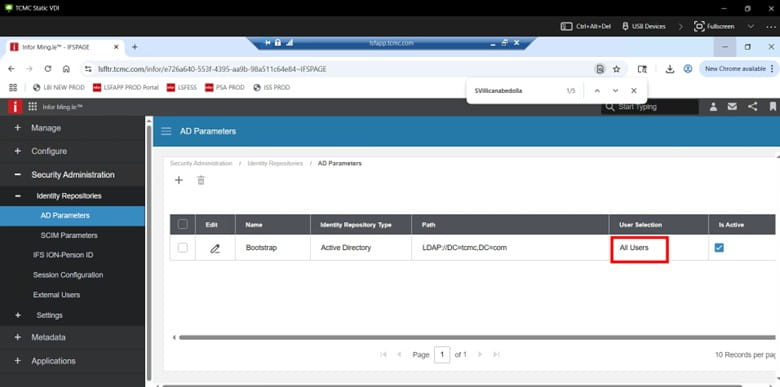
Export the AD User-Get-ADUser username -Properties * | Select * > username.txt to check AD to make sure UPN doesn’t have any weird characters in it.
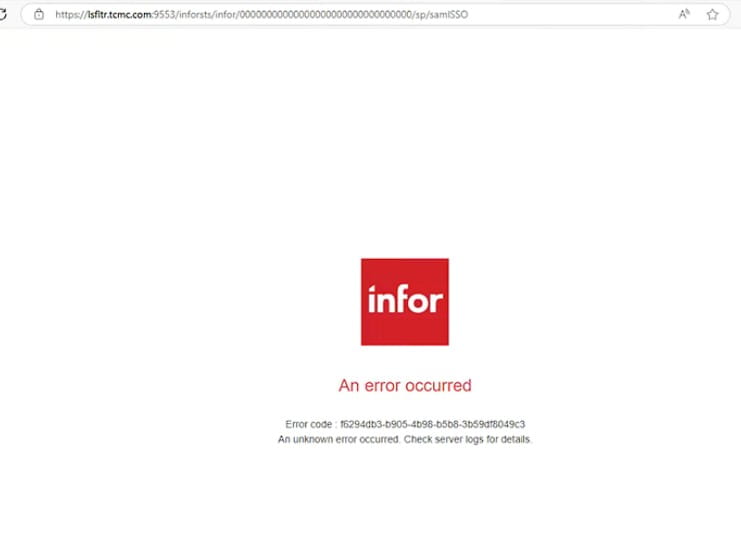
An Error Occurred:
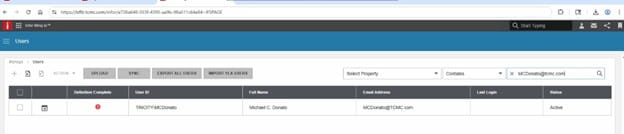
In INFOR OS, Check Soft deleted users, hard delete and sync
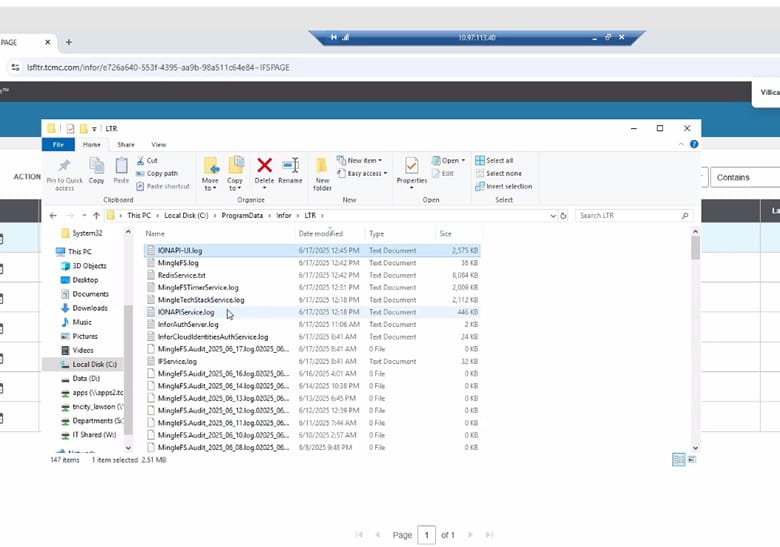
Infor OS Mingle Logs on-prem Logs:
Other notes: Export the AD user to check AD for unique characters that are causing the UPN to not match up with Infor OS, also check Infor OS for those same characters.
Enterprise resource planning (ERP) is undergoing a major shift in 2026, moving from a behind-the-scenes system to a core driver of operational strategy and competitive advantage. According to a recent ERP Today article by senior editor Chris Vavra, this evolution is being fueled by autonomous AI, accelerated software consolidation, and rising ESG and governance demands.
The big takeaway is clear: ERP is no longer just about recordkeeping—it’s becoming a system of action. Organizations that delay adopting autonomous agents risk falling behind, as early adopters are already seeing measurable gains like reduced downtime, better scheduling, and stronger margins. The focus has shifted from whether to use AI-driven agents to how to govern them responsibly, with transparency, auditability, and human oversight built in.
Vendor selection is also changing. In 2026, ERP differentiation won’t hinge on dashboards or analytics, but on governance frameworks—how decisions are logged, explained, overridden, and approved. At the same time, aggressive M&A activity is reshaping the ERP landscape. Mid-market providers are being acquired at a rapid pace, legacy platforms are losing support, and pricing power is concentrating among fewer players. This makes vendor stability and roadmap credibility essential evaluation criteria.
Another critical shift is the rise of ESG data governance. Modern ERP platforms are beginning to treat sustainability data with the same rigor as financial data, enabling traceable, auditable environmental metrics across supply chains as regulations tighten.
Ultimately, the organizations that will succeed in 2026 are those that treat ERP not as a one-time IT upgrade, but as the operating system for managing capital, risk, sustainability, and day-to-day operations in an increasingly autonomous world.
AI (artificial intelligence) is quickly becoming a practical requirement rather than an innovation experiment for manufacturers and supply chain leaders. In his recent article on ERP Today, senior editor Chris Vavra examines why adoption remains uneven—and what ERP and operations leaders must do to close the gap.
Vavra explains that while AI investment is accelerating, many organizations struggle with fragmented data, limited internal expertise, legacy ERP constraints, and unclear business outcomes. These challenges are especially acute in manufacturing environments where variability, traceability, and real-time decisions demand high-quality, well-governed data. As vendors respond with domain-specific AI embedded directly into ERP and supply chain workflows, the question shifts from if AI will matter to how fast leaders can operationalize it.
Vavra highlights three day-to-day changes technology leaders should expect:
Data stewardship becomes central
AI performance depends on clean, trusted operational data. Leaders must formalize data ownership, enforce data hygiene, and continuously monitor model performance across ERP, MES, and supply chain systems.
Cross-functional orchestration becomes routine
AI initiatives now require tight coordination across operations, quality, finance, and IT. Success depends on shared accountability, clear governance, and structured change management—not isolated analytics teams.
Evaluation criteria shift toward operational proof
Executives should favor explainable AI, prebuilt ERP integrations, industry-specific logic, and proven reference architectures over generic platforms. Vertical expertise consistently delivers faster time-to-value.
The takeaway for ERP insiders is clear: AI-enabled ERP is becoming outcome-driven and data-first. Vendors and partners that embed industry-specific AI, strengthen data governance, and reduce adoption friction will define the next phase of manufacturing ERP.
https://www.nogalis.com/wp-content/uploads/2024/11/artificial-intelligence-ai-technology.jpg300450Angeli Mentahttps://www.nogalis.com/wp-content/uploads/2013/04/logo-with-slogan-good.pngAngeli Menta2026-01-21 10:49:482026-01-16 12:53:47Overcoming AI Adoption Challenges in Manufacturing and Supply Chain
If you are receiving an IPA (Infor Process Automation) Memory Alert of type WU Alloc when an IPA flow runs, and you have made every attempt to optimize your flow, you can increase the alert threshold. Note that this fix will only work for on-premises customers. To increase the alert threshold, you will need to open a Landmark command window and run the following command:
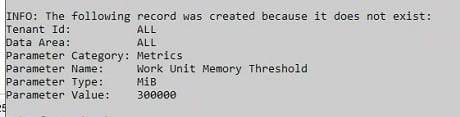
paadm cfgprm update –tenant ALL –dataarea ALL –category Metrics –name “Work Unit Memory Threshold” –type MiB –value <new threshold>
The record will either be created (if this has never been done before), or updated. It should look like the screenshot below.
Cybersecurity is heading into a make-or-break moment as AI reshapes how attacks are created and launched. Scott Harrell, CEO of Infoblox, shares an article on Fast Company arguing that the traditional, reactive security models simply won’t hold up in an AI-first threat environment.
Harrell points to three trends leaders need to understand now:
AI-powered, highly personalized attacks
Attackers are using AI to study individual organizations and craft custom malware, phishing, and deepfake-driven social engineering campaigns. These attacks are often brand new and designed to evade existing tools, making “detect and respond” approaches too slow. Relying on employees as the last line of defense becomes unrealistic at this level of sophistication.
A rapidly expanding attack surface
IoT devices, aging network infrastructure, and AI systems themselves are becoming prime targets. As AI is embedded deeper into enterprise software, compromised models could behave like insider threats with broad access. Security teams will need to protect not just endpoints, but the AI and infrastructure running the business.
Cybercrime-as-a-service goes mainstream
AI is fueling an underground economy where attackers no longer need deep technical skills. Ransomware-as-a-service, exploit kits, and stolen access marketplaces make advanced attacks easier, faster, and more scalable, blurring the line between casual hackers and organized crime.
Harrell’s message is straightforward: simply adding AI to legacy security tools creates a dangerous illusion of safety. To succeed in 2026, organizations must rethink cybersecurity from the ground up—shifting from reactive defenses to preemptive, adaptive strategies built for AI-driven attackers.