As of October 31, 2020, Infor is no longer going to support Internet Explorer as a browser for accessing Lawson applications. According to Microsoft, the end of life for IE will coincide with the end of life for Windows 10, so this is not a notice for the end of life for IE. This just means that any future Infor patches will not be developed to function with Internet Explorer.


Lawson has been stable in Chrome since the later releases of version 9. It is also supported on Microsoft Edge Chromium and Firefox. There are some things you will want to consider before moving to a different browser:

Impacted Applications

  • Infor Lawson System Foundation (LSF) 10.0.X.0 release
  • Infor Landmark Technology Runtime 10.1.1.X and 11 releases
  • Lawson for Infor Ming.le 10.0.X.0 and 10.1.X releases
  • Infor Lawson for Ming.le Content Lawson applications 10.0.X release
  • Infor Lawson Requisition Center 10.0.X.0 release
  • Infor Lawson Smart Reconciliation 10.0.X.0 release
  • Infor Lawson Procurement Card Self-Service 10.0.X.0 release
  • Infor Employee and Manager Self-Service 10.0.X.0 release
  • Infor Lawson Contextual Applications 10.0.X.0 release
  • Infor Lawson Mobile Supply Chain Management (MSCM) 11.X release
  • Infor Lawson Point of Use (POU) 11.X release
  • Infor Lawson Business Intelligence (LBI) 10.X.0.0 release
  • Infor Business Intelligence for Lawson (IBI) 10.X.0.0 release
  • All Infor Human Capital Management (HCM) products, including Infor Global Human Resources (GHR) and Infor Talent Management 10.1, 10.2 and 11 releases.
  • Infor CloudSuite Financials & Supply Management (CSF) 11 release

Design Studio

  • Design Studio 10 (the application) is going to continue to be supported in Internet Explorer
  • Design Studio forms might need some updates to make them compatible with a different browser. Design Studio relies heavily on JavaScript, and some of the syntax is browser-dependent.  Make sure you test all of your design studio forms before having users switch browsers.

MSCM

  • MSCM 10 is not compatible with Chrome. Infor will continue to support Internet Explorer with MSCM 10 installations until the end-of-life for MSCM 10.X.
  • MSCM 11.X (base, POU, and SIM) is compatible with Chrome, and it is recommended that you get to v11 as soon as possible! Contact us if you need help upgrading.

Recommendations

  • Switching browsers should be pretty seamless. Just have your users spend a week performing their daily tasks in your organization’s chosen browser, and log any issues that arise.  If they hit a wall, they can always move to IE until a workaround is provided.
  • Upgrade MSCM! If you own licensing for MSCM, the update should already be available to you.


As always, check the Infor Lawson compatibility matrix to get the latest information in application compatibility.

When buying season gets busy, it’s easy to neglect your day-to-day operations and customer relationship management (CRM) duties in the real estate business. However, real estate CRM is the heart of your business and it’s important to stay on top of this when it comes to managing this area of your business. Simply taking some time to get your systems in order and organize contacts and leads, you’ll have a smoother run business. RIS Media shares an article, written by Buffini & Company, to help get your real estate CRM in successful order.

Sort and Qualify Relationships. “While this may be time-consuming, sorting and qualifying your database is the best way to make sure you’re marketing to the right people and spending your time efficiently.”

Input Your Goals. “The best CRM software should include space for income and lead generation goals so that you know what you’re working toward.”

Complete Your Daily To-Dos. “Your real estate CRM should populate daily lead generation tasks for you to complete, giving you an idea of what needs to be done that day to stay in line with your goals.”

Update Your Tracking. “Be consistent about adding new relationships to your database and updating your CRM when you send a client a personal note or chat with a new lead.”

Take Advantage of the Mobile App. “Get familiar with the different features, and consider watching tutorial videos. This will allow you to master every part of your real estate CRM so you can take your lead generation on the go.”


For Full Article, Click Here

Cloetta, a leading confectionery company in Northern Europe, has selected Infor CloudSuite Food & Beverage to support digital transformation and drive innovation across its operations. The nature of the confectionery sector is that most purchases are impulse driven and experiential. Thus, Cloetta needs to keep in pace with demand whilst ensuring quality is paramount to its success. Already an Infor M3 customer for many years, Cloetta selected Infor CloudSuite Food & Beverage because they were impressed with the deep industry functionality in Infor CloudSuite Food & Beverage, which supports the nuances and dynamics of its business, including aspects such as quality control, recipe management and traceability.


For Full Article, Click Here

If your organization has custom websites that need to be secured quickly and easily, you can use the IIS internal authentication and authorization rules.

First make sure that your host server is set up to utilize Windows Authentication.  In Roles and Features  > Server Roles > Web Server (IIS) > Security, install “Windows Authentication”.

Once Windows Authentication is installed, select your site in IIS and select “Authentication”

Set Windows Authentication to enabled

Go back to your website, and select “Authorization Rules”

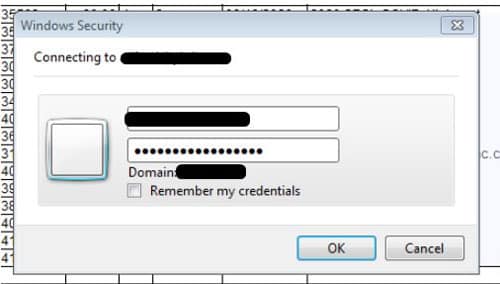
From here, you can give access to individual users or Active Directory groups.  The users will be presented with a Microsoft credentials dialog, and they will log in with their Windows credentials.


Infor recently announced that Finnish postal and logistics leader Posti has begun its migration to Infor CloudSuite WFM (Workforce Management). With a need to address key business process improvements, Infor CloudSuite WFM will simplify the shift planning process and offer an improved user experience, including mobile access, while decreasing running costs and enabling seamless upgrades. Currently, Infor WFM handles the scheduling and fully automated time-and-attendance related to sorting, transportation and delivery of mail and parcels for Posti. In addition, it handles complex, Posti-specific pay rules and more than 20 collective and local agreements. Infor CloudSuite WFM will continue to support all this existing functionality. as well as cover five new employess groups and enable inegration with other Posti systems. Per the press release, these new capabilities built on a cloud deployment will provide employees with the flexibility they need to quickly adapt in today’s environment.


For Full Article, Click Here

Enterprise Resource Planning (ERP) systems play a crucial role in businesses. Unfortunately, not every firm has taken advantages of the benefits an ERP system can have on business. One such advantage that companies should learn to master with this tool is with Big Data. When integrated with Big Data, your ERP system can achieve better processes and drive substantially higher revenue. Marketing expert Mrunal Chokshi shares an article on Customer Think on the huge impact of Big Data on ERP. and why this integration is a necessity for businesses in today’s day and age.

  1. Understand customers better: What big data does is empower ERP systems with better insights and data, sourced from a variety of new sources, including social media.
  2. Better supply chain: When ERP is fortified with big data, companies gain access to insights into the supply chain, i.e., an in-depth overview of the processes, assets, etc. that can then be leveraged to streamline the movement of products across the entire supply chain.
  3. Sales forecasts: Any business needs to be able to make sound sales forecasts. And the duo of ERP and big data helps in this department as well by analyzing inventory and supply chain data.


For Full Article, Click Here

If AD FS is configured to use the Windows Internal Database (WID) server, there are a couple of ways to maintain the databases created in the install.  They can be maintained using command-line sql or SQL Server Management Studio.  The AD FS configuration databases are called AdfsArtifactStore and AdfsConfiguration.

Not that both of these methods need to be performed on the server where AD FS is configured.


Command-line SQL

Log into the AD FS server using the service account under which AD FS was configured.

To prepare the server to run SQLCMD.exe, you will need to install the Native Client, ODBC Driver 11 for SQL Server, and the Command Line Utilities for SQL Server 2012.  These can be downloaded from Microsoft’s website.

Once these utilities are installed, create two “.sql” files using a text editor, one for the artifact database and one for the configuration database.  The following text should be placed in the sql file (update with the appropriate names and file paths).  The database names are AdfsArtifactStore and AdfsConfiguration.

BACKUP DATABASE [database name] TO DISK = “backup-path/backup-file.BAK” WITH NOFORMAT, INIT, NAME = “Artifact – Full Database Backup”, SKIP, NOREWIND, NOUNLOAD,STATS = 10

GO

Next, run the sqlcmd to execute a SQL script (provide the name of the script you created in the step above).

sqlcmd.exe -S \\.\pipe\MICROSOFT##WID\tsql\query -i sql-script-path\sql-script-filename.sql


SQL Server Management Studio

The WID server can also be accessed using SQL Server Management Studio (SSMS).  Note that SSMS must be installed on the server where AD FS is configured in order to be able to connect.

Log into the AD FS server using the service account under which AD FS was configured.  Run SSMS as administrator.  Connect to the server \\.\pipe\MICROSOFT##WID\tsql\query, and use Windows Authentication to connect.

The AD FS configuration databases are AdfsArtifactStore and AdfsConfiguration.  As long as you logged into SSMS as administrator, you should have admin rights on these databases to perform backups, run queries, etc.


Infor recently announced that it is equipping the family-owned McDreams hotel group with Infor EzRMS, Infor’s powerful cloud-based revenue management solution. Infor EzRMS uses deep learning AI to provide enhanced revenue management functionalities and helps to improve guest service. Per the press release, Infor EzRMS is able to help McDreams automate its revenue management, optimize its room occupancy and independently analyze market data. Already a customer of Infor, McDreams hopes to extend their collaborative partnership to provide a competitive advantage among its competition. The group has been managing all internal hotel management processes with Infor’s cloud-based property management solution, Infor HMS, for several years. The cloud-based property management solution connects different hotels: If a guest in Leipzig wants to know whether a room in Munich is available for the following week, the reception staff can retrieve this information within seconds – an incredible advantage.


For Full Article, Click Here

A user in Lawson is unable to login to their account. Username or password is incorrect. Assuming your organization is using single sign-on through Active Directory, you can verify the user’s username via Windows powershell.

  1. Login into Lawson Security Administrator (or SCWeb Admin App). Locate the user and copy the username.
  2. Open powershell and check the user via this command: Get-ADuser -identity <username>
  3. If you receive this error: “Cannot find an object with identity”, the user is not setup in AD under that username.
  4. Check with the organizations IT team to verify the correct AD user (assuming you don’t have direct access).
  5. Once they send you that ID, check via powershell again and it should return this result:

Customer relationship management (CRM) systems are a key tool in businesses, especially in your marketing department. A CRM system houses all customer data, which is an essential part of the marketing toolkit that is used to engage and nurture long-term customers. Marketing teams can utilize CRM to strengthen customer relationships, improve communication, and generate new opportunities. Dale Murray, CEO, SalesAgility shares an article on Destination CRM about how CRM solutions can successfully assist your organization’s marketing campaigns:

  1. They can help you get to know your audience. “A CRM system provides a complete omnichannel, companywide view of your prospect and customer contacts. It gives direct access to the latest data available within the organization.”
  2. They can help you send the right personalized message at the right time. “A CRM system will allow you to reach new heights in engaging with your contacts. Identifying trends in behavior will allow you to adapt your messaging and pre-empt future needs.”
  3. They can help to keep the data clean. “Using a CRM system can help to easily manage your datasets, ensuring compliance is maintained with data protection regulations. By implementing automation, workflows can be utilized to clean data and reduce the probability of human error.”
  4. They can help you monitor success and repeat. “The success of your campaigns will continue to feed the CRM with more valuable insights. You can use the results achieved from previous campaigns to improve future ones.”


For Full Article, Click Here