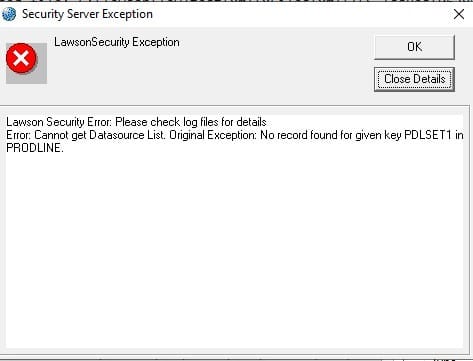
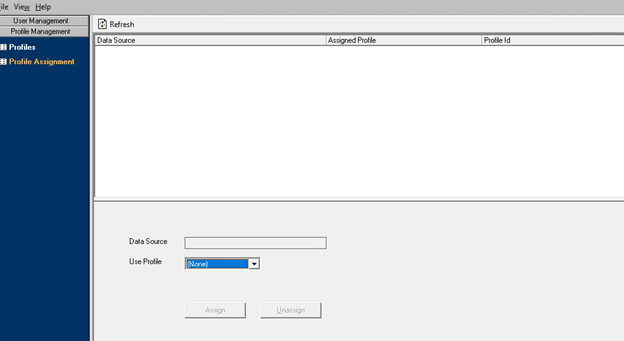
If you are getting an error message in Lawson Security Administrator that references “No record found for given key PDLSET1 in PRODLINE”, it is possible that your Lawson instance has lost connection from the database and is unable to recover. This can happen during an unexpected restart of the system, or a network outage. To resolve the issue, simple stop and restart the Lawson services, including the IBM WebSphere services. The startup order is:
Insight environment
IBM WebSphere Cell Manager
IBM WebSphere Node
IBM WebSphere application server
https://www.nogalis.com/wp-content/uploads/2022/01/PDLSET1-error-in-Lawson.jpg470470Angeli Mentahttps://www.nogalis.com/wp-content/uploads/2013/04/logo-with-slogan-good.pngAngeli Menta2022-01-21 08:24:232022-01-19 11:46:55PDLSET1 error in Lawson
A manufacturing execution system (MES) is the foundation for just about every smart manufacturing endeavor in the modern digital and industrial age. A MES supports a number of capabilities from data collections to enterprise resource planning (ERP) interfaces and other manufacturing applications. According to Forbes Technology Council Member John Clemons, for any MES to be highly effective, it must have several specific characteristics that will provide both significant capabilities and significant value. When considering different MES options, Clemons suggests you ask potential vendors about key characteristics to understand if the MES can provide the foundation for smart manufacturing.
Database – “A highly effective MES must start with a comprehensive database to capture all the critical information from the shop floor. Essentially, every piece of data related to the manufacturing operations in the four walls of a plant from the receiving dock to the shipping dock needs a place in the database. That includes materials, suppliers, customers, processes, equipment, labor, quality, maintenance, deviations, incidents and everything else that is part of the manufacturing process.”
Functionality – “The execution part of an MES must include orders, production, consumption, scheduling, quality, materials and recipes at a minimum. It also must have built-in capability for ERP integration, plus integration with other information systems, along with the ability to integrate automation and control systems through the IIoT.”
Scalability – “For companies who have multiple facilities, an MES should easily scale up to those facilities with hundreds of workers in them or scale down to those with very few workers. A highly effective MES must work across a variety of physical architectures.”
Configurable – “An MES solution can’t be custom, and it can’t be a toolkit. It must be a configurable solution built on specific out-of-the-box applications and application templates.”
Flexibility – “In a smart manufacturing and Industry 4.0 environment, manufacturing facilities change all the time — equipment is moved or added, processes are changed or added, and so on, all the time. The MES must be able to easily handle these changes. Whether it’s changes to the plant model, to the database model, to specific applications or to dashboards or analytics, MES must be flexible enough to handle these types of changes on a routine basis.”
https://www.nogalis.com/wp-content/uploads/2013/04/logo-with-slogan-good.png00Angeli Mentahttps://www.nogalis.com/wp-content/uploads/2013/04/logo-with-slogan-good.pngAngeli Menta2022-01-20 09:32:132022-01-19 18:52:25Five Characteristics To Look For In A Highly Effective MES
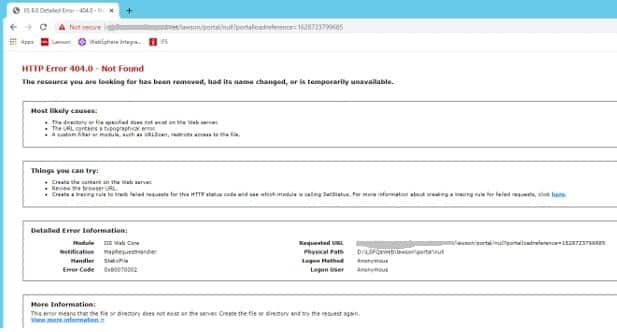
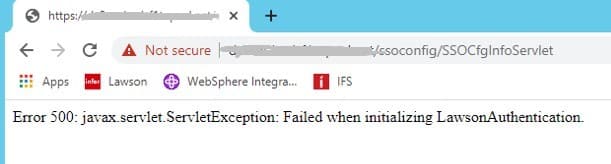
With the latest java update, some instances of Lawson are throwing exceptions. The portal is throwing a 404 error, and SSOCfgInfoServlet throws a 500 error.
In this scenario, the security_authen.log is throwing an exception “Failed to initialize authentication layer.” The lase_server_0_0.log has a much more detailed error message referring to “Client requested protocol TLSv1 is not enabled or supported in server context”.
To resolve the issue, edit the java.security file at JAVA_HOME/jre/lib/security. Update the jdk.tls.disabledAlgorithms line to include TLSv2.
This is a temporary solution; Infor is working on a permanent solution to resolve this issue.
security_authen.log
Thu Aug 12 10:02:49.303 CDT 2021 – default-421637524 – L(4) : tenantID=DEFAULT thread=main. CacheManager.setRefreshInterval(): RefreshInterval =null is invalid.
SACO, a retail and wholesale leader in the Kingdom of Saudi Arabia (KSA) region, has deployed Infor WMS (warehouse management system) with Infor ION, and third-party application, Loftware Labelling. Per the press release, the Infor WMS solution, which is fully integrated with SACO’s SAP ERP platform using Infor ION, is set to optimize order processing and picking, enhance put-away, and expedite the loading and validation processes. The project was managed by Infor partner SNS. Infor WMS will support SACO’s warehouse operations managed by logistics services provider MEDSCAN. MEDSCAN will capitalize on the Infor WMS portal, in particular to streamline financials and billing for the retail and wholesale giant. Further, with eight warehouses SACO needed a solution to optimize performance across its warehouse management. As well as enhancing its picking processes, the company needed to facilitate seamless integration with its ERP platform to ensure a real-time view of operations at any given time and expedite decision-making.
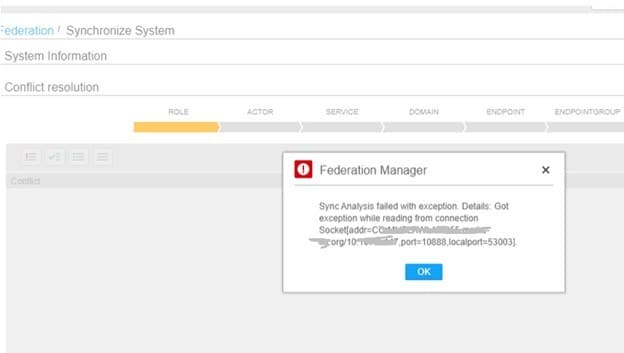
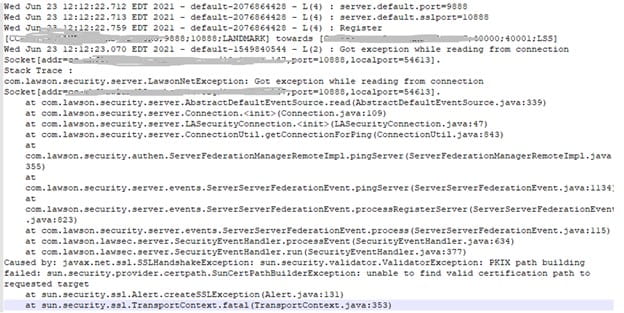
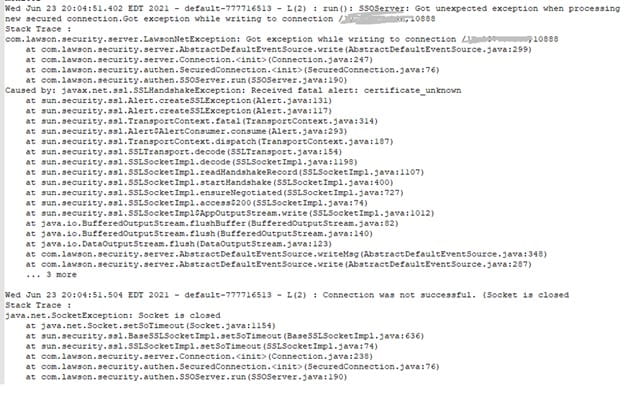
You may encounter an error message when running a federation sync after Lawson is federated to Landmark. There can be many causes of these errors, so it is important to start reviewing logs on both servers for more details. In this case, the security_provisioning.log on LSF and the security_authen.log on LMK indicated a PKIX error “got exception while reading from connection.”
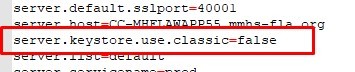
There is a workaround for this error. Open LAWDIR/system/lsservice.properties on LSF and LADIR/system/lsservice.properties on Landmark. In both files, add the line “server.keystore.use.classic=false”. Reboot both machines and try the sync again.
Security_provisioning.log (LSF)
Security_authen.log (LMK)
Lsservice.properties (both)
https://www.nogalis.com/wp-content/uploads/2022/01/PKIX-Error-Message-When-Registering-Federation-Server.jpg470470Angeli Mentahttps://www.nogalis.com/wp-content/uploads/2013/04/logo-with-slogan-good.pngAngeli Menta2022-01-14 08:27:122022-01-11 16:35:28PKIX Error Message When Registering Federation Server
It’s no doubt that the COVID-19 pandemic sent every industry on emergency mode and required everyone to make changes whether they liked it or not. In the healthcare industry, the new era of digital health began and has redefined patient care. Pediatric otolaryngologist Dr. Eric Gantwerker shares an article on MedCity News about the focus on digital health for the coming years based on these bold predictions for 2022.
The enhancement of biometric data collection and what that means for the patient and physician It has become increasingly simple to monitor a patient’s health in the comfort of their home.Home-based wearable and implantable biosensors have become more prevalent and more accessible to consumers. Demand for this technology will only increase as at-home or on-the-go physician monitoring continues to grow, fueling adoption by healthcare practitioners.”
Digital health will alter HIPAA compliance “As consumers continue to monitor their health at home, there will surely be an increase in patient data. This is extremely beneficial to help manage and understand the health of a patient outside of the doctor’s office. Patients no longer need to visit a clinical setting to obtain this data. However, as patients continue to measure their health via devices, patient data can be compromised given currently limited privacy protection for consumer-level data.”
Healthcare will continue to evolve, and so will the Food and Drug Administration (FDA) “The world of digital health is expanding rapidly, and the healthcare industry has a lot of catching up to do. With the help of AI technology and recent surges in data from consumer-based medical devices, patients’ health information will be at risk until HIPAA updates its compliances.”
The increased importance of offering telehealth services “Telehealth is no longer considered a luxury, but an integral part of a health systems’ care strategy. Remote healthcare is here to stay, and healthcare institutions should invest in the proper technology to remain relevant in an ever-evolving virtual care world—this includes ensuring that patients have the same-quality visits in a virtual setting as they would in the doctor’s office.”
https://www.nogalis.com/wp-content/uploads/2015/11/internet-of-things-healthcare-technology-mobile.jpg252504Angeli Mentahttps://www.nogalis.com/wp-content/uploads/2013/04/logo-with-slogan-good.pngAngeli Menta2022-01-13 13:07:432022-01-13 13:07:43Digital health predictions for 2022
Customer interaction drives almost every decision in your marketing and sales department. Customer relationship management (CRM) software helps to streamline and develop better and long-lasting relationships with customers to ensure a positive experience every time. Selecting a CRM solution can be an extremely difficult task because of all the considerations to take for your company. Solutions Review writer and analyst William Jepma shares a list of questions to ask yourself when considering implementing a CRM system for your business.
What Business Needs Am I Looking to Address?“Figuring out your team’s needs should be the first step to selecting the most appropriate CRM solution to fit your needs.”
What Are My Budgetary Constraints?“Before beginning your search for a CRM platform, make sure your company has a concrete budget to refer to once you start getting quotes from different vendors in the marketplace.”
Can the CRM Scale Alongside My Organization? “Before purchasing a solution, consider how it can benefit your organization in the present and the future.
How Will the Customer Data be Secured?“Your chosen solution must offer secure data storage to protect your customer privacy.”
Is the Software Easy to Use? “Once implemented, your company will use its CRM every day, so you will need to find a platform that your team can quickly learn to use.”
https://www.nogalis.com/wp-content/uploads/2020/01/CRM-it-tech-software.jpg400600Angeli Mentahttps://www.nogalis.com/wp-content/uploads/2013/04/logo-with-slogan-good.pngAngeli Menta2022-01-12 10:07:242022-01-11 16:24:45Questions to Consider When Selecting a CRM for Your Business
An Enterprise Resource Planning System (ERP) is a business process management software that enables companies to integrate and manage automated processes in one place. ERP software offers the advantages of optimized and integrated business processes, lower operating costs, improved reporting capacity, data security and increased productivity. Solutions Review is an online directory of ERP vendors, platforms and software solutions that contains a condensed overview, contact information, links to the company’s social media handlers and the top 24 vendors.
Your company needs to identify the exact solutions and automation capabilities it needs in an ERP system to determine which system best serves your specific needs. You should create a cross-functional team that consists of accounting, supply chain, IT and possibly HR personnel that are part of the selection team; people who know how your business is run day-to-day. One of the worst mistakes companies make in selecting an ERP system is having the executives watch a snazzy sales presentation with all the reporting at the end and decide on bells and whistles instead of what your company needs to perform your day-to-day processes. All ERP systems provide reporting capabilities. There are many inexpensive tools to create reporting dashboards for any ERP system so this should not be a deciding factor.
As a selection tool, it might be good to create a spreadsheet which lists the functions of an ERP system that your organization needs. These vary by company so your spreadsheet may look entirely different from another company’s spreadsheet. Then have everyone on the cross-functional selection team rate the various ERP companies on their ability to provide each function on a 1 – 5 scale, for example. Then totaling the scores will provide a good idea about which ERP solution best fits your overall needs. Don’t forget to include the integration piece in your evaluation for making sure you can easily integrate any other software that your organization needs so you end up with a fully automated system. Using this type of selection criteria: multi-functional, objective scoring on each function, allows you to end up with an objective way of making a decision based on the overall needs of your organization.
The cost of an ERP system is composed of license fees (depending on how many users you have), the software itself, the modules you choose, the host hardware, installation, maintenance, training and support. The Software Path Report 2019 states that you can expect to spend up to $7,200 per user on your system on average – and that’s a big investment – a reminder that ERP selection is a long-term consideration. In the traditional view of your ERP – selection, you don’t need to choose the most expensive; choose the system which you can get the best fit for your business.
https://www.nogalis.com/wp-content/uploads/2022/01/How-To-Choose-An-ERP-Application.jpg470470Angeli Mentahttps://www.nogalis.com/wp-content/uploads/2013/04/logo-with-slogan-good.pngAngeli Menta2022-01-11 12:03:342022-01-11 12:03:34How To Choose An ERP Application
AlMalki Group, one of Saudi Arabia’s largest distributor and retailers of luxury goods, has recently deployed the latest version of Infor WMS warehouse management system. Infor WMS will increase efficiency, space utilization and order reliability, while ensuring full traceability from receipt of goods through to shipping. Per the press release, having used Infor WMS for many years, AlMalki has now upgraded and expanded the solution to support a more digitalized operation and underpin future growth. Further, Infor WMS version 11.4.1 was selected based on its ability to deliver entirely paperless picking and packing methods to boost productivity, and capture all data, both inbound and outbound, to instill visibility and expedite decision-making and customer service. Put-away strategy, cluster picking, labels, catch data, wave processing and billing functionality were also key to the group’s upgrade goals. The project was managed by SNS with integration supported by the AlMalki Group team following go-live.
https://www.nogalis.com/wp-content/uploads/2021/04/Infor-wms-supply-chain.jpg333500Angeli Mentahttps://www.nogalis.com/wp-content/uploads/2013/04/logo-with-slogan-good.pngAngeli Menta2022-01-10 10:48:542022-01-07 13:48:26AlMalki Group Takes Warehousing to Next Level with Infor and SNS
In the outsourcing of software maintenance, a company hires a focused and tailored software maintenance partner to carry out and manage an entire or a specific segment of software maintenance.
Software maintenance outsourcing gives companies a competitive advantage by minimizing costs, improving customer service and ensuring product quality on a limited budget. Outsourcing Software maintenance to an experienced and reliable company gives companies a competitive advantage by reducing cost, improving product quality and improving customer service. Outsourced software maintenance services work with qualified multidisciplinary teams to help you execute temporary projects, reduce labor costs, and improve maintenance and execution speed.
This means your business can better manage its support budget, allocate funds to other projects, reduce costs, and avoid unexpected expenses.
This is a great option for companies to accomplish their support goals while reducing risks and maintaining cost savings. American companies should be aware of this approach as outsourcing software maintenance has many advantages. Whatever you are working for a large company or a start-up, we hope that these resources will help you make the right choice for your business when choosing whether to outsource maintenance to an agency or to build your own in-house app.
https://www.nogalis.com/wp-content/uploads/2022/01/Why-You-Should-Outsource-Your-Application-Management.jpg470470Angeli Mentahttps://www.nogalis.com/wp-content/uploads/2013/04/logo-with-slogan-good.pngAngeli Menta2022-01-07 08:06:102022-01-04 12:18:38Why You Should Outsource Your Application Management