If you have services for approval or other types of flows in IPA, and they stop getting triggered after a Landmark update, it is possible that you need to repackage and redeploy the LPS jars. This is good practice after a Landmark CU anyway.
On the Landmark server, open a Landmark command window
Run the command “packageLPSClientJars”
Copy the LASYSDIR/LPS/LPSClientJars.jar file to the Lawson server at GENDIR/bpm/jar
Run commands stoppfem and stoppfrmi
Navigate to GENDIR/bpm/jar in a command window with environment variables set
Run tar -xvf LPSClientJars.jar
Run commands startpffrmi and startpfem
If the changes don’t take effect, reboot the Lawson server
https://www.nogalis.com/wp-content/uploads/2024/04/Work-Units-Not-Triggered-after-Landmark-Update.jpg470470Angeli Mentahttps://www.nogalis.com/wp-content/uploads/2013/04/logo-with-slogan-good.pngAngeli Menta2024-04-12 08:13:342024-04-05 18:15:10Work Units Not Triggered after Landmark Update
Are you getting this error when updating a user’s record in ISS stating
loadResource(): returned identity [User:] already exists?
If so, then this error is due to missing extended attributes in LDAP. The extended attributes are what allow ISS to know that the user exists in LMK and are created when a user is added via ISS or the user is included in a sync.
Simply run a full sync via the ISS webpage to create the extended attributes
To prevent this issue going forward you should add a list-based sync to the user add process. This should resolve the error completely.
Go to the field and do a Ctrl + shift and left click on your mouse, this will give you the Business class that you will need to have and the name of the field. In this example we will be looking at the Employee business and the field Work Type
Let’s open up Excel and go to the Infor tab, and we will be doing a query. Go to the Insert Query and click on the drop down arrow
This box will appear, do a drop down and pick the environment name for your Data Area
In the second box, we will be typing in the business class, in this example it will be Employee
As you are typing in the second box the business class will appear
Now you see all the field that you can pick from under Employee Business Class. The ones that are Orange are required fields and need to be in your Query. The Employee is the Employee ID number
We will be using for this example the following fields,
HROrganization
Employee
Name.FullPresentationName
Scroll down and pick
StartDate
Adjusted Start Date
Relationship to Org
Relationship Status and click on Insert
Go to the Employee and rich click on your mouse, pick Add to Filter
Go to the bottom of the Insert, and you will see Employee. Next to Employee, under Value enter your Employee ID number.
Like Below
Now click off that field
Go to Refresh at the top of the page by the Infor sign and do a drop down
We will be clicking on Refresh
This box will appear
Your Information will appear,
Now let add Work Type to our report, Find the Field Work Type and check the box,
Click on Refresh again and the Work Type Information will be part of your Report
https://www.nogalis.com/wp-content/uploads/2024/03/How-to-do-a-Spreadsheet-Designer.jpg470470Angeli Mentahttps://www.nogalis.com/wp-content/uploads/2013/04/logo-with-slogan-good.pngAngeli Menta2024-04-05 08:04:342024-03-29 16:20:23How to Do a Spreadsheet Designer
After implementing this change, you will need to perform the following restarts:
Stop your WebSphere application server or cluster for this environment.
Stop the Lawson environment using the stoplaw command.
Start the Lawson Environment using the startlaw command.
Start the WebSphere application server or cluster for this environment.
Execute the report again to verify that it completes successfully.
https://www.nogalis.com/wp-content/uploads/2024/03/Lawson-Security-Administrator-LSA-Reporting-is-stuck-in-processing-status.jpg470470Angeli Mentahttps://www.nogalis.com/wp-content/uploads/2013/04/logo-with-slogan-good.pngAngeli Menta2024-04-02 08:18:022024-03-29 16:19:49Lawson Security Administrator (LSA) Reporting is stuck in “processing” status
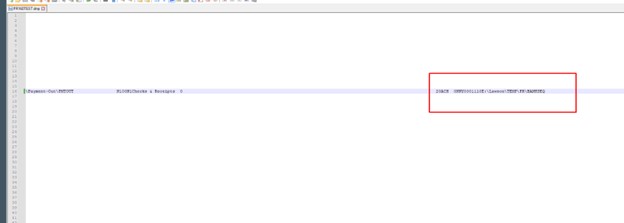
Once you dump this job, edit it in notepad or notepad++ and locate the incorrect path, example below:
Update this path ONLY to what you need it to be and use jobload to reload it:
jobload -c -o Job YourPR160JOBNAME.txt
Then recover the job and it should put the file in the correct path.
https://www.nogalis.com/wp-content/uploads/2024/03/PR160-In-Recovery-but-cant-delete-and-need-to-update-the-file-path-parameter.jpg470470Angeli Mentahttps://www.nogalis.com/wp-content/uploads/2013/04/logo-with-slogan-good.pngAngeli Menta2024-03-29 08:01:112024-03-28 15:03:30PR160 In Recovery but can’t delete and need to update the file path parameter
When you’re logged into Lawson, in order to compile all the programs invoked by one program, make sure that the syntax reads: lstinvk -q <pdl> <program>.
By doing this it will compile anything that is invoked by the program. After, you do this, then you will need to also compile the program itself. (See screenshot below for reference)
That’s all there is to it!
https://www.nogalis.com/wp-content/uploads/2024/03/Compiling-all-invoked-programs.jpg470470Angeli Mentahttps://www.nogalis.com/wp-content/uploads/2013/04/logo-with-slogan-good.pngAngeli Menta2024-03-26 10:16:572024-03-26 14:22:32Compiling all invoked programs
If your Lawson PR160 job status is in “Needs Recovery” or “Is currently running” (because it’s in recovery), see below for the potential fix.
Another error you may encounter is “Ern2 Record Exceeded limit size of 15000”
Resolution:
Rerun PR140 (If you encounter an error indicating that PR160 is currently running when rerunning PR140, you should restart PR00 by performing a “double delete.”)
“Double Delete” means going to PR00 and hitting the delete button twice until you clear out * and R flags
Run PR160 with the Earnings Record NOT equal to blank after clearing flags in PR00
Hope this was helpful!
https://www.nogalis.com/wp-content/uploads/2024/03/Lawson-PR160-Job-is-in-Needs-Recovery-or-is-currently-running.jpg470470Angeli Mentahttps://www.nogalis.com/wp-content/uploads/2013/04/logo-with-slogan-good.pngAngeli Menta2024-03-22 08:49:022024-03-20 14:41:47Lawson PR160 Job is in Needs Recovery or “is currently running”
So you’re running a Lawson PR160 job (Payment Print) and encounter the “Bad File Status 9 009 error on File TAPE-FILE” error. What do you do?
Resolution:
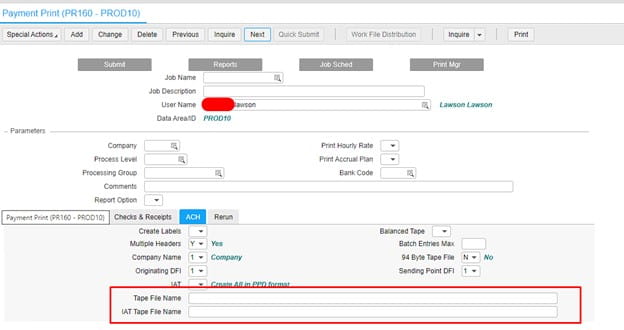
First, understand that the error message “Bad File Status 9 009” signifies that either the directory is full or doesn’t exist.
What you will need to do is simple: ensure that a valid path is specified in the PR160 parameters. If there is, double-check that the path is correctly spelled and has sufficient available space in the default location (along with any folder permissions). See the screenshot below for guidance. That’s all there is to it!
https://www.nogalis.com/wp-content/uploads/2024/03/Lawson-Error-PR160-error-Bad-File-Status-9-009-on-File-TAPE-FILE.jpg470470Angeli Mentahttps://www.nogalis.com/wp-content/uploads/2013/04/logo-with-slogan-good.pngAngeli Menta2024-03-19 07:58:472024-03-14 14:53:06Lawson Error – PR160 error Bad File Status 9 009 on File TAPE-FILE
After adding a view to a productline database and adding it to the application productline using dbdef, blddbdict and dbreorg, the blddbdict created a +dictionary, but the dbreorg -lc does not show anything as being added.
Resolution:
Files added in dbdef and assigned a database space defined as “Is View Yes” are treated as views by the dbreorg.
Views are not created or modified in the database by the dbreorg process, therefore, they will not show up in the output list from dbreorg -lc.
The dbreorg -lc only lists structure changes that the dbreorg makes to the database.
Any non-structure changes made to the file definitions are not shown in the dbreorg -lc output. Non-structure changes are file relation definitions and fields defined as compute, conditional or string.
https://www.nogalis.com/wp-content/uploads/2024/03/dbreorg-lc-lists-does-not-show-dictionary-changes-exist.jpg470470Angeli Mentahttps://www.nogalis.com/wp-content/uploads/2013/04/logo-with-slogan-good.pngAngeli Menta2024-03-15 08:47:242024-03-14 14:49:23dbreorg -lc lists does not show dictionary changes exist