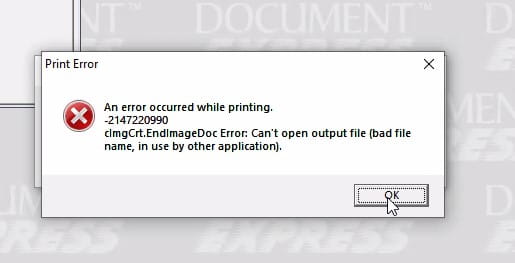
You may have come across this message on Lawson MHC – An error occurred while printing. This problem happens when printing Lawson forms or checks from MHC Image Express, and users may receive the error on their screens while printing.

In MHC, users often print 1099 forms, checks, etc. and may need to re-print a form.
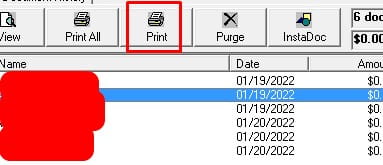
When re-printing they sometimes run into this error and are unable to resolve on their own:
  1. First, you’ll need an MHC or Lawson trained individual who understands the application.
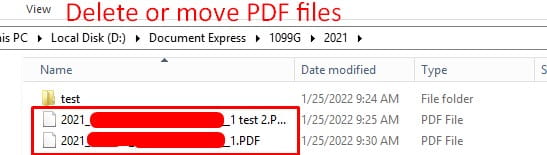
  2. Locate the output files via the print routines in the same account the user previously printed from.
  3. Below is an example of where our print routines point to. Delete or move these files to a backup directory to resolve this error:
MHC Image Express integrates with Lawson and it’s a lot to ask of an individual Lawson employee to maintain when they may be tied up with other daily issues.

To combat this, organizations often bring on Lawson consultants who offer managed service and typically have expertise in maintaining and updating MHC related products (especially around year-end).


Good luck!

Technology has always played a role in the medical industry. It only become even more popular because of the COVID-19 pandemic in 2020. More and more virtual patient care and medical devices were used and the medical device industry has since been busier than ever. Entrepreneur and technology expert Alex Kulitski – Found and CEO of Smart IT and CTO of MEDvidi, shares his expert knowledge on Med Device Online of the rising trends in the healthcare industry and where medical devices can have the most impact.

  1. Cybersecurity. “The number of cybersecurity attacks targeting U.S. healthcare organizations doubled in the first half of 2022 compared to 2021, with small and midsize hospitals being the most at risk of cyberattacks and lack of cyber security, according to a survey carried out by CyberMD. That is why medical device manufacturers must continue to stay vigilant about designing user-friendly healthcare products that are well protected against cybersecurity risks.”
  2. 5G Technologies. “In recent years, healthcare providers benefited a lot from abundant digitally stored data. Nevertheless, they still struggle to connect medical specialists like physicians, surgeons, and radiologists to the data-driven insights they need at critical decision-making moments. 5G networks streamline real-time data transfers, which is crucial for a fast and accurate diagnosis. A 5G device is two to five times faster than one based on Wi-Fi or 4G.”
  3. 3D Printed Devices. “Manufacturers of medical devices moved forward during the COVID-19 pandemic despite facing a number of hurdles. International supply chains were disrupted because of local lockdowns and reduced numbers of employees. For this reason, additive manufacturing, or 3D printing, started to grow at a rapid clip. By 2026, the global 3D printed medical devices market is expected to reach $4.5 billion at an annual growth rate of 13%, according to The Business Research Company report.”
  4. AI And Machine Learning. “Among current trends in the medical device industry, artificial intelligence and machine learning algorithms also play a significant role. The necessity of these technologies grows with the increasing number of medical devices in health facilities. The new AI and ML features provide healthcare workers with new and important insights deriving from the growing amount of data from medical records. Consequently, these tools lead to improved diagnostic decision-making while providing high levels of precision.”
  5. Medical Robotics. “With the global nursing shortage on the rise, medical device companies in developed countries started to invent robots to help nurses perform their tasks. The need for extra assistance has intensified after the pandemic. Introducing robots in a healthcare facility frees medical workers from routine tasks such as performing venipuncture, monitoring patient vitals, lifting elderly people out of their beds, disinfecting patient rooms, and protocoling.

Kulitski concludes the reshaping of the medical device market, thanks to the COVID-19 pandemic, will see major challenges including the tight labor market, increased hacker attacks, logistics concerns, and risk of misleading diagnoses. Because of this and with learning to be even more prepared for the unknown, medical device innovations will continue to overhaul the market in the coming years.


For Full Article, Click Here

Kaleida Health, the largest healthcare provider in Western New York, serving the area’s eight counties, recently selected Infor to assist in consolidating multiple organizations under one single enterprise and move its critical financial and supply chain applications to the cloud to create a more reliable, scalable technology platform. Per the press release, Infor’s healthcare specific cloud solutions run on Amazon Web Services (AWS), and will help Kaleida Health remove workflow silos, gain efficiencies across departments, and improve knowledge sharing organization-wide. Long time Infor customers, the 25 year relationship helped Kaleida Health easily make the decision to upgrade its entire health system to the cloud with the tech giant. Created an integrated enterprise platform will provide Kaleida with the ability to integrate with its clinical systems and partners in a more intuitive, seamless and organized, become more efficient, have better control of costs, make decisions faster, and contribute to better patient outcomes.


For Full Article, Click Here

Infor recently announced that Åbro Bryggeri, Sweden’s oldest family-owned brewery, has chosen Infor CloudSuite Food & Beverage to help achieve its ambitious growth goals after a procurement process in which three suppliers participated. Per the press release, this project is part of Åbro Bryggeri’s transformation to a modern business system. Håkan Larsson, supply chain manager at Åbro Bryggeri says of the project, “Throughout the process, we have had good contact with both Infor’s and M3CS’ sales organization and felt trust in both parties.” Additionally, Anne Lageson, IT manager at Åbro Bryggeri comments, “We now have a solution adapted for the future, such as our e-commerce where customers will be able to place orders directly in the system, which is not possible in our current solution. As Infor’s solution runs in the cloud, it simplifies things for the IT side where we do not need to have any hardware in place. Updates are ongoing and the software is being developed, so even for our industry, we see the cloud as the future to simplify everyday life.”


For Full Article, Click Here

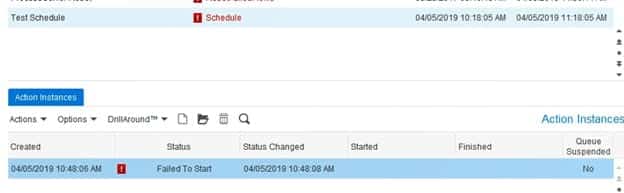
Sometimes you may find that your scheduled flows have not run, seemingly with no explanation.  When this happens, there is a good possibility that there was an error in the scheduler that needs to be resolved.  To check the scheduler, log into Rich Client or your IPA Web Administrator.

To view/edit your own schedules, to Start > My Actions.

To view/edit ALL schedules, log into Rich Client and navigate to Start > Applications > Async Framework Components > Requests.  From there, you will be presented with a list of all Async Action Requests.  The IPA process schedules are under module “pfi”.

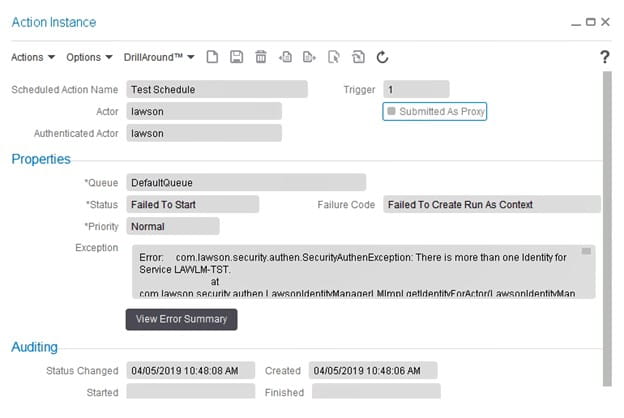
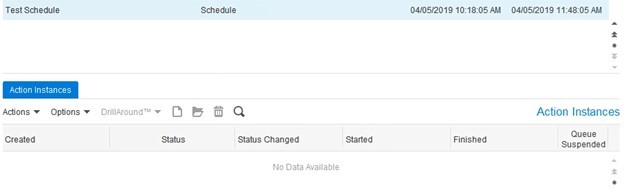
Find the schedule of the flow that didn’t run, and verify if there is an error.  Double-click on the failed instance at the bottom of the screen to get more detail on the error.


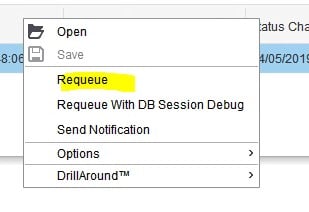
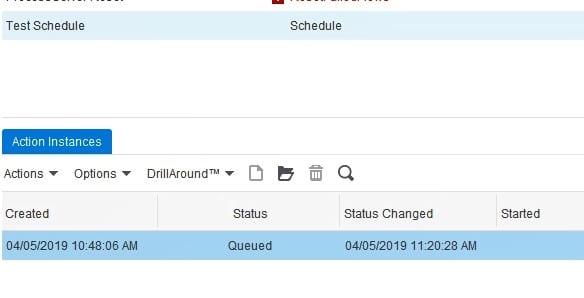
Once you have resolved the issue that caused the error, right-click on the instance and select “Requeue”.  Note that this will cause your schedule to run immediately.


After the schedule has run successfully, there will not be any more items in the “Action Instances” tab.


If your schedule is still failing, open a chat session with Nogalis and we would be happy to help you with a bit of troubleshooting!  And if IPA is a pain point for you, we have some great resources on hand who can provide managed services of your system, training, and project work.  Check out our managed services program today!


Your enterprise resource planning (ERP) system is the most mission-critical of all business systems in your organization. If your ERP goes down, your business cannot function properly. With out access to it, your employees cannot properly perform their duties. So, why haven’t more businesses moved their on-premise ERPs to the cloud? Aside from obvious costs and time for implementation, many decision makers have yet to find the urgency to switch over to the Cloud – even though the risks of staying on prem should be a big enough reason alone. Those who are considering the move still have some concerns, which could easily be addressed. Eric van Rossum from SAP shares an article on Forbes to help ensure that you move to a cloud ERP successfully and for all the right reasons, so you can achieve your desired business outcomes.

  1. Understand WHAT you’re doing. “The term cloud ERP means different things to different people. There needs to be a clear understanding of what you’re trying to accomplish, in business terms. Write down your business objectives and make sure everyone sees them. It sounds simple, but most companies don’t do this.”
  2. Understand WHY you’re doing it now. “What’s going on within the business that means now is the right time to start a cloud ERP transformation? This may be a new strategy with ambitious growth plans; the launch of a new product line that requires new processes; the desire to enter new geographies or markets, etc. There may be (and probably will be) external drivers too, such as changing customer demands around sustainability, issues with fragile supply chains, and changing government regulations.”
  3. Prepare for the mindset shift. “Moving from (an often highly customized) on-premises ERP system to cloud ERP and its standardized processes is as much about changing the way you work as IT transformation. But how do you guide your organization through such a radical shift? It starts with looking at your business and accepting that there are a bunch of things you do that are non-differentiating. Don’t spend valuable time maintaining a business process that works just fine following the industry standard. Let cloud ERP do what it does best and handle your most essential and non-differentiating business processes, so you can focus on what does differentiate your business and excite your customers.”
  4. Get a handle on your current business processes. “Before you can say with certainty which of your business processes are differentiating or non-differentiating, and before you can credibly assess the feasibility of moving to a standard set of processes, you need to have a clear picture of what your current business processes actually look like. Business process transformation tools help you create detailed roadmaps of your business processes so you can see how data and decisions move across your organization.”

Rossum concludes that without a clear view into where your business processes are today and where they need to go, you won’t be able to make a compelling case for moving to cloud ERP.


For Full Article, Click Here

Infor recently announced that the CAMPCO Ltd. (Central Arecanut & Cocoa Marketing and Processing Co-operative Limited), a leading processor of agri-based products and a manufacturer of chocolate in India, has chosen Infor CloudSuite Food & Beverage to digitally transform the business and unlock its next phase of growth. Per the press release, CAMPCO aims to create opportunities for the socio-economic welfare of the farming community by optimizing an end-to-end supply chain network and promoting sustainable operations. The project is expected to go live in April 2023. The company faced the challenge of catering to India’s northern and western markets from its Mangalore production facility in the south and needed to improve its demand forecasting. To address this, CAMPCO chose Infor CloudSuite F&B to garner complete visibility across its supply chain and transform business operations with its deep expertise in the food & beverage vertical. Additionally, Infor PLM for Process (Optiva) and Infor Birst BI solutions were selected to provide meaningful insights to make informed decisions.


For Full Article, Click Here

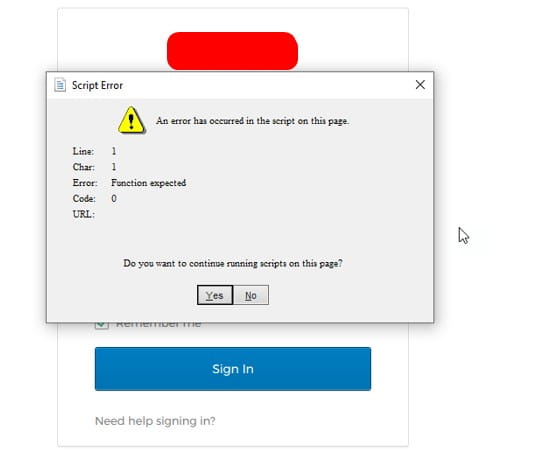
Problem: User is trying to login to Lawson add-ins and receives a Script Error, blocking them from entering their credentials.

  1. Update the users add-ins version MOA32bit or MOA64bit installer depending on version of Excel. See compatibility matrix for add-ins on Infors Concierge website.
  2. Make sure the user is on the latest internet explorer version: https://www.microsoft.com/en-us/download/internet-explorer.aspx (Microsoft is planning on leaving support for IE on 6/15/2022 so it is recommended to update the users operating system).

Temporary workaround: Copy the users username and click Yes on the dialog error and quickly paste in the username. Do the same thing for the password.

NOTE: As of posting this article, this info may still be relevant but likely will be resolved through updating the users PC to the latest Windows OS as well as a later version of add-ins and Microsoft Excel.


Infor recently announced an agreement with one of Europe’s largest fireplace suppliers, Jøtul. The company supplies the markets through one of the most far-reaching global networks in the industry, consisting of its own sales companies and distributors. Per the press release, Infor’s Consulting Services will assist Jøtul in upgrading its current enterprise resource planning (ERP) solution to Infor M3 CloudSuite, which is a standardized industrial manufacturing solution. Further, Infor M3 CloudSuite, powered by Amazon Web Services (AWS), is updated monthly for customers and has a dedicated team to ensure strict requirements for IT security and uptime. The solution is expected to be live in January 2023.


For Full Article, Click Here

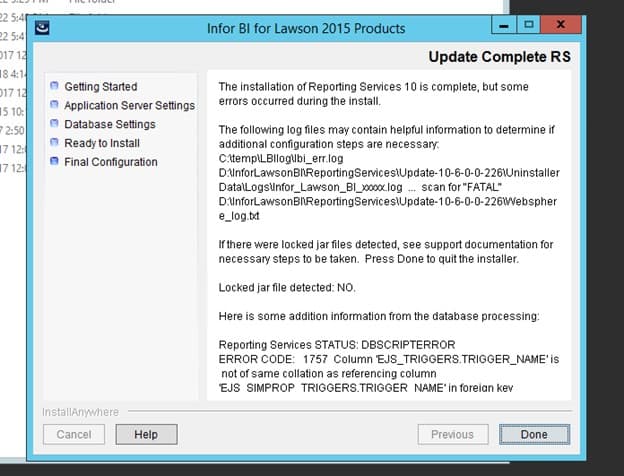
Here is a simple solution for common LBI Install Errors.


Problem:

During an LBI install you get this error regarding a trigger name not the same collation as refencing column.


Resolution:

Run this query

IF NOT EXISTS (SELECT * FROM dbo.sysobjects WHERE id = object_id(N'[dbo].[EJS_SIMPROP_TRIGGERS]’) and

                OBJECTPROPERTY(id, N’IsUserTable’) = 1)

                CREATE TABLE [dbo].[EJS_SIMPROP_TRIGGERS]

                                ( [SCHED_NAME] NVARCHAR(120) NOT NULL,

                                [TRIGGER_NAME] NVARCHAR(130) COLLATE SQL_Latin1_General_CP1_CI_AS NOT NULL,

                                [TRIGGER_GROUP] NVARCHAR(160) COLLATE SQL_Latin1_General_CP1_CI_AS NOT NULL,

                                [STR_PROP_1] NVARCHAR(512) NULL,

                                [STR_PROP_2] NVARCHAR(512) NULL,

                                [STR_PROP_3] NVARCHAR(512) NULL,

                                [INT_PROP_1] INT NULL,

                                [INT_PROP_2] INT NULL,

                                [LONG_PROP_1] BIGINT NULL,

                                [LONG_PROP_2] BIGINT NULL,

                                [DEC_PROP_1] NUMERIC(13,4) NULL,

                                [DEC_PROP_2] NUMERIC(13,4) NULL,

                                [BOOL_PROP_1] NVARCHAR(2) NULL,

                                [BOOL_PROP_2] NVARCHAR(2) NULL,

                                CONSTRAINT PK_EJS_SIMPROP_TRIG PRIMARY KEY (SCHED_NAME,TRIGGER_NAME,TRIGGER_GROUP),

                                CONSTRAINT FK_EJS_SIMPROP_TRIG FOREIGN KEY (SCHED_NAME,TRIGGER_NAME,TRIGGER_GROUP)

                                REFERENCES EJS_TRIGGERS(SCHED_NAME,TRIGGER_NAME,TRIGGER_GROUP));


Start your install over and the same error should not repeat.