With growing technology means growing companies. The hot topic today is moving to the cloud. The latest trend with this is adopting a multicloud strategy, a move that comes with multiples benefits  – if done right of course. There are challenges involved in a multicloud strategy, but none that cannot be tackled head on to prevent future issues. Member of the Forbes Technology council share some of the challenges that can come with managing a multicloud strategy, with advice on how to help businesses through each issue to ensure multicloud success.

  1. Managing Data Security And Compliance. “One challenge in managing workloads across multiple cloud environments is ensuring data security and compliance. Businesses can prepare for this by implementing robust security policies, utilizing encryption and access control measures and conducting regular audits to ensure adherence to industry standards and regulatory requirements.” – Remo Peduzzi, ICR Informatik AG
  2. Avoiding Data Fragmentation. “In today’s business landscape, scaling your company naturally leads to an increase in the amount of data generated, processed and stored, making cloud environments a necessity. However, this growth in data can result in fragmentation, making it crucial to take control of your data through automation and standardization before it becomes unmanageable.” – Daniel Korogodski, First Bridge
  3. Ensuring Reliable Tenant Access And Resource Security. “Leveraging cloud technology across multiple cloud environments will enable business continuity in the event of downtime in any one of the environments. Two of the challenges l see will be maintaining access to the tenants and possible security issues. To prepare for this change, businesses should ensure that tenant access and resources within multiple cloud environments are adequately secured.” – Nihinlola Adeyemi, ErrandPay Limited
  4. Ensuring Integration And Compatibility Between Different Platforms. “Ensuring seamless integration and compatibility between different cloud platforms is an understated challenge. With the increasing popularity of multicloud and hybrid cloud strategies, businesses may find themselves using multiple cloud providers, each with its own set of tools, APIs and interfaces—blending all of them is a gargantuan engineering hurdle in itself.” – Prashanth Balasubramanian, Striga
  5. Getting The Most Out Of A Multicloud Strategy. “Taking cloud-native approaches to developing applications and incorporating good design principles from the beginning can help companies make the most of multicloud services. Instead of focusing on managing workloads, it is better to design applications to take full advantage of the capabilities of cloud services. Embracing containerization through infrastructure as a service instead of traditional workload management can be beneficial when serverless architectures are not suitable.” – Brad Mallard, Version 1
  6. Monitoring Permissions. “In my experience, basic controls are still an issue for many cloud deployments. Monitoring permissions for corporate data stored in AWS, Azure and other platforms is a fundamental control that is often reviewed only annually. This leaves corporate data at risk if permissions are not set correctly.” – John Bruggeman, CBTS
  7. Managing FinOps. “Organizations are on multicloud platforms to avoid vendor lock-in or to manage business demands (or sometimes even by accident). Whatever the reasons for a multicloud strategy might be, FinOps—matching the available cloud budget with costs across the divisions within an organization—is the pinnacle of all the multicloud challenges organizations face. CFOs often lack a real-time, “single pane of glass” view of the budget versus spending trends across cloud platforms.” – Srini Gajula, Sage IT INC
  8. Controlling The Cost And Complexity Of Collaboration. “One problem with multicloud setups is the cost and complexity of making them work together. Many providers make it prohibitively expensive to move data out of their clouds. In such cases, multicloud setups are not truly multicloud, as people are unable to take advantage of what each cloud offers. This makes simplicity, support, documentation and an open platform important, particularly for startups.” – Yancey Spruill, DigitalOcean
  9. Balancing Cost And Carbon Optimization.  “One challenge that comes with a multicloud strategy is trying to balance minimizing costs and carbon optimization. The pace of change and agility demands faster analysis of where to place a workload to minimize both the cost and the carbon footprint.” – Travis Greene, Micro Focus
  10. Supporting Both On-Premises And Cloud Applications. “We’re witnessing fragmentation across the data landscape in terms of technologies, vendors and use cases. Organizations can’t operate in silos anymore; we have to be ready to support applications that are hosted both on-premises and in the cloud. Only with common tools and approaches will we see the efficiency gains this offers, allowing us to improve productivity and spend more time creating value.” – Jakub Lamik, Redgate Software
  11. Auditing Infrastructure Security. “When data is scattered across multiple clouds, it is vulnerable to data breaches. As cloud providers constantly add new features to meet customer needs, IT teams must continuously audit and manage their infrastructure to ensure their cloud environments meet security requirements. Some best practices include strong encryption and automated monitoring tools to simplify the audit process.” – Parvinder Walia, ESET
  12. Coping With Increased Security Complexity. “While a multicloud strategy comes with many benefits in terms of the ability to use the best cloud service provider for the workload, technology and cost, it increases complexity in terms of security. Since each cloud platform is different, cloud defenders need to learn multiple technologies, and they often end up using separate security tools for each provider, complicating policy alignment and increasing workloads.” – Avi Shua, Orca Security
  13. Managing Machine Identities. “Managing machine identities is a significant challenge for multicloud environments. Modern workloads driven by DevOps, containerization or Internet of Things devices often require an extremely large number of machine identities in the form of digital certificates or keys. Without robust management, oversight and automation, outages, security problems or even breaches can occur.” – Ted Shorter, Keyfactor
  14. Optimizing For The Strengths Of Different CSPs. “Companies using multicloud strategies or delivering cloud-native technologies must be thoughtful in optimizing for the strengths of different cloud providers, seeking out the best models for data storage, GPU performance, tightest integration with end-user suites and, of course, support for security capabilities and tools. There are differences, and prioritizing usage based on need is critical.” – Devin Redmond, Theta Lake
  15. Overcoming Data Gravity. “Data gravity is the newest challenge. It can make moving data between cloud providers difficult, leading to delays and complexity in workload management. By building microservices with high availability in each cloud environment, businesses can optimize data processing and storage for each environment, reducing the need for data movement.” – Darren Person, Circana
  16. Codifying Infrastructure. “As cloud environments grow more complex, infrastructure as code becomes more and more important. Codifying your infrastructure means you can tear an environment down and spin the entire thing back up with the click of a button. By codifying your infrastructure now, you will position yourself well to manage workloads that span multiple cloud environments in a scalable and secure way.” – Tim Mitrovich, Artisan
  17. Managing Cognitive Load. “Cognitive load is becoming more of a challenge as the answer to every question continues to be “shift left.” Where will enterprises turn to find employees who can set up and secure networks while also writing code and managing deployed applications? Some estimates indicate that developers spend 20% of their time working on infrastructure rather than writing code that solves business problems.” – Rick Kilcoyne, CloudBolt Software
 

For Full Article, Click Here

You might be used to copying all Lawson jobs from one user to another when provisioning new users because jobdump and jobload flags can be very confusing in Lawson.


Something like this:

jobdump -d -o Job -v UserName joesmoe jobdump.txt

then

jobload -c -o Job -v UserName <copy userid1> <to userid2> jobdump.txt


What if you only needed specific jobs from a user to copy over?

Lets say we only need to transfer a MA126 job called MA126M:

jobdump -d -o Job -v JobName MA126M -v UserName joesmoe jobdump.txt

Here is a AP155 Job named AP155_P1:

jobdump -d -o Job -v JobName AP155_P1 -v UserName joesmoe jobdump.txt


Remember the dump file will be in the path you’re currently in LID. Good luck!


Infor recently announced that AB Agri, a leading international agri-food business providing animal feeds and services, has chosen Infor CloudSuite Food & Beverage enterprise resource planning (ERP) solution, powered by Amazon Web Services (AWS), to digitally transform its global operation. Per the press release, AB Agri was concerned about the challenges caused by the variety of aging, highly-customized ERP systems in use across the business’s 11 brands and entities. “We were at the stage where our systems were slow and even unable to adapt to the changing needs of our business and our customers. We realized we weren’t leveraging the full potential of what an ERP solution could do for our business,” says Pascal Martel, AB Agri CIO. Choosing Infor checked off all the boxes for what they needed with a new and advanced ERP solution.  With Infor’s CloudSuite Food & Beverage solution, Pascal notes, “We’re looking forward to seeing increased efficiencies right across the business, from more effective forecasting and operational planning, through to improved pricing and enhanced visibility, timeliness and accuracy of inventory.”


For Full Article, Click Here

Problem:

When we try to connect to an SQL database with TLS1.2 on and TLS1.0 off, we get this error:

The test connection operation failed for data source x on server x at node <node> with the following exception:

java.sql.SQLException: The driver could not establish a secure connection to SQL Server by using Secure Sockets Layer (SSL) encryption.

Error: “SQL Server did not return a response. The connection has been closed.

ClientConnectionId:x”.

DSRA0010E: SQL State = 08S01, Error Code = 0. View JVM logs for further details.


Resolution:

TLS 1.2 and SQL Server require a fix from Microsoft to work.


To get the Content Store connection working:

– Ensure that the unrestricted jre policy files are added and in cognos configuration you add the SHA256 ciphersuites.

– Use the latest SQL Server jdbc driver (at least 7.0) for the java version that Cognos uses. You can find the latest SQL Server JDBC driver here: https://docs.microsoft.com/en-us/sql/connect/jdbc/download-microsoft-jdbc-driver-for-sql-server?view=sql-server-ver15

– Edit install_location\bin64\startwlp.bat (Windows) to add the following lines after the line set JVM_ARGS=-Xmx4096m -XX:MaxNewSize=2048m -XX:NewSize=1024m %DEBUG_OPTS%:

set JVM_ARGS=”-Dcom.ibm.jsse2.overrideDefaultTLS=true” %JVM_ARGS%

NOTE: The startwlp.bat file no longer exists in 11.1.5 and higher. 

– Edit install_location\bin64\bootstrap_wlp_os_version.xml to add the following lines after the line <param condName=”${java_vendor}” condValue=”IBM”>-Xscmaxaot4m</param>:

<param>”-Dcom.ibm.jsse2.overrideDefaultTLS=true”</param>

– Edit install_location\bin64\cogconfig.bat (Windows) to add the following lines after the line set J_OPTS=%DD_OPTS% %J_OPTS%:

set J_OPTS=”-Dcom.ibm.jsse2.overrideDefaultTLS=true” %J_OPTS%

– If SQL Server has ‘Force Encryption’ set to ‘Yes’ (meaning that it is using an SSL certificate), you will need to import the SQL Server certificate into the Java cacerts keystore for your JRE. For example (using the Cognos JRE):

  1. Obtain the root Certificate Authority certificate that issued your SQL Server’s certificate (or the self-signed server certificate if it was not issued by a Certificate Authority), and copy to the computer where Cognos Analytics is installed. For example, copy the file sqlcert.cer to the root directory, c:\sqlcert.cer
  2. Type cd C:\Program Files\ibm\cognos\analytics\ibm-jre\jre\lib\security
  3. Type , for example, C:\Progra~1\ibm\cognos\analytics\ibm-jre\jre\bin\keytool -import -trustcacerts -file “c:\sqlcert.cer” -keystore cacerts -alias SQLCert

– Start Cognos Configuration using cogconfig.bat you modified in the previous step. Important: You must start IBM Cognos Configuration using cogconfig.bat

To get the SQL Server Native Client Connection:

Download a version of the Native Client that supports TLS 1.2 as per Microsoft’s KB Article: https://support.microsoft.com/en-ca/help/3135244/tls-1-2-support-for-microsoft-sql-server

To get the JDBC data source connection working:

– Go to Cognos Administration -> Configuration tab -> Dispatchers and Services
– Click on the dispatcher server to drill down to the services
– Beside the QueryService, click the Set Properties button
– Go to the Settings tab
– Add the following the Additional JVM Arguments for the QueryService setting

-Dcom.ibm.jsse2.overrideDefaultTLS=true

– Click OK
– Click on the Status tab
– Select System
– Click on the server to drill down to the services
– Beside QueryService, click the drop down arrow
– Select “Stop immediately”
– Wait 30 seconds for it to fully stop
– Click the drop down again and select “Start immediately”


You can also review the article from IBM:

https://www-01.ibm.com/support/docview.wss?uid=swg22016796

Infor recently announced that Oliver Packaging & Equipment Co., a leading manufacturer of premium food equipment and meal packaging systems, is leveraging its integrated Infor CloudSuite Industrial and artificial intelligence (AI) solution to help provide critical food supplies to senior meals programs (including Meals on Wheels America), healthcare organizations, schools, grocery stores and more. Per the press release, Oliver Packaging integrated Infor Coleman AI services with Infor CloudSuite Industrial and implementing anomaly detection algorithms to identify abnormal customer orders and amounts quickly and more accurately. Further, daily processing of these anomalies, using machine learning, is delivered to the Oliver Packaging team in a user-friendly dashboard, where it reviews and analyzes the variances for sales and operations to make critical, real-time business decisions. Understanding their customers’ buying trends continually changing, Oliver Packaging knew there had to be a better way to detect these changes so that the right products were delivered at the right time — to improve the bottom line and customer experience.


For Full Article, Click Here

An enterprise resource management (ERP) can be the catalyst to lead your business to success. However, just having one implemented but not utilized to its potential doesn’t do much. It all starts at implementation and whether or not you have given  your team enough time and training to adapt to the changes with the new system. Forbes Council Member and CTO at Unit4 Claus Jepsen shares five ways to increase your chance of a successful ERP implementation.

  1. Define Your Goals. “You need to understand your current position and desired destination before determining the best way to get there. Examine your current ERP’s ‘as-is’ state compared to the desired ‘to-be’ capabilities, considering your business environment and strategy. This stage should involve assessing current business processes, technology infrastructure and employee skills.”
  2. Choose The Right Technology For Your Organization. Your solution should cater to your business model and industry. Seek a vendor that understands the intricacies of your business or sector, enabling them to hit the ground running, introduce best practices and help you achieve a faster return on investment. Remember to consider post-implementation running costs.”
  3. Get Your People Involved. “Even the best ERP system will fail without user adoption. Transitioning to a new ERP system entails a transformation for your entire organization, necessitating a clear change-management strategy and plan.”
  4. Test And Validate Your System. “Testing your new ERP system is essential to identify any potential issues or errors before going live. It will help minimize risks such as system failures, data corruption and other potential problems that could disrupt operations. Testing also provides an opportunity to make sure it is correctly integrated with other relevant systems.”
  5. Train Your People. “You can’t roll out a new ERP system without first teaching your people how to use it. Although your vendor can provide training material, it will be based on the standard software. They will configure the system to fit your industry and organization’s needs, which means that your final setup will differ slightly. For this reason, it’s essential to speak to your vendor about creating training material specific to your circumstances.”

Implementing an ERP system is a complicated project, but yields great results for your organization – if don’t correctly. Investing time and resources, as Jepsen emphasizes from his 5 tips, then you can ensure a smoother implementation process and more effected ERP system to help with your company’s success.


For Full Article, Click Here

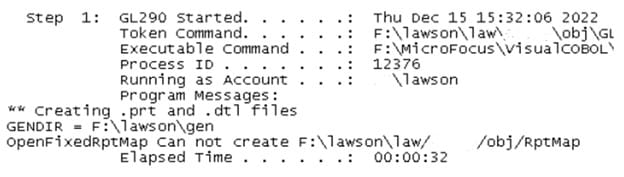
Sometimes when a batch job in GL goes into recovery, you may get the following exception or error on your screen: “OpenFixedRptMap Can not create LAWDIR/pdl/obj/RptMap”. Fear not, this is a quick and easy fix! To get past this screen, you will need to make sure that the batch user has full access to the LAWDIR/pdl/obj directory. This will dismiss the error for the batch recovery. After you confirm the batch user has full access, at this point you can then recover the batch job. You should not get the error again. You can look at the screenshot below for reference.

Chichester Park Hotel recently deployed Infor Hospitality Management Solution (HMS) and Infor Sales & Catering (SCS), a fully integrated, event management software solution. The new cloud systems, according to the press release, have streamlined and amalgamated key processes, laying the foundations for continued business growth. The 86-room hotel in the heart of historic Chichester, England chose Infor’s two systems simply for the ease-of-use of the solutions and their ability to integrate seamlessly with each other, as well as other solutions and technologies. Since implementation, Infor HMS and SCS delivered numerous benefits for the business, securing valuable efficiency savings and providing more insightful and accessible data than with the previous solutions. “Infor HMS and SCS are built to meet the exacting demands of the hotel industry,” comments Paul Griffiths, Infor hospitality business development manager for UK and Ireland. “Our flexible and scalable solutions deliver quantifiable business benefits, automating core processes to deliver that all-important quality experience for guests and staff alike. The efficiencies and valuable insights that our solutions deliver make them the ideal choice for hotel businesses keen to pursue ambitious growth strategies, boosting customer satisfaction as well as profitability.”


For Full Article, Click Here

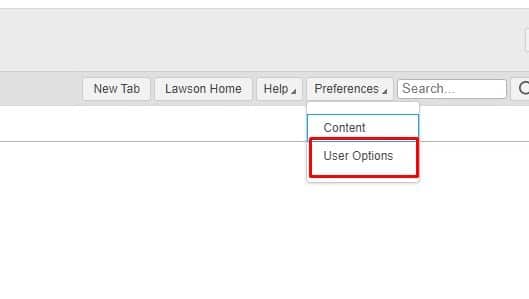
Login to portal an admin user.

Preferences >> User Options

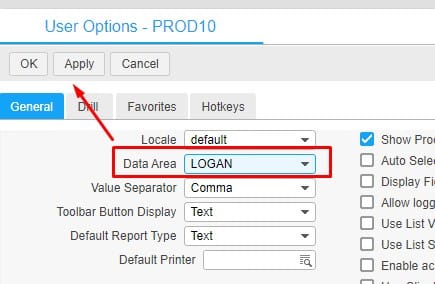
Set Data Area to LOGAN and APPLY then OK


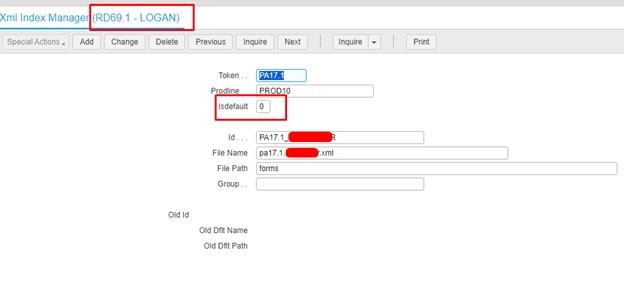
Go to form RD69.1 and click next to cycle through forms and if you see the one you’re looking for, look for the Isdefault flag. If it is set to 0, it means it’s not the default form when users search it.

If the Isdefault is set to 1, when users search PA17.1, they would be brought to the custom form above (but its set to 0 so it wouldn’t apply here).


Alternatively, users could still be using a custom form even if Isdefault is 0 if it was setup in a bookmark or favorites tab within portal.


Good luck!

It’s no surprise that the healthcare industry is thriving on the newest technological advancements. Technology is everywhere in the medical field – from artificial intelligence to telehealth to 3D printing and robotic surgical assistance. Jacob Kupietzky, president of HCT Healthcare Executive Interim Management & Consulting, shares an article on Newsweek of four major components in healthcare that have rapidly advanced thanks to technology.

Collecting Information. “The proliferation of smartphones and wearable trackers like Fitbits have made it possible to monitor and record patient activity and vital signs remotely, without the need for constant medical supervision. It also allows physicians to access objective, reliable data with which they can make informed medical decisions.”

Diagnosis. “A diagnosis is a professional judgment based on available data. That leaves lots of room for human error, be it from unreliable patient self-reports to misinterpreting data to insufficient measurement. Now, machine learning and artificial intelligence can identify trends within large data sets that lead to faster and more accurate diagnoses. This allows for more sensitive testing and more successful interventions.”

Treatment. “Traditionally, treatment would require in-person, doctor-to-patient interventions that risked human error and unforeseen complications. Now, while no medical intervention is truly foolproof, technological improvements have made treatments safer and more available, and in some cases can even preclude disease. Telemedicine has made certain low-risk interventions more convenient and broadly accessible by making them remote.”

Running And Building Your Practice.  “Making sure your practice remains up to date can not only keep it from feeling stale — it can also help ensure you’re providing the modern health services your community needs. That not only increases convenience — it creates better outcomes. Machine learning helps with analytics, and virtual appointments and electronic prescriptions help with telehealth patients.”

The digital age of advanced technology has greatly revolutionized the healthcare industry, and will continue to play a critical role for years to come.


For Full Article, Click Here