Traditional enterprise resource planning (ERP) implementations can take up to two years — a luxury small- and medium-sized businesses (SMBs) can rarely afford. In a fast-moving landscape shaped by regulatory shifts, customer demands, and rapid innovation, a lengthy rollout can mean your ERP is outdated before it even goes live. Tech writer Craig Powers of ERP Today highlights this critical challenge and offers a new path forward. Enter the cloud-native, no-code ERP platform. Powers spotlights vendors like Nextworld, which offer SMBs the ability to implement ERP solutions in weeks rather than years. These platforms allow businesses to roll out updates incrementally — automating AP approvals, adopting new revenue rules, or extending functionality — all without overhauling core systems. The shift from “big bang” ERP overhauls to agile, iterative improvements offers a powerful competitive edge. While one company waits 18 months for transformation, its nimbler rival is already adapting, innovating, and growing. For ERP professionals and SMB leaders, the takeaway is clear: prioritize platforms with short time-to-value. Adopt a culture of innovation. And empower business users — not just IT — to drive transformation using no-code tools. In short: the game has changed. Speed is no longer a luxury; it’s a requirement. The question is whether your ERP strategy is built to keep up.


For Full Article, Click Here

If you want to know how to bookmark a custom cobol ‘Vanilla’ Form, follow these simple instructions below:


This is how the custom cobol “vanilla” form in RD69 shows under ID it’s called XX3.1_TEST

So you may think you need to add it in as XX3.1_TEST when adding as a favorite or creating a bookmark.

An example:

LAWFORM|PDL=PROD10|TKN=XX3.1|ID=XX3.1_TEST

Instead, since it is the custom “vanilla” cobol program, you only need to mention the TKN, not the ID

LAWFORM|PDL=PROD10|TKN=XX3.1


That’s all there is to it! Just clear the IOS cache and browser cache, then you should be able to load the bookmark now.

In a recent Forbes article by Carl D’Halluin, CTO at Datadobi, urges organizations to stop viewing data migration as a routine IT task and start seeing it as a strategic business opportunity. Traditionally, migration was treated as a simple “lift-and-shift”—moving data from one system to another without much thought. But with 80% of enterprise data now unstructured and scattered across on-prem, cloud, and remote environments, that approach no longer works. Fragmented infrastructure, tighter budgets, and growing compliance needs make visibility, governance, and intentionality essential. D’Halluin argues that migration should be a moment of clarity, allowing organizations to assess what data exists, who owns it, and what truly matters. By analyzing data before moving it—based on age, usage, and business relevance—organizations can reduce clutter, improve performance, and align storage with strategic goals. To succeed, migration must be business-led, not just IT-driven. This includes establishing a migration governance council, ensuring cross-departmental alignment, and planning migrations in waves based on business function or data sensitivity. It’s also crucial to define and agree on what qualifies as outdated or orphaned data—early and clearly. Ultimately, D’Halluim believes that a well-executed migration improves more than storage—it enhances compliance, strengthens AI readiness, and increases operational agility. For organizations aiming to be truly data-centric, migration is no longer just a technical step—it’s a strategic milestone.


For Full Article, Click Here

In today’s fast-paced business world, data is crucial. Migrating to the cloud, especially platforms like Snowflake, offers organizations a way to centralize data, reduce costs, and gain deeper insights. However, the migration journey comes with challenges. A structured approach can help businesses maximize the benefits of cloud migration. As businesses increasingly move to the cloud, Snowflake has become a popular choice for data migration, offering enhanced scalability, security, and insights. In his Forbes article, Devang Pandya, Vice President, Data Engineering at Tredence Inc., outlines a structured approach to migrating data, ensuring organizations can centralize their data and reduce costs while overcoming potential migration hurdles.

Four Key Steps for Successful Migration

  1. Analysis and Discovery: Begin by assessing your legacy systems. Identify high-value data and outline performance, security, and ROI goals. Careful planning is the foundation of a successful migration.

  2. Data Migration: Transition both historical and real-time data to Snowflake, unifying structured and unstructured data for richer insights. Use preview demos to ensure smooth adoption.

  3. Process Migration: Modernize legacy workflows like ETL and reporting to align with cloud environments. Tools like Fivetran and DBT can optimize this process.

  4. Data Validation: Before full migration, ensure data accuracy and consistency using automated tools. Clear communication is crucial for resolving discrepancies and building trust with users.

A successful migration involves collaboration across teams—executives, IT, business units, and security officers—ensuring alignment and smooth execution. When selecting data platforms and system integrators, focus on scalability, AI/ML support, and secure data sharing. Avoid partners who overpromise or lack transparency. By following this structured approach, Pandya believes that organizations can unlock the full potential of platforms like Snowflake, driving smarter, data-driven decisions.

For Full Article, Click Here

If you need to update your SQL Tables after a data refresh, follow the simple steps below:


First, open up the properties for the DB that was just refreshed and you can see that the DB tables have the PROD name instead of TEST.


Next, run the following SQL query for the TEST DB:

ALTER DATABASE INFORLAWTEST10 MODIFY FILEGROUP INFORLAWPROD10_DATA NAME = INFORLAWTEST10_DATA

ALTER DATABASE INFORLAWTEST10 MODIFY FILEGROUP INFORLAWPROD10_INDEX NAME = INFORLAWTEST10_INDEX

Your SQL tables should now be updated after doing a data refresh. Continue to repeat these steps whenever you do refreshes.

In her recent article by ERP Today, senior editor Radhika Ojha interviews Kevin Campbell, CEO of Syniti, to unpack the challenges organizations face when preparing for SAP S/4HANA migrations. Based on findings from a new Syniti report, one thing is clear: when it comes to data, “good enough” simply isn’t good enough. While 70% of organizations claim to have a data strategy, 86% fear poor data management will derail their AI efforts. The root issue? It’s not the tech—it’s the people. Too often, data is treated as an IT issue, not a business priority. Campbell argues that success starts with a “Data First” culture where executive commitment, early business involvement, and shared ownership are non-negotiable. One of the biggest missteps in SAP S/4HANA projects is treating data quality as an afterthought. Campbell warns: every migration is a data quality project. Delaying data cleansing leads to delays, inflated costs, and downstream errors. The solution? Start cleansing 6–8 months before design and involve business users from day one. AI, often viewed as a goal, should also be used as a tool—helping to automate data cleansing and governance at scale. But AI is only as effective as the data it’s fed. Finally, companies must bridge the talent gap. Success demands business-savvy data specialists and cross-functional teams fluent in both data and operations. Ojha concludes that if your data isn’t right, your transformation won’t be either. You must treat data as your most valuable asset.

For Full Article, Click Here

When testing the FTP connection on a Lawson Back-office data source in LBI, you may receive the error message “System Directory Not Available”.  You may also see this message in the SystemOut.log on the LBI server when the system is testing the connection.

Here are some troubleshooting steps when you encounter this issue:

  1. Open a Windows command prompt on LBI server
  2. ftp <lawson application hostname>
  3. log in as <ftp user>
  4. cd <application home path>
  5. ls (You should see the ‘system’ directory listed here.  If not, that is the source of the “system directory not available” error). If you see the system directory, continue:
  6. cd /system/ers/backoffice/<pdl>
  7. get published.csv
  8. del published.csv
  9. put published.csv
  10. cd <application home path>/print/username/jobname/1 (use a username and job name for a published report, or any job if you have nothing published yet.)
  11. get <JOBNAME>.prt
  12. del <JOBNAME>.prt
  13. put <JOBNAME>.prt

NOTE you can also use an ftp client such as Filezilla to check for the file

Once you have ensured access to all of the above directories over ftp, you should find the following message when you test the FTP connection.

In the fast-paced world of manufacturing, delivering exceptional customer experiences requires more than just great products—it requires seamless operations behind the scenes. According to an article for ERP Today by Craig Powers, integrating your CRM (Customer Relationship Management) and ERP (Enterprise Resource Planning) systems is one of the most effective ways to achieve this. While many manufacturers still operate with siloed data, the benefits of unifying these systems are clear: faster response times, better inventory management, and improved customer satisfaction. By integrating CRM and ERP, manufacturers can ensure that every department is on the same page, from sales teams to production. For example, when a customer places an order, production teams can immediately see the demand, adjust schedules, and track progress—without worrying about duplicate data or manual processes. This integration eliminates costly delays and improves accuracy across the entire order lifecycle. Take the case of an industrial equipment manufacturer who integrated Salesforce with Rootstock Cloud ERP. The result? Real-time visibility from order to production, reducing errors and improving delivery timelines. Another machine manufacturer saw a 70% drop in inventory shortages and near-perfect on-time delivery after unifying their CRM and ERP systems. The key takeaway Powers highlights is that manufacturers with siloed systems are wasting time and money. A cloud-based platform that unifies CRM and ERP can help streamline operations, improve customer satisfaction, and reduce costly inefficiencies. Now’s the time for manufacturers to make the leap—connecting the dots between customer demand and production processes is critical to staying competitive.

For Full Article, Click Here

In the IT world, especially within industries like food and beverage, we constantly face the challenge of building enterprise resource planning (ERP) systems that meet unique business needs without overcomplicating operations. As Shiv Kaushik highlights in his Forbes article, finding the right balance between customization and standardization is crucial for ERP success. Too much customization can create long-term issues, while an over-reliance on out-of-the-box solutions may limit business flexibility. Kaushik stresses the importance of a hybrid approach: “configure-first, customize-when-necessary.” This methodology allows IT teams to leverage the flexibility of configuration tools within modern ERP platforms while avoiding the pitfalls of excessive customization. A focus on standardizing core processes, while customizing only when absolutely necessary, reduces complexity, minimizes upgrade costs, and ensures smoother future integrations. For IT professionals, this means conducting thorough business capability assessments to distinguish between core differentiators that require customization and commodity functions that can be managed through standard ERP modules. By leveraging industry-specific ERP solutions and configuration tools (such as role-based dashboards and low-code platforms), organizations can accelerate implementation and avoid the technical debt that often accompanies custom-built systems. Kaushik also emphasizes the value of strong governance, including continuous oversight and iterative improvements post-implementation. This ensures systems evolve alongside the business without unnecessary bloat. Ultimately, the key takeaway for IT professionals is this: balancing flexibility with control is critical to achieving an ERP system that’s both scalable and future-proof.


For Full Article, Click Here

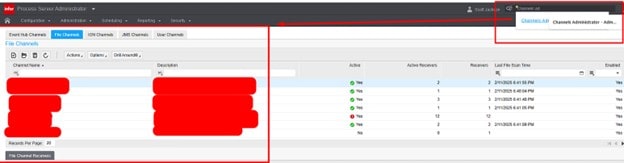
Intuitively you may assume that you can access scheduled processes in the Lawson Process Server Administrator main toolbar:

This becomes more frustrating because you would assume it would be under “Scheduling”. After all, this is supposed to be Infor’s convenient move away from the clunky Rich Client app.


To access your existing scheduled processes, you need to go to the top right where your user is and click there and select “My Actions”, NOTE: you’ll need to be logged in as the system user

This will take you to your Scheduled Actions as show below. Double click the Name to modify the schedule and you’re set after saving!