Cloud computing offers businesses increased accessibility and flexibility, but migrating digital assets from existing servers can pose security risks if not executed carefully. To prevent data breaches and compliance issues, it’s essential to follow best practices in cloud security, guided by experienced professionals. A recent article on Analytics Insight discusses four main challenges organizations face when securing data during a cloud transition. First, data privacy becomes complex as sensitive information moves outside traditional on-premises environments, raising compliance concerns. Second, ensuring proper access control is critical; organizations must manage identities and permissions effectively to prevent unauthorized access. Third, data leakage risks increase during migration, requiring robust encryption and monitoring measures. Fourth, maintaining consistent security policies across hybrid or multi-cloud setups is challenging, leading to potential vulnerabilities. The article emphasizes the importance of a comprehensive security strategy that includes data encryption, identity management, and continuous monitoring. It also highlights the need for organizations to understand their data flow and adopt best practices for data governance. Implementing strong authentication methods and leveraging automation can help mitigate risks. Regular security assessments and staff training are essential to adapt to evolving threats. Cloud service providers offer security tools, but organizations must actively configure and manage these resources. Additionally, transparency and compliance with regulations like GDPR are vital during the transition. The article concludes that proactive planning and a layered security approach are key to safeguarding data in cloud migrations. Overall, addressing these challenges ensures data integrity, confidentiality, and compliance in the cloud.


 

For Full Article, Click Here

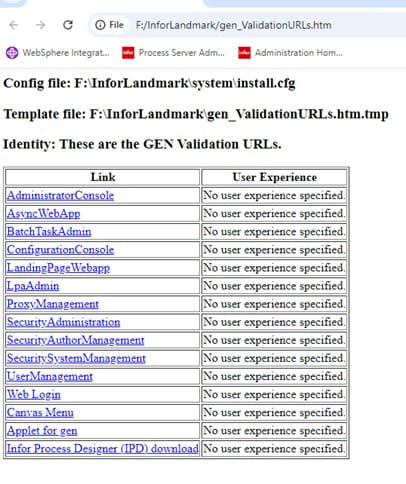
There are occasions when Infor Support will request you to report if you are able to access all validation links. To find the links for validation, follow the steps below:

First, in file explorer, go to the InforLandmark folder

In the folder, you should have an htm file for the validation URLs (see screenshot)


Next, double click on the file to open it.

Click on each of these links to validate you can access each link.

Finally, send Infor the screen shots of any links that have errors so they can review.

Enterprise Resource Planning (ERP) systems are essential for managing core business functions but their central role also introduces significant risks if not properly secured. To prevent costly fraud and compliance issues, IT and business leaders must prioritize effective Segregation of Duties (SoD) and user access management. In an article on ERP Today, written by tech expert Jennifer Lawinski, she emphasizes the importance of enhancing ERP security through smarter Segregation of Duties (SoD) and user access management. The article highlights that ineffective access controls can lead to fraud, errors, and compliance issues, making it crucial to implement robust policies. Automation tools can help identify and mitigate risks by continuously monitoring user activities and access rights. Regular audits and reviews ensure that access privileges remain appropriate over time. Role-based access control (RBAC) simplifies management by assigning permissions based on job roles, reducing errors. Dynamic access management adapts to changing organizational needs, improving security and efficiency. The article advocates for integrating security solutions with existing ERP systems to streamline oversight. It stresses the importance of strong authentication methods, such as multi-factor authentication, to prevent unauthorized access. User provisioning and de-provisioning should be automated to minimize human error. Implementing real-time alerts for suspicious activities can help detect potential breaches early. Establishing clear policies and training staff enhances adherence to security protocols. Regular risk assessments identify vulnerabilities proactively. Combining technology with governance ensures comprehensive security coverage. The article notes that organizations often overlook the complexity of SoD conflicts, which can be mitigated with smarter tools. It advocates for a risk-based approach to access management, prioritizing high-risk areas. Proper documentation and audit trails support compliance with regulations like SOX or GDPR. Continuous improvement of access controls aligns security with evolving threats. The article concludes that smarter SoD and user access management are vital for safeguarding ERP systems effectively. Investing in these practices reduces the likelihood of security breaches and financial losses.


For Full Article, Click Here

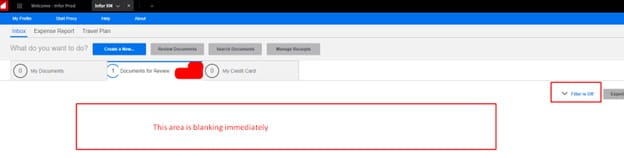
Problem: when logging into Infor XM (Expense Management) and clicking Documents to review, the section expands and closes immediately and is left blank.

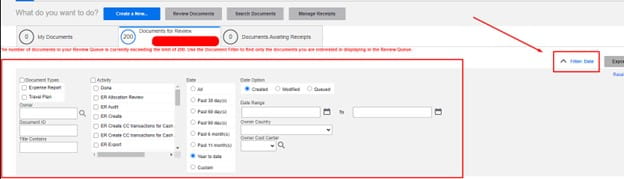
First check your filters are cleared:

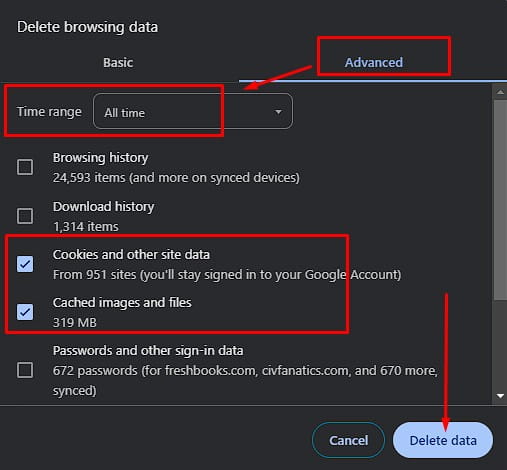
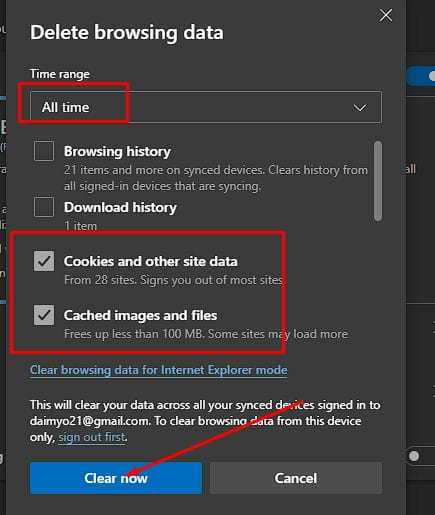
If the filters are cleared, this is a browser related caching issue. To clear your browser follow the steps below.

Google Chrome Browser:

  1. Select Chrome browser and on your keyboard press CTRL + SHIFT + DELETE
  2. Select the Advanced Tab
  3. Time Range set to “All time”, check the “Cached Images and files” and Cookies boxes
  4. Select Delete Data and close the browser completely to test again.

Microsoft Edge Browser:

To clear browsing info stored on your device, like saved passwords or cookies:

  1. Select Microsoft Edge and on your keyboard press CTRL + SHIFT + DELETE
  2. Time Range set to “All time”, check the “Cached Images and files” and Cookies boxes
  3. Click Clear now and close the browser


Migrating enterprise resource planning (ERP) platforms to the cloud offers agility, cost savings, and faster innovation—but it also brings new challenges. With deeper integrations and rapid updates, traditional testing can’t keep up. That’s why smart organizations are rethinking their approach from the ground up. An article by tech writer Jennifer Lawinski from ERP Today discusses the challenges and necessary strategies for testing during ERP cloud migrations. As organizations shift to cloud-based ERP systems, traditional testing methods prove inadequate due to the complexity and rapid pace of these migrations. The author emphasizes the importance of adopting a new testing approach that aligns with the unique demands of cloud environments. In cloud migrations, organizations face issues such as integration with existing systems, data migration, and ensuring business continuity. Lawinski notes that testing should be an ongoing process rather than a one-time event, promoting continuous integration and delivery practices. Additionally, automated testing tools are recommended to enhance efficiency and accuracy. Stakeholder involvement is crucial throughout the testing phase to ensure that all business requirements are met. The article also points out the necessity of a clear testing strategy that includes defining objectives, scope, and methodologies. Furthermore, it discusses the importance of performance testing to gauge how the new system will handle real-world conditions. Lawinski advises organizations to prioritize user acceptance testing to ensure end-user satisfaction. A proactive, flexible, and scalable testing approach is essential for successful ERP cloud migrations.


For Full Article, Click Here

As digital transformation becomes essential for businesses, organizations that adopt multi-cloud and hybrid cloud strategies are achieving enhanced agility, efficiency, and sustained value. IT analyst  Kaushik Vemulapalli shares an article on IT Pro Today that discusses how cloud migration and modernization are key drivers for business growth in today’s digital landscape. Companies are increasingly adopting cloud technologies to enhance their operational efficiency and scalability. The transition to cloud services allows businesses to streamline processes, reduce costs, and improve accessibility to data and applications. Businesses that embrace cloud migration can benefit from increased agility, enabling them to respond quickly to market changes. The cloud also facilitates innovation, allowing companies to experiment with new services and products without significant upfront investments. Additionally, the integration of advanced technologies such as AI and machine learning into cloud platforms enhances data analysis and decision-making capabilities. The article highlights that a strategic approach to cloud adoption can lead to improved customer experiences and satisfaction. However, successful migration requires careful planning and consideration of security, compliance, and legacy systems. Organizations must prioritize training and upskilling their workforce to effectively leverage cloud technologies. Furthermore, the article emphasizes the importance of choosing the right cloud model—public, private, or hybrid—based on specific business needs. It concludes that as more organizations recognize the benefits of cloud migration and modernization, those that delay may risk falling behind their competitors in the rapidly evolving market. Overall, the cloud presents significant opportunities for growth and innovation, shaping the future of business operations.


For Full Article, Click Here

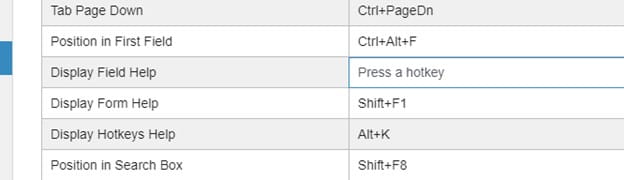
Hotkeys are shortcut key combinations that cut down on the number of clicks required to complete a task.  Administrators can edit or create hot key combinations to provide to end users.  Lawson Portal roles can be used to make hot keys available to users.

To edit hot keys,

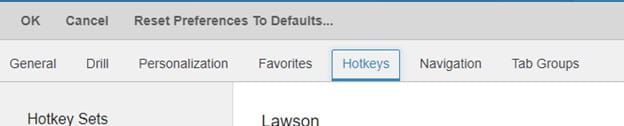
Go to the navigation menu under the General group, and select User Options.

Click the Hotkeys tab.

Decide which hot key you are editing, and click in the Hotkey cell.

Select the hotkey combination on your keyboard that you want to use

Click the Revert button to go back to the default


In their latest press release, Infor launched its new Infor Velocity Suite, a comprehensive platform designed to enhance process innovation through generative AI. This suite integrates advanced AI capabilities into Infor’s cloud-based solutions, aiming to streamline workflows and boost productivity across various industries. With Infor Velocity, businesses can leverage AI to automate routine tasks, gain insights from data, and improve decision-making processes. The suite includes features such as automated report generation, predictive analytics, and natural language processing, which collectively enable organizations to respond swiftly to market changes and customer demands. Infor emphasizes that this innovative approach not only accelerates operational efficiency but also fosters creativity and collaboration among teams.

The introduction of Infor Velocity reflects the company’s commitment to harnessing cutting-edge technology to empower users and create more agile business environments. By facilitating easier access to AI tools, the suite helps organizations mitigate risks and enhance their competitive edge. Infor also highlights the importance of user-friendly interfaces, ensuring that even those with minimal technical expertise can effectively utilize the suite’s capabilities.

The company has collaborated with industry leaders to tailor the suite’s functionalities to meet specific sector needs, ensuring relevant applications across various markets. Infor Velocity aims to provide a seamless integration experience, allowing businesses to adopt AI technology without significant disruptions. As organizations increasingly recognize the value of AI, Infor Velocity positions itself as a crucial tool for driving future growth and innovation.

Overall, the Infor Velocity Suite represents a significant advancement in the use of generative AI within enterprise solutions, promising to transform traditional business processes and enhance overall performance.


For Full Article, Click Here

The ssconfig utility is password-protected. It is a good idea to change the ssoconfig password periodically. You might also need to recover or change the password because you don’t remember it.

Password Reset

This is a good procedure to perform periodically to ensure that the password does not become known by unauthorized persons. You perform this procedure using the ssoconfig utility and you must know the current password.

  1. Run the ssoconfig utility. From a command prompt, specify

    ssoconfig -c

  2. At the prompt, specify the password for the ssoconfig utility.
  3. From the main menu, select “5” Manage Services and then select “2” Change authentication administration settings.
  4. At the prompt for “Enter the password for the ssoconfig utility,” specify the new password and then press Enter. Confirm the change by specifying the password again at the next prompt.
  5. Press Enter to retain your setting for the attribute accessed by the prompt, “Do you want to enforce e-mail mechanism for password recovery?”

You should now be at the main menu for the ssoconfig utility.

Password Recovery

Use this method to create a new ssoconfig utility password if you have forgotten the password.

This method does not actually recover the password. It simply assigns a new one.

  1. Run the ssoconfig utility. From a command prompt, type

    ssoconfig -p

  1. When the prompt, “Enter the new password for Lawson security utilities” appears, type the new password and then press Enter.

You will be prompted to confirm the password. You should receive the message, “Password is changed successfully.”


Tech writer and analysts Krishna Seth shares an article on Analytics Insight that discusses the evolving landscape of Enterprise Resource Planning (ERP) systems, highlighting their critical role in modern businesses. It emphasizes the shift from traditional ERP solutions to more innovative, cloud-based platforms that offer greater flexibility and scalability. The integration of advanced technologies like artificial intelligence, machine learning, and data analytics is transforming how ERPs function, enabling real-time insights and automation. Seth notes that businesses are increasingly seeking ERP systems that can adapt to their specific needs and processes. This customization is facilitated by modular ERP solutions, allowing companies to select and implement only the functionalities they require. The rise of mobile access and user-friendly interfaces is also making ERP systems more accessible to employees, improving collaboration and decision-making. Moreover, the article highlights the importance of data security and compliance in the development of future ERP systems. As organizations handle more sensitive information, they must ensure that their ERP solutions meet regulatory standards.


For Full Article, Click Here