
How to find and run the Landmark Validation URLs
There are occasions when Infor Support will request you to report if you are able to access all validation links. To find the links for validation, follow the steps below:
First, in file explorer, go to the InforLandmark folder
In the folder, you should have an htm file for the validation URLs (see screenshot)

Next, double click on the file to open it.
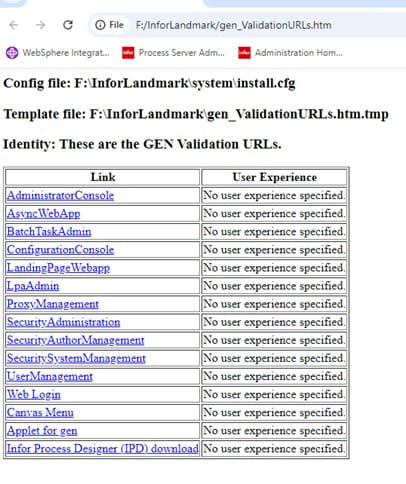
Click on each of these links to validate you can access each link.
Finally, send Infor the screen shots of any links that have errors so they can review.
Retiring Lawson, PeopleSoft, or Oracle? APIX archives the entire application — every table, every year, attachments and security included — into your own AWS account in about 30 days, so you can decommission the legacy system and keep full access to the history.


Leave a Reply
Want to join the discussion?Feel free to contribute!