To view/edit your own schedules, log into Rich Client and navigate to Start > My Actions.

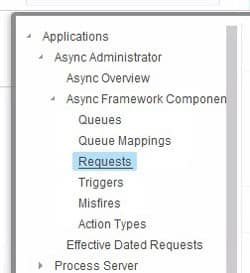
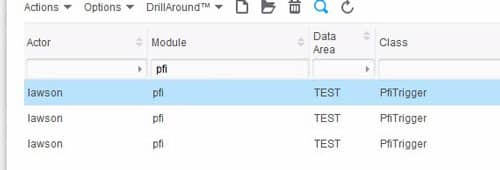
To view/edit ALL schedules, log into Rich Client and navigate to Start > Applications > Async Framework Components > Requests.  From there, you will be presented with a list of all Async Action Requests.  The IPA process schedules are under module “pfi”.


The start of the new decade has a slew of technological advancements and changes that will influence our lives. Anis Uzzaman of Pegasus Tech Ventures shares an article on VentureBeat of the top trends we will most likely see that will impact our lives in 2020.

  1. Breakout moment of artificial intelligence (AI) in manufacturing
  2. Practical deployment of Internet of Things (IoT)
  3. Increased demand for edge computing processing power
  4. Commercialization of quantum computing usage in mass scale
  5. Evolution of aerospace technologies
  6. New era of the internet — deployment of 5G and Starlink broadband internet technology
  7. Evolution of health care — predictions at the genome level
  8. Evolution in Agriculture – technology to Grow Crops Efficiently
  9. Evolution of autonomous driving technology
  10. The U.S. and China put blockchain to practical use

We’re heading into the next decade with a handful of technologies that will impact us and change the world. There is no doubt that 2020 will be a time of innovation and better leveraging of technology.

For Full Article, Click Here

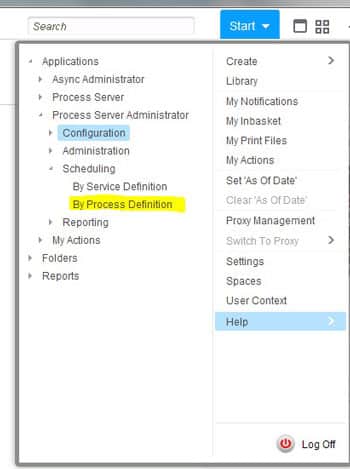
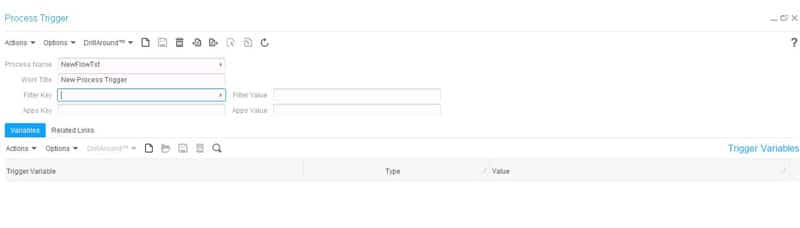
To trigger a process manually, you first have to set up a trigger.  From Rich Client, navigate to Start > Process Server Administrator > Scheduling > By Process Definition.  Click Actions > Create to create a new trigger.  For Process Name, select the IPA process that you want to run.  Enter a descriptive Work Title (the trigger will fail if it doesn’t have a Work Title).  Click Save.  Then, click Actions > Start.  Check the Work Unit log to see that your process has run!  If you want to delete your trigger, you will first need to delete the work units associated with it.

Enterprise Resource Planning (ERP) software has evolved and adapted to the ever-changing business needs, customer demands and enterprise innovations. Solutions Review has highlighted some major trends we should take note of in 2020.


For Full Article, Click Here

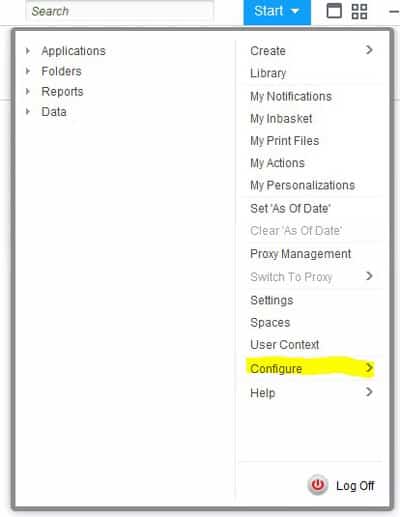
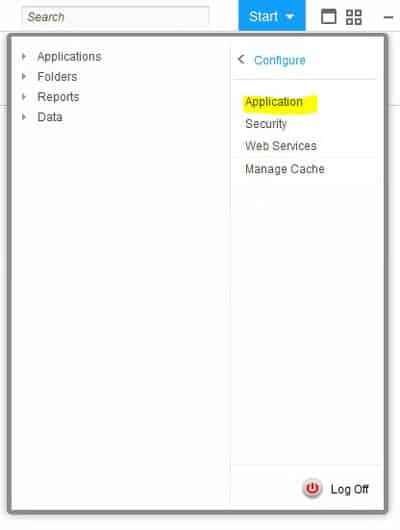
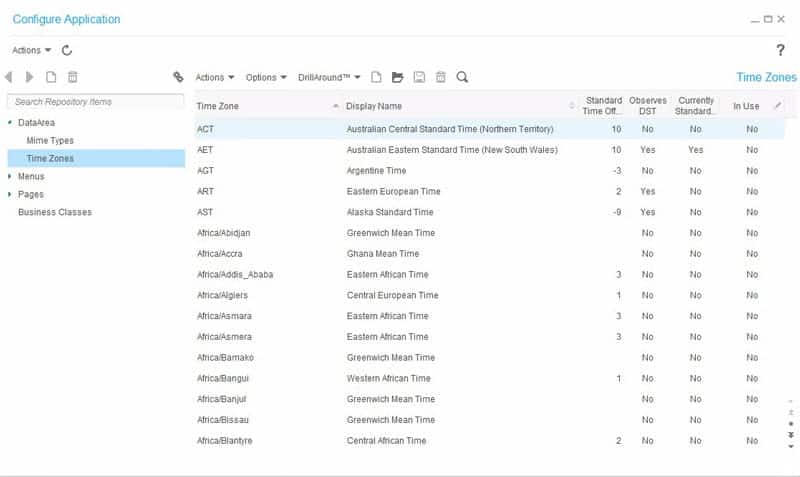
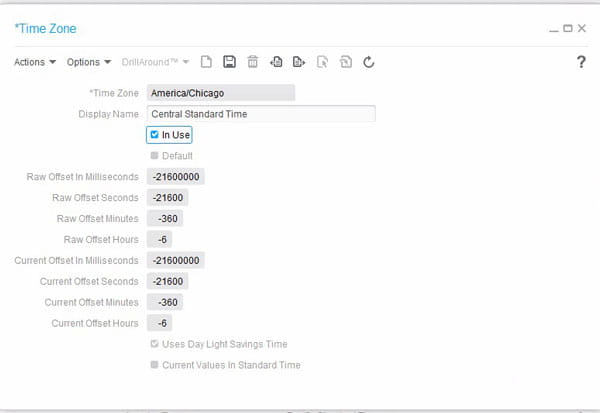
To activate the time zones available in your Landmark applications, from the GEN data area, go to Start > Configure > Application.  Under “Data Area” in the left panel, select “Time Zones”.  Find the Time Zone(s) that you want to activate, and double-click to edit.  Set the “In Use” flag.  Now that Time Zone will be available to select in your Landmark applications.

Retail technology has made great strides in 2019. Computer Weekly shares what technologies that retailers were rushing to adopt how consumer behavior is changing. In an attempt to deal with today’s fickle’s customers, retailers have been implementing modern technologies to cater to shopper habits. Experimentation with different technologies, data, artificial intelligence (AI), virtual reality (VR), augmented reality (AR), and mobile applications have made huge impacts in the industry. Some of the top trends in retail technology this year include:

To read the full list of trends, refer to the link below and read the full article on Computer Weekly.

For Full Article, Click Here


The Landmark Configuration Console allows you to effect system-wide changes with no downtime for your users.  You can personalize your Landmark applications in a multitude of ways:

  • Add custom fields
  • Move fields or remove them from forms
  • Set fields to required
  • Modify list columns (add/remove/rearrange)
  • Create new
    • User interfaces (pages, lists, etc)
    • Business classes (data, objects, etc)
  • Security
    • Use the Security Configuration tool to modify security classes, rules, and roles
  • Web Services
    • External systems communication with Landmark business classes using SOAP, HTTP, WSDL, or REST

The Infor-delivered role what will allow users to access Configuration Console is GlobalUIConfigAccess_ST.  The role that will allow users to access Security Configuration is SecurityConfigAccess_ST.

A breakthrough in battery technology has happened for IBM research. According to Tech Republic, this new technology – which is said to potentially make lithium-ion batteries obsolete – can charge incredibly quickly, has low flammability, contains no heavy metals, and is more environmentally friendly than current battery technology. Battery performance complaints aren’t anything new, but there was still the need to improve the technology. Though IBM is keeping private about this new breakthrough, it’s safe to say that it will be a real game changer in the tech space. The article on Tech Republic shared that the three components of IBM’s newest battery can all be extracted from sea water, which means the environmental damage from, and humanitarian cost of, mining heavy metals for batteries could be eliminated and reduce costs. Other known details of the new technology are:

  • It can reach a power density of more than 10,000 watts per liter;
  • It can reach an energy density of more than 800 watt hours per liter, which is comparable to modern lithium ion batteries;
  • It has an energy efficiency (defined by IBM as “the ratio of the energy to discharge the battery over the energy to charge the battery”) of over 90%.


For Full Article, Click Here

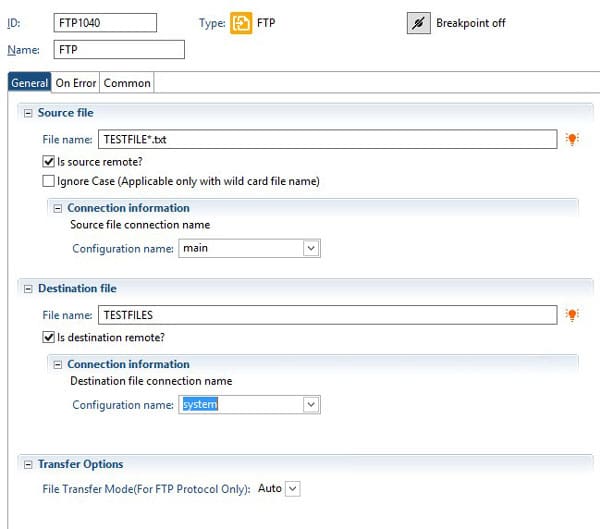
When you are using IPA to transfer files, there may be some cases where you need to pick up multiple files, or where you need to get files for which you only know a partial name (such as a file that contains a date/timestamp).  To get multiple or masked files, you can supply an asterisk (*) in the filename as a wildcard.  Then, the destination file should actually be a directory name (of a directory that exists).  All files that are picked up in the FTP process will be placed in that directory, and you can use them from there.


The Lawson database relationships are stored in the GEN database.  Foreign key constraints are not actually added to the database tables.  So, to see what these relationships are, you can query the GEN data.  The primary relationship information is stored in FILEREL.  Then, to get the fields that are used in the relationship you’ll need to join FILRELFLD and FILEINDFLD.  FILERELFLD contains the primary field names, and FILEINDFLD contains the foreign field names.  The below query is a sample run against a SQL Server database for a data area called “TEST”.


SELECT RTRIM(FILEREL.FILENAME) PARENT_FILE,

RTRIM(FILEREL.RELFILE) CHILD_FILE,

REPLACE(RTRIM(FILERELFLD.FRFLDNAME), ‘-‘, ‘_’) PARENT_FIELD,

REPLACE(RTRIM(FILEINDFLD.FLDNAME), ‘-‘, ‘_’) CHILD_FIELD

FROM FILEREL INNER JOIN

FILERELFLD ON FILERELFLD.FILENAME = FILEREL.FILENAME AND

FILERELFLD.RELNAME = FILEREL.RELNAME INNER JOIN

FILEINDFLD ON FILEINDFLD.FILENAME = FILEREL.RELNAME AND

FILEINDFLD.INDEXNAME = FILEREL.INDEXNAME AND

FILEINDFLD.FLDNBR = FILERELFLD.FLDNBR INNER JOIN

FILEDEF ON FILEDEF.FILENAME = FILEREL.FILENAME

WHERE FILERELFLD.FRFLDNAME <> ‘              ‘ AND

FILEREL.PRODUCTLINE = ‘TEST’