If you want to use one System Command Node to run more than one command, simply concatenate the commands with “&&”. The output of the System Command Node will be the combined results of all the commands. For example:
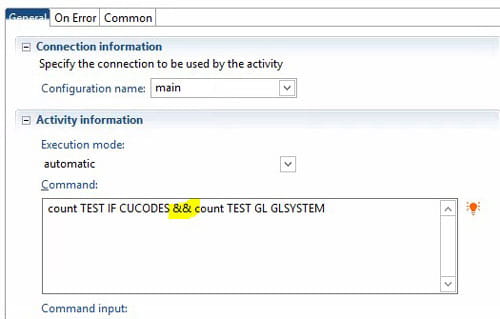
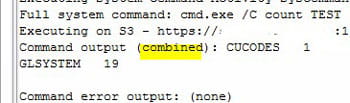

If you want to use one System Command Node to run more than one command, simply concatenate the commands with “&&”. The output of the System Command Node will be the combined results of all the commands. For example:

Infor recently announced that Lycamobile, the world’s largest international mobile virtual network operator (MVNO), has invested in Infor SunSystems. This will allow the company to save costs by improving control of expenditure, and also help enable faster, more meaningful reporting. Per the press release, Infor SunSystems will replace the various financial management systems currently in use across all Lycamobile territories with a unified solution. The first phase of the roll-out will include France, the UK, Portugal and Spain. Implementation will be done by Infor service partner Lawrence Campbell. Following the initial phase and a comprehensive knowledge transfer programme, Infor SunSystems will be rolled out to the remaining 20 countries by a project team within Lycamobile.

Many companies are turning to enterprise resource planning (ERP) tools with accounts payable (AP) automation to harness both solutions’ abilities and level up their businesses’ values, according to PYMNTS.com. By bridging AP automation to ERP capabilities, it enhances working capital management, reduces operational costs and improves productivity. Per the article, the following advantages are available:
ERP and AP Automation Uptake
“Implementing cloud-based ERP software has appealing benefits, but industry analysts find most companies lack the comprehensive AP capabilities necessary for efficient record keeping or rapid invoice and payment processing. AP automation simplifies the invoicing process to the extent that it can cut the cost of processing a single invoice.”
Benefits of Combining ERP and AP Automation Solutions
“Augmenting ERP software with robust AP automation capabilities produces a system that significantly reduces typical human errors, such as duplicate invoice payments, and often provides additional support for innovative payment methods.”
Upgrading ERP Simultaneously With AP Automation
“Embracing AP software solutions by implementing them simultaneously with ERP upgrades can streamline technical integration efforts and maximize worker productivity.”
Microsoft is hardening their security with LDAP channeling and LDAP signing in an update coming soon. Any applications that rely on LDAP connections to Active Directory Domain Services (AD DS) or Active Directory Lightweight Directory Services (AD LDS) need to be converted to LDAPS. LDAPS is a secure connection protocol used between applications like Lawson and the Network Directory or Domain Controller. Below are the potential impacted Lawson applications mentioned by Infor in a recent KB Article.
Impacted Lawson applications:
Infor has recommended that on-premise clients configure the impacted applications and have provided KB Articles on how to perform these tasks.
Some important things to note:

Infor recently announced that Raval, an innovator in flow control solutions for the global automotive industry, has successfully deployed Infor M3 enterprise resource planning (ERP) system. Infor M3 has helped add significant improvements to Raval’s operational processes including user interface improvements, cardboard packaging management, order pickup processes and adjustments to numerous tax and regulatory requirements needed for its international operations. The implementation, which was carried out by Intentia Israel in collaboration with Raval’s information systems department, lasted several months. Infor M3 went live at all the company’s locations around the world, adhering to schedules and in a transparent manner, without interrupting the company’s day-to-day operations and giving full operational independence to Raval.

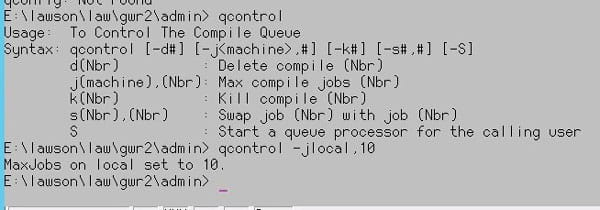
When doing a patch compile or a product line compile, it is best to increase the number of jobs that can be added to the queue so they will compile faster. The default is two jobs. To increase the number of jobs, use the command “qcontrol -j<machine name>,#”
For example:

Investing in an enterprise resource planning (ERP) system is the best thing you could do for your business to stay productive. However, simply implementing one and never reevaluating it from time to time could hurt your business more than helping it. That’s because with ever growing advancements in business technology, sometimes older systems get outdated. Hugo Britt at thomasnet.com shares seven ways to tell that your ERP system is outdated.
An outdated ERP will incur plenty of loss for a company over time. Consider reevaluating your current system and determine if you need to update to a newer, better-integrated system.
Many ERP systems allow for a much longer location ID than Lawson does.
Many Punch Out vendors have limitations on the size of the location ID. Make sure to validate with any Punch Out vendors you may have before you come up with a new location naming convention. Otherwise you may have to revisit this item later.
Infor’s latest partnership with cloud data platform Snowflake will help enterprises build automated data warehouses using the Birst full-stack analytics and BI platform. Birst is a single, integrated, end-to-end platform for building automated data warehouses natively on Snowflake, which eliminates the need for separate ELT/ETL (extract, load & transform, and extract, transform & load), data modeling, data preparation and analytics tools. Per the press release, joint customers can use Birst’s self-service data preparation capabilities to blend end-user-created data with enterprise data in Snowflake, providing true self-service for business users and analysts. Birst and Snowflake both run natively in AWS (Amazon Web Services), which speeds data processing and querying, while obviating the need to export data out of Snowflake.

Infor recently announced that Stagecoach, the largest bus and coach operator in the UK, has selected Infor CloudSuite EAM (enterprise asset management). Deployed and supported by Infor partner Sapphire Systems, the cloud based system will help digitalize asset management at the bus company. Stagecoach has a large and widespread asset portfolio to which they were faced with a need t o modernize their current system by fully digitalizing their asset management practices. Stagecoach choice Infor CloudSuite EAM to support fleet availability, facilitate comprehensive warranty management and expedite vehicle recovery. Per the press release, Infor was selected based on its technology platform, scalability and fit with Stagecoach’s wider digital transformation goals. The software’s user friendliness and speed of performance were also key to the decision.