
Lawson Decommissioning: How to Retire Infor Lawson Without Losing Your History
You’ve picked the replacement. Maybe it’s Workday, Oracle Cloud, UKG, or Infor CloudSuite. The go-live date is on the calendar. And yet Lawson is still running, because nobody can say with confidence that it’s safe to turn off.
That’s the usual story with Lawson decommissioning. Most projects aren’t delayed by the new system. They’re delayed by the old one: years of payroll, general ledger, AP, purchasing, and HR history that still has to be producible for auditors, attorneys, and employees long after the cutover. The fix is a Lawson data archive that preserves that history so the system itself can finally go away.
This guide covers what a proper Lawson decommissioning involves and where projects tend to stall.
Why “Retired” Lawson Keeps Costing You
A Lawson server kept around “just in case” isn’t free. It still needs licensing, hosting, DBA time, backups, and disaster recovery. It also still sits in scope for every security assessment, usually on an operating system and database that no longer get meaningful vendor support. For many organizations, that adds up to $300K–$750K a year for a system nobody uses day to day.
When teams plan to retire Infor Lawson, they usually weigh three options:
- Leave the VM running. It’s the safest-feeling option and the most expensive one. It also depends on the few people who still know how to operate it.
- Export tables to SQL dumps and spreadsheets. This is cheap up front, but Lawson data isn’t flat. It uses compound keys and effective-dated history, and records relate to each other across modules. Once the tables are exported, those relationships are gone. Answering “what was this employee’s pay rate on March 1, 2012?” becomes a forensic exercise.
- Move to a purpose-built Lawson data archive. Extract everything, keep the relationships intact, and put it behind a login your users already know.
Only the third option lets you actually turn Lawson off.
What Makes Lawson Decommissioning Different
Lawson isn’t a standard ERP retirement, because the data model works against shortcuts. Accounts payable, general ledger, purchase orders, HR, payroll, and benefits are all connected. If you’re also running Landmark or Global HR (including Talent Management), you have a second layer of history with its own structure.
A useful Lawson data archive has to preserve:
- Every table and row, plus attachments and print files
- The relationships between records, not just the records
- Effective-dated history, so you can see data as it stood at a point in time
- Drill-downs and exports that resemble the screens your team already knows
If any of those are missing, you haven’t archived Lawson. You’ve stored a copy of it.
Five Steps to a Clean Lawson Decommissioning
- Decide what moves and what stays. Not everything belongs in your new ERP. Loading a decade of history into a new system slows the project, adds cost, and often isn’t what the new platform is designed for. Convert what you need to run the business going forward. Archive the rest.
- Inventory what you actually have. List the modules in use, how many years of history exist, what attachments are stored, and which interfaces or scheduled jobs are still quietly running. Overlooked batch jobs and integrations are a classic reason shutdowns slip.
- Extract and validate against production. Extraction isn’t done when the export finishes. It’s done when totals reconcile against the live Lawson system. Do that before decommissioning, while you can still compare. If a number doesn’t match, you want to find it, not your auditors.
- Deploy the archive somewhere you control. Where the archive lives matters as much as what’s in it. It should be encrypted, read-only, and auditable, and it should be owned by you instead of rented from a vendor holding your only copy.
- Confirm access, then pull the plug. Test the real use cases: an auditor request, a legal hold, a retiree asking for an old paystub, a finance team reconciling a prior-year invoice. Make sure users can answer these in seconds without calling IT. When they can, shut the servers down for good.
APIX: The Lawson Data Archive Built for Decommissioning
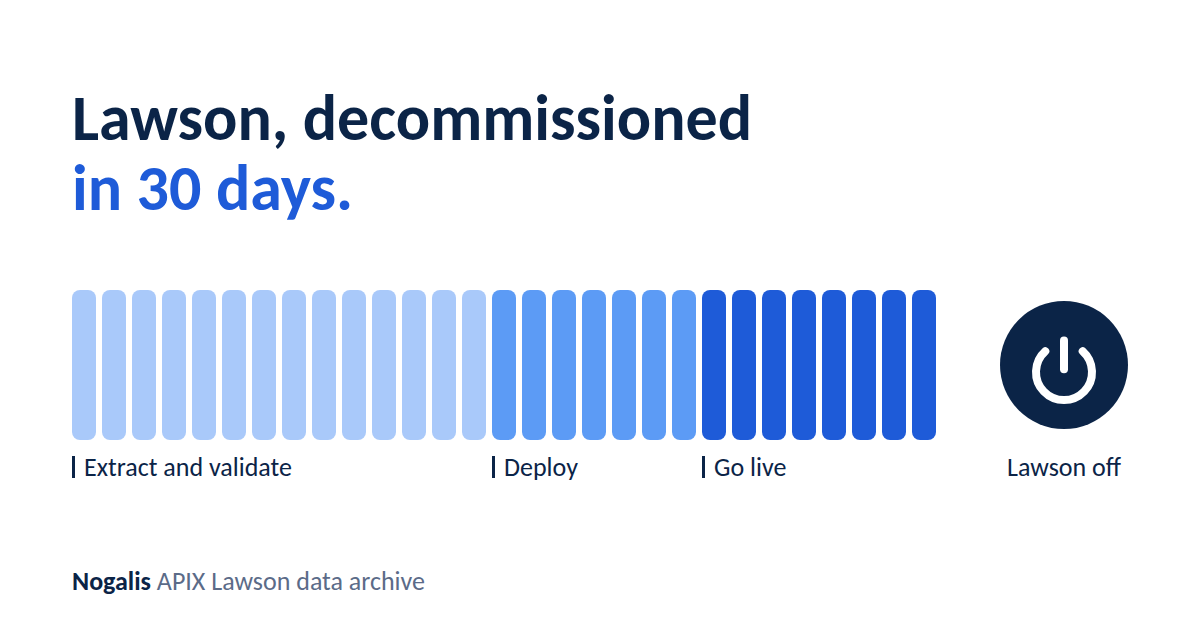
APIX is Nogalis’s Lawson data archive, built to make steps 3 through 5 predictable. Here’s how a typical project runs:
- Weeks 1–2: Extract and validate. We pull every table, row, attachment, and print file from Lawson S3, Landmark, and GHR, then run automated checks against your production system.
- Week 3: Deploy. APIX is deployed serverlessly into your own AWS account using S3, Lambda, Athena, OpenSearch, and CloudFront. It is hardened with a 30-point checklist and a WAF, and independently penetration tested.
- Week 4: Go live, then go dark. SAML single sign-on through Active Directory or Entra ID means no new passwords. Users find HR, payroll, GL, AP, and supply chain history in familiar fields and drill-downs. Then Lawson is decommissioned.
A few things worth knowing:
- Your data stays yours. It lives in your AWS account, encrypted and read-only, under your keys. If you’d rather not manage an AWS account, Nogalis can host a dedicated single-tenant deployment.
- Nothing to maintain. The architecture is serverless, so there are no servers to patch and no backups to babysit.
- Security is audited. Our SOC 2 Type 2 program is audited annually.
- Light lift for your team. Nogalis runs the project end to end, and the typical time commitment is under a quarter of one FTE.
- Straightforward pricing. APIX is a SaaS subscription based on the Lawson suites you need archived, plus a one-time implementation fee. No surprises, and the archive typically pays for itself quickly compared with the annual cost of keeping Lawson alive.
- Unlimited users. APIX isn’t priced per user. Give access to everyone who needs it, including finance, HR, auditors, legal, and retirees looking up old records, without the cost going up.
Whether you’re moving to Workday, Oracle Cloud, UKG, or CloudSuite, the archive holds whatever the new system didn’t take.
Questions to Ask Any Lawson Data Archive Vendor
Whoever you choose, hold them to these:
- Do you preserve compound keys and effective-dated history, or flatten them?
- Is Landmark and Global HR data included, and under the same login?
- How do you validate completeness against production, and can I see the results?
- Where does my data live, and who holds the keys?
- Do you charge per user?
- What’s the ongoing maintenance burden after go-live?
- Can you show a demo on data that looks like mine?
Ready to Start Your Lawson Decommissioning?
Book a 30-minute Discovery Session with a Nogalis expert. We’ll review your Lawson and Landmark footprint, tell you exactly what your Lawson data archive will contain, and set up a demo on data like yours. You can also run your numbers with the APIX cost calculator to see what Lawson is costing you today.
[Book a Discovery Session] · [Run your numbers]
Retiring Lawson, PeopleSoft, or Oracle? APIX archives the entire application — every table, every year, attachments and security included — into your own AWS account in about 30 days, so you can decommission the legacy system and keep full access to the history.
