
Resolving Bouncy Castle Errors
After a WebSphere fix pack, or an update of some kind, you might see a 500 server error that indicates a Bouncy Castle jar mismatch.
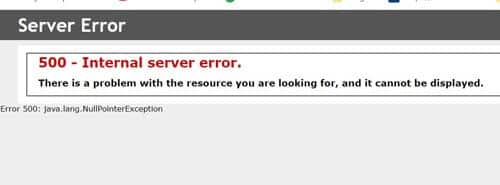
To verify that your issue is related to Bouncy Castle, you can check the ssoconfig/SSOCfgInfoServlet web page to see if the XML will render. If you see a similar error below, check the ios.log. The “NoSuchProviderException: No such provider: BC” indicates that the Bouncy Castle jar files need to be updated.

| [10/15/20 9:06:31:448 CDT] 000000ef SystemErr R com.lawson.lawsec.authen.LSFSecurityAuthenException:Message:java.security.NoSuchProviderException: No such provider: BC
Stack Trace : java.security.NoSuchProviderException: No such provider: BC at javax.crypto.Cipher.getInstance(Unknown Source) at com.lawson.lawsec.authen.AuthenDat.decryptData(AuthenDat.java:2619) at com.lawson.lawsec.authen.AuthenDat.getRMPrivUserPass(AuthenDat.java:521) at com.lawson.lawsec.authen.LawsonAuthentication.getJNDIProps(LawsonAuthentication.java:1087) at com.lawson.lawsec.authen.LawsonAuthentication.getInitialDirContext(LawsonAuthentication.java:1045) at com.lawson.lawsec.authen.LawsonAuthentication.getInitialDirContext(LawsonAuthentication.java:1033) at com.lawson.lawrm.rmMetaMgr.RMContext.getDirContext(RMContext.java:464) at com.lawson.lawrm.rmMetaMgr.RMContext.getRMMetaDataManager(RMContext.java:798) at com.lawson.lawrm.rmMetaMgr.RMContext.InitContext(RMContext.java:282) at com.lawson.lawrm.rmMetaMgr.RMContext.<init>(RMContext.java:162) at com.lawson.lawrm.rmMetaMgr.RMContext.<init>(RMContext.java:126) at com.lawson.lawrm.rmMetaMgr.RMContext.getInitialContext(RMContext.java:208) at com.lawson.lawrm.rmMetaMgr.RMContext.borrowRMContext(RMContext.java:303) at com.lawson.lawsec.authen.LawsonService.<init>(LawsonService.java:152) at com.lawson.lawsec.authen.LawsonSecurityXRefImpl.getServiceForName(LawsonSecurityXRefImpl.java:365) at com.lawson.lawsec.authen.LawsonSSODomainManagerImpl.getDefaultPrimaryService(LawsonSSODomainManagerImpl.java:320) at com.lawson.security.vulmit.VulnerabilityMitigation.getDefaultPrimaryService(VulnerabilityMitigation.java:193) at com.lawson.security.vulmit.VulnerabilityMitigation.getStringServiceProperty(VulnerabilityMitigation.java:203) at com.lawson.security.vulmit.VulnerabilityMitigation.configureAntiCsrf(VulnerabilityMitigation.java:173) … |
To update the jar files, navigate to WAS_HOME/java/bin and run the command “java -jar %GENDIR%/java/thirdparty/bcinstall.jar”. This will automatically check the validity of your Bouncy Castle jar file and update if needed.
| D:\IBM\WebSphere\AppServer\java\bin>.\java -jar %GENDIR%\java\thirdParty\bcinstall.jar
Testing for provider … FAIL: No such provider: BC Installing provider Installing bcprov-jdk16-145.jar transferring …….done Adding java.security entry Adding org.bouncycastle.jce.provider.BouncyCastleProvider to java.security file backing up ………………………………………………..done D:\IBM\WebSphere\AppServer\java\jre\lib\security\java.security backed up to D:\IBM\WebSphere\AppServer\java\jre\lib\security\java.se curity1901856172194836655.bak placing new properties ………………………………………….done Testing for strong encryption policy … PASS. ..done backup D:\IBM\WebSphere\AppServer\java\jre\lib\security\policy\unlimited\local_policy.jar to D:\IBM\WebSphere\AppServer\java\jre\lib \security\policy\unlimited\local_policy.jar78069013951101779.bak ..done copied D:\IBM\WebSphere\AppServer\java\jre\lib\security\policy\unlimited\US_export_policy.jar to D:\IBM\WebSphere\AppServer\java\jre \lib\security\policy\unlimited\local_policy.jar Verifying provider … PASS. Verifying policy … PASS. Summary : Provider installed successfully Policy installed successfully Crypto policy set |
Retiring Lawson, PeopleSoft, or Oracle? APIX archives the entire application — every table, every year, attachments and security included — into your own AWS account in about 30 days, so you can decommission the legacy system and keep full access to the history.

