
844-NOGALIS (844-664-2547)
Nogalis, Inc.
  • Link to Facebook
  • Link to X
  • Link to LinkedIn
  • Link to Mail
  • Company
    • News, Events and Articles
    • About Us
  • Products
    • Infor Lawson Data Archive
    • PeopleSoft Data Archive
    • Oracle Data Archive
  • Services
    • Infor Lawson Support
    • Infor Lawson / CloudSuite Consulting
  • Education & Training
  • Support
  • Contact Us
  • Click to open the search input field Click to open the search input field Search
  • Menu Menu

Setting Up IFS Bootstrap For LDAPS

Articles, Frontpage Article, News

Our article “Configuring Lawson for LDAP Signing” takes you step-by-step through configuring your environment for the new LDAPS requirements being enforced by Microsoft later this year.  That article discusses how to configure IFS for LDAPS, but after we got a few questions about the procedure, we decided to clarify it further.

When IFS is installed, a “Bootstrap” parameter is created to link to the root of your active directory.  This parameter is only utilized to bring users from AD into Lawson.  It should look something like this:
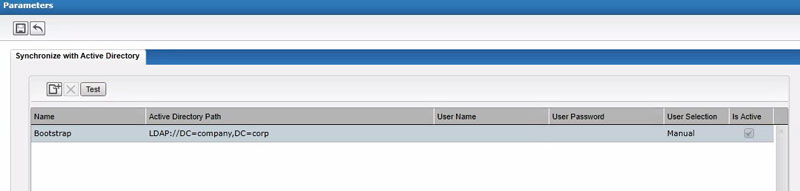
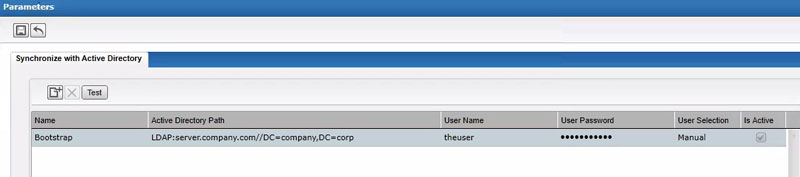
To configure IFS for LDAPS, you will need to update your Bootstrap to use the host name of one of your domain controllers, and you will also need to provide the credentials of a user that has authorization to search the AD tree.  This bootstrap connection is not actually used for authentication, so it shouldn’t be a problem that you have multiple DCs.  It is only used to bring users into IFS from Active Directory.  As long as the user connecting to that DC has the ability to search the tree for users, you should be fine.

Your URL is going to look something like LDAP://server.company.com:636/DC=company,DC=com.  Essentially, you just need to add the server name and port to the bootstrap value.  Remember that the protocol is “LDAP” not “LDAPS”.  To change the IFS parameters, just click into the boxes, and start typing.  Click the “Save” button at the top when you are done.
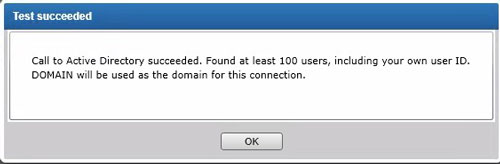
To make sure your settings are working properly, click the “Test” button, and you should receive this message:
Retiring Lawson, PeopleSoft, or Oracle? APIX archives the entire application — every table, every year, attachments and security included — into your own AWS account in about 30 days, so you can decommission the legacy system and keep full access to the history.

See how the APIX ERP archive works →

05/22/2020
Share this entry
  • Share on Facebook
  • Share on X
  • Share on WhatsApp
  • Share on LinkedIn
  • Share on Reddit
  • Share by Mail
https://www.nogalis.com/wp-content/uploads/2020/05/Setting-Up-IFS-Bootstrap-For-LDAPS.jpg 470 470 Angeli Menta https://www.nogalis.com/wp-content/uploads/2013/04/logo-with-slogan-good.png Angeli Menta2020-05-22 08:09:032020-05-21 18:44:53Setting Up IFS Bootstrap For LDAPS

LEGACY ERP DATA ARCHIVE SOLUTION


Discover how our clients are leveraging AWS services to archive their Legacy ERP data and provide ubiquitous access to users via a light-weight, secure, and read-only web interface. Secure, Fast, Reliable, and Cost Effective. That is the promise of APIX. Follow the link below to find out more and book a discovery call with our data archive specialist.

BOOK DEMO

© Copyright - Nogalis, Inc. 2026
  • Legal
  • Privacy
  • Contact Us
Link to: Working from Home: 4 ways to Optimize Productivity Using Your CRM Link to: Working from Home: 4 ways to Optimize Productivity Using Your CRM Working from Home: 4 ways to Optimize Productivity Using Your CRM Link to: Altaïr Group to Deploy Infor M3 for International Growth Link to: Altaïr Group to Deploy Infor M3 for International Growth Altaïr Group to Deploy Infor M3 for International Growth
Scroll to top Scroll to top Scroll to top