If it feels like déjà vu, you’re not alone. Just days after the AWS outage that took down parts of the internet early last week, airline giant Alaska Airlines had to ground all flights across its network due to a major IT failure. First the cloud, now the skies — it’s been a tough week for uptime. While Alaska Airlines quickly clarified that the issue wasn’t a cyberattack, it still highlights how fragile critical systems can be when even one piece of infrastructure goes down. A failure at the airline’s primary data center cascaded across multiple systems, halting flight operations and disrupting travelers nationwide.

For businesses that depend on enterprise resource planning (ERP) and other major information technology (IT) systems — whether that’s for logistics, finance, or customer service — this incident should feel very familiar. Because the truth is, it doesn’t take a massive airline to experience massive downtime.

So, what can companies learn from this?

  1. Don’t rely on “primary” anything. Alaska’s issue started with a single data center. Whether you’re hosting ERP on-premises or in the cloud, redundancy isn’t optional anymore. Active-active data centers or multi-region cloud setups can prevent a single point of failure from turning into a full stop.
  2. Test your disaster recovery plan — for real. Most organizations think they’re ready, but few have actually run a live failover test. Simulating a disaster once or twice a year is one of the best ways to uncover hidden dependencies and response gaps before they happen in production.
  3. Monitor like your business depends on it (because it does). Real-time monitoring and predictive alerts can detect issues before users do. It’s not just about catching downtime — it’s about catching weak signals that something’s about to fail.
  4. Communicate clearly when things go wrong. Even when your systems are down, your communication shouldn’t be. Customers and teams appreciate transparency, and that trust can make all the difference during a crisis.

The takeaway: prepare before you have to react.

Outages like these — whether from AWS, Alaska Airlines, or the next big headline — are reminders that resilience has to be built, not assumed. Every company relying on technology (which is basically every company) should be asking:

  • Do we know how long we can afford to be down?
  • When was our last DR test?
  • Who gets called first when systems go offline?

If those answers aren’t clear, now’s the time to get ahead of it.

At Nogalis, we help organizations strengthen their IT and ERP environments through proactive server maintenance, disaster recovery planning, and 24/7 managed support. Because downtime doesn’t just cost money — it costs trust, momentum, and peace of mind. The next major outage will likely follow AWS and Alaska Airlines and make headlines. Let’s make sure it’s not yours. Contact us today for a free quote.
Reporter Dave Jones shares an article on Cyber Security Dive noting the increased priority that companies have placed on cloud security because of the increased instances of cyber attacks and ransomware. To brief, Jones highlights the following:


For Full Article, Click Here

One of the biggest security risks for any business is human error. This can expose your business to serious vulnerabilities. With the major shift to remote work/hybrid work spaces since the COVID-19 pandemic surfaced, an influx in cyberattacks have happened – targeting mostly to remote workers. While remote work isn’t new, it’s demand in the current times will continue to be a huge representation in today’s workforce. This doesn’t mean we need to worry greatly about cyber attacks – it means we should be more prepared. Vivian Lopez at Trello shares some great tips on how to tighten your company’s cybersecurity for remote and hybrid work spaces. Employees need a solid understanding of security risks for your business, Lopez says. Below are three factors to gretaly consider when setting up your employees to work remotely.

Make IT Security Education Part Of Onboarding. “Instill good IT security habits from the start. Work with human resources to ensure IT security training is part of onboarding. Let new team members start their job with a clear understanding of your enterprise’s IT policies and procedures, like maintaining password hygiene or discouraging shadow IT.”

Conduct Regular Cybersecurity Training. “Cybersecurity threats grow and evolve, and consistent cybersecurity training is a necessity. While many industry experts recommend quarterly training, we recommend a cadence that supports your company goals. And there’s plenty to cover. According to the (ISC)² 2021 Cloud Security Report, the top IT security training topics enterprises find valuable include cloud-enabled cybersecurity, incident response, risk-based frameworks, and application security.”

Build A Knowledge Hub Of Cybersecurity Assets. “There’s a lot for your remote workforce to absorb when it comes to cybersecurity—IT policy and procedure handbooks, training videos, and more. Your team needs a source of truth for reference materials: An accessible knowledge hub where all IT security resources live.”

One suggested offering for security would be Lopez’s Enterprise Security suite with Trello. “Trello Enterprise relies on enterprise-grade security to help build cybersecurity awareness and keep your business safe. Security features like single sign-on (SSO), user management capabilities, and mobile device management help teams collaborate and work remotely,” says Lopez.


Original Post by Vivian Lopez from Trello.

For Full Article, Click Here

Lawson SQL Code Snippets

Lawson SQL Code Snippets

We don’t typically post technical information here on the blog, that’s mostly reserved for the education section of the site. The past couple of week however we were able to write a couple of queries that helped out a customer quite a bit so we figured maybe you all can benefit from them. Without any further delay, here they are:


-- Get available balances for employees in a specific group and/or plan
select E.COMPANY,E.EMPLOYEE,E.FIRST_NAME,E.LAST_NAME ,E.EMP_STATUS, T.R_PLAN, T.EMPLOYEE_GROUP,T.ACCR_LAST_DT,T.AVAIL_HRS_BAL
From [PROD].[dbo].TAEEMASTER T, [PROD].[dbo].EMPLOYEE E
Where 
-- T.EMPLOYEE_GROUP = 'EXAMPLE' and
T.R_PLAN='XXX' and
T.COMPANY = E.COMPANY and
T.EMPLOYEE = E.EMPLOYEE and
E.EMP_STATUS not like 'T%';
-- Obviously you'll have to change the Employee Group, the Plan code, and the Emp-Status condition to match yours.

This next statement does something rather unique. It reaches into GEN to get the status code definitions for the table field. Nifty!

-- Get all transactions for specific employee group and plan since a specific date including field transactions from GEN
select E.COMPANY,E.EMPLOYEE,E.FIRST_NAME,E.LAST_NAME ,E.EMP_STATUS, T.R_PLAN, T.EMPLOYEE_GROUP,T.TA_HOURS,T.DESCRIPTION,A.VALXLT as 'TYPE',B.VALXLT AS 'TRAN TYPE',C.VALXLT AS 'STATUS',D.VALXLT AS 'BALANCE TYPE'
From [PROD].[dbo].TAEMPTRANS T, [prod].[dbo].EMPLOYEE E , [GEN].[dbo].[VALLST] A, [GEN].[dbo].[VALLST] B, [GEN].[dbo].[VALLST] C, [GEN].[dbo].[VALLST] D
Where 
T.EMPLOYEE_GROUP = 'EXAMPLE' and
T.R_PLAN in('XXX','YYY') and
T.COMPANY = E.COMPANY and
T.EMPLOYEE = E.EMPLOYEE and
T.R_DATE >= '2015-01-01' and
A.DOMVAL =  T.TA_TYPE and
B.DOMVAL =  T.TRAN_TYPE and
C.DOMVAL =  T.STATUS and 
D.DOMVAL = T.BALANCE_TYPE and
A.PRODUCTLINE = 'PROD' and A.FILENAME='TAEMPTRANS' and A.FLDNAME='TA-TYPE' and
B.PRODUCTLINE = 'PROD' and B.FILENAME='TAEMPTRANS' and B.FLDNAME='TRAN-TYPE' and
C.PRODUCTLINE = 'PROD' and C.FILENAME='TAEMPTRANS' and C.FLDNAME='STATUS' and
D.PRODUCTLINE = 'PROD' and D.FILENAME='TAEMPTRANS' and D.FLDNAME='BALANCE-TYPE';

-- You'll have to change the Employee Group, the Plan codes, and the date condition to match yours.

Infor Process Automation IPAWhat is IPA (or LPA Lawson Process Automation)

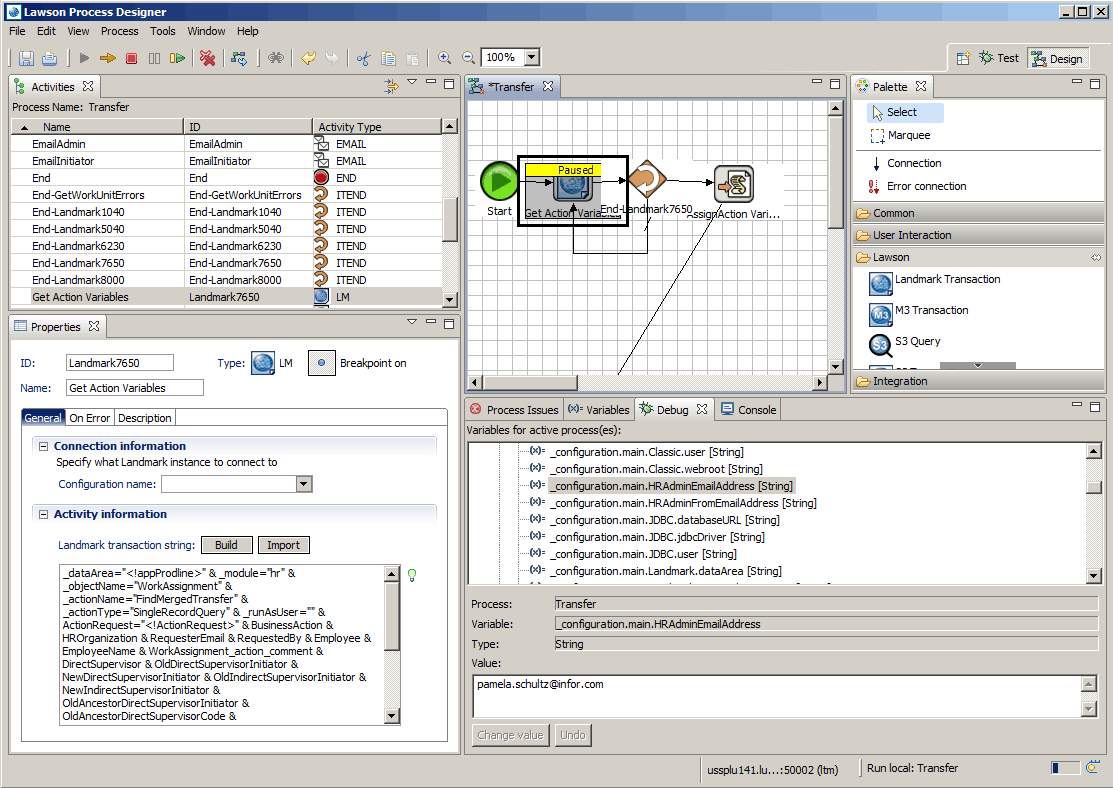
IPA is a tool that enables users to automate business processes. IPA is an umbrella term for two software components. Infor Process Designer and Process Server.
The Designer is a utility that allows users to graphically define a business process.
The process server allows a user to maintain processes and administration setup.

Main differences between PFI and IPA

  • IPA is built on Landmark
  • Designer is built on Eclipse (I know it’s the same in the latest version of PFI) “Same same but different”
  • Admin tool based on SmartOffice (Lawson Canvas) and it encopasses everything. A single app to rule them all.
  • Reduced footprint: Menu.do and RMI Server are gone, Java clients are now part of Smart Office, Event manager and scheduler are now part of Landmark.
  • Now works with a single data area at a time. In fact you have to specify your data source when you log in.
  • Process/Logs stored in database. You XML files are now .lpd files and they’re stored directly in the database not in pfrepository
  • Inbasket is now a part of Smart Office / Rich Client. Also in Ming.le and workspace.
  • A true debugger that allows you to set breakpoints, check variables, and move step by step through nodes