Enterprise resource planning (ERP) systems have been around for decades as a game changing tool to help organizations manage various business processes. We are in the digital age with many of our personal and professional resources being entrusted in the digital space. It’s no surprise that ERP systems have shifted over to the cloud, providing businesses with more accessibility. It’s also no surprise that there are a large number of businesses still running legacy, or on premise, ERP applications. The current pandemic had many people shift to a work from home environment, forcing businesses to create a remote workplace. While the cloud is not a new technology – or the primary choice over on premise  solutions – it became a more appealing solution for the sudden switch to remote/hybrid work spaces. Though not every business realizes when it’s time to switch over. Technology expert Claus Jepsen shares an article on readwrite.com pointing out the signs that will let your know if  your legacy ERP system needs to be replaced – preferrably in the cloud.

  1. You’re spending more time and money modifying the configuration and customization(s) of the ERP to accommodate changes in your business processes.
  2. You’re finding data integrations increasingly complex.
  3. Employees are unhappy with the ERP system.

When the pandemic hit in 2020, Gartner coined the term “composable ERP” to describe an ERP approach that incorporates agility and flexibility by integrating multiple applications and platforms. This modern strategy, Jepsen notes, enables mid-sized enterprises to adapt quickly when markets are disrupted (i.e. the COVID-19 pandemic). The cloud makes it possible for businesses to be flexible and control scalability, something the pandemic challenged all of us to consider.

Making the decision to replace your legacy ERP system is only half the battle. Now you’re tasked with finding the right cloud-based solution, determining if it fits in your budget, choosing a reputable vendor, and deciding what tools within an ERP system will increase your overall productivity.  Jepsen concludes when you take all of these factors into consideration, they is a vast savings potential that a modern, cloud-designed ERP can provide, which can be an exciting possibility within a business’s reach.
 

For Full Article, Click Here

Galva Coat Industries LLC, a landmark plant in the industrial area of Abu Dhabi that produces a wide range of steel products, has selected Infor CloudSuite Industrial to enable the digitalization of the production process and delivery, in its effort to become the leading producer of lighting poles and guard rails across the region. Infor CloudSuite Industrial is a powerful cloud-based, industry-focused, enterprise resource planning (ERP) solution, which will help Galva Coat move forward with their transition from their legacy on-premise systems to the cloud – a crucial part of its digital transformation. Per the press release, after evaluating various options, the company chose Infor CloudSuite Industrial, powered by Amazon Web Services (AWS), to enable order management with CRM, planning, shop floor operations, time sheets management, supply chain including vendor portals and customer portals, finance and analytics. The multi-tenant Infor CloudSuite Industrial, running on the Infor OS operating services platform and powered by AWS, helps with Galva Coat’s aim to automate and integrate its production control systems and plant maintenance solutions and provide meaningful real-time analytics across operations to its senior management. Further, the deployment will start in April and is expected to go live before December. ITWare LLC, Dubai, UAE, one of Infor’s long-standing ERP channel partners, worked closely with the Infor team during the entire presales cycle and will be leading the implementation efforts.


For Full Article, Click Here

Searching for user properties in LDAP may not be as straightforward to do or you may not have had formal instructions in past to do this task. Below is a step-by-step guide to easily search for user properties in the LDAP application.


D:\LSF > ldifde -f cli.ldif -r “samAccountName=Cli”

Connecting to “cust.private”

Logging in as current user using SSPI

Exporting directory to file cli.ldif

Searching for entries…

Writing out entries1 entries exported


The command has completed successfully

D:\LSF > ls cli*

cli.ldif

D:\LSF > lashow cli.ldif


dn: CN=Li\, Catol,OU=Users,OU=Accounting,OU=Finance,DC=cust,DC=private

changetype: add

objectClass: top

objectClass: person

objectClass: organizationalPerson

objectClass: user

cn: Li, Catol

sn: Li

title: Accountant I

description: Finance – Accounting

physicalDeliveryOfficeName: Halo

telephoneNumber: (713) 644-3333

givenName: Catol

distinguishedName:

CN=Li\, Catol,OU=Users,OU=Accounting,OU=Finance,DC=cust,DC=private

instanceType: 4

whenCreated: 20210218225523.0Z

whenChanged: 20220224165103.0Z

displayName: Li, Catol CatolCat

uSNCreated: 293302835

memberOf: CN=!AP_Invoice_Process,OU=Distribution Lists,DC=cust,DC=private

memberOf:

CN=FortiGateWebFilter_Finance,OU=Web Groups,OU=Information Technology,DC=cust,

DC=private


In recent news, Japanese food importer and distributor Foodex Group has selected to implement Infor CloudSuite Distribution Enterprise, a cloud ERP platform with prebuilt capabilities for food and beverage distributors. Per the press release, the 20-year-old company from Paris has chosen a “One Infor” approach, entrusting the vendor with the entire project through a mission of consulting, support and services delivered in SaaS mode throughout the project. Infor’s CloudSuite covers the main needs of large international food distributors as standard, from omnichannel sales and order management, through purchasing, inventory and supply management, financial management, and associated analytical reporting with the implementation of the Infor Birst BI module.


For Full Article, Click Here

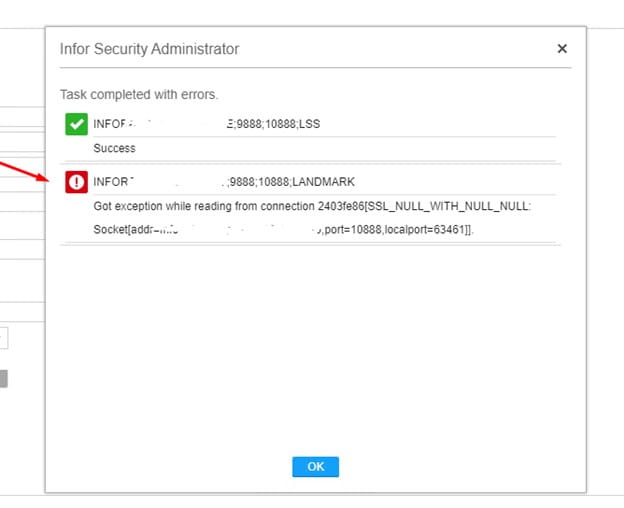
If you receive a “socket” error when saving data in Infor Security Administrator, it is probable that your Federated Server Certificate is corrupt or out of sync and needs to be recreated.  Note that this is NOT the WS Federation Certificate.

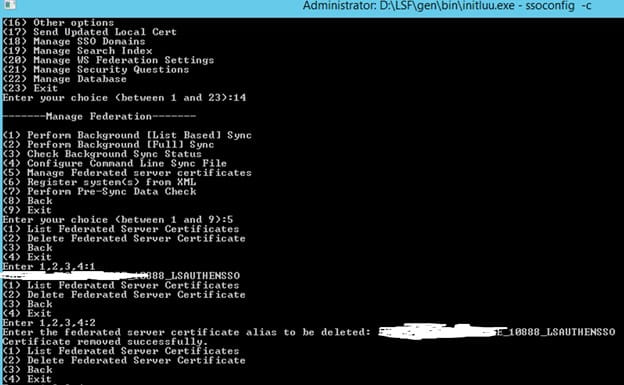
To recreate the Federated Server Certificate, open a command line window on the LSF server and set the environment variables.  Log into ssoconfig -c.

First, get the Federated Server Certificate name.  “Manage Federation” > “Manage Federated Server Certificates” > “List Federated Server Certificates”.  Make note of the name.

Select “Manage Federation” > “Manage Federated Server Certificates” > “Delete Federated Server Certificate”.  Type in the name that you saved above.

After a successful confirmation, restart the servers and try again.  A new Federated Server Certificate will be generated upon recycle.


While remote work has been a recent trend as of late thanks to the COVID-19 pandemic, there is a specific type of worker group who hasn’t been given much attention, yet they should. Deskless workers, or those who are essentially always on-the-job lack many of the tools and resources an employee would otherwise have if working at a desk or home office. More than 2.7 billion workers worldwide are categorized as deskless employees. However, despite making up 80% of the global workforce, deskless workers lack the necessary technology needed for a more efficient work flow. Jacob Waern, founder & CEO at eduMe, shares a great read on Forbes explaining the importance of this niche in the workforce. This lack of tools should be available to deskless workers, and it should be available now. While you can name a laundry list of the basic essentials (i.e. a work laptop, mobile phone, etc), Waern does note that this immediate transition of technological availability for deskless workers is not a simple task. In his Forbes article, Waern shares three criteria which are nonnegotiable when it comes to empowering adoption and ongoing use of mobile technology among deskless demographics:

  1. Easily Accessible. “92% of users who forget their login information simply leave the site or app they’re trying to access. Ensure that access to learning content is as frictionless as possible. One way is to embed it into your native app.”
  2. Delivered At The User’s Point Of Need. “If training doesn’t fit into a deskless worker’s flow of work, it won’t be adopted long-term. Lean on triggered notifications and workforce communication tools to intelligently deliver relevant and timely content.”
  3. Short-Form Content. “The microlearning method isn’t just beneficial for user engagement and long-term knowledge retention, it also caters to deskless workers’ tight schedules. Break training content down into two-to-five-minute bursts to retain learners’ attention.”

Remote workers as well as deskless workers are fast becoming the majority of today’s workforce. Just like remote workers who had to immediate set up their machines and networks at home, these on-the-job deskless employees need the right resources to their job as well.


For Full Article, Click Here


ProMedica, a mission-based, not-for-profit health and well-being organization headquartered in Toledo, Ohio, has successfully implemented Infor CloudSuite Healthcare on Amazon Web Services (AWS). Needing to replace their legacy systems and consolidate common functional requirements after the acquisition of HCR ManorCare in 2018, it was an easy choice to use Infor and AWS cloud services. Per the press release, since the go-live ProMedica has improved data sharing and streamlined its processes. The organization has also significantly increased the number of financial reports for monthly distribution and reduced item master data from 60,000 items down to 13,000. Infor’s CloudSuite applications specialized for healthcare offers flexibility of the configuration and encompassed everything necessary from financial reporting to financial close, as well as being able to monitor the close. Further, with this successful go-live, the hunger for innovation continues with plans to further improve financial processing and other key areas of the business with Infor over the next two to three years.


For Full Article, Click Here

After making changes to Landmark application configuration or security configuration, it is not always necessary to restart Landmark.  You can force configuration changes via command line, or in Rich Client.

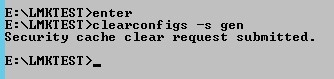
To force changes via command line, open a Landmark command with environment variables set.  Run the command clearconfigs -s <data area> to clear the security caches.  Other options are -a for authendat, or blank for all (clearconfigs gen).

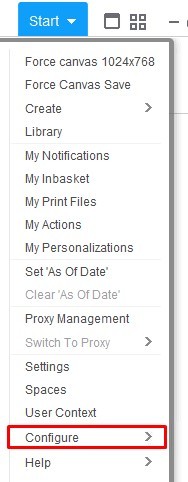
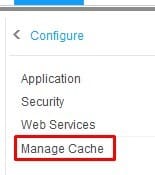
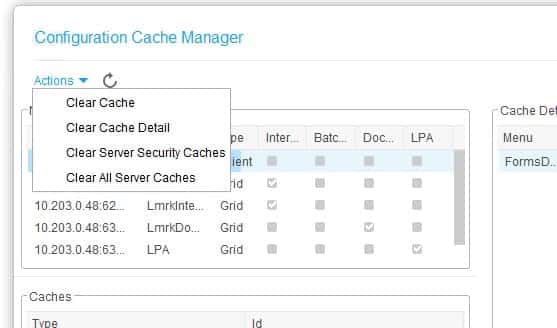
To perform this task in Rich Client, Go to “Start > Configure > Manage Cache”.  Then select “Actions > <the cache you wish to clear>”


Ostseehotel Dierhagen has recently decided to upgrade to the Infor Hospitality Management Solution (HMS). With this upgrade, Rostock, Germany-based hotel is taking a significant step towards digital transformation and equipping itself for the future. A long-time customer of Infor Starlight on-premise, moving to the cloud is an important step for the company towards the future for the hotel, and will help ensure its competitiveness for the long term. Per the press release, the Infor Sales & Catering module will help streamline processes in the banquet and conferencing area, through automated processes in resource and event management. Additionally, mobile functionalities such as check-in via smartphone and the option to manage housekeeping via mobile devices will significantly increase efficiency. With a cloud-based solution in place, Ostseehotel Dierhagen can now build upon a fully integrated, solution specifically designed to automate the entire event booking process. This in turn will help optimize internal processes and relieve employees from menial duties, allowing them to focus on providing guests with optimal service.


For Full Article, Click Here

The listprod -d command shows information about the product line’s status.  The -a option shows information about all product lines.

For Example:

D:\\>listprod -ad
prodline data area Status

gen gen active
prod prod active
test test active
dev dev active


Here are descriptions of the statuses:

Active

The data area has an active dictionary

Pending

The data area has a pending dictionary

Upgrading

The data area is being upgraded

Out-of-date

The framework version used to build the most recent dictionary for the data area does not match the framework version used to build the most recent “GEN” dictionary

Active-out-of-date

The framework version used to build the active dictionary for the data area does not match the framework version used to build the active “GEN” dictionary

Config-missing

There is no data area configuration file

Config-changed

The data area configuration file is newer than the newest dictionary for the data area

Source-missing

There is no source for the product line

Source-changed

The source for the product line has changed since the newest dictionary for the product line’s data area was built