The cloud’s has many benefits such as self-service access, elasticity, scalability, quick deployment, and lower costs. This has brought about accelerated delivery to market and rapid uptake by enterprises. However, there are still risks involved in adopting the public cloud strategy, Chief information security officers (CISOs) should note that cloud strategies continue to change and evolve as new cloud technologies and services are introduced. This results in cloud security strategies of as little as five years ago are already outdated. Cloud security must evolve at the rapid pace as the public cloud space.

Forrester, one of the most influential research and advisory firms in the world, shares an article on Forbes depicting the most critical cloud trends  that CISOs should and/or need to be aware of:

  • Securing AI in the cloud. “The onslaught of generative AI has meant that CISO organizations have also had to pivot. Lack of transparency around black-box AI models, susceptibility to bias, ethical considerations, threat actors that can exploit open-source models, and AI models that hold large amounts of data vastly increase an organization’s attack surface. CISOs should be addressing these three concerns: 1) reviewing the security controls and governance of cloud-managed AI services; 2) agreeing on the security roles and responsibilities between the cloud provider and your security team; and 3) upskilling the AI capabilities of the security and broader cloud infrastructure team to secure these new services.”
  • Workload placement for cloud sustainability. “New sustainability reporting requirements in the EU have forced enterprises to focus on their carbon footprint. One method of meeting sustainability requirements is through placing workloads in more sustainable availability zones. For example, this could involve ensuring that an availability zone powered by solar power or other renewable energy sources is preferred to one powered by a gas-fired plant. Cloud teams rely on cloud management solutions and carbon footprint data to inform workload placement. CISOs need to ask where their data will reside and implement controls over sensitive data to avoid automatic movement by workload management solutions that break security requirements.”
  • Sovereignty and regulatory requirements. “In recent years, new sovereignty requirements have created a broader push for private and sovereign clouds. CISOs operating in such environments know they need to meet these sovereignty and regulatory directives but have to balance this with allowing the wider IT team to deliver capabilities that the business needs and wants. CISOs should focus on ensuring that they understand which data types require sovereign cloud services, skeptically review claims about sovereignty by some hyperscalers, and seek to protect only the data that requires this protection, in order to keep the business on side.”
 

For Full Article, Click Here

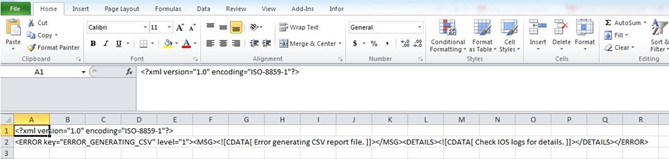
The option to “Create CSV File” in print manager in Portal or attempt to export a report to CSV using Lawson Addins, the CSV file is not generated and the following error message is displayed in Excel or the browser after it opens:

Error generating CSV report file. Check IOS logs for details.

ERROR [ key=ERROR_GENERATING_CSV level=1 ]

<![CDATA[ Error generating CSV report file. ]]>

<![CDATA[ Check IOS logs for details. ]]>

The ios.log shows the following type of detail:


2024-01-05 13:40:32,088 ERROR [WebContainer : 8] [user1      ] [REPORT      ] [BldxffilesRunner] ********************** bldxffiles **********************

2024-01-05 13:40:32,088 ERROR [WebContainer : 8] [user1      ] [REPORT      ] [BldxffilesRunner] Security Violation

/GENDIR/bin/rptgen: Error Encountered In Execution

2024-01-05 13:40:32,088 ERROR [WebContainer : 8] [user1      ] [REPORT      ] [BldxffilesRunner] ********************************************************

2024-01-05 13:40:32,088 ERROR [WebContainer : 8] [user1      ] [REPORT      ] [ReportEngine] IOException generated while streaming / LAWDIR/print/user1/ap201/1/AP201.csv/

2024-01-05 13:40:32,088 ERROR [WebContainer : 8] [user1      ] [REPORT      ] [ReportEngine] File not found  /LAWDIR/print/user1/ap201/1/AP201.csv

2024-01-05 13:40:32,089 ERROR [WebContainer : 8] [user1      ] [REPORT      ] [Report] com.lawson.ios.core.Report.ReportException: ERROR_GENERATING_CSV

2024-01-05 13:40:32,096 INFO  [WebContainer : 8] [            ] [            ] [IOSSecurityContext] Destroying security context for user1


Resolution:

To troubleshoot this issue, follow the steps below:

Check the LAWDIR/system/ios.logs for the actual error message and problem. When reviewing the IOS logs, start with a search for “ERROR_GENERATING_CSV” and then review the messages that occur before that.

For the error message used in the example above, make sure the user has been granted access to the “rptgen” token under the ENV profile in Lawson Security. The user should be assigned a batch role which grants access to ‘rptgen’.

  1. Log into the Lawson Security Administrator.
  2. Go to the ENV profile.
  3. Select your batch security class.
  4. Click Add Rule.
  5. Choose the box for development tools.
  6. Select Grant all access.
  7. Expand the development tools.
  8. Select rptgen – Grant all access.
  9. Apply the rule.


Ahead of its Dreamforce 2024 event in San Francisco, California this week, Salesforce introduced a slew of generative artificial intelligence (AI) and data security products and updates. A list of some of the topics are summarized below by senior editor Radhika Ojha at ERP Today.

Preparing for new regulatory frameworks. “Salesforce recently introduced a new suite of tools to help IT teams tackle key challenges related to strong data governance and security as more chief technology officers (CTOs) use generative artificial intelligence (AI) to help them protect sensitive data from hackers. The product is meant to prepare companies to follow new regulations as lawmakers move to strengthen laws around the use of generative AI. For example, the EU has passed the EU AI Act to ensure the technology’s ethical use and deployment in the region.”

Accelerating productivity. “Salesforce unveiled new data and AI-powered Sales Cloud capabilities. The enhanced platform promises to drive business transformation with new account planning, forecasting, prospecting, and compensation management capabilities.”

Industry customization. “Salesforce’s latest array of AI tools includes Industries AI, which customizes prompts, data models, and capabilities depending on the industry. The tool currently covers over 100 customizable AI capabilities for 15 sectors.”


For Full Article, Click Here

Lawson Portal 10.1 Series –  Personalizing the Form Elements of Lawson Portal 10.1

In the first article of the series we went over how to personalize the theme of your Lawson Portal. The next article in the Lawson Portal 10.1 Series overview will cover how to personalize the form elements on the page.


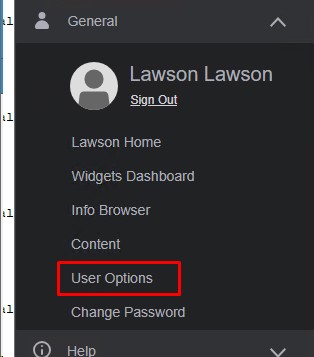
To update the form elements, such as label colors and sizes, of Lawson Portal 10.1, from the left-hand menu, go to General > User Options.


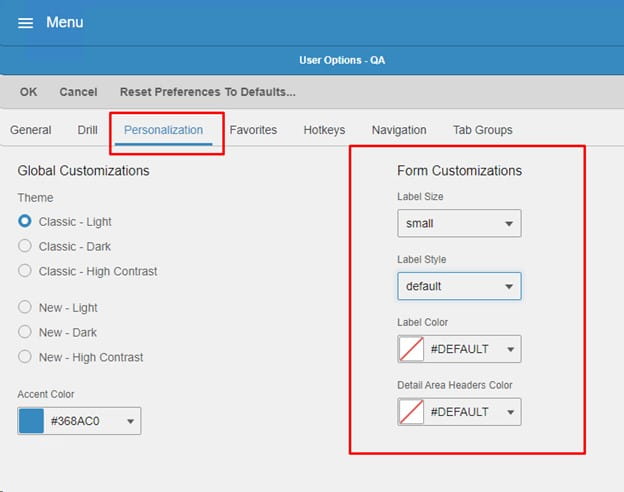
Next, click the Personalization Tab.


Under Form Customizations settings you have the options to select a label size, label style, label color, and detail area headers color. Feel free to customize to your likings or match your company’s colors.


Cloud migration can be a difficult  task but it doesn’t mean businesses shouldn’t do it. It offers many benefits such as agility, cost savings, and scalability. The “difficulties” in such endeavor range from staying within budget, checking that data is secure, choosing the right provider and ensuring that employees are ready for change, among others. But these challenges can be avoided or resolved head on. Sashank Purighalla, CEO and founder at BOS Framework, shares an article on builtin.com about how you can keep your cloud migration from becoming dangerous and disastrous. With some planning, a comprehensive understanding of the current situation, and some best practices in place, cloud migration doesn’t need to be dangerous or difficult, he states. He Purighalla, in his article, goes into great detail on some of the best practices to follow for a smart cloud migration. Here is a preview of his list. For a comprehensive breakdown, visit the article on the link below.

4 Best Practices for a Smart Cloud Migration

  1. Create a comprehensive roadmap for your cloud migration.
  2. Implement robust data safety precautions.
  3. Control your costs.
  4. Implement smart change management policies.


For Full Article, Click Here

Implementing an ERP (enterprise resource planning) system for your organization is a challenging endeavor. For chief information officers (CIOs) and other top executives, this process represents a significant test of leadership and organizational capability. ERPs aim to streamline operations, improve data visibility and enhance decision-making capabilities. However, the road to this is littered with obstacles. Miguel Llorca, Forbes Council Member and Microsoft Regional Director, Dual MVP & MCT, shares an article to help determine if the maturity of your organization is ready to implement a new ERP system.

Assessing Organizational Readiness: The First Step
The first step on the journey to ERP implementation is assessing the readiness and maturity of your organization. Llorca notes, “A mature organization has clearly defined processes, well-managed data and a workforce that is open to change. If any of these elements are lacking, the chances of a successful ERP implementation diminish significantly.” In addition, with cultural readiness, an ERP system requires a shift in how employees work, communicate and collaborate. “If the organizational culture is resistant to change or if there is a lack of trust in the leadership’s vision, the ERP project is likely to encounter significant resistance,” he adds. “This is why a maturity assessment should not only evaluate the technical aspects but also include a deep dive into the organization’s cultural fabric.”

The Reorganization Challenge: More Than Just Software
Implementing a new ERP system demands that existing structures and processes be reevaluated and often reorganized. Lorca states, “This reorganization is not just a technical exercise; it is a strategic move that requires careful planning and execution. The leadership team must be prepared to make tough decisions about which processes need to be overhauled and which roles may need to be redefined. Moreover, they must communicate these changes effectively to ensure that all employees understand the rationale behind the reorganization and are on board with the new direction.”


Change Management: The Key To Success
Given the scale an ERP implementation entails, it means change management is crucial. Llorca finds that the ADKAR model (which stands for awareness, desire, knowledge, ability and reinforcement) works best in managing change in this context. “The ADKAR model provides a structured approach to managing the human side of ERP implementation. It helps ensure that employees are not just passive recipients of change but active participants in the transformation process. By following this model, organizations can better mitigate resistance, build momentum and increase the likelihood of a successful ERP rollout,” he says.


The Role Of Leadership In ERP Implementation

Like any project, leadership plays a critical role, and it is detrimental to the success or failure of an ERP project. Llorca notes that leaders in this position must be prepare for push back from their employees on new changes or make difficult decisions such as reallocating resources or restructuring teams. Moreover, transparency and communication throughout the ERP implementation process if needed. Llorca states, “When employees understand the bigger picture and feel that their concerns are heard, they are more likely to support the change.”


For Full Article, Click Here

Lawson Portal 10.1 Series – Personalizing the Theme of Lawson Portal 10.1

Welcome to the first article of the Lawson Portal 10.1 Series. Along with this one, future posts will cover other personalizations, how to set up your bookmarks, and adding main content to your Lawson Portal screens. Let’s get started with the first topic – personalizing the theme of your Lawson Portal 10.1.


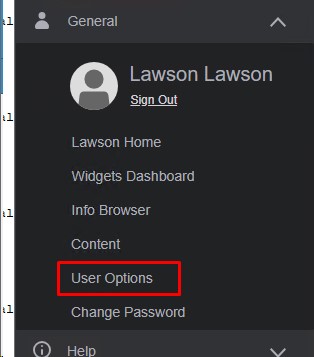
To change the theme (background/foreground colors) of Lawson Portal 10.1, from the left-hand menu, go to General > User Options.


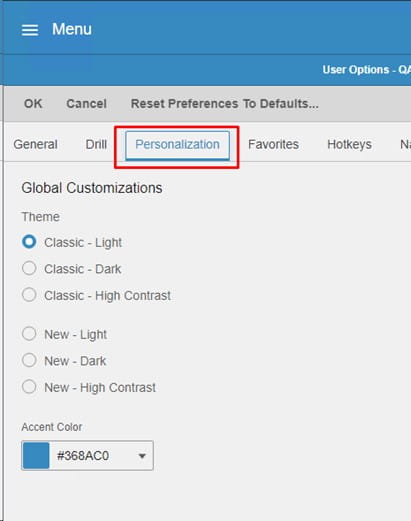
Next, click the Personalization Tab.


Under Global Customizations you have the options to select a new theme (light, dark or high contrast), and a different Accent Color if desired (usually to match your company’s colors).


Choosing to implement a new technology or system for your business takes planning – and with planning a certain timeline is put in place. Charles Whitmore, commercial editor at ERP Today, shares an article where they sat down with Rimini Street’s Frank Reneke, GVP and PMM of Oracle Applications and Technology, and Ryan Bendana, senior director of Global License & Advisory Services to discuss this integral part of a transformation journey and what Rimini Street’s Smart Path can do to help firms get a clearer picture of their future. “Embracing technology to create a competitive advantage is a natural stepping stone for any evolving firm, and is typically encouraged by enterprise software providers,” says Whitmore. Reneke was quick to point out how licensees will be encouraged to upgrade to the “latest and greatest functionality or move licenses to a subscription or cloud-based software program to make the most of the upcoming AI and ML capabilities. Additionally, despite the push for enterprise tech upgrades, 70 percent of the recently implemented ERP initiatives failed to meet their original business use case end goal. We need to create a better plan for IT, bringing attention to how a lack of understanding of IT capabilities could hinder software effectiveness. Typically, extending the life of your current ERP system can help you avoid expensive and potentially unnecessary upgrades while maximizing the value and current software assets you’ve already invested in, Reneke and Bendana point out. “The issue of cost is a universal concern,” they state, “and needing to spend even more money to upgrade legacy systems is potentially one of the biggest money sinks in the enterprise software sphere.” Further, “It just doesn’t make sense that the only way to get some relief in the increasing technical support costs, is to spend even more money,” lamented Reneke. “And it doesn’t solve your challenges or create an opportunity for you to tackle some of the initiatives you have in your own business.” Knowing when to implement a cost-saving ERP cloud system is also dependent on when you can fully shut down your old system – keeping in mind the licenses, support, updates, and security risks.


For Full Article, Click Here

Welcome to Nogalis’s LSFIQ security reporting tool overview.


What is LSFIQ?

  • LSFIQ is a cloud-based Lawson security reporting tool
  • Designed with a user-friendly interface for non-technical and technical users
  • Faster and more accessible reporting without the need of VPNs or Lawson server access
  • Provides enhanced Lawson security reports that are not included in the traditional tool


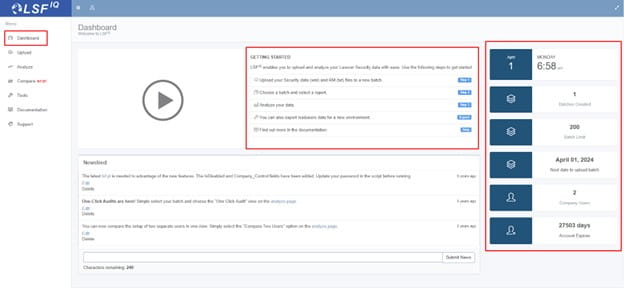
The Dashboard is a quick overview of batch information personal to your LSFIQ account

  • A batch is generated on the Lawson LSF server via Lawson Interface Desktop tool
  • This batch is then uploaded to LSFIQ and ready for reporting

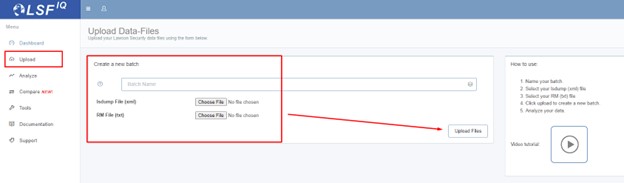
The Upload tool is where you name and select the batch files to be uploaded:

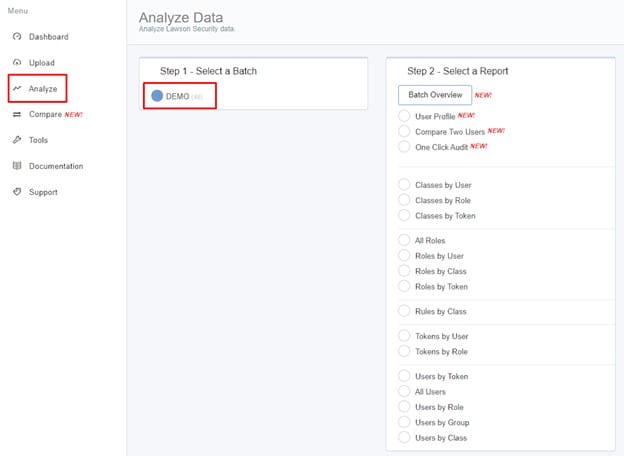
The Analyze tool is where all the reporting happens:

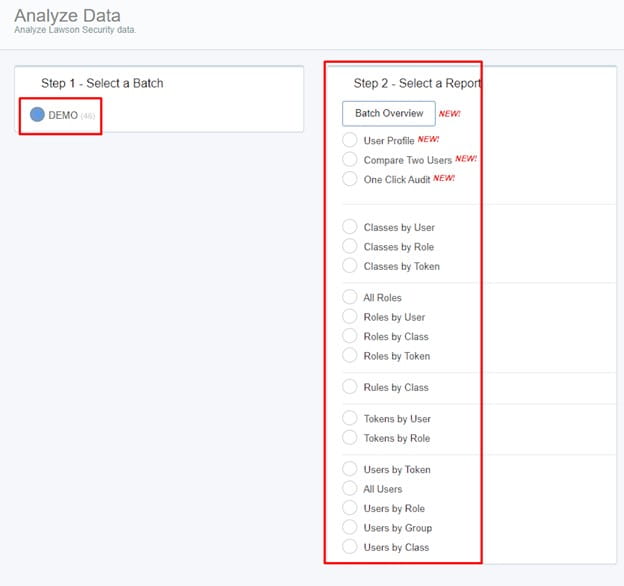
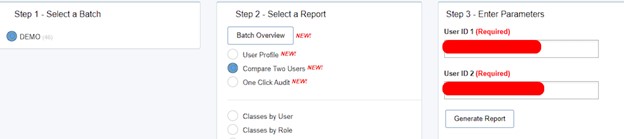
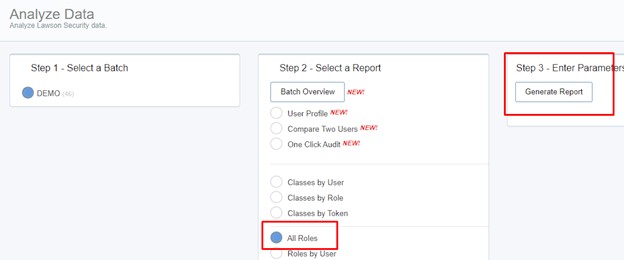
First you select your batch (DEMO is this example), then you can select a wide array of reports:

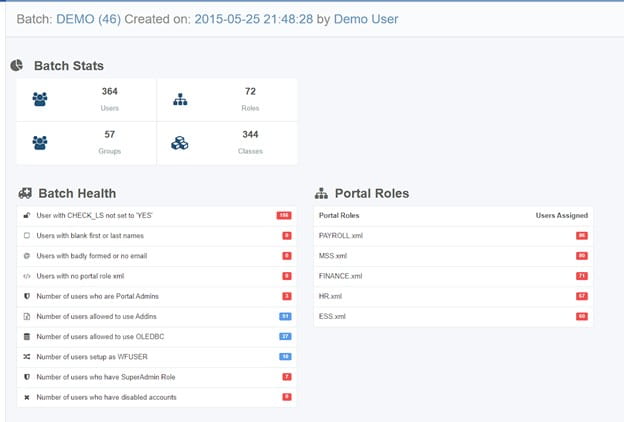
The Batch Overview feature is a great first step to analyze your current Lawson Security:

  • Batch Stats shows important information about your system like number of roles and groups
  • Batch Health represents potential issues with your system, including checking if the CHECK_LS flag is not set to YES (this means security is off for this user depending on the version of Lawson your organization is on).
  • All of the Batch health rows are clickable and will generate a report in a new tab.

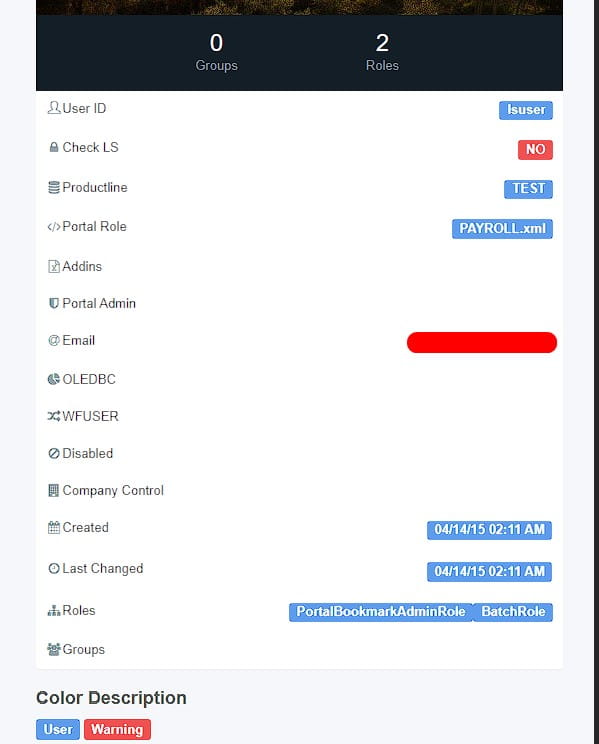
The User Profile is also a nice feature that shows RMID info from Lawson Security:


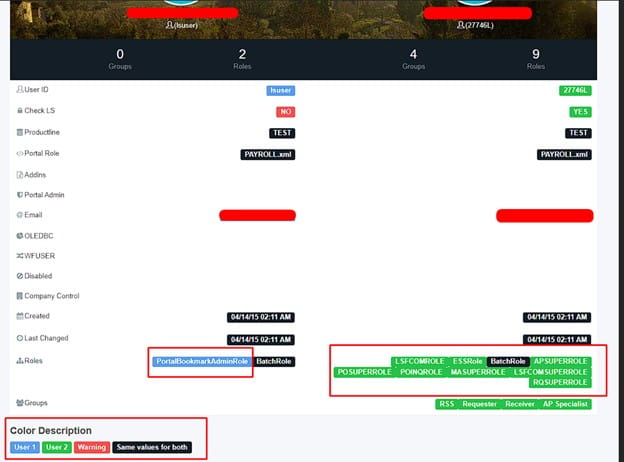
You can also compare two user profiles with the compare tool:

This shows the different roles and other info each user contains that the other does not:

The All Roles query shows all your roles as you’d expect:

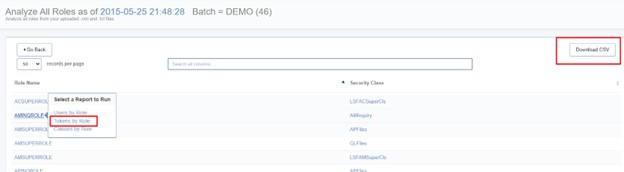
However, you can also click each one quickly to query down on them or simply download them all:

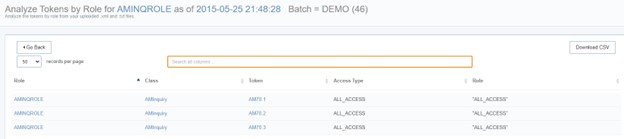
Tokens by Role AMINQROLE generated from above:

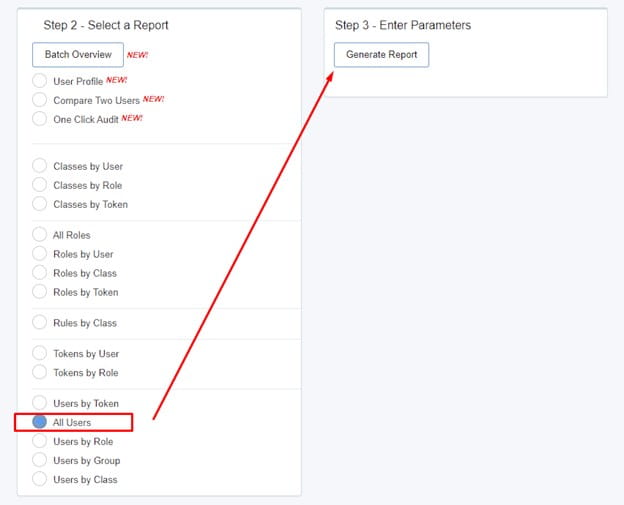
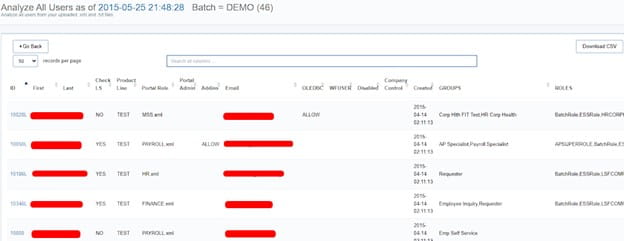
One of our most used reports is the All Users report:


All other reports show in a similar fashion and provide a wide array of versatility when reviewing user security.

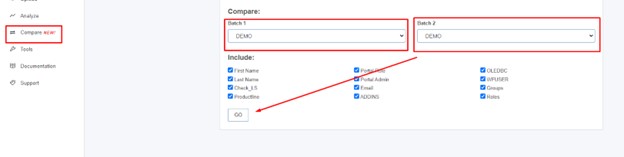
If you have a user that changed security recently, but wanted to compare to an old batch, you can do that with the Compare Tool:

Since this example account only has one batch called DEMO, it can’t compare.

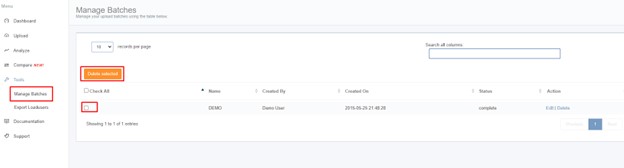
You can also Purge batches if needed under Manage Batches:

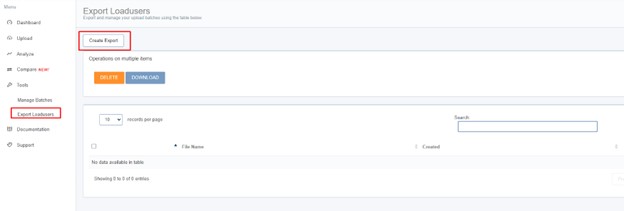
Need to mass change users in Security? That’s what the Export Loaduser tool is for:

This builds out XML files for the native Lawson loaduser command.


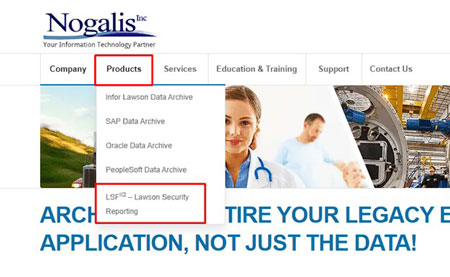
LSFIQ is ready to go in literally 5 minutes! Contact us today, go to our website at nogalis.com under products >> LSFIQ – Lawson Security Reporting

Linked is a recent webinar we did demoing this tool live. Thanks for visiting!

FAQ:

Q: Does LSFIQ include disabled users in it’s All User report?

A: Yes!


Q: Can you download reports and send to other users?

A: Yes, they download in CSV format and can easily be re-saved as excel format if needed.


Ask anyone in business what the secret to being the best is and a majority will say it is to stand out from the crowd. Be the best, most unique, most innovative, and simple different from your competition. But that doesn’t necessarily need to be applied to every aspect of your business. Claus Jepsen, Forbes Council Member and chief product and technology officer at Unit4, shares an article on Forbes Innovation about the importance of sticking with your sector when it comes to choosing an ERP (enterprise resource planning) system. “Being ‘just like everyone else’ in your sector can pay off when selecting a core business system,” he states. Global spend on ERP software is estimated to reach US$53.15 billion in 2024 with an annual growth of 4.26% (CAGR) to 2029, according to Statista. However, Gartner predicts that by 2027, more than 70% of recent implementations will fail to fully meet their business goals. This can be due to many factors such as poor planning, shoddy data quality, wrong assumptions, lack of leadership buy-in and unhappy users. Companies can spend a fortune on the wrong system—and then waste more resources trying to clear up the mess. Jepsen believes there is a safer way to buy an ERP: Resist the desire to be different. 

When scouring the marketplace, Jepsen highly suggest to pick an ERP that credible competitors in your sector are using already. Be like them because their ERP systems have proven to work for their (and your) type of business. There are three major reasons for this, according to Jepsen:

  1. You’ll avoid costly customizations. “ERPs should reflect industry practices and local laws for each vertical market. If you find an ERP vendor that has years of knowledge in your sector, they’ll probably cover all of your business processes from the outset. The software will reflect industry best practices too, which will help to modernize and drive efficiency in how you operate as a business. Alternatively, if you select a fairly generic ERP—or something primarily used by another sector—these missing features may quickly become apparent.”
  2. You’ll get a faster payback. “The availability of ready-to-go application programming interfaces (APIs) for your sector is absolutely critical and something you must check before you buy an ERP. APIs enable disparate systems to talk to each other. As a result, critical business data moves freely between your ERP and the other software packages you use, whether it happens to be a CRM or maybe a warehousing system. ERP vendors with domain expertise should already have the most important APIs that are commonly used in your sector—and this is key. You can plug and play immediately with these standard APIs, get a faster return on your ERP investment and energize your overall digital strategy.”
  3. You’ll become more future-ready. “A good-quality ERP vendor serving multiple companies in your sector will be one step ahead and responsive to your needs, launching new capabilities that meet your aspirations and upcoming challenges. There’s every likelihood that you and your peers will need new system features and APIs along the line—so it’s worth the vendor keeping everyone happy. From a customer perspective, there’s safety in numbers. As an aside, it’s also worth choosing an ERP vendor that’s a good fit for the size of your business.”


For Full Article, Click Here