As organizations grow, their existing enterprise resource planning (ERP) systems may become cluttered and inefficient, necessitating a migration to a more modern and effective solution. Thus, it is important to put lots of thought and careful planning before executing your migration process to avoid disruptions. Kerry Brown, Forbes Council Member and transformation evangelist at Celonis, discusses strategies for successfully executing ERP system migrations. It compares the challenge of migrating ERP systems to cleaning a cluttered garage—both are labor-intensive and require clear planning to avoid overwhelming complications.

Key strategies for a successful ERP migration are:

  1. Secure Stakeholder Buy-In: It’s crucial to align the migration with the organization’s broader goals to garner support. Keep stakeholders engaged through transparent communication and regular updates.
  2. Map and Analyze Processes: Understanding the existing processes is essential. Modern tools can help identify inefficiencies in legacy systems, enabling organizations to prioritize and optimize what gets migrated.
  3. Organize for Strategic Impact: Deciding which processes to retain, discard, or improve should align with business goals and aim to maximize efficiency and reduce redundancy.
  4. Focus on User Adoption: Beyond the technical deployment, ensuring employees embrace the new system is vital. Early engagement, training, and communication about how the new system addresses their pain points can improve the chances of a successful migration.
  5. Implement Innovative Technologies: Using tools like process intelligence, AI, and robotic process automation can improve migration precision, reduce errors, and offer strategic upgrades during the process.

The article concludes by emphasizing that, with a strategic, well-planned approach, ERP migrations can lead to increased efficiency, innovation, and long-term success for an organization.


For Full Article, Click Here

Problem: You get a print directory error when running the BN532 and staging the BNDEPBATCH file: “Employee benefit does not exist;”


This typically occurs when you’re testing BN531 and BN532 in report mode to make sure everything runs correctly. Both you BNBATCH and BNDEPBATCH file are ready to go and have been renamed (because BN531 and BN532 to this day still appear to only accept BNBATCH).


Resolution: While it’s easy to overlook, you must first run BN531 in UPDATE mode after running it in report mode to test. Once the BNBATCH employee data is loaded into the database, you must rename your BNDEPBATCH file to BNBATCH and run the BN532 in report mode to test it as well.


So, to recap simply:

  1. Stage BNBATCH file in %LAWDIR%\<productline>\work\BNBATCH\ folder
  2. Run BN531 in report mode, check for error
  3. Run BN531 in update mode if no errors from step 2.
  4. Stage BNDEPBATCH by renaming it to BNBATCH (backup BNBATCH employee file) %LAWDIR%\<productline>\work\BNBATCH\ folder
  5. Run BN532 in report mode, check for errors
  6. Run BN532 in update mode if no errors in step 5.

That’s it!

Transitioning an ERP system to the cloud provides advantages such as enhanced scalability and cost savings, yet it necessitates a systematic strategy to mitigate risks, including data integrity concerns and security vulnerabilities. ERP Today writer Jennifer Lawinski discusses in an article the risks and challenges associated with migrating an Enterprise Resource Planning (ERP) system to the cloud. While cloud migration offers benefits like scalability, cost-efficiency, and improved security, it can introduce significant risks without proper planning and testing.

Key risks include:

  • Maintaining customizations and integrations: Custom workflows, scripts, and third-party software integrations may break during migration if not thoroughly tested.
  • Data integrity: Data extraction, transformation, and loading (ETL) processes can lead to issues like data loss, corruption, and inconsistencies, which can affect financial reporting and operations.
  • Security and compliance: Improperly configured cloud environments can expose sensitive data to breaches and regulatory violations (e.g., GDPR, HIPAA, SOX).

A structured testing strategy is essential to mitigate these risks. Original Software’s testing solutions help ensure that critical ERP features, custom configurations, and integrations work correctly post-migration, improving accuracy and reducing manual effort.

Additionally, the article highlights that the cloud ERP market is growing rapidly, and businesses are shifting from on-premises systems to cloud-based solutions. However, cloud migration can be costly, with expenses ranging from $100,000 to over $1 million for mid-to-large enterprises. Poor testing can lead to unexpected costs, such as data transfer fees, compliance audits, and post-migration fixes.

A strong testing program can reduce these costs by identifying issues early, preventing downtime, reducing rework, and ensuring a smoother transition to the cloud. This approach helps businesses avoid disruptions and achieve a faster return on investment in their cloud ERP systems.


For Full Article, Click Here

Many organizations often overlook cybersecurity and data protection, focusing more on integrating the latest SAP technology rather than maintaining strong cyber hygiene. A recent SAPinsider report highlights the importance of empowering, equipping, and educating employees to ensure robust data protection. ERP Today spoke with Marty Menard, CIO of Pacific Coast Companies, to gain insights from his 20+ years of experience on the key cybersecurity challenges and solutions tech leaders are facing today. In an article written by Rizal Ahmed (CIO Leader, WIS) and Charles Whitmore (Cybersecurity Editor, ERP Today), they highlight Menards message of the importance of data protection in the context of cybersecurity, focusing on the CTO’s perspective. It stresses that data protection should be a primary concern for businesses, especially in light of growing cyber threats. Key points include:

  1. Data protection is the top priority in cybersecurity, with 57% of experts emphasizing its critical role in securing valuable SAP data amidst rising cyber threats.
  2. Human error is a major cybersecurity risk, as 96% of breaches start with phishing attacks targeting employees, highlighting the need for comprehensive security awareness and training.
  3. Improving data security requires strong alignment between cybersecurity efforts and company leadership, utilizing external audits for impartial evaluations, and prioritizing ongoing employee education to prevent cyber incidents.

Overall, businesses must recognize that human-engineered cyber attacks, like phishing, remain a significant threat and that educating employees is key to enhancing data security.


For Full Article, Click Here

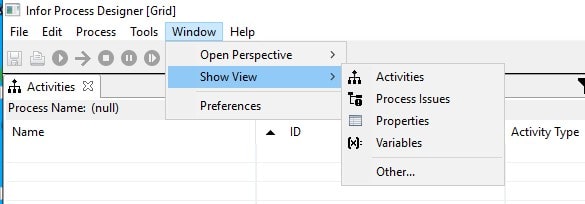
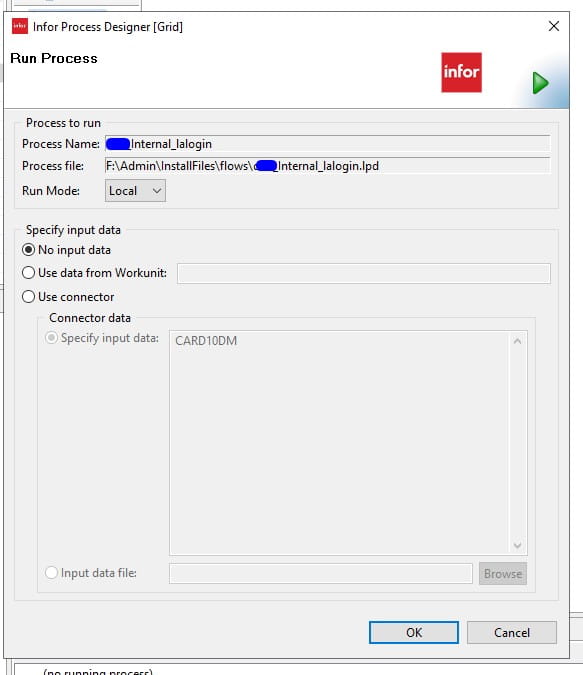
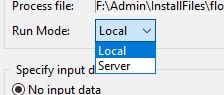
If you are wondering what version of Infor Process Designer (IPD) you should run with Landmark, follow this simple guide.


Your IPD install should be the same version as your Landmark version.


You can find your version of IPD to check if it is running the same version as Landmark.


To find your Landmark version go to Process Server Administrator

Administration>Work Units>Work Units


Open a work unit that has completed and go to the Information tab and look at the landmark version noted:


Other releases of IPD are not compatible if not the same version of Landmark.


Thomas Gavaghan, Vice President at Kyriba, shares an article on ERP today that discusses the rush from “Big Data” to Artificial Intelligence (AI) and how companies might be overlooking the foundational work required to leverage these technologies effectively. He stresses the importance of strategic data management in finance and treasury for smarter decision-making, not just adopting AI for its own sake. The five essential dimensions of data management—Streaming, Searching, Data Lakes, Machine Learning, and Generative AI—are crucial for optimizing liquidity performance.

  1. Streaming: Real-Time Data Flow. Real-time data streaming breaks down silos and enables quicker, smarter liquidity decisions. APIs help link systems and enhance flexibility, making it crucial for dynamic decision-making in volatile markets.
  2. Searching: Efficient Data Discovery. As data centralization grows, the ability to search large datasets quickly is essential. Modern, cloud-native search tools enable finance teams to access and query data efficiently, driving proactive intelligence and better liquidity management.
  3. Data Lakes: Centralized and Scalable Data. Data lakes centralize both structured and unstructured data, providing treasury teams with a single source of truth for analysis. This infrastructure supports better liquidity forecasting and decision-making, especially when integrated with APIs and business intelligence tools.
  4. Machine Learning: Leveraging Patterns for Insights. Machine learning identifies patterns in data to improve areas like fraud detection and cash forecasting. The quality of ML insights depends on well-organized, accessible data, which is provided by strong data lakes.
  5. Generative AI: Transforming Decision-Making. Generative AI automates decision-making by generating insights from complex data. It can predict and execute liquidity decisions, but its effectiveness relies on robust data foundations.

To fully realize AI’s potential, Gavaghan stresses that companies must focus on solid data management. Prioritizing technologies like streaming, searching, and data lakes enables AI-driven decision-making and helps finance teams unlock long-term strategic value from data.


For Full Article, Click Here

With Infor Cloudsuite’s SQL Manage User Service, there is no need to setup any DBA permissions or to use database management software. You can simply add a read-only database user via Cloudsuite in the below steps.


  1. Login to Infor Cloudsuite and go to the Service Request tab, then click Create a Service Request
  2. Select Deployment and Request Type: SQL Manage User >> Next
  3. Select the Database Server, fill in the User, Password, Database name and for our example we are using the default database roles, for read-only, use db_datareader. See all default SQL database roles here and then click Submit!


NOTE: Some organizations have minimum password requirements. We recommend using a password generator online and keeping it to letters and numbers so users can type in relatively easy.

If you found this article helpful and need support managing your Infor Cloudsuite or Lawson Database processes, Nogalis provides expert managed services to simplify and optimize your system. From resolving issues like database user management to maintaining/optimizing existing processes, our team is equipped to deliver the assistance you need—without the cost and commitment of a full-time, in-house staff. Contact us to learn more about how we can help streamline your Lawson environment.

With millions of emails, texts, and searches occurring every minute, organizations must manage their data to avoid issues related to storage limits, software updates, and system re-platforming. Tech expert Martin Visser shares an article that discusses the critical importance of planning data migrations effectively, especially as the volume of data generated by businesses continues to rise significantly. To ensure successful data migration, the first step is to take inventory of existing systems and their dependencies, identifying all components that need to be supported during the migration. This process helps uncover overlooked instances or necessary updates before the migration begins. Additionally, evaluating the current performance of systems—tracking metrics such as throughput and latency—provides a baseline for comparison post-migration. It’s essential to define a clear migration target and communicate this to all stakeholders. The implications of a migration can vary widely; for instance, an infrastructure refresh may only result in temporary downtime, while a complete database overhaul may require significant retraining and adjustments in applications. Visser supplies a step-by-step approach to migrations rather than a “big bang” cutover, recommending full backups and the use of canary deployments to test migrations incrementally. This method allows for identifying potential issues before migrating all systems. Additionally, automated alerts can help manage performance tracking during the transition, facilitating timely rollbacks if necessary. Finally, a comprehensive communication plan is vital to keep all involved parties informed about the migration process, ensuring that both technical teams and business stakeholders understand the implications of changes. By considering data migration as part of a broader operational framework, organizations can enhance their chances of a successful transition.


For Full Article, Click Here

While migrating your enterprise resource planning (ERP) system to the cloud is the sensible solution, that’s just the first step. To achieve migration success, organizations must focus on strategic planning, change management, and user adoption to fully realize the benefits of cloud ERP solutions. Tibi Puiu, tech expert and co-founder of ZME Science, writes an article that explores why simply migrating to a cloud-based ERP system is not enough for success. It highlights that organizations often struggle with cloud ERP adoption because they fail to address two key challenges: “technical debt” (legacy systems) and “business process debt” (outdated workflows). These issues can prevent businesses from fully benefiting from cloud ERP. Additionally, change management is crucial, as employees often resist new systems due to fear of the unknown. Puiu recommends involving stakeholders from various departments early in the process to ensure their needs are met. Communication is vital to address concerns and foster a positive attitude toward the transition. Moreover, the article points out that data migration must be handled carefully to prevent issues with accuracy and integrity. Organizations should also consider scalability, ensuring the ERP system can grow with their business. Continuous evaluation and feedback loops are necessary to refine the system post-implementation. Ultimately, Puiu underscores that a successful cloud ERP implementation is a comprehensive effort that goes beyond technology. It requires cultural shifts within the organization, strategic alignment, and ongoing support to adapt to the changing business landscape. By prioritizing these factors, companies can leverage cloud ERP to enhance efficiency and drive growth.


For Full Article, Click Here

In an IPA process that runs a batch job using a Web Run node, and you get the message “An unknown error occurred” in the Work Unit Log, the next step should be to check the IOS.log.  If you see the message “javax.transaction.TransactionRolledbackException: Transaction is ended due to timeout”, you need to increase the timeout in WebSphere.

Sample Error: WU Log


Activity name:WebRun9710 id:1 started @ 06/28/2024 02:30:15.993 AM

                 WebRun WebRun9710: Executing WebRun activity node

                 WebRun WebRun9710: call type Lawson HTTP Call

                 WebRun WebRun9710: calling host https://server.company.com:1447 (Req timeout: 60 min; # Retries: 3; Pause: 1,000 ms) web program cgi-lawson/jobrun.exe?FUNC=run&USER=NA%5Crlawjob&JOB=AP136-02&WAIT=true&OUT=XML

                 WebRun WebRun9710: Post string

                 WebRun WebRun9710: WebRun result size: 0.00 MiB

                 WebRun9710_result = <?xml version=”1.0″ encoding=”ISO-8859-1″?>

<ERROR key=”UNKNOWN_ERROR” level=”1″><MSG><![CDATA[ An unknown error occurred. Please contact your system admin. ]]></MSG><DETAILS><![CDATA[ Check IOS logs for details. ]]></DETAILS></ERROR>

                 WebRun WebRun9710: Success string <STATUS>63</STATUS> not found

                 WebRun9710_errorCode = 1

                 WebRun9710_informationCode = 0

                 WebRun9710_returnMessage = WebRun WebRun9710: Success string <STATUS>63</STATUS> not found

                 WebRun9710_outputData =

Activity name:WebRun9710 id:1 failed @ 06/28/2024 02:44:51.452 AM


Sample Error: Ios.log


2024-06-28T02:44:51,403 ERROR [WebContainer : 1] [          ][lawson      ] [CGI-LAWSON  ] [Cgilawson] Exception occurred while processing CGI invocation.

javax.ejb.EJBTransactionRolledbackException: Transaction rolled back; nested exception is: javax.transaction.TransactionRolledbackException: Transaction is ended due to timeout

                at com.ibm.ejs.container.BusinessExceptionMappingStrategy.mapCSIException(BusinessExceptionMappingStrategy.java:167) ~[com.ibm.ws.runtime.jar:?]

                at com.ibm.ejs.container.BusinessExceptionMappingStrategy.mapCSITransactionRolledBackException(BusinessExceptionMappingStrategy.java:618) ~[com.ibm.ws.runtime.jar:?]

                at com.ibm.ejs.container.EJSDeployedSupport.mapCSITransactionRolledBackException(EJSDeployedSupport.java:711) ~[com.ibm.ws.runtime.jar:?]

                at com.ibm.ejs.container.EJSContainer.postInvokeRolledbackException(EJSContainer.java:4900) ~[com.ibm.ws.runtime.jar:?]

                at com.ibm.ejs.container.EJSContainer.postInvoke(EJSContainer.java:4586) ~[com.ibm.ws.runtime.jar:?]

                at com.lawson.ios.services.CGI.EJSLocal0SLCGIServiceBean_7f987149.invoke(EJSLocal0SLCGIServiceBean_7f987149.java) ~[?:?]

                at com.lawson.servlet.Cgilawson.doService(Cgilawson.java:105) [classes/:?]


Steps to Resolve

  1. Access the LSF WebSphere Administration/Integrated Solutions Console.
    2. Navigate to Servers > Server Types > WebSphere Application Servers > {LSF Application Server} > Container Services > ORB service.
    3. In the Request timeout field type 900 (equates to 15 minutes)
    4. In the Locate request timeoutfield type 300 (which is the maximum value allowed for this field).
    5. Click OK.
    6. Save the changes to the master configuration.
    7. Navigate to Servers > Server Types > WebSphere Application Servers > {LSF Application Server} > Container Services > Transaction service.
    8. In the Total transaction lifetime timeout field type 900
    9. In the Client Inactivity timeoutfield, type 900
    10. In the Maximum transaction timeout field, type 900
    11. Click OK.
    12. Save the changes to the master configuration.
    13. Restart the LSF application server for the changes to take effect.