You may find the need to install or update DSP for your SSO applications, such as LBI or MSCM.  DSP allows these external web application to authenticate against Lawson for Single Sign-On.

Information you will need:

  • The password for ssoconfig
  • The passkey used to install your current DSP version (if applicable)
  • FQDN’s for your LSF server and the server that hosts the application for which you are installing DSP
  • Credentials for an admin account (usually lawson)


First, download the latest DSP jar file from InforXtreme.

It is best practice to back up your ldap instance before you begin the install.

On the server of the SSO application, open a command prompt as administrator.  Navigate to the directory where you saved the DSP install file.

Type command java -jar <DSP file>.jar.  This will open the install wizard.
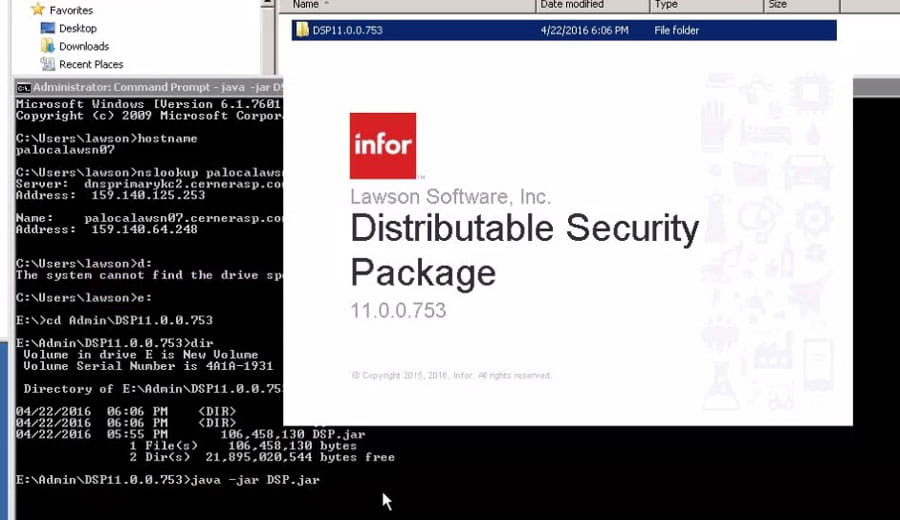

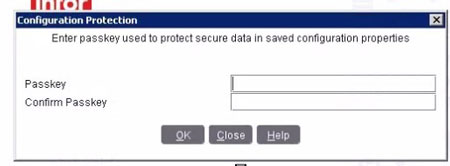
Enter a new configuration passkey.  NOTE that if you are updating an installed DSP, you will need to know what passkey was used to install it.
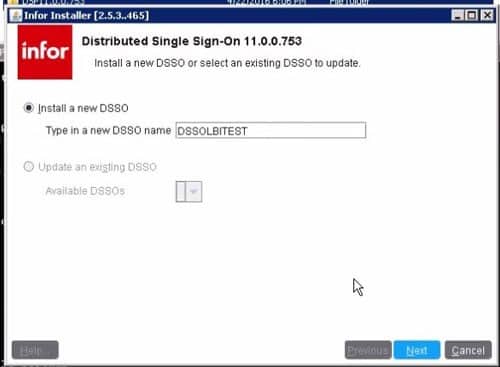
 

Give your DSP instance a meaningful name
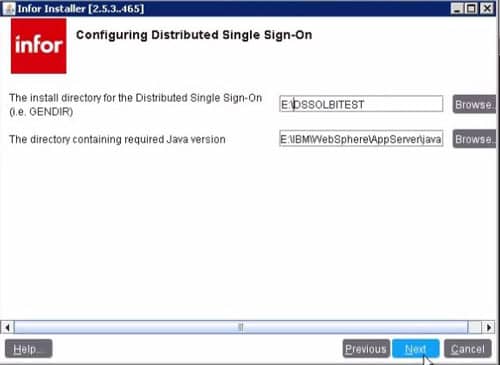
 

Set the location where you want the install files saved, and set the java location.
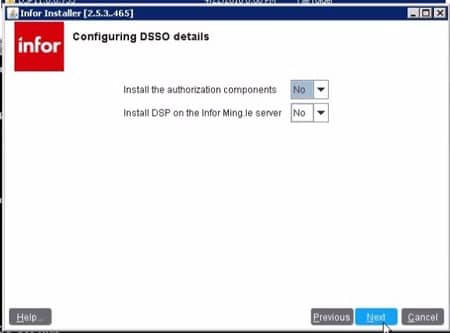
 

Mingle DSP install is a different process not addressed in this article.
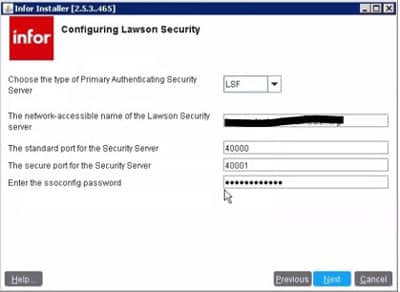
 

Provide the FQDN of your LSF server.  The standard and secure ports can be found in your LSF install log.  Enter the password that you use to run ssoconfig.
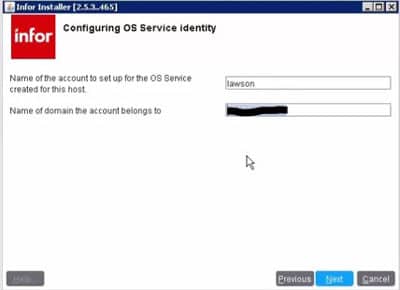
 

Enter account information with administrative privileges in Lawson
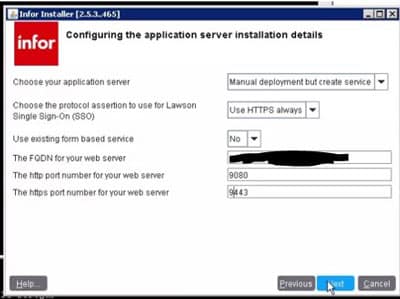
 

Enter the appropriate values for the server that hosts your SSO application
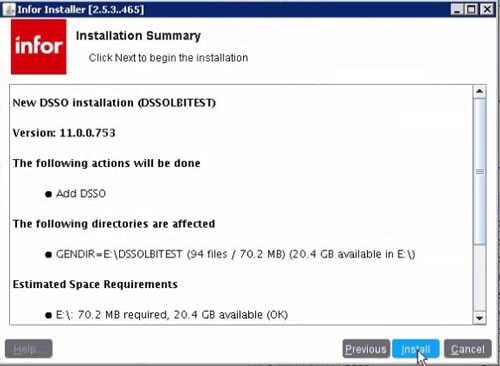
 

Click Install
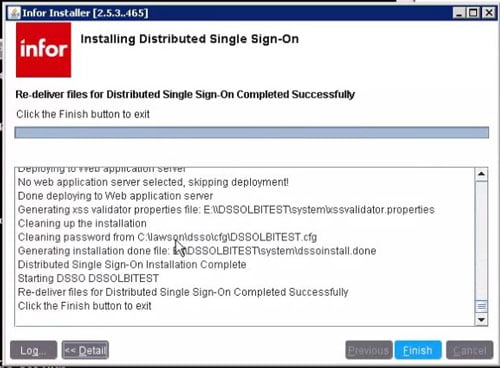
 

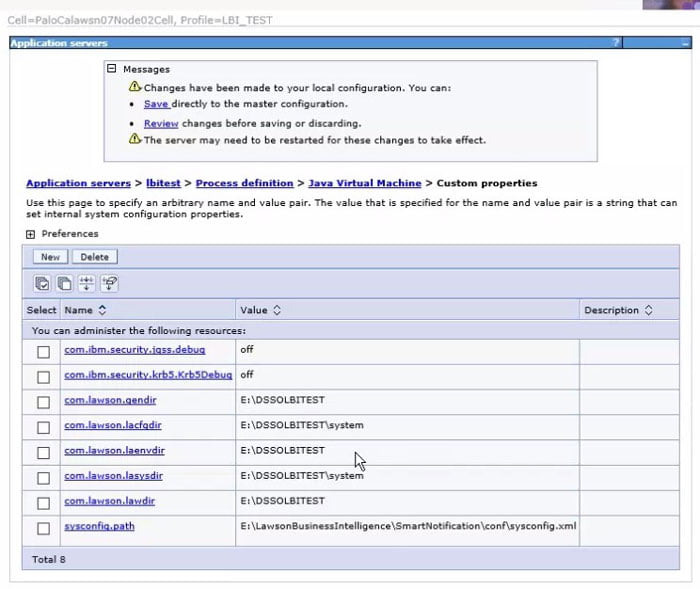
Update the JVM custom properties with the new install information (if necessary)
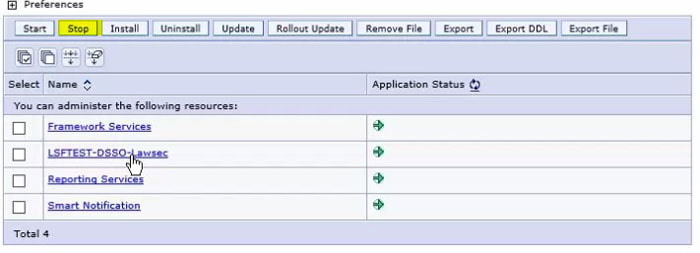
 

Install or update your security application in WebSphere.  The install file lawsec.ear can be found in <DSP install directory/jar/secondary
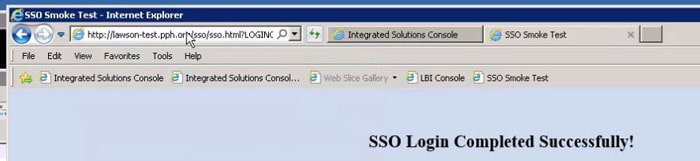
 

Run a smoke test against the new DSP install at https://<application base url>:<port>/sso/SSOConfig


The procurement modules in large ERP systems are great for buying in bulk and keeping stock supplied for your larger purchasing needs.  Usually items are shipped to a receiving dock and are received into the ERP system by the receiving personnel.  This makes doing AP matching viable for these purchases.

What do you do with the items that your local store needs that are not shipped to a warehouse for distribution?  What about when the items are not part of a current contract or even needed on a contract? A store may need light bulbs for their light fixtures, for example, and the local manager has the authority to place an order for them without getting them in his regular warehouse deliveries.  This type of local purchase does not need approval beyond the store manager.  Waiting for a long process to establish a local supplier of light bulbs could leave the store in the dark before the process completes.

You still want these local store purchases to have an approval process that is tracked for audit compliance and a way to know what your commitments are.  How do you deal with these purchases now?  Wouldn’t it be great to have a local purchasing solution that doesn’t require a receiving department and still allows you to know:

Who approved the order

What your total corporate commitments are

Where you purchased something before for when you need to purchase them again

A solution is coming – stay tuned for more information soon!


Here is a list of known IPA errors and their solutions as provided by Infor.

  1. Email attachment does not existAttachment: Drive:/Path/To/File/filename.ext does not exist.Solution:
    When adding attachments to a IPA email node, you must first ensure the file you wish to attach resides on the Landmark Environment Server.• If the file exists in LASYSDIR/LPS/emailattachments, simply list the file by filename.ext
    • If the file exists in any other Landmark Server Directory, list the file by it’s full absolute directory path
    • If you are using Multi-tenant Cloud, the file needs to be added PfiFileStorage, list the file by its full name in PfiFileStorage 
  2. SSOCfgInfoServlet was not successful Login error: com.lawson.security.authen.httpclient.LawsonHttpClientException: Login: The call to SSOCfgInfoServlet was not successfulImportant to note that any failing path connecting from IPA to LSF server can throw an identical error as stated above. The solution below should only be applied if the following can be seen in WebSphere’s system.out log:REQUIRED SUBSEQUENT ERRORjava.net.UnknownHostException: <server>

    at java.net.InetAddress.getAllbyName0(InetAddress.java:1302)

    Solution: Try adjusting the java.security file to disable caching while troubleshooting the problem on the DNS server. In order to modify this value, open JAVA_HOME/jre/lib/security/java.security and change the networkaddress.cache.ttl line to:

    networkaddress.cache.ttl=0

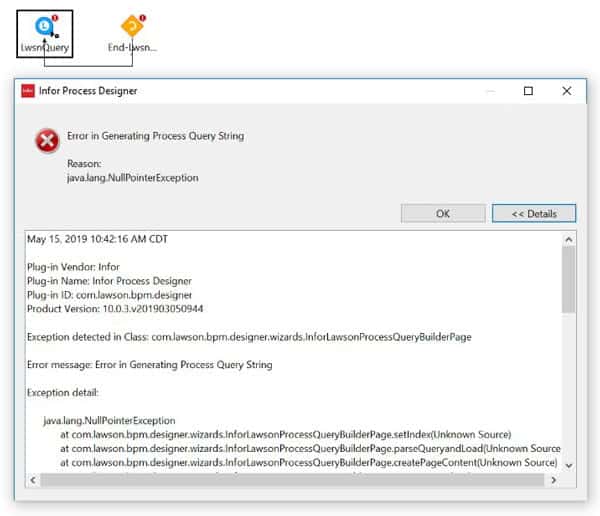
  3. IPA Designer: Lawson Query Builder Error Generating Process Query String

This error can pop up upon pressing “Build” in IPA Designer LawsonQuery node.

Solution: This silly error may be caused by using a IPA variable (such as <!appProdline>) for your dataarea in the query string. Instead, just remove the variable and type in the dataarea manually instead.

Before: PROD=<!appProdline>&FILE=EMPLOYEE&INDEX=EMPSET1&KEY=<!Company>=<!Employee>&FIELD=ADD-ALLOW-AMT;AUTO-DEPOSIT;BIWEEKLY-RATE;COMPANY;EMPLOYEE&OUT=CSV&DELIM=

After:
PROD=lsapps&FILE=EMPLOYEE&INDEX=EMPSET1&KEY=<!Company>=<!Employee>&FIELD=ADD-ALLOW-AMT;AUTO-DEPOSIT;BIWEEKLY-RATE;COMPANY;EMPLOYEE&OUT=CSV&DELIM=

Infor recently partnered with Australian-based fashion and accessories brand Forever New to transform its supply chain and warehouse management operations in order to remain agile in a dynamic retail industry. Forever New will leverage Infor’s Supply Chain Execution (SCE) and Intelligence Open Network(ION) solutions across its warehouses and supply chain to help cater to demand across its channels including in-store, e-commerce and drop-ship for online marketplaces. SNS, a global supply chain alliance partner, will assist in implementing the solution and will help streamline Forever New’s warehouse management operations. This allows for dynamic order processing capability and enhanced stock optimization with voice-based operations, activity-based billing, labor management, better inventory visibility and accuracy. “Forever New’s desire to be an agile retail player is matched by Infor’s drive to deliver finely-tuned, industry-specific capabilities in the cloud. We are committed to helping this new-age dynamic retail leader carve out new markets by continued innovation, and supporting their growth and digital strategy,” said Helen Masters, Senior Vice President and General Manager, Infor Asia Pacific.


For Full Article, Click Here

The Data Iterator node is commonly used to loop through records but it can also read a file into IPA. (For more on the Data Iterator Node, visit: https://www.nogalis.com/2017/05/04/ip-designer-series-the-data-iterator-node/)

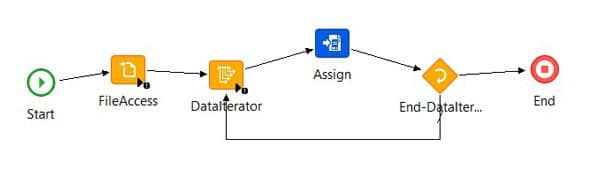
Based on the responses of seasoned IPA developers on the Infor/Lawson forums, the best way to ‘load’ in a file to an IPA flow is to use a FileAccess node followed by a DataIterator node. This speeds up the flow considerably as the FileAccess node would read the file into memory and then the DataIterator node can use the data from the memory instead of reading and closing the file multiple times.

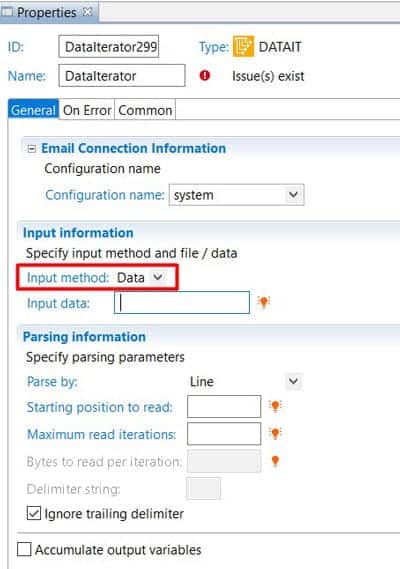
First ‘load’ or ‘read’ the file into IPA using the FileAccess node. Then set DataIterator to process the Data (and not File) and set the source to be the FileAccess_outputData. This should noticeably improve the performance of the flow as the data is just being loaded into memory once by the FileAccess.


If you run into this error, it likely means that many of your batch jobs in Lawson are going into recovery. The reason this may have occurred is due to a domain name change or possibly an accidental password reset.


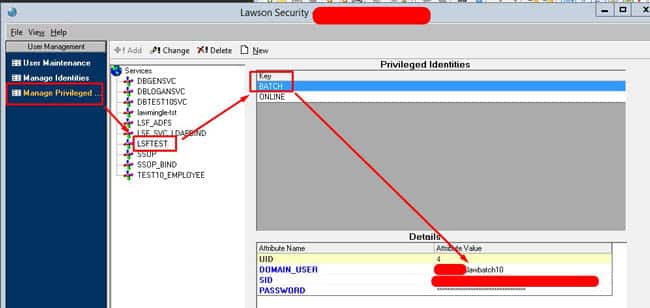
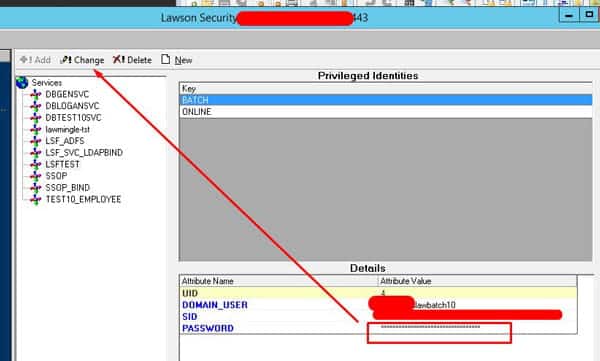
To resolve, first login into LSA, then go to Manage Privileged Identities.

Once there, click the Environment named service ie. LSFPROD, LSFTEST or however yours is named. Select the BATCH key and find out what user is assigned under it.


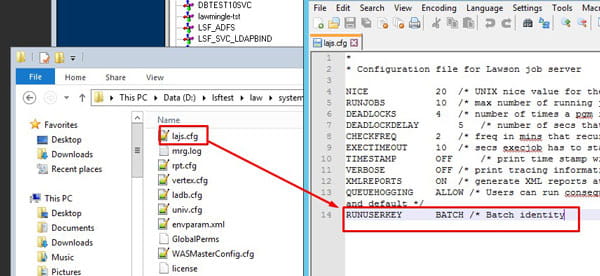
This BATCH key may be named differently so check your lajs.cfg file under RUNUSERKEY as shown below in the system folder.

If you know the latest password login to LID with it first to confirm.


After confirming, type the password in the password field shown below and remember to click CHANGE after you confirm the password:

Go back to the job scheduler and attempt to recover your jobs.

Lawson makes it incredibly simple to add users to its reporting wing LBI.


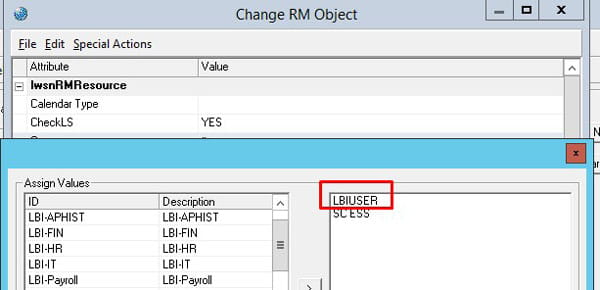
First what you want to do is add the LBIUser GROUP to the user in LSA:

This group may be spelled differently but typically it’s called LBIUSER and is defined when Lawson is first setup for your organization.


Once you add this group to the Lawson user. Make sure you save and clear your server cache.


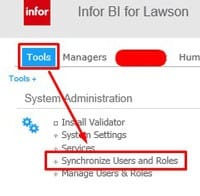
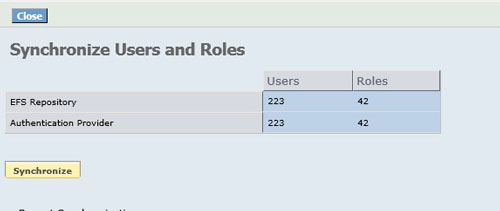
Log in to LBI, go to Tools, and under System Administration click “Synchronize Users and Roles”

LBI typically auto-synchronizes once a day but you can manually do it now and you’ll notice the users and roles will be the same after your sync them.

The user should be able to login into LBI but likely won’t be able to access much if reports, dashboards, and links are assigned additional Lawson groups as a means of restricting access. Again, these are called “roles” in LBI but “groups” in Lawson.


There is also a matter of bursting reports to the user which is another form of security that will be outlined in another article.

Technology is undoubtedly a huge part of the way we live, learn, and work. It doesn’t take long to come across a new story focusing on the rise of artificial intelligence (AI) and automation and its potential impact on jobs. A study from McKinsey finds that by 2030, an estimated 800 million jobs could be lost worldwide to automation, with data-centric roles like accounting biggest hit. Technology is introducing new tensions as well as opportunities for the finance industry to transform the way business is done. Though, instead of fearing technology will take over our jobs we should embrace it. Technology will be able to do our basic tasks more efficiently, but the human side of business is best done by humans. Finding the human-technology balance in your business is the sweet spot that will give your business more satisfied customers.

Use tech to improve human relationships – The importance of customer service to financial organizations is a great example of how human-technology balance works for your business. Customer service agents use AI and machine learning to respond to customer requests because these technologies can allow them to quickly identify customer needs and spend more time solving problems and maintaining a human touch.

Refocus on becoming people-centric – While many businesses consider themselves customer-centric, they should really be focusing on being people-centric. When people are placed at the center of your organization, adopting innovations will always focus on solving real human problems. While new technology is changing the way accountants work, these developments are providing new opportunities for them and their clients to thrive.

The true power of “human technology” is taking advantage of the latest technological advances, while still prioritizing the unique things that only human interactions can deliver.


For Full Article, Click Here

Infor Process Automation should be configured correctly to ensure proper functioning of other Lawson System Applications. Here are the official best practice IPA-LSF Server Configuration recommendations directly from Infor. (KB 1946828)

Recommended Configurations

  1. JT-973173

    This JT resolves a memory leak issue in the Event Manager Java Process. Not having this JT means the Event Manager Java Process will slowly grow in size and if left unchecked, can consume all RAM and even crash the LSF Server.

  2. Remove lpsMaxHeap=XXXXX and lpsMinHeap=XXXXX from LAWDIR/system/bpm.properties

    These settings are only required when using JNI.

  3. Set useLPSBridgeSocket=true in LAWDIR/system/bpm.properties

    NOTE: The use of the LPS Bridge Socket connection means LSF batch/online programs will no longer initialize a JVM, it will simply make a socket connection to the Event Manager process to make the request.

  4. Set Windows pagefile on LSF server to 32 GB


Additional Recommendations for Infor Cloud Clients

  • Verify and ensure that lpsHost=inforbclm01.inforbc.com
  • NOTE: If this setting is not pointed at the internal domain, a grid session memory leak can occur in Event Manager on the LSF server
  • NOTE: Changes to this file should be made by executing pfserv config lps and they require a restart of LSF Process Flow and LSF Web Application Servers.

Additional Recommendations for LSF on LINUX

  • Ensure LSF JT-875069 is applied to the LSF system
  • Add “useLPSLocalServices=true” to LAWDIR/system/bpm.properties
  • Follow KB 1936921 which has two process definitions files used for synchronizing services from IPA/Landmark to LSF
  • In the GEN data area of the Landmark Rich Client, navigate to ConfigurationParameter BusinessClass and add: Component=ipa, Name=useRMIWebServlet, Value=true
  • Configure LSF to look at IPA Services in the LOGAN database instead of connecting to IPA. This requires LSF JT-875069 which allows you to add “useLPSLocalServices=true” in bpm.properties. This also requires the use of a ServiceSyncFlow to move the services from IPA to LSF. To implement this procedure, please follow instructions on KB 1936921.

Enterprise resource planning (ERP) systems can help your business integrate procedures from many different departments, save time, reduce costs, and increase efficiency. An article in The Future of Things highlights 5 ERP trends that you should watch out for in 2019. 

  1. Additive Manufacturing – also called 3D printing, is making creating large-scale, complex, high-volume products faster and less expensive, benefiting the Manufacturing ERP field.  
  1. The Internet of Things – Also in manufacturing, the Internet of Things (IoT) can make other aspects of business more efficient. You can use smart equipment to automate many actions and cut costs. Connecting these IoT devices to your ERP will give you access to convenient summaries and help you make the right decisions.
  1. Mobility and Flexibility – With many business processes migrating to the cloud, ERPs will become more accessible for everyone in your business. Employees can access the software from different locations in real time. This leads to better communication, profitable choices, expanded business, and adaptions to changes in regulations, supply, or demand.
  1. Better Analytics ERPs are improving their analytics abilities to make management decisions quicker. ERP will eventually become a comprehensive data tool that informs decisions at all levels, from the factory floor to the executive suite.
  1. Industry-Specific Solutions Many ERP solutions can provide industry-specific features. They let businesses avoid paying for additional software or customization. They can also provide a variety of different functions tailored to specific industries.

ERPs are becoming more user friendly, according to a Tech Pro research survey. With seamless integration and quality data running through the software, ERP will help you grow your company.

For Full Article, Click Here