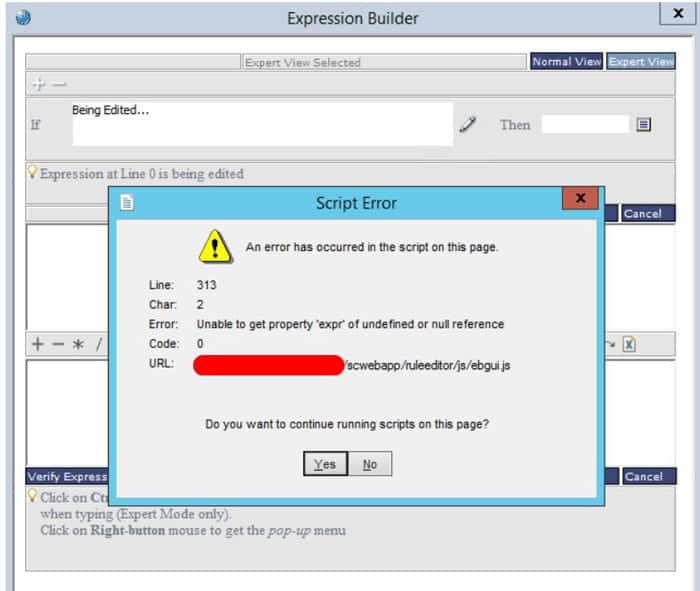
Use the Landmark Transaction node to query or update Landmark data.  In the properties window, select “Build” and you will be presented with a wizard to help you build your Landmark query.

Select the data area that you are querying/updating.  Select the Module and Object Name.  (HINT: these values can be found by using Ctrl+Shift+Click on the form in Rich Client or the Landmark Web UI).

Choose your action.  There are basic CRUD (create, read, update, delete) actions for each object, and there will be more actions specific to the object you selected.  Action Operator will likely be “NONE”.  Select your action type (SingleRecordQuery, MultipleRecordQuery, etc.), and finally select the criteria.  Click OK.

Decide whether to use the hardcoded values for your transaction field values.  You can supply variables here to make your flow more portable.


Dutch construction and home decor leader Fetim Group is using an Infor benchmark of 800 world-leading companies to improve its processes and workflows. Analyzing this data has helped Fetim improve productivity and workflow efficiency. Additionally, Fetim is playing an active role to improve Infor’s software and to help it better align with customer needs. This Dutch group is no stranger to Infor as they’ve worked with them in several projects. Per the press release, “Fetim’s IT architecture is built on the best-of-class principle, and the company already uses Infor CloudSuite Distribution Enterprise, based on the Infor M3 ERP (enterprise resource planning) application and Infor CloudSuite Configure Price Quote (CPQ), a digital portal to improve the customer buying experience. It is currently rolling out Infor CRM and the acclaimed Infor Nexus to realize an online real-time collaboration platform to help improve cooperation with suppliers and to maximize the reliability of the supply chain.” Being able to influence the functionality included in newer versions of Infor’s industry CloudSuites based on Infor M3 helps Fetim make only a minimal number of modifications and quickly achieve standardized processes.


For Full Article, Click Here

Security on activity groups is handled outside of LSA.  If users are getting a “security violation for activity group” when they try to add a batch job in the activities module, you will need to do a little extra security maintenance.

First, go to AC00 and make note of the value in the “Security” field.

Next, open the user’s security record in ISS or LSA and navigate to the “Company Control” field.  Click on the search and make sure that “Security” value is in the user’s company list.  If not, add it.  Then clear out the security cach and perform an IOSCacheRefresh.

Infor recently announced that French shipbuilder Piriou has chosen Infor LN software to assist in transforming its global production, repair, and maintenance operations. The french company builds mid-sized boats for private and public use military and commercial fishing. They have decided to implement a modern enterprise resource planning (ERP) software system in a quest to double its revenues over the next five years. Their previous ERP system limited the company from keeping up with growing production numbers and expansion into shipyards in Africa and Vietnam. By choosing Infor LN, Piriou can better maintain their growing company and will plan a steady roll-out over the coming years, wishing to avoid a “big-bang” deployment approach. Using Infor LN, Piriou expects to increase its production volume by better optimizing its production and giving users direct visibility to component parts ordering.


For Full Article, Click Here

Infor has successfully completed the acquisition of Intelligent InSites, Inc., a leading provider of healthcare software and services leveraging location-based intelligence from real-time location systems (RTLS). Headquartered in Fargo, North Dakota, Intelligent InSites has customers in the US and Australia. With this acquisition, Infor will be able to offer an expanded suite of technology for organizations in the healthcare industry. Per the news announcement, Intelligent InSites solution will complement the Infor CloudSuite Healthcare footprint, enabling support across the continuum of care including clinics, urgent care, emergency departments, inpatient care, procedural care, and behavioral health.


For Full Article, Click Here
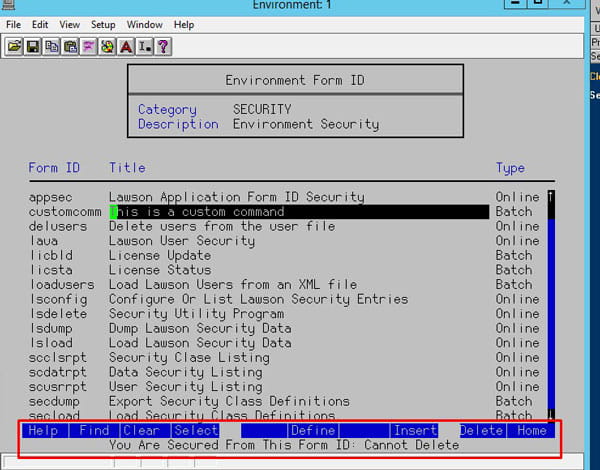
AP Invoices only flow to Asset Management when there is an Asset Template associated with the AP invoice distribution line.

The invoices appear on AM15 and can be then added to AM or not depending on the actual need.

AP invoices do not automatically create assets, they need to be reviewed on AM15 and all aspects of the information that appears there is able to be adjusted before the invoice becomes an Asset.


The best sales processes start long before your first meeting with a potential client. How successful of a relationship you will have with customers depends on how prepared you are in your sales process. Andrew Thomas, founder of Skybell Video Doorbell, shares an article on INC of several technology tools that you can use to boost and strengthen your sales process. With the many available resources out there, technology is the most useful. It’s vital role in successful strategies is what separate good sales processes with mediocre ones, growing companies from dying ones. They are:

  1. Manage relationships with a CRM
  2. Save time with smarter email outreach
  3. Use online apps to build your community
  4. Stay up to date with Google Alerts
  5. Always be learning with audiobooks

In Thomas’ experience, by adding tools and using the available resources out there, you can have a successful sales process for your business.

For Full Article, Click Here
As we are settling in to the new year, developments in technology isn’t slowing down a bit, especially in business. Khadim Batti shares an article on Forbes of the changes in the workplace this year and over the next decade.

Hyper-Automation – with first-gen automation, robotic machinery accomplished repetitive tasks formerly done by people. Hyper-automation will involve stacking multiple machine learning software packages on top of automation tools to for advanced types of work.

Accelerated Digital Transformation – Most organizations tackle digital transformation to increase operational efficiencies and cut costs so as to harness technology to improve business models, operational efficiency and the customer experience.

Digital Adoption Solutions – Digital adoption solutions, or DAS, aims to accelerate employee adoption by cutting through the complexity of a company’s enterprise systems and integrating real-time, context-sensitive, on-screen prompts into an application.

Elevated Employee Experience – The makeup of the workforce has changed significantly, which is prompting different approaches to employee training and retention. One such change is the growing population of remote workers. Employers are making efforts to align their training and retention strategies for these types of employees.

Learning In The Flow Of Work – Global industry analyst Josh Bersin identifies a new concept called “Learning in the Flow of Work,” which recognizes that for learning to really happen, it must fit around and align itself to working days and working lives. This technique treats learning in the workplace as a continuous process.


For Full Article, Click Here
Wearables, smart electronic hands-free devices, have not only peaked interest for the everyday user, but has been a huge asset in other fields such as health and logistics. The latter, for example, shows the benefits of wearables being used in supply-chain processes and management. Kristen Herhold shares an article on supplychainbrain.com of the many ways wearable technology has aided in supply-chain efficiency and has since increased productivity within warehouses and all throughout organizations.


Minimize Manual Labor – Wearables streamline warehouse workflows by removing manual steps from day-to-day processes. Simple things such as barcode scanners are being quickly recorded real-time by wearable and mobile devices, quickening logistics processes. “Scanner-enabled wearables allow employees to automatically send reports to management that would otherwise have to be manually typed in,” says Herhold.


Provide Comprehensive Data – Wearables allow businesses to monitor their workers’ physical activity, location, and health. Similar to how professionals are using these devices in the healthcare field, these devices with biometric sensors report the health and wellness of employees, especially if most require physical labor at warehouses. Herhold notes that the data collected by warehouse wearables gives management the opportunity to better serve workers’ needs.


Offer Real-Time Feedback – Wearables are a smart device, so it usually means that any activity inputted and recorded is sent to another device or database where others in the network are given immediate access to data, in real time. Voice headsets, for example, connect to a phone on the user and increase the accuracy of warehouse work through real-time feedback.


For Full Article, Click Here
Recently we ran into the dreaded “Unable to load” error message in Portal, and could not find any indication of why Portal couldn’t load.  The most we could see through a Fiddler trace is that the sso.js file was getting a 500 error.  There was nothing logged anywhere.  Not on the WebSphere node, application server, nothing in ios, security, event viewer.  Nothing!  We figured WebSphere had to be the culprit, because sso.js is wrapped up in an ear file in WAS_HOME, and everything on the Portal side was working until it tried to hit that script.  So, we started digging into WebSphere and figured out that one of the certs was expired on the Node.  For some reason, a custom wildcard cert had been used for the WebSphere install on the node only.  We opted to switch it to use the default self-signed cert, which was not expired, and was the solution that worked best for us.  Another option would, of course, be to upload a new wildcard cert and switch the old one to the new one.

To switch a cert in WebSphere, go to Security > SSL certificate and key management > Key stores and certificates.  Select the NodeDefaultKeyStore of the node you want to change, and under additional properties on the right, select “Personal certificates”.  Click your “old” cert and select “Replace”.  Select the “new” certificate that is replacing the old one.  Check the “Delete old Certificate after replacement” box.

Bounce WebSphere services, or better yet, reboot.  And you should be good to go!