

IP Designer Series – The Data Iterator Node
The Data Iterator node can be used to loop through records. One way to use this node is to loop through the lines of a TXT or CSV file so that the data can be manipulated and stored somewhere else, or used in Lawson programs. Here is an example of a process using data iterators. The first node accesses a csv file and loops through each line. The second iterator takes the line from the first node, and splits it on a delimiter. From there, it loops through each field in the line and makes an assignment.
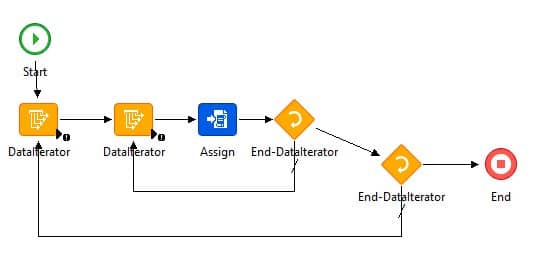
- The first node, which uses a file as the input
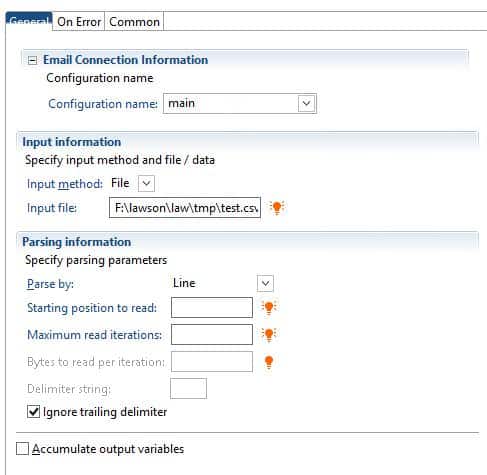
- Configuration name – select the configuration where the file resides (main is LSF, system is Landmark)
- Input file – the path to the file
- Parse by:
- Line – loop through each line
- Delimiter string – provide a character or string, the iterator will “split” on that string and loop through each item
- Length – use this for a fixed-length flat file
- Starting position – use this to determine which line the iterator should start on (so you could skip header rows if needed)
- Maximum read iterations – Use if you only want to read a certain number of lines/characters in a file
- Ignore trailing delimiter – will ignore the delimiter at the end of the line
- Accumulate output variables – Specifies whether records should be output into separate variables as they are parsed. If true (check box is selected), each record will be saved in the activity variable activityName_outputDataN, where activityName is the name of the activity and N is the record number.

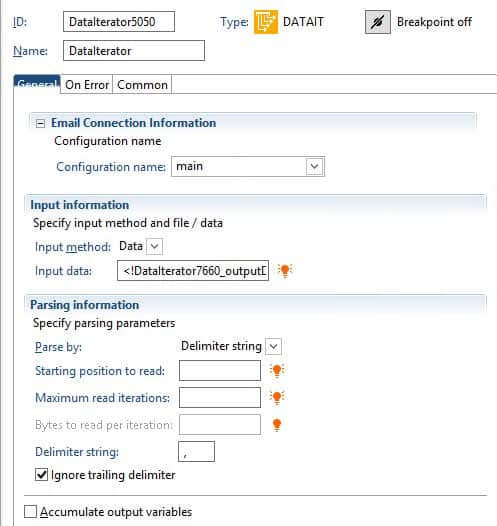
- The second node, which uses a file as the input
- Configuration name – select the configuration where the file resides (main is LSF, system is Landmark)
- Input data – the data to read into the iterator
- Parse by:
- Line – loop through each line
- Delimiter string – provide a character or string, the iterator will “split” on that string and loop through each item
- Length – use this for a fixed-length flat file
- Starting position – use this to determine which character the iterator should start on
- Maximum read iterations – Use if you only want to read a certain number of lines/characters in a file
- Bytes to read – used for fixed width files
- Delimiter string – the string that splits each field of the record
- Ignore trailing delimiter – will ignore the delimiter at the end of the line
- Accumulate output variables – Specifies whether records should be output into separate variables as they are parsed. If true (check box is selected), each record will be saved in the activity variable activityName_outputDataN, where activityName is the name of the activity and N is the record number.

Retiring Lawson, PeopleSoft, or Oracle? APIX archives the entire application — every table, every year, attachments and security included — into your own AWS account in about 30 days, so you can decommission the legacy system and keep full access to the history.
