
844-NOGALIS (844-664-2547)
Nogalis, Inc.
  • Link to Facebook
  • Link to X
  • Link to LinkedIn
  • Link to Mail
  • Company
    • News, Events and Articles
    • About Us
  • Products
    • Infor Lawson Data Archive
    • PeopleSoft Data Archive
    • Oracle Data Archive
  • Services
    • Infor Lawson Support
    • Infor Lawson / CloudSuite Consulting
  • Education & Training
  • Support
  • Contact Us
  • Click to open the search input field Click to open the search input field Search
  • Menu Menu

Lawson Add-ins Script error – An error has occurred in the script on this page

Articles, Frontpage Article, News

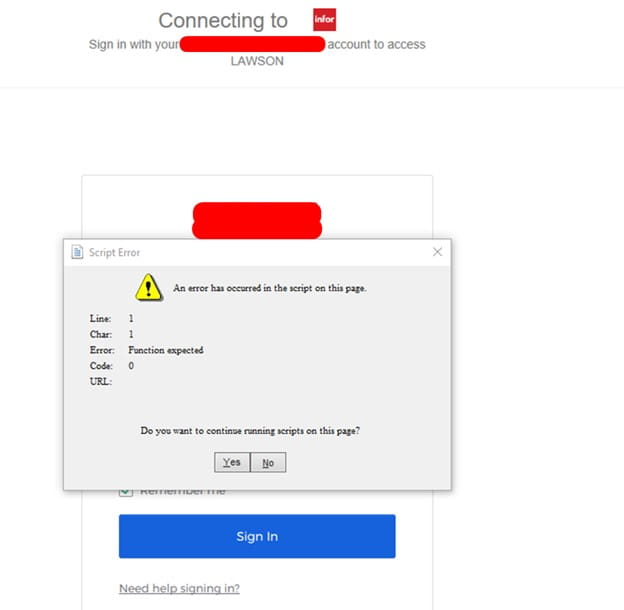
Lawson Add-ins Script error “An error has occurred in the script on this page”. This used to be caused by an outdated internet explorer browser before Microsoft migrated fully to Edge. Now this can occur when Excel extension apps get added via an app update or feature update.


When logging into Lawson Excel addins, you may get this script error, locking up your session and not being able to login.
 

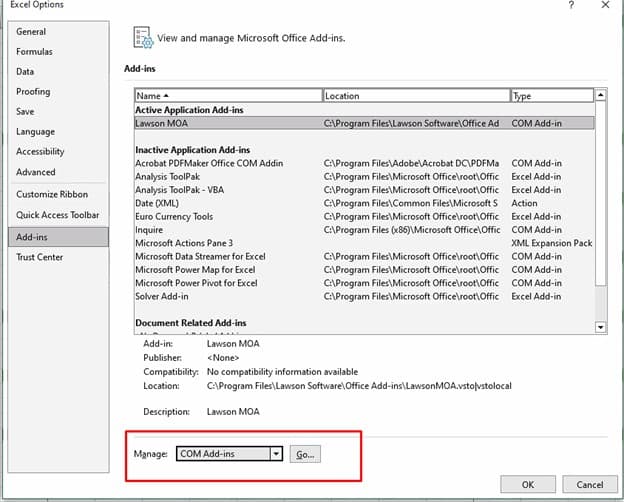
To resolve this, in Excel, go to File >> Options >> Add-ins >> Com Add-ins >> Go
 

In this case, it was an Acrobat PDFMaker office com addin extension that was added after an update, simply uncheck this extension and click OK.
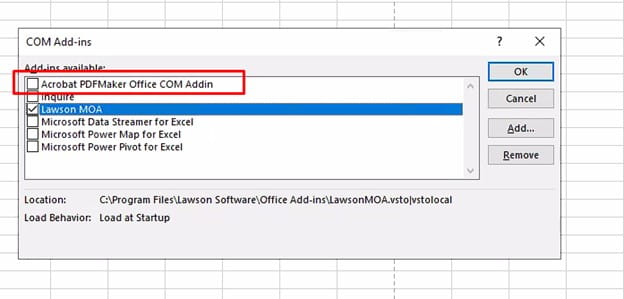
 

Now close excel and open again, you should be able to login to Lawson Add-ins now.

Retiring Lawson, PeopleSoft, or Oracle? APIX archives the entire application — every table, every year, attachments and security included — into your own AWS account in about 30 days, so you can decommission the legacy system and keep full access to the history.

See how the APIX ERP archive works →

12/22/2023
Share this entry
  • Share on Facebook
  • Share on X
  • Share on WhatsApp
  • Share on LinkedIn
  • Share on Reddit
  • Share by Mail
https://www.nogalis.com/wp-content/uploads/2023/12/Lawson-Add-ins-Script-error-An-error-has-occurred-in-the-script-on-this-page.jpg 470 470 Angeli Menta https://www.nogalis.com/wp-content/uploads/2013/04/logo-with-slogan-good.png Angeli Menta2023-12-22 07:53:352023-12-19 16:08:39Lawson Add-ins Script error – An error has occurred in the script on this page
0 replies

Leave a Reply

Want to join the discussion?
Feel free to contribute!

Leave a Reply

You must be logged in to post a comment.

LEGACY ERP DATA ARCHIVE SOLUTION


Discover how our clients are leveraging AWS services to archive their Legacy ERP data and provide ubiquitous access to users via a light-weight, secure, and read-only web interface. Secure, Fast, Reliable, and Cost Effective. That is the promise of APIX. Follow the link below to find out more and book a discovery call with our data archive specialist.

BOOK DEMO

© Copyright - Nogalis, Inc. 2026
  • Legal
  • Privacy
  • Contact Us
Link to: 10 ERP trends for 2024 and beyond Link to: 10 ERP trends for 2024 and beyond 10 ERP trends for 2024 and beyond Link to: Weekly Patch Notification: December 23, 2023 Link to: Weekly Patch Notification: December 23, 2023 Weekly Patch Notification: December 23, 2023
Scroll to top Scroll to top Scroll to top