
Lawson Error – loadResource returned identity already exists
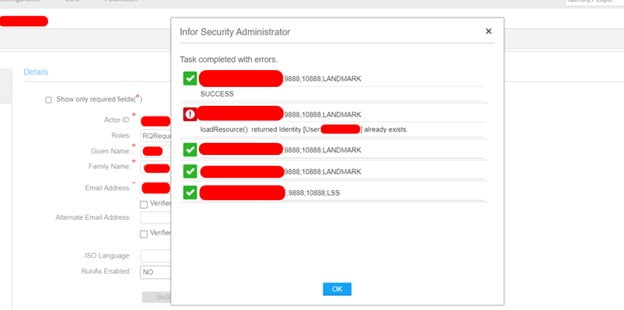
This article shows you a step by step guide on how to resolve the following Lawson error:
“loadResource(): returned identity [User:] already exists“
We need to run a list-based sync but first let’s explain what it is.
How list-based sync works:
Initially, an XML file containing all the records to be synchronized is required for executing the procedure. Later, the ssoconfig utility is employed to import the file. As a result of the sync command, all the relevant data related to actors/users, identities, and their associated roles (and services if required) is transferred from the “original system” (the one with updated data) to the “target system” (the one in need of an update).
Note: Please keep in mind that when synchronizing, if a service is present on the original system but not on the target system, it will be generated on the target system. It is important to note that syncing of services is a one-time process.
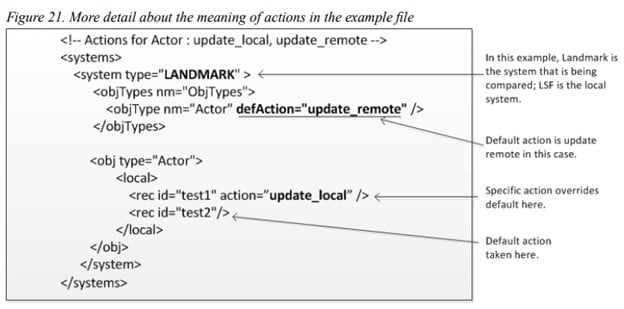
By default, during synchronization, Actor Roles are included with other user information and combined. For instance, if an Actor record in the LSF has one role “NormalUser,” and the same Actor is present in Landmark with two roles “NormalUser” and “BenefitsClerk,” then after synchronization, both systems would display “NormalUser” and “BenefitsClerk” for that actor. However, if you prefer to prevent the merging of Actor Role attributes, you can override the default setting in the input file. In this case, you will be asked to decide between Update Local or Update Remote action for each difference, similar to other attributes.
Create the XML input file (default behavior for Actor Roles)
Prepare an XML file in the suitable format for importing. The following example depicts the standard approach, where Actor Roles are combined during synchronization.
Example File:
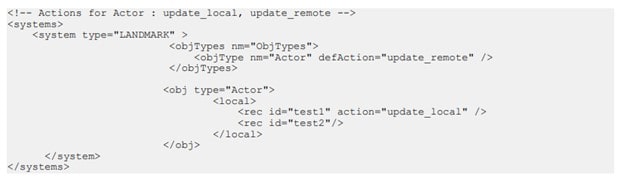
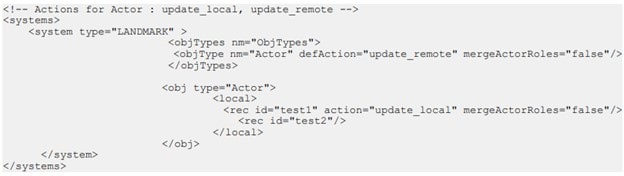
XML input file in which you specify behavior of Actor Roles
This instance contains the “mergeActorRoles” attribute, which is present in the file and set to “false.” Consequently, the roles will not be merged, and the specified action in the XML file will be followed instead.
NOTE: If you require the merging of roles for some Actor records, you should adjust the “mergeActorRoles” attribute to “true.”
Example file:
Run the import command using the ssoconfig utility
- Execute the import command using the ssoconfig utility. Open a command window and enter the following command:
ssoconfig -S PWD <full_path_and>InputFileName
In this command, replace PWD with the security administrative password and <full_path_and>InputFileName with the name of the input file that you created in the previous step.
Once entered, a notification will confirm that the synchronization process has begun.
- To monitor the synchronization progress, navigate to the Check Background Sync Status option within the Manage Federation sub-menu.
Validate results.
Retiring Lawson, PeopleSoft, or Oracle? APIX archives the entire application — every table, every year, attachments and security included — into your own AWS account in about 30 days, so you can decommission the legacy system and keep full access to the history.

