
A workaround for TLSv1 error after java update
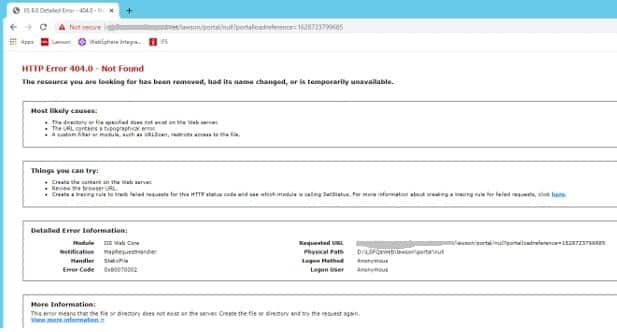
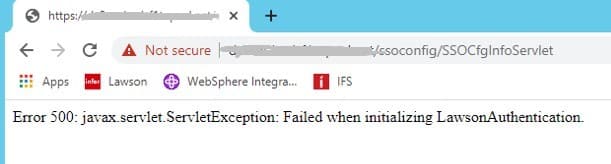
With the latest java update, some instances of Lawson are throwing exceptions. The portal is throwing a 404 error, and SSOCfgInfoServlet throws a 500 error.
In this scenario, the security_authen.log is throwing an exception “Failed to initialize authentication layer.” The lase_server_0_0.log has a much more detailed error message referring to “Client requested protocol TLSv1 is not enabled or supported in server context”.
To resolve the issue, edit the java.security file at JAVA_HOME/jre/lib/security. Update the jdk.tls.disabledAlgorithms line to include TLSv2.
This is a temporary solution; Infor is working on a permanent solution to resolve this issue.
security_authen.log
Thu Aug 12 10:02:49.303 CDT 2021 – default-421637524 – L(4) : tenantID=DEFAULT thread=main. CacheManager.setRefreshInterval(): RefreshInterval =null is invalid.
Thu Aug 12 10:02:49.309 CDT 2021 – default-421637524 – L(4) : tenantID=DEFAULT thread=main. CacheManager.setRefreshInterval(): RefreshInterval =28800 seconds
Thu Aug 12 10:02:49.309 CDT 2021 – default-421637524 – L(4) : tenantID=DEFAULT thread=main. CacheManager.getCacheProperties: cache properties were initialized: Development=false, Instance=com.lawson.security.util.cache.ConcurrentCache, RefreshInterval=28800,
Thu Aug 12 10:05:55.179 CDT 2021 – default–932566529 – L(2) : error starting up SecEvent servlet, original message: Failed to initialize authentication layer. Cause Connection error (server.company.com, null). Cause: {2}.
Stack Trace :
com.lawson.security.authen.SecurityAuthenException: Connection error (server.company.com, null). Cause: {2}.
at com.lawson.security.authen.LawsonAuthentication.initClientAuthenDatThroughSSL(LawsonAuthentication.java:449)
at com.lawson.security.authen.LawsonAuthentication.initClientAuthenDat(LawsonAuthentication.java:307)
at com.lawson.security.authen.LawsonAuthentication.remoteInit(LawsonAuthentication.java:2593)
at com.lawson.security.authen.LawsonAuthentication.initializeForTenant(LawsonAuthentication.java:244)
at com.lawson.security.authen.LawsonAuthentication.performInitializeForTenant(LawsonAuthentication.java:181)
at com.lawson.security.authen.LawsonAuthentication.initializeForTenant(LawsonAuthentication.java:127)
at com.lawson.security.authen.LawsonAuthentication.initialize(LawsonAuthentication.java:116)
at com.lawson.security.authen.SecEventServlet.init(SecEventServlet.java:86)
at com.ibm.ws.webcontainer.servlet.ServletWrapper.init(ServletWrapper.java:345)
at com.ibm.ws.webcontainer.servlet.ServletWrapperImpl.init(ServletWrapperImpl.java:168)
at com.ibm.ws.webcontainer.servlet.ServletWrapper.loadOnStartupCheck(ServletWrapper.java:1369)
at com.ibm.ws.webcontainer.webapp.WebApp.doLoadOnStartupActions(WebApp.java:649)
Lase_server_0_0.log
21-08-12 10:10:46:682 12 default.SEVERE authen.SSOServer.run(): SSOServer: Got unexpected exception when processing new secured connection com.lawson.security.server.LawsonNetException: Got exception while writing to connection /11.111.111.11,10001
Stack Trace : com.lawson.security.server.LawsonNetException: Got exception while writing to connection /11.111.111.11,10001
at com.lawson.security.server.AbstractDefaultEventSource.write(AbstractDefaultEventSource.java:299)
at com.lawson.security.server.Connection.<init>(Connection.java:170)
at com.lawson.lawsec.authen.SecuredConnection.<init>(SecuredConnection.java:39)
at com.lawson.lawsec.authen.SSOServer.run(SSOServer.java:180)
Caused by: javax.net.ssl.SSLHandshakeException: Client requested protocol TLSv1 is not enabled or supported in server context
at sun.security.ssl.Alert.createSSLException(Alert.java:131)
at sun.security.ssl.Alert.createSSLException(Alert.java:117)
at sun.security.ssl.TransportContext.fatal(TransportContext.java:357)
at sun.security.ssl.TransportContext.fatal(TransportContext.java:313)
at sun.security.ssl.TransportContext.fatal(TransportContext.java:304)
at sun.security.ssl.ClientHello$ClientHelloConsumer.negotiateProtocol(ClientHello.java:740)
at sun.security.ssl.ClientHello$ClientHelloConsumer.onClientHello(ClientHello.java:705)
at sun.security.ssl.ClientHello$ClientHelloConsumer.consume(ClientHello.java:683)
Update JAVA_HOME/jre/lib/security/java.security

Retiring Lawson, PeopleSoft, or Oracle? APIX archives the entire application — every table, every year, attachments and security included — into your own AWS account in about 30 days, so you can decommission the legacy system and keep full access to the history.
