844-NOGALIS (844-664-2547)
Nogalis, Inc.
  • Link to Facebook
  • Link to X
  • Link to LinkedIn
  • Link to Mail
  • Company
    • News, Events and Articles
    • About Us
  • Products
    • Infor Lawson Data Archive
    • PeopleSoft Data Archive
    • Oracle Data Archive
  • Services
    • Infor Lawson Support
    • Infor Lawson / CloudSuite Consulting
  • Education & Training
  • Support
  • Contact Us
  • Click to open the search input field Click to open the search input field Search
  • Menu Menu

Creating an LBI Smart Notification Series – Creating an Info Set (Part 1)

Articles, Frontpage Article, News

LBI Smart Notifications are reports that are sent directly to users for reviewing vs a user logging into LBI to manually view a report. In this section we will first start off with an Intro to creating an Info Set.


  1. Login into LBI (admin permission required) >> go to Tools >> Select Smart Notification
  2. In Smart Notification, select Admin at the top >> Work with InfoSets
  3. Click Add to start creating an InfoSet
  4. InfoSet Wizard should start >> Select the type of Info Set you want
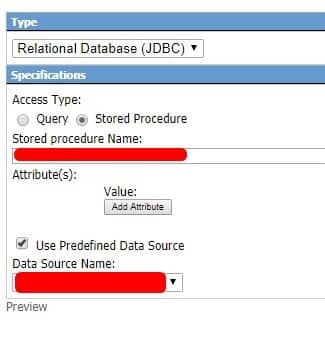
    • Our example will be a Relational Database (JDBC) stored procedure with a predefined Data Source
  5. Click Next or go to Step 2 Define Info Set
    • In this section you will be defining your data depending on what type you select.
    • This data can include defining column data, number/string format etc.
  6. Click Next or go to Step 3 Specify Links
    • This section allows you to add file or class links which is dependent on your organization’s needs and what the notification will be used for.
  7. Click Next or go to Step 4 Save InfoSet
    • In this section you can add a Name, Description, set a group name.
    • Also allows you to add additional access, filter certain content, even categorize or limit the InfoSet.
  8. Once done with Step 4, click Save As New at the bottom to finish your InfoSet

 

That’s it! Smart Notifications and InfoSets have a lot of customizability, most of which aren’t necessary to get it going.

See Part 2 of this series titled “Creating an LBI Smart Notification Series – Creating a Smart Notification (Part 2)” to find out how to add this InfoSet to a new Notification report. Good luck!

Retiring Lawson, PeopleSoft, or Oracle? APIX archives the entire application — every table, every year, attachments and security included — into your own AWS account in about 30 days, so you can decommission the legacy system and keep full access to the history.

See how the APIX ERP archive works →

11/03/2021
Share this entry
  • Share on Facebook
  • Share on X
  • Share on WhatsApp
  • Share on LinkedIn
  • Share on Reddit
  • Share by Mail
https://www.nogalis.com/wp-content/uploads/2021/11/Creating-an-LBI-Smart-Notification-Series-Creating-an-Info-Set-Part-1.jpg 470 470 Angeli Menta https://www.nogalis.com/wp-content/uploads/2013/04/logo-with-slogan-good.png Angeli Menta2021-11-03 07:22:502021-11-19 15:39:03Creating an LBI Smart Notification Series – Creating an Info Set (Part 1)

LEGACY ERP DATA ARCHIVE SOLUTION


Discover how our clients are leveraging AWS services to archive their Legacy ERP data and provide ubiquitous access to users via a light-weight, secure, and read-only web interface. Secure, Fast, Reliable, and Cost Effective. That is the promise of APIX. Follow the link below to find out more and book a discovery call with our data archive specialist.

BOOK DEMO

© Copyright - Nogalis, Inc. 2026
  • Legal
  • Privacy
  • Contact Us
Link to: Foundation Building Materials Selects Infor CloudSuite Distribution as its Technology Platform for Growth Link to: Foundation Building Materials Selects Infor CloudSuite Distribution as its Technology Platform for Growth Foundation Building Materials Selects Infor CloudSuite Distribution as its Technology... Link to: How can CRM software help me improve customer relationships? Link to: How can CRM software help me improve customer relationships? How can CRM software help me improve customer relationships?
Scroll to top Scroll to top Scroll to top