844-NOGALIS (844-664-2547)
Nogalis, Inc.
  • Link to Facebook
  • Link to X
  • Link to LinkedIn
  • Link to Mail
  • Company
    • News, Events and Articles
    • About Us
  • Products
    • Infor Lawson Data Archive
    • PeopleSoft Data Archive
    • Oracle Data Archive
  • Services
    • Infor Lawson Support
    • Infor Lawson / CloudSuite Consulting
  • Education & Training
  • Support
  • Contact Us
  • Click to open the search input field Click to open the search input field Search
  • Menu Menu

How to get a list of specific program codes and screen descriptions in Lawson

Articles, Frontpage Article, News

There are two common ways to get a list of program forms and their description from Lawson. One is through LID and another is through a database application like SQL Management Studio.


Method 1: The database application method requires your user to have at least database read access to the PROD or TEST Lawson database.

  1. Login to the PROD or TEST database through your database app (using SQL Management Studio for this example).
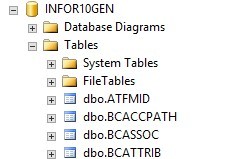
  2. Expand the PROD or TEST GEN database and expand the Tables folder:
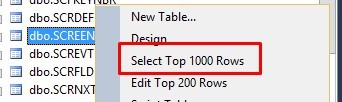
  3. Scroll to the dbo.SCREEN table >> Right-click >> Select Top 1000 Rows
  4. For those not familiar with SQL, simply remove the TOP 1000 portion from the code to return all records in this table.
Change from this:
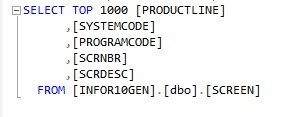
To this:
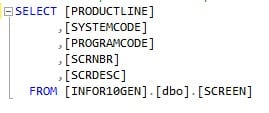
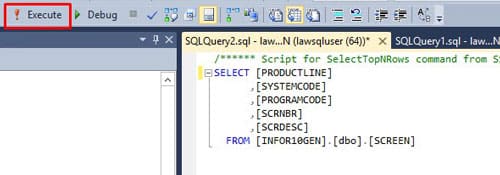
  1. Now click the Execute button:
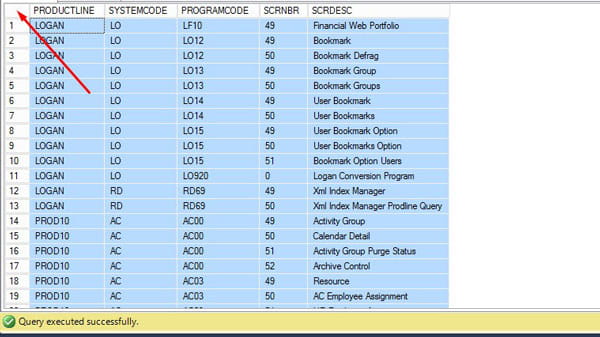
  2. Select all returned records at the bottom by clicking the top left box:
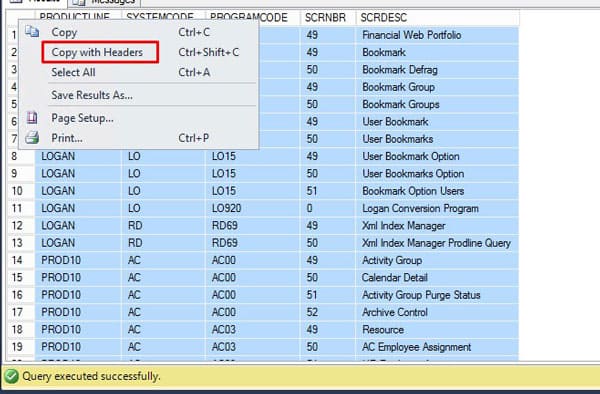
  3. Right-click same box >> Copy with Headers
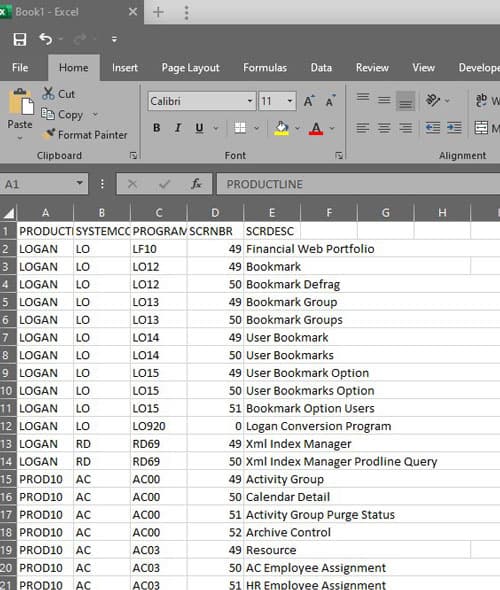
  4. Paste into Excel and filter as needed:


Method 2: The LID method is simpler if you have access to Lawson Interface Desktop

  1. Login into LID, your user will need access to rngdbdump
  2. Change directory to a safe directory to dump a file into.
  3. Type this command: rngdbdump -ct gen SCREEN > SCREEN.csv
    1. This command will dump out the SCREEN database table into a csv file in your current directory
  4. Go to that directory and open the csv file in Excel, filter down on the forms you want to view.

Good luck!


Retiring Lawson, PeopleSoft, or Oracle? APIX archives the entire application — every table, every year, attachments and security included — into your own AWS account in about 30 days, so you can decommission the legacy system and keep full access to the history.

See how the APIX ERP archive works →

10/26/2021
Share this entry
  • Share on Facebook
  • Share on X
  • Share on WhatsApp
  • Share on LinkedIn
  • Share on Reddit
  • Share by Mail
https://www.nogalis.com/wp-content/uploads/2021/10/How-to-get-a-list-of-specific-program-codes-and-screen-descriptions-in-Lawson.jpg 470 470 Angeli Menta https://www.nogalis.com/wp-content/uploads/2013/04/logo-with-slogan-good.png Angeli Menta2021-10-26 08:07:242021-10-21 11:27:17How to get a list of specific program codes and screen descriptions in Lawson

LEGACY ERP DATA ARCHIVE SOLUTION


Discover how our clients are leveraging AWS services to archive their Legacy ERP data and provide ubiquitous access to users via a light-weight, secure, and read-only web interface. Secure, Fast, Reliable, and Cost Effective. That is the promise of APIX. Follow the link below to find out more and book a discovery call with our data archive specialist.

BOOK DEMO

© Copyright - Nogalis, Inc. 2026
  • Legal
  • Privacy
  • Contact Us
Link to: Infor Continues to Invest in Cloud-Based Event Management for Hospitality Industry Link to: Infor Continues to Invest in Cloud-Based Event Management for Hospitality Industry Infor Continues to Invest in Cloud-Based Event Management for Hospitality I... Link to: The Cornell Peter and Stephanie Nolan School of Hotel Administration Partners with Infor Link to: The Cornell Peter and Stephanie Nolan School of Hotel Administration Partners with Infor The Cornell Peter and Stephanie Nolan School of Hotel Administration Partners...
Scroll to top Scroll to top Scroll to top