
Delete Lawson HTTP Endpoints
This article will walk you through the process of deleting endpoints in Lawson. You may need to do this if you decommission an external server and need to add a new server as an endpoint, or if there is an issue with your endpoint and you need to redo it. First, you will unassign the endpoint from all its services, then you will delete it.
From LID or a command line window (with the environment variables set), type ssoconfig -c. Log into ssoconfig with the appropriate password.
First, unassign the endpoint from all the services to which it is attached. (You can see which services it’s attached to in ssoconfig Manage Lawson HTTP Endpoints > Export HTTP Endpoints and HTTP Endpoint assignment to Service).
Go to Manage Lawson HTTP Endpoints > Unassign HTTP Endpoint from Service
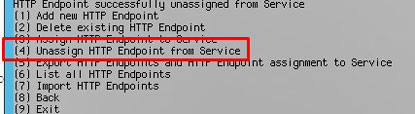
Enter the FQDN of your endpoint, the HTTP port, and the HTTPS port. These are identifying values, and must be entered exactly as they are stored. Enter the service name that you are unassigning (this will typically be either SSOP or the service you use for the thick client login).
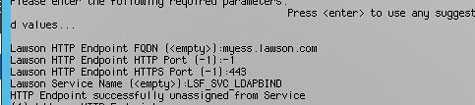
Repeat this process with all the services that this endpoint is attached to. Some examples are IOS, BPM, and LSADMIN. Again, you can find out for sure by exporting the endpoint/services configuration.
Next, select “Delete existing HTTP Endpoint”
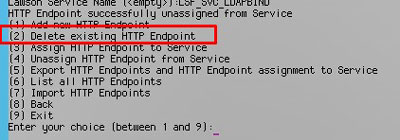
Enter the FQDN of your endpoint, the HTTP port, and the HTTPS port. These are identifying values, and must be entered exactly as they are stored.

You must recycle Lawson after making these changes, as these types of security configurations are stored in the security caches.
Retiring Lawson, PeopleSoft, or Oracle? APIX archives the entire application — every table, every year, attachments and security included — into your own AWS account in about 30 days, so you can decommission the legacy system and keep full access to the history.

