
844-NOGALIS (844-664-2547)
Nogalis, Inc.
  • Link to Facebook
  • Link to X
  • Link to LinkedIn
  • Link to Mail
  • Company
    • News, Events and Articles
    • About Us
  • Products
    • Infor Lawson Data Archive
    • PeopleSoft Data Archive
    • Oracle Data Archive
  • Services
    • Infor Lawson Support
    • Infor Lawson / CloudSuite Consulting
  • Education & Training
  • Support
  • Contact Us
  • Click to open the search input field Click to open the search input field Search
  • Menu Menu

Database Errors after an LBI Upgrade

Articles, Frontpage Article, News

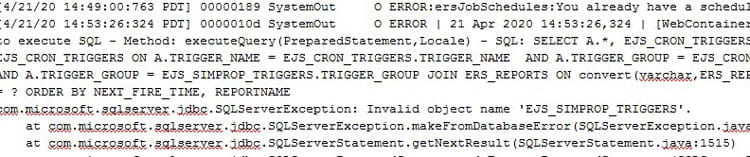
When using the wizard to perform an in-place update to LBI, occasionally the database scripts will fail without notification. The issue will typically present itself when you restart the IBM services and the SystemOut.log throws database errors, such as “invalid object name” or “field does not exist” after the application attempts to run a query.
The good news is that the database update scripts can be run manually.  These scripts can be found at <lbi_install_dir>\<product>\<product>.ear\<product>war-<version>.war\WEB-INF\rdbms\<database type>

So, for example:

  • D:\LBI\ReportingServices\Reporting Services.ear\erswar-10.6.0.0.war\WEB-INF\rdbms\MSSQL2K
  • D:\LBI\FrameworkServices\Framework Services.ear\efswar-10.6.0.0.war\WEB-INF\rdbms\MSSQL2K
  • D:\LBI\SmartNotifications\Smart Notifications.ear\lsnwar-10.6.0.0.war\WEB-INF\rdbms\MSSQL2K

You want to run all the update scripts that exist between your old version and your new version.  So, if you are upgrading from 10.4 to 10.6, you would run the highlighted scripts:
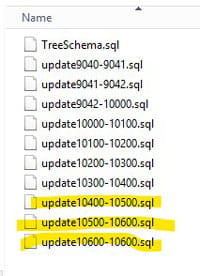
***IMPORTANT:  DO NOT run the oracle.sql or TreeSchma.sql script. They will drop all your tables.


Retiring Lawson, PeopleSoft, or Oracle? APIX archives the entire application — every table, every year, attachments and security included — into your own AWS account in about 30 days, so you can decommission the legacy system and keep full access to the history.

See how the APIX ERP archive works →

06/16/2020
Share this entry
  • Share on Facebook
  • Share on X
  • Share on WhatsApp
  • Share on LinkedIn
  • Share on Reddit
  • Share by Mail
https://www.nogalis.com/wp-content/uploads/2020/06/Database-Errors-after-an-LBI-Upgrade.jpg 470 470 Angeli Menta https://www.nogalis.com/wp-content/uploads/2013/04/logo-with-slogan-good.png Angeli Menta2020-06-16 07:23:092021-02-10 11:59:18Database Errors after an LBI Upgrade

LEGACY ERP DATA ARCHIVE SOLUTION


Discover how our clients are leveraging AWS services to archive their Legacy ERP data and provide ubiquitous access to users via a light-weight, secure, and read-only web interface. Secure, Fast, Reliable, and Cost Effective. That is the promise of APIX. Follow the link below to find out more and book a discovery call with our data archive specialist.

BOOK DEMO

© Copyright - Nogalis, Inc. 2026
  • Legal
  • Privacy
  • Contact Us
Link to: Why Facial Recognition Remains a Powerful Yet Controversial Technology Link to: Why Facial Recognition Remains a Powerful Yet Controversial Technology Why Facial Recognition Remains a Powerful Yet Controversial Technology Link to: How to Build Resilience Amid Supply Chain Disruption Link to: How to Build Resilience Amid Supply Chain Disruption How to Build Resilience Amid Supply Chain Disruption
Scroll to top Scroll to top Scroll to top