844-NOGALIS (844-664-2547)
Nogalis, Inc.
  • Link to Facebook
  • Link to X
  • Link to LinkedIn
  • Link to Mail
  • Company
    • News, Events and Articles
    • About Us
  • Products
    • Infor Lawson Data Archive
    • PeopleSoft Data Archive
    • Oracle Data Archive
  • Services
    • Infor Lawson Support
    • Infor Lawson / CloudSuite Consulting
  • Education & Training
  • Support
  • Contact Us
  • Click to open the search input field Click to open the search input field Search
  • Menu Menu

Utilizing Lawson Business Intelligence (LBI) Security Groups

Articles, Frontpage Article, News

Traditionally LBI is setup with Lawson Groups such as the LBIUser which by default, communicates to LBI which users should have access.

There is another way to assign rights in LBI aside from adding more groups to users. LBI has its own native “Report Security Group” system.

  1. To access this system, login into LBI as your admin user and access Reporting Services Administration.
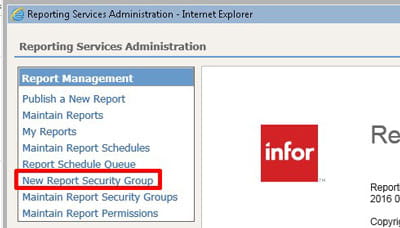
  2. Under Report Management, select “New Report Security Group” to create a new security group
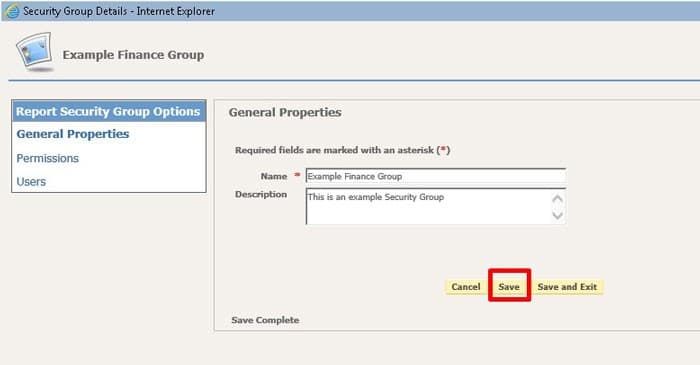
  3. Enter the name of the group and description, click Save
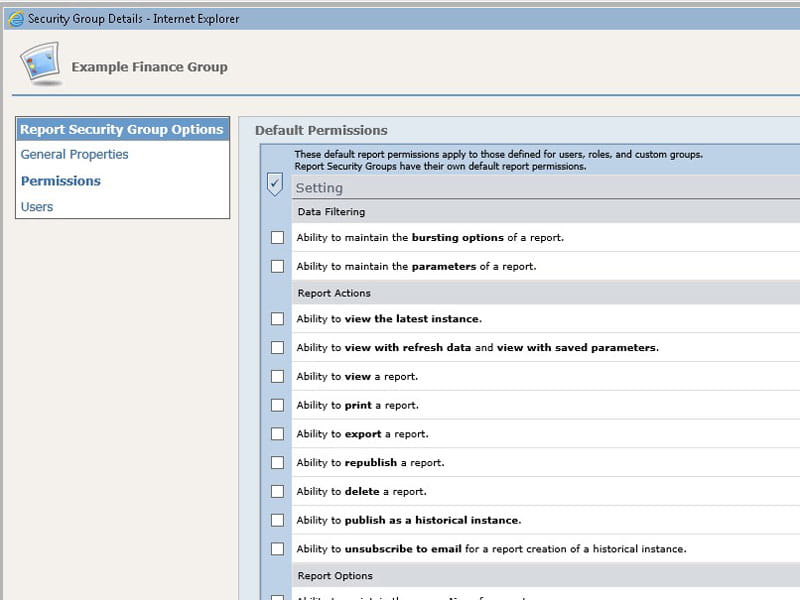
  4. Now set the permissions similar to how you set permissions per report.
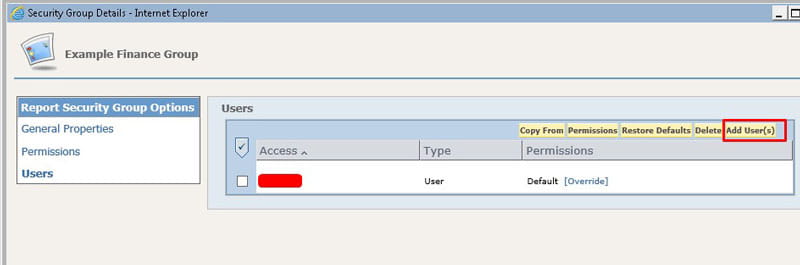
  5. Go to Users and add the users you want to have access to this group, you can even set report overrides per user if needed
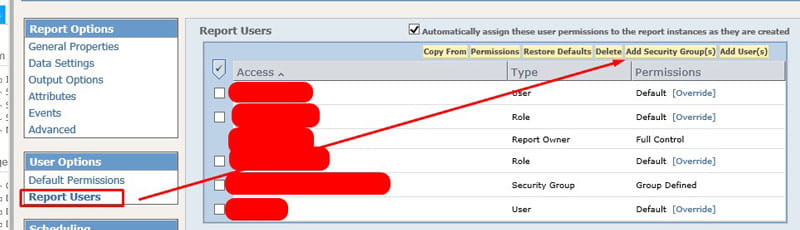
  6. Now on an individual report, you can add the entire security group you just created to it:

You’ll still need to have Lawson groups to grant access to individual dashboards and modules but this helps add a new layer of security in an organized way.

Retiring Lawson, PeopleSoft, or Oracle? APIX archives the entire application — every table, every year, attachments and security included — into your own AWS account in about 30 days, so you can decommission the legacy system and keep full access to the history.

See how the APIX ERP archive works →

04/16/2020
Share this entry
  • Share on Facebook
  • Share on X
  • Share on WhatsApp
  • Share on LinkedIn
  • Share on Reddit
  • Share by Mail
https://www.nogalis.com/wp-content/uploads/2020/04/Utilizing-Lawson-Business-Intelligence-LBI-Security-Groups-3.jpg 470 470 Angeli Menta https://www.nogalis.com/wp-content/uploads/2013/04/logo-with-slogan-good.png Angeli Menta2020-04-16 08:37:282020-04-11 14:30:23Utilizing Lawson Business Intelligence (LBI) Security Groups

LEGACY ERP DATA ARCHIVE SOLUTION


Discover how our clients are leveraging AWS services to archive their Legacy ERP data and provide ubiquitous access to users via a light-weight, secure, and read-only web interface. Secure, Fast, Reliable, and Cost Effective. That is the promise of APIX. Follow the link below to find out more and book a discovery call with our data archive specialist.

BOOK DEMO

© Copyright - Nogalis, Inc. 2026
  • Legal
  • Privacy
  • Contact Us
Link to: How the COVID-19 pandemic is reshaping healthcare with technology Link to: How the COVID-19 pandemic is reshaping healthcare with technology How the COVID-19 pandemic is reshaping healthcare with technology Link to: Configuring Lawson for LDAP Signing Link to: Configuring Lawson for LDAP Signing Configuring Lawson for LDAP Signing
Scroll to top Scroll to top Scroll to top