
844-NOGALIS (844-664-2547)
Nogalis, Inc.
  • Link to Facebook
  • Link to X
  • Link to LinkedIn
  • Link to Mail
  • Company
    • News, Events and Articles
    • About Us
  • Products
    • Infor Lawson Data Archive
    • PeopleSoft Data Archive
    • Oracle Data Archive
  • Services
    • Infor Lawson Support
    • Infor Lawson / CloudSuite Consulting
  • Education & Training
  • Support
  • Contact Us
  • Click to open the search input field Click to open the search input field Search
  • Menu Menu

Resolving job error – “No Data in Report File – Check Report Parameters for Possible Error Message”

Articles, Frontpage Article, News

While this error itself may be obvious, you’ve already taken the steps to run the job under a different user with the same parameters and everything seems to be working. Sound familiar? Let’s dive deeper to see if this issue is related to yours.

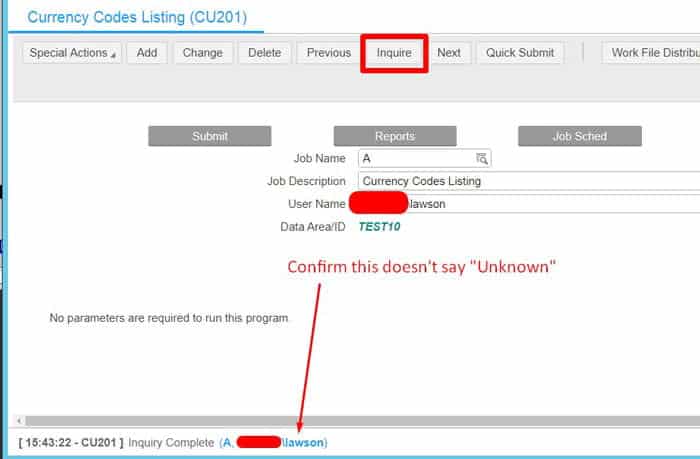
  1. Go to the Lawson batch job form for the user that is having issues.
  2. Inquire on the job and verify that you do NOT get an “Unknown” user
  3. If you’re seeing an “Unknown” at the bottom of the browser bar, continue, else you likely do not have the same issue.
  4. Open Lawson Interface Desktop (LID) and run command: listusermap -n
  5. In LID, run command: listusermap -a
  6. This should generate a new list of user identities again.
  7. Clear your server cache and IOS cache, logout and back in and your issue be resolved.
 

Retiring Lawson, PeopleSoft, or Oracle? APIX archives the entire application — every table, every year, attachments and security included — into your own AWS account in about 30 days, so you can decommission the legacy system and keep full access to the history.

See how the APIX ERP archive works →

03/23/2020
Share this entry
  • Share on Facebook
  • Share on X
  • Share on WhatsApp
  • Share on LinkedIn
  • Share on Reddit
  • Share by Mail
https://www.nogalis.com/wp-content/uploads/2020/03/Resolving-job-error-“No-Data-in-Report-File-Check-Report-Parameters-for-Possible-Error-Message”.jpg 470 470 Angeli Menta https://www.nogalis.com/wp-content/uploads/2013/04/logo-with-slogan-good.png Angeli Menta2020-03-23 07:13:412020-03-20 17:26:27Resolving job error – “No Data in Report File – Check Report Parameters for Possible Error Message”

LEGACY ERP DATA ARCHIVE SOLUTION


Discover how our clients are leveraging AWS services to archive their Legacy ERP data and provide ubiquitous access to users via a light-weight, secure, and read-only web interface. Secure, Fast, Reliable, and Cost Effective. That is the promise of APIX. Follow the link below to find out more and book a discovery call with our data archive specialist.

BOOK DEMO

© Copyright - Nogalis, Inc. 2026
  • Legal
  • Privacy
  • Contact Us
Link to: Five Features Your Next CRM Needs To Maximize Your Sales Link to: Five Features Your Next CRM Needs To Maximize Your Sales Five Features Your Next CRM Needs To Maximize Your Sales Link to: Saarioinen Gets Fresh with Infor Link to: Saarioinen Gets Fresh with Infor Saarioinen Gets Fresh with Infor
Scroll to top Scroll to top Scroll to top