
Using IPA to Update SSOP Identity after AD FS Configuration
Once your AD FS configuration is done, you’ll need to update the SSOP identity with userPrincipalName for all of your users in Lawson Security. IPA is a great tool for this task.
Some nodes that you’ll need include:
- System Command – get AD users
- Run a powershell command to get the samAccountName and userPrincipalName from Active Directory
- powershell “Get-ADUser -Filter * -SearchBase ‘<OU Path (i.e. OU=Users,DC=company,DC=org)>’ | Select-object SamAccountName,UserPrincipalName | ConvertTo-Csv -NoTypeInformation”
- Data Iterator to iterate through the results from the AD query
- Resource Query
- Get User by querying on SSOP value
- <?xml version=”1.0″ encoding=”UTF-8″ standalone=”yes”?><TRANSACTION user=”user@company.org” method=”getRMQuery”><SERVICE><![CDATA[SSOP]]></SERVICE><SERVICEATTRS><SERVICEATTR><NAME><![CDATA[USER]]></NAME><VALUE><![CDATA[<!samAccountName>]]></VALUE></SERVICEATTR></SERVICEATTRS><OBJECT><![CDATA[People]]></OBJECT><ATTRIBUTES><ATTRIBUTE><![CDATA[ID]]></ATTRIBUTE></ATTRIBUTES><OUTPUTSERVICEATTRS/></TRANSACTION>
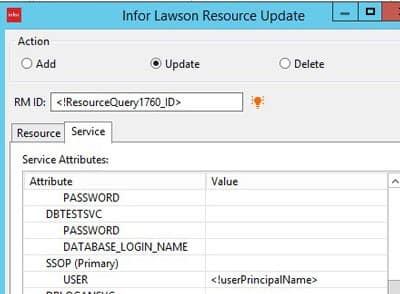
- Resource Update
- Using the ID from your Resource Query, Update the SSOP service
Retiring Lawson, PeopleSoft, or Oracle? APIX archives the entire application — every table, every year, attachments and security included — into your own AWS account in about 30 days, so you can decommission the legacy system and keep full access to the history.

