844-NOGALIS (844-664-2547)
Nogalis, Inc.
  • Link to Facebook
  • Link to X
  • Link to LinkedIn
  • Link to Mail
  • Company
    • News, Events and Articles
    • About Us
  • Products
    • Infor Lawson Data Archive
    • PeopleSoft Data Archive
    • Oracle Data Archive
  • Services
    • Infor Lawson Support
    • Infor Lawson / CloudSuite Consulting
  • Education & Training
  • Support
  • Contact Us
  • Click to open the search input field Click to open the search input field Search
  • Menu Menu

5 ServiceNow Tips & Tricks I Wish I Knew When I Started!

Articles, Frontpage Article, News
  1. Performance degradation? Forms slow to load?
    Try following these steps:
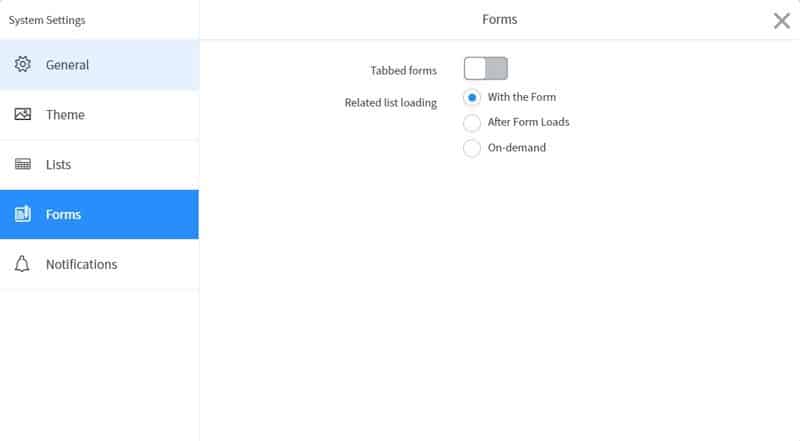
    • Click the Settings Gear Icon on the top right of your ServiceNow screen, next to your name. Then, navigate to the Forms tab.


    • Changing the Related list loading from “With the Form” to “After Form Loads” for a slight improvement in performance. Changing to “On-Demand” can result in significant performance gains as this would change it so that records get loaded only upon click.

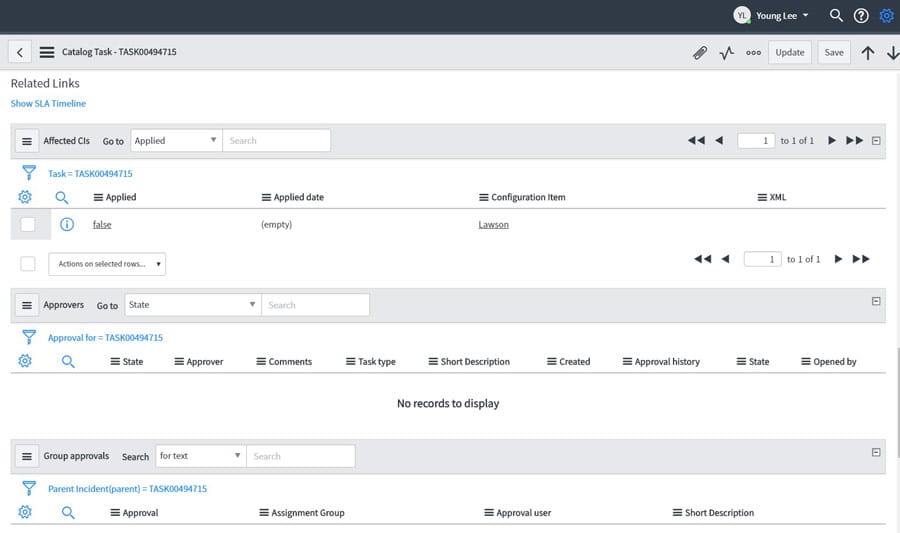
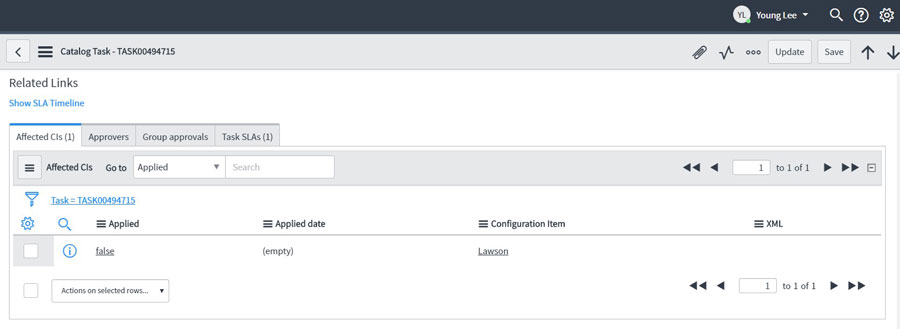
  2. Change the form view to a cleaner tabbed format versus the normal lengthy vertical layout.
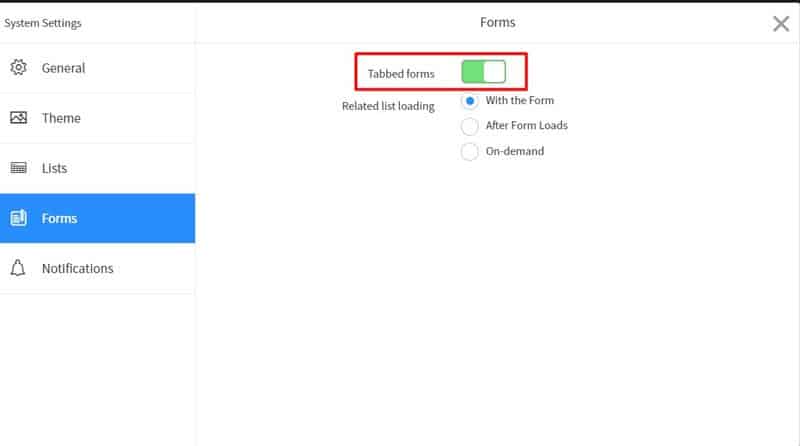
    From the same Forms tab in System Settings (refer to tip #1), we can turn on Tabbed forms to change to this view.

    BEFORE:

    AFTER:

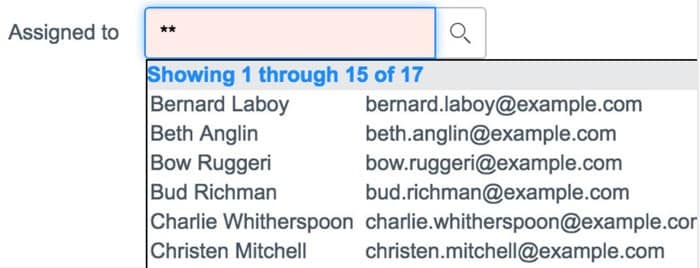
  3. Using asterisks (*) and double asterisks (**) for Reference fields.
    In ServiceNow, searching for a record in a reference field will automatically use a “STARTSWITH” query.

    This can cause some difficulties when trying to search for records.

    The solution is to use an asterisk before typing in the search term. This will change the query to a “CONTAINS” search which makes searching for records a lot easier.

    Also, you can also use double asterisks (**) to quickly return the first (up to) 15 records in the table.

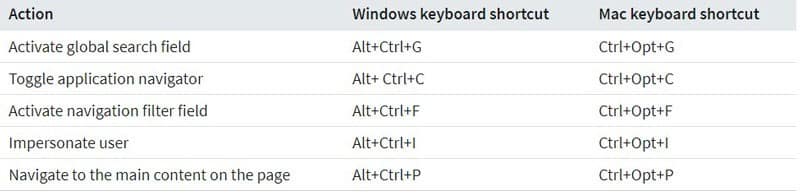
  4. ServiceNow Keyboard Shortcuts.
  5. Quickly add attachments by simply dragging file to “Work notes” area.

    Attaching files by clicking the paperclip icon and then browsing for the file is a slow process. You can
    simply drag and drop the file you want to attach into the Work notes box.

Retiring Lawson, PeopleSoft, or Oracle? APIX archives the entire application — every table, every year, attachments and security included — into your own AWS account in about 30 days, so you can decommission the legacy system and keep full access to the history.

See how the APIX ERP archive works →

05/08/2019
Share this entry
  • Share on Facebook
  • Share on X
  • Share on WhatsApp
  • Share on LinkedIn
  • Share on Reddit
  • Share by Mail
https://www.nogalis.com/wp-content/uploads/2019/05/5-ServiceNow-Tips-Tricks-I-Wish-I-Knew-When-I-Started.jpg 439 480 Angeli Menta https://www.nogalis.com/wp-content/uploads/2013/04/logo-with-slogan-good.png Angeli Menta2019-05-08 08:04:562019-05-08 14:27:425 ServiceNow Tips & Tricks I Wish I Knew When I Started!

LEGACY ERP DATA ARCHIVE SOLUTION


Discover how our clients are leveraging AWS services to archive their Legacy ERP data and provide ubiquitous access to users via a light-weight, secure, and read-only web interface. Secure, Fast, Reliable, and Cost Effective. That is the promise of APIX. Follow the link below to find out more and book a discovery call with our data archive specialist.

BOOK DEMO

© Copyright - Nogalis, Inc. 2026
  • Legal
  • Privacy
  • Contact Us
Link to: SQL DECLARE and SET datetime Link to: SQL DECLARE and SET datetime SQL DECLARE and SET datetime Link to: Iberian Sport Retail Group Gets Fit for Business with Infor Link to: Iberian Sport Retail Group Gets Fit for Business with Infor Iberian Sport Retail Group Gets Fit for Business with Infor
Scroll to top Scroll to top Scroll to top