
Infor Process Automation (IPA) Best Practices and Performance Improvement Tips
Since Infor Process Designer is an open-ended visual design tool, different users can achieve the same end goal but in many different ways. While the flow might technically “work”, this level of design freedom usually leads to processes that are not as efficient as they could potentially be.
Here are some tips to keep in mind as you design your next flow:
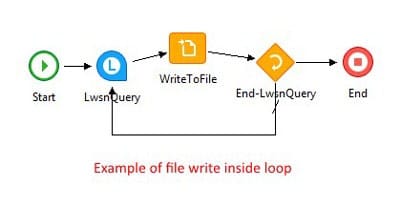
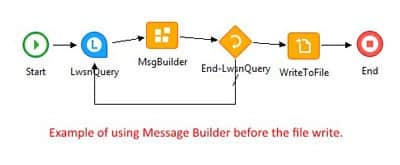
- Use a MsgBuilder node instead of writing to file for each record


By using a MsgBuilder node, we can append all found records to a String in memory. We can then call the string when we need to write the records. This is much faster than individually writing each line, each time through the FileAccess node. - Merge Assign Nodes

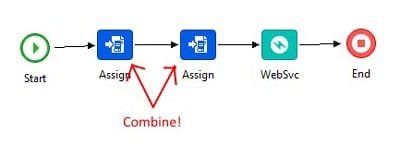
This is a common mistake in many processes. There is no reason two Assign nodes would have to line up one after another in a flow. You can simply use one Assign node for all your variables/javascript. More nodes in your flow results in slower speeds so you should always try to use as few nodes as possible. - Remove Unnecessary Assign Nodes

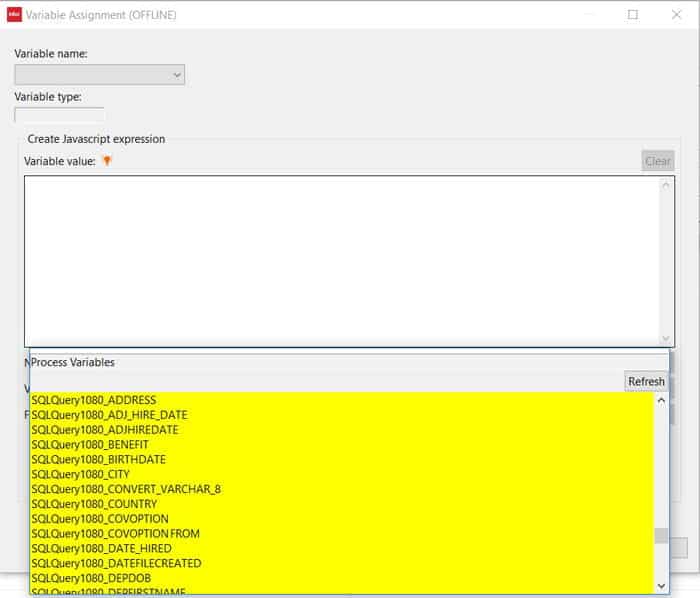
When a value is returned from a query or processing node, it is automatically assigned an internal variable name.In the screenshot above, we see the values pulled from my SQL query have already been automatically assigned a variable. Therefore, there would be no point in having an Assign node to set SQL ADDRESS to my custom variable <!ADDRESS>. It would be better to simply call <!SQLQuery1080_ADDRESS> when needed as the variable has already been created for me.
- Remote File Access
When the Infor Lawson business applications and ProcessFlow are on the same server, file access is blazing fast since all the files are local. However, when IPA is on a separate server, the process slows down since the flow must now access the file across the network and not locally.To mitigate this issue, make sure file access is done as efficiently as possible. Perhaps reach out to those in charge of network IT to see about reducing network lag.
- Upload the Process with Logging Off
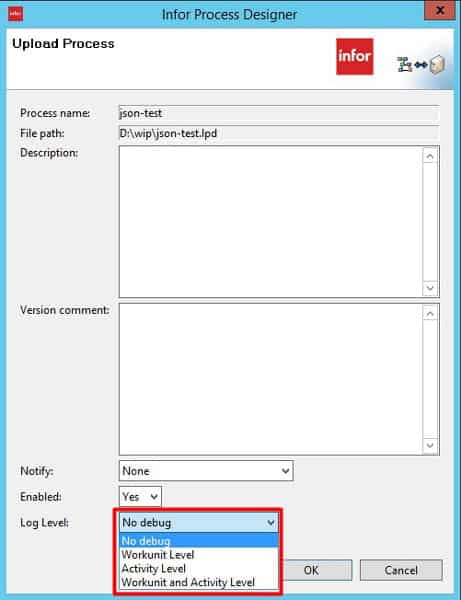
Process logging can negatively affect performance. Unless you are troubleshooting a problem, processes should be uploaded with Log Level: No debug

Retiring Lawson, PeopleSoft, or Oracle? APIX archives the entire application — every table, every year, attachments and security included — into your own AWS account in about 30 days, so you can decommission the legacy system and keep full access to the history.

