844-NOGALIS (844-664-2547)
Nogalis, Inc.
  • Link to Facebook
  • Link to X
  • Link to LinkedIn
  • Link to Mail
  • Company
    • News, Events and Articles
    • About Us
  • Products
    • Infor Lawson Data Archive
    • PeopleSoft Data Archive
    • Oracle Data Archive
  • Services
    • Infor Lawson Support
    • Infor Lawson / CloudSuite Consulting
  • Education & Training
  • Support
  • Contact Us
  • Click to open the search input field Click to open the search input field Search
  • Menu Menu

Adding a report to an existing list in LBI

Articles, News
  • First, check the criteria of the report list
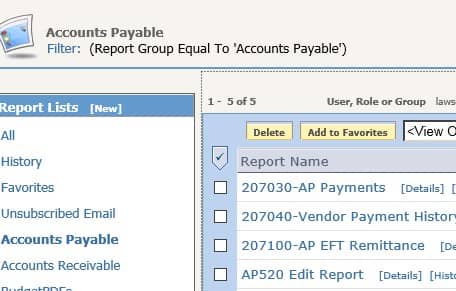
  • Go to the Tools tab and select “Reporting Services My Reports”
  • Click on your list name
  • Make note of the filter
  • Some filters use attributes to create lists. If your filter uses an attribute, you would want to add that attribute to your report.
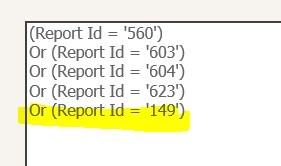
  • The list in this example “hard-codes” report id values, so you need to edit the list rather than the report
  • Get the ID of your report
  • Go back to My Reports and find your report
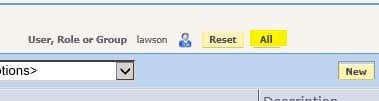
  • If you don’t see your report listed, try clicking the “All” button at the top to display reports for all users
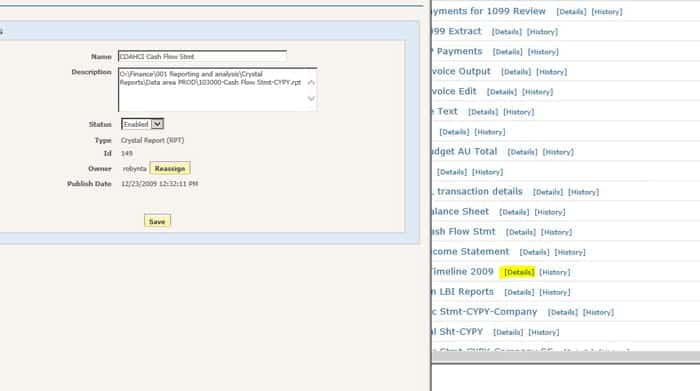
  • Navigate to your report in the list and click “Details”
  • Make note of the ID
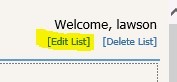
  • Go back to your list and click “Edit List” at the top of the screen
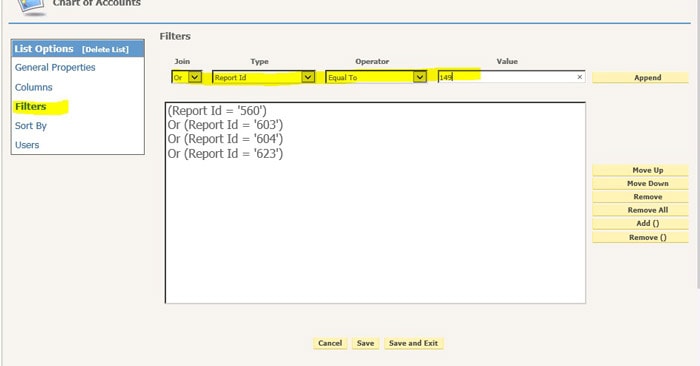
  • Click Filters
  • Add the text “Or (Report Id = ‘<your id>’)
  • Click ‘Append’

Here is an example of how to update attributes for a list that works on attributes:

  • Follow the steps above to find your list name and get the criteria for your list
  • Go to the report that you want to show up in that list
  • Click Details
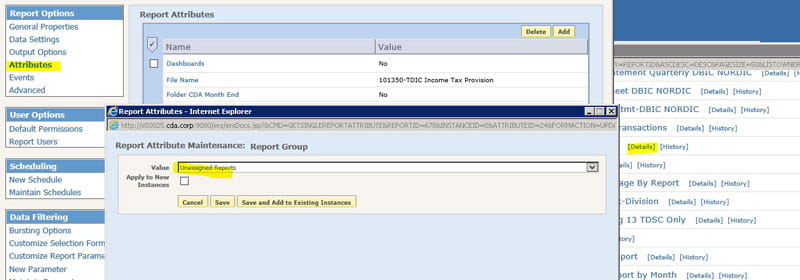
  • Click Attributes
  • Click Add
  • Select the attribute(s) that are used in the list filter
  • Select the filter value

Retiring Lawson, PeopleSoft, or Oracle? APIX archives the entire application — every table, every year, attachments and security included — into your own AWS account in about 30 days, so you can decommission the legacy system and keep full access to the history.

See how the APIX ERP archive works →

01/23/2019
Share this entry
  • Share on Facebook
  • Share on X
  • Share on WhatsApp
  • Share on LinkedIn
  • Share on Reddit
  • Share by Mail
https://www.nogalis.com/wp-content/uploads/2019/01/Adding-a-report-to-an-existing-list-in-LBI.jpg 458 500 Angeli Menta https://www.nogalis.com/wp-content/uploads/2013/04/logo-with-slogan-good.png Angeli Menta2019-01-23 10:23:472019-02-23 11:05:16Adding a report to an existing list in LBI

LEGACY ERP DATA ARCHIVE SOLUTION


Discover how our clients are leveraging AWS services to archive their Legacy ERP data and provide ubiquitous access to users via a light-weight, secure, and read-only web interface. Secure, Fast, Reliable, and Cost Effective. That is the promise of APIX. Follow the link below to find out more and book a discovery call with our data archive specialist.

BOOK DEMO

© Copyright - Nogalis, Inc. 2026
  • Legal
  • Privacy
  • Contact Us
Link to: 7 Steps for Implementing Reliability-based Maintenance Link to: 7 Steps for Implementing Reliability-based Maintenance 7 Steps for Implementing Reliability-based Maintenance Link to: 7 Golden Rules for ERP Implementations Link to: 7 Golden Rules for ERP Implementations 7 Golden Rules for ERP Implementations
Scroll to top Scroll to top Scroll to top