
Submitting ACA (Affordable Care Act) to IRS
Once you have done all your Infor work to create your files for submitting to IRS, the steps below will help you get your file submitted successfully. The final files are generated when you run the BN299.
Download the schema package from the IRS website: Schema Package – IRS
Follow instructions on validating the files generated from Infor. See attached KB from Infor View Attachment
Example of file names:
1094C_Request_XXXXX_YYYYMMDDXXXXXXXXXXZ.xml
1094C_Request_XXXXX_YYYYMMDDXXXXXXXXXXZ-Manifest.xml
An XML Reader Application is needed to validate the files. Altova XMLSpy application is a good program to use for this. Follow the steps in the above KB article to validate the files.
Once you make the changes that are noted in the XML Validator you will need to update the Checksum value in the Manifest.xml

Checksum verifies the integrity of the file. Download the utility FCIV. FCIV (File ChecksumIntegrity Verifier) is utility from Microsoft that computes (MD5 and SHA1) and verify Integrity of the File.
From the command prompt:
- Browse to the location where your files and fciv.exe is located
- Type program name + file name (ex. fciv.exe 1094C_Request_BB9LL_20160629T100009000Z.xml)
- Press enter
- The unique value should be placed in the ChecksumAugmentationNum tag in the Manifest.xml


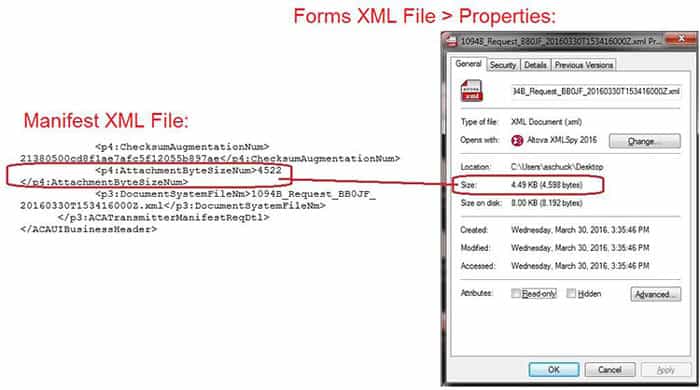
You also will need to make sure the AttachmentByteSizeNum is correct. This can change when you make changes to the file.

See attached KB from Infor for details. View Attachment
- Locate the Forms XML File.
- Right click on the file, select Properties
- Locate the Manifest XML File.
- Right click and open using Wordpad
- Find <p4:AttachmentByteSizeNum> entry
- Replace the existing byte size entry with the byte size found in the Forms XML File properties.
- In this example: Change Manifest Size: 4522 to match Forms XML File size: 4598
- Save update

And we’re done!
Retiring Lawson, PeopleSoft, or Oracle? APIX archives the entire application — every table, every year, attachments and security included — into your own AWS account in about 30 days, so you can decommission the legacy system and keep full access to the history.

