
844-NOGALIS (844-664-2547)
Nogalis, Inc.
  • Link to Facebook
  • Link to X
  • Link to LinkedIn
  • Link to Mail
  • Company
    • News, Events and Articles
    • About Us
  • Products
    • Infor Lawson Data Archive
    • PeopleSoft Data Archive
    • Oracle Data Archive
  • Services
    • Infor Lawson Support
    • Infor Lawson / CloudSuite Consulting
  • Education & Training
  • Support
  • Contact Us
  • Click to open the search input field Click to open the search input field Search
  • Menu Menu

SQL DECLARE and SET datetime

Articles, Frontpage Article, News

This article discusses the DECLARE statement in SQL, which you can find the official documentation here: https://docs.microsoft.com/en-us/sql/t-sql/language-elements/declare-local-variable-transact-sql?view=sql-server-2017

The DECLARE statement is used in a SQL statement to declare a variable. The declared variable can then be set using SET statement. Once set, the declared variable can be referred by the SELECT statement.

The DECLARE statement can also be used to declare a DATETIME and the SET statement can modify this DATETIME with DATEADD. This allows us to avoid dealing with JavaScript datetime variables.

For our case, we wanted to query all individuals that were set to turn 18 years old within a year.

In order to do this, we first ‘DECLARE’d the variables we would need and modified them using SET:
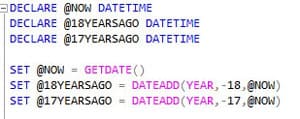

Note: First argument of DATEADD function can be any accepted SQL interval (year,month,week,day,hour,second,etc.)

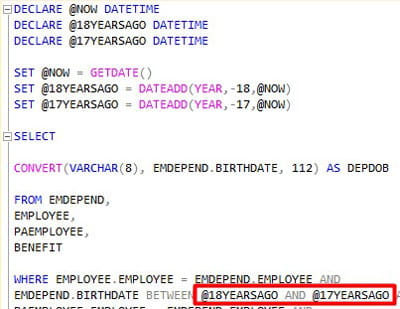
Now that our 3 variables had been set, we were able to refer to them in the WHERE portion of the SELECT statement:
Full query with results:
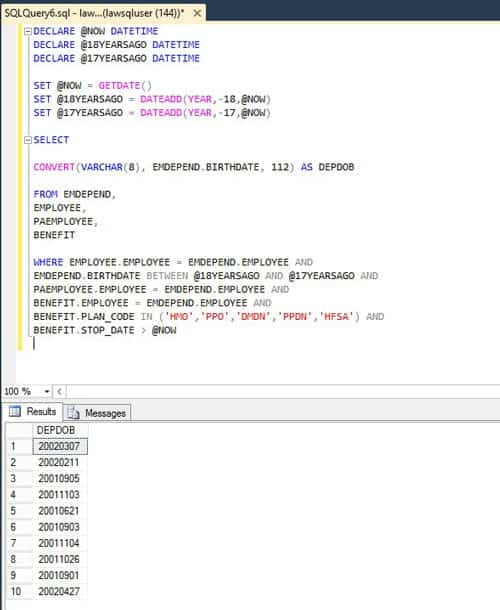
By specifying the search range using DECLARE and SET, we are able to query the DOBs of just those users that are set to turn 18 years of age within a year of the query date.

Retiring Lawson, PeopleSoft, or Oracle? APIX archives the entire application — every table, every year, attachments and security included — into your own AWS account in about 30 days, so you can decommission the legacy system and keep full access to the history.

See how the APIX ERP archive works →

05/07/2019
Share this entry
  • Share on Facebook
  • Share on X
  • Share on WhatsApp
  • Share on LinkedIn
  • Share on Reddit
  • Share by Mail
https://www.nogalis.com/wp-content/uploads/2019/05/SQL-DECLARE-and-SET-datetime.jpg 446 490 Angeli Menta https://www.nogalis.com/wp-content/uploads/2013/04/logo-with-slogan-good.png Angeli Menta2019-05-07 14:21:362019-05-06 14:23:54SQL DECLARE and SET datetime

LEGACY ERP DATA ARCHIVE SOLUTION


Discover how our clients are leveraging AWS services to archive their Legacy ERP data and provide ubiquitous access to users via a light-weight, secure, and read-only web interface. Secure, Fast, Reliable, and Cost Effective. That is the promise of APIX. Follow the link below to find out more and book a discovery call with our data archive specialist.

BOOK DEMO

© Copyright - Nogalis, Inc. 2026
  • Legal
  • Privacy
  • Contact Us
Link to: How to Leverage Relationships Through CRM Link to: How to Leverage Relationships Through CRM How to Leverage Relationships Through CRM Link to: 5 ServiceNow Tips & Tricks I Wish I Knew When I Started! Link to: 5 ServiceNow Tips & Tricks I Wish I Knew When I Started! 5 ServiceNow Tips & Tricks I Wish I Knew When I Started!
Scroll to top Scroll to top Scroll to top