While many of our business processes are making a home in the accessible cloud , many enterprise CISOs (chief information security officers) find themselves in a love/hate relationship with this new environment. While the cloud could be readily accessible and seamless to users, there are still security threats and policies that need to be in place to keep your company’s data secure. Technology expert Evan Schuman shares an article on CSO Online explaining how the very nature of cloud use in the enterprise can deliver a wide range of insidious cybersecurity problems that can be difficult to detect. Schuman spoke with a range of cloud security experts about under-the-radar cloud security issues most likely to surprise the enterprise SOC.

IT inventory excuses don’t cut it in the cloud. “Security specialists often avoid dealing with performing inventory of IT assets on-prem. What many don’t realize is that taking inventory in the cloud is far easier and there are no excuses for avoiding doing it anymore,’ says Scott Piper as such inventory avoidance can deliver severe cybersecurity problems.”

Cloud bills help track attacks — but with caveats. “Some attackers aren’t interested in stealing enterprise data via ransomware or shutting down operations via DDoS. Instead, they are saboteurs looking to punish the enterprise for whatever reason. One such method includes denial of wallet (DoW) attacks designed to force your enterprise to run up lots of extra cloud charges.”

Your IDP strategy is likely lacking. “Identity provider (IDP) outages are relatively rare and don’t last very long. Plus, switching to a backup service can cause bigger disruptions for end-users — given the possibility of requiring a behavioral change — than simply waiting a few more minutes to see whether the primary system gets restored. ‘But because there’s no way to determine when restoration will happen, enterprises still need an IDP backup strategy,’ says Martin Kuppinger, principal analyst for German consulting firm Kuppinger Cole Analysts. Unfortunately, for the reasons cited above, many companies forego having one.”

SaaS is a security issue you’re not fully dealing with. “‘SaaS providers vary hugely in risk. SaaS apps are radically different in how much risk they present to the organization. The biggest are very good. The next couple of tiers are usable but there is a long tail of SaaS apps that are very hard to assess,’ says Gartner analyst Charlie Winckless. ‘This issue is compounded by the fact that many CISOs have a massive focus on the three big hyperscalers and ignore SaaS. Code repositories are often in SaaS and may be open or much less secure than you expect.'”

Dangling DNS pointers can be big problems. Winckless adds about DNS, ‘It’s easy in the dynamic nature of cloud to be exposed by DNS. [Let’s say your team] sets up a site in Azure with an azurewebsites.net DNS and creates a CNAME for yourself and points it to the site. If you delete the site, which is common, and not the CNAME, an attacker can masquerade under your dangling DNS. This isn’t cloud-unique, but the cloud dynamism makes it much easier to accidentally leave yourself with the dangling DNS pointer.'”

API access is a security incident waiting to happen. “‘Local API keys in apps are a surprisingly common yet overlooked cloud security gap,’ says Paul Querna, CTO of ConductorOne, an identity governance firm. ‘In many cases, there’s a local API key that will continue working even after SSO has been disabled. That’s because local API keys operate independently of the user’s SSO status and are not automatically revoked when SSO is turned off. This means that the user might still have access to some systems or data, which poses a serious security risk.'”

IMDSv2: What you don’t know could kill your cloud. “In March 2024, Amazon quietly rolled out an update to a critical piece of the AWS platform: the Instance Metadata Service (IMDS). Some SOCs ‘might not even realize that they are using [IMDS]’ and therefore they are exposing their operation to a serious ‘security threat related to metadata exposure,’ says Pluralsight’s Firment. AWS introduced a second version of IMDS to improve the security of unauthorized metadata, although many organizations are still using the original IMDSv1 as the default. To help CISOs close this potential security hole, AWS recently announced the ability to set all newly launched Amazon EC2 instances to the more secure IMDSv2 by default. IMDSv2 ‘was launched by AWS in November 2019 but the ability to set the default to the new version was not introduced until March 2024. As a result, many organizations continued to use the original vulnerable IMDSv1. Interesting to note that the default only applies to new instances launched, so existing instances with IMDSv1 still need to be reconfigured,’ Firment says.”
 

For Full Article, Click Here

If you’re experiencing Landmark Error:

“Email failed with error: 554 Access denied: Amazon SES no longer supports TLS 1.0 and TLS1.1 connections”


This is a known issue with TLS v 1.2 with the version of Landmark your current system is running. It’s resolved in the 11.0.49 release, reach out to your Infor representative or MSP consultant to get this updated. Here at Nogalis we also provide this MSP support if needed.


In the meantime, you can download the attached jar file or search KB 2221448 and then follow the steps below.

  1. Stop Landmark and Stop WAS to be thorough (LMK command window type stoplaw)
  2. Delete (or save off into a different directory) GRIDHOME\LAENVDIR\java\thirdParty\mailapi.jar
  3. Copy the javax.mail-api-1.6.2.jar you downloaded into GRIDHOME\LAENVDIR\java\thirdParty and rename it to mailapi.jar
  4. Start Landmark (LMK command window type startlaw) – Start WAS


Done! Hope this was helpful and resolved your TLS issues in Landmark.


Enterprise resource planning (ERP) software has quickly gone from on-premise environments to the cloud being the most popular option. Being on the cloud means your ERP will be hosted online – meaning greater accessibility and reach to your team. Amy Nichol Smith, tech expert and writer, and Kelly Main, marketing editor and writer, wrote an article on Forbes highlighting this years best cloud ERP software on the market and how they can benefit your business almost immediately.

The Best 7 Cloud ERP Software of 2024

  • Microsoft Dynamics 365 Business Central: Best overall
  • SAP Business One Professional: Best for customization
  • SYSPRO: Best for manufacturing businesses
  • QT9: Best for real-time reporting
  • Epicor Prophet 21 ERP: Best for distributors
  • Oracle NetSuite OneWorld: Best for global companies
  • Acumatica: Best for easy pricing


Benefits of Choosing a Cloud ERP

There are many benefits of choosing to move to a cloud ERP over traditional on-premise applications. For one, the ease of accessibility with cloud-based ERPs is a great advantage for on the go employees or those who work remotely. Additional benefits, according to the Forbes article, include:

  • Low upfront investment: With the platform and data hosted on the provider’s servers, you don’t need to purchase hardware for the software
  • Less expensive: Paying a monthly per-user fee may be much easier on budgets of small enterprises, so it can be affordable to use cloud ERP software.
  • No maintenance: You won’t need your IT department to dedicate resources to updating or maintaining your software because the provider should handle it for you.
  • Consolidated data: All the data you need to see across departments should sync seamlessly, so you can see real-time analytics on financials, materials, processes, time restraints, expected availability of goods and other important data.
  • Fewer integrations: Most cloud ERP software is fairly complete, so you shouldn’t need to subscribe to multiple SaaS to handle business operations.
  • Mobile access: You can access your platform wherever you are from a tablet, smartphone or laptop, making it much easier and faster to work with clients, provide quotes and log orders without having to rekey information back at the office.
  • Highly scalable: Cloud ERP software typically charges companies a monthly fee based on how many users they have, so it’s much easier to scale the software with your company.
  • Easy to get started: Rather than creating a business operations solution piecemeal, as many startups do in the beginning, small businesses can take advantage of the low cost of entry of cloud ERP software to get started with ERP from the get-go.
  • Reduce paper trails: You can track purchase orders, invoices and receipts all from a single cloud ERP app, so you don’t have to input data later.


How To Choose the Best Cloud ERP Software

Not all ERP software are the same, and not all will have the bells and whistles needed for your business, industry and/or product. Some offer better customizations, others offer more real-time reporting, and of course some will be better for your budget than others. Below are what Forbes advisors suggest as must-have features and the key factors for a cloud ERP.

  • Real-time analytics: One of the most useful features of cloud ERP software is the real-time reporting most include. You can view your data in different ways using many variables to help you make informed business decisions.
  • Automatic syncing: The main benefit of cloud ERP software is the ability to use it anywhere you are (as long as you have an internet connection), so automatic syncing of data is also important for every user. This helps ensure you have accurate information every time you use the app.
  • Inventory management: Almost all cloud ERP software includes inventory management, but some get granular and include kitting and bills of materials, which is vital for manufacturing and distribution companies.
  • Accounting: The majority of cloud ERP software centers its platform on the financial side of things. You can expect basic accounting features (general ledger, accounts receivable and payable, reconciliations, etc.), but some get more advanced. Most also include the ability to issue quotes, invoices and accept payments and pay bills (and payroll).
  • Automation: The best cloud ERP software includes automated workflows, so you can set up actions based on triggers to run payroll, create invoices or send reports, for example, automatically. This is a big part of how cloud ERP software is used to increase a company’s productivity.
  • Integrations: Many small and midsize enterprises still rely on other apps to help manage their businesses, so it’s important to find out which apps a cloud ERP software supports.
  • Supply chain management: There are a variety of features you can find within supply chain management, including purchase and work orders, order transfers and demand and supply planning.
  • CRM: Even if it’s basic CRM features, most cloud ERP software include ways for you to manage contacts, see client profiles and take notes within them.

In addition to ERP cloud features, consider also the following: Cloud ERP Software Specialization, Ease of Use and Implementation, Support, Price, and Integrations.


For Full Article, Click Here

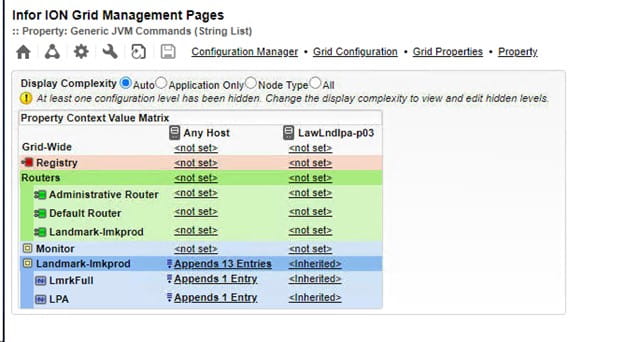
When using a Web Service node in IPA that retrieves XML data, you may encounter the “innerElementCountThreshold” error if the XML returns too many records for IPA to handle it.  You can increase this threshold by updating the Grid properties.

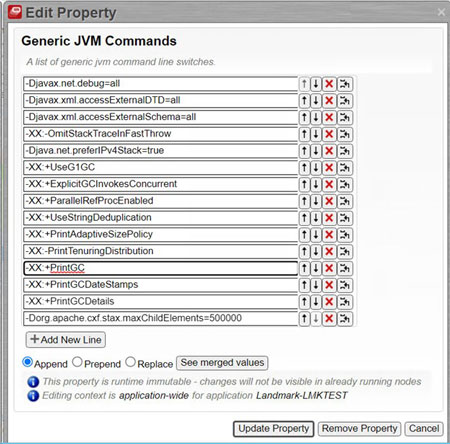
Open the Landmark Grid and navigate to the Configuration Manager (gear symbol) > Grid Configuration > Grid Properties > Node Properties > Generic JVM Commands

Select the Landmark application property under “Any Host”.

Append the command -Dorg.apache.cxf.stax.maxChildElements=500000.  You can set it to more records than 500000, but be mindful of system performance.

Click Update Property, and then Save the configuration.  Reboot the server for the changes to take effect.

Cybersecurity is paramount for organizations in every industry as your organizational data is of key importance to the success of your business. Editorial assistant and tech writer Melissa Evatt shares and article on ERP Today about the importance of keeping your cyber security plans up to date within your organization. With cyber attacks becoming more frequent and sophisticated, it is important for organizations to stay protected from data breaches. Evatt points out that according to Oracle, 33 percent of organizations worldwide have experienced a ransomware attack or breach and 57 percent of data breaches are attributed to poor patch management. While cybercriminal activity cannot be stopped once and for all, she notes, organizations can take extra measures in order to protect their data and discourage cyber attacks. Certain consultancy firms such as Rossera, who specialize in Oracle applications, offer ways to stay cyber secure with their own products to protect your ERP systems. Keeping your organization secure and free from cyber attacks doesn’t have to be difficult. Having the support of third party businesses can allow your own business to scale-up whilst keeping security and data protection at the forefront.


For Full Article, Click Here

Infor recently announced that Sanford Health, the largest rural health care system in the US, will implement a suite of Infor cloud-based applications designed for healthcare to streamline and modernize functions across its network. Partnering with Infor allows Sanford Health to better leverage data to break down silos across departments, streamline workflows, and gain real-time insights, freeing up caregivers to prioritize care. Per the press release, Sanford Health decided to partner with Infor because of its modern, cloud-based architecture, and ability to offer health care-specific finance and supply chain solutions that meet the organization’s requirements without extensive manual customization. Further, Infor’s solutions integrate seamlessly into Sanford’s current business needs and processes, providing leadership with real-time data. Thus, Infor was able to clearly demonstrate its commitment to health care, extensive product roadmap, and forward-thinking approach. Steve Fanning, senior vice president, Infor, says of the partnership, “We look forward to supporting Sanford Health in achieving greater operational efficiency and delivering exceptional health care services to the communities they serve.”


For Full Article, Click Here

Problem:           

You need the command for an Infor Process Automation (IPA) to automatically recover or kill jobs waiting queue.


Resolution:     

There is a simple solution for this. You will need to first create a Process Flow that checks Jobs and Recovers and Kills them (Note that Invalid Parameters Status jobs aren’t going to recover).

Next, add the jqaction token to a security class, as it’s not defaulted.

Next, try SysCmd Nodes using the jqstatus -wr to get the Job List, and then jqaction -r to recover a job and jqaction -k to kill a Job.

Now you are able to recover or kill jobs waiting in the queue.

These days cyberattacks and ransomware attaches are becoming more frequent, prompting businesses to really focus on their data security. While many businesses will primarily focus on backup solutions, that simple isn’t enough. CSP GmbH & Co. KG, Germany based innovative software solutions company, shares an article on Open PR of the importance of data security practices that go beyond just backing up your data. Backups are typically designed for short-term data and recovery options. If you want to protect your company’s data long term, there is the option of archiving data. The article states that modern archiving systems offer effective solutions such as enabling data to be stored for several years or even decades and offer advantages such as the ability to search in time periods, reduce the load on the database and take partial database sections into account. Businesses should look for products that not only back up but protect your archived data and allow an easy way to access these storage systems. With these comprehensive functions, the article concludes, companies can not only archive their data securely, but also manage it efficiently and access it quickly when required.


For Full Article, Click Here

You need to update your license file if you exceed the maximum number of application users. All application users are also Infor Lawson Environment users.

The license and applications information is stored in the %LAWDIR%\system directory.

Note:  To update your license, you must first have received a new license file via e-mail from Infor.

Shut down the WebSphere application server. Use the instructions provided with your application server to stop the server you configured to run Infor Lawson. The person who shuts down the application server must be a member of the group for Infor.

Stop the Infor Lawson system.

At the command line, specify this information:

stoplaw

Optional. If you want to keep a copy of your existing license, make a backup copy.

Copy the license content you received in email to %LAWDIR%\system. At the prompt to overwrite the existing file, select yes.

Start the Infor Lawson system.

To start the Infor Lawson servers, at the command line, specify this information:

startlaw

Restart the application server. Use the instructions provided with your application server to start the server you configured to run Infor Lawson. The person who starts the application server must be a member of the group for Infor.

Note: The web server must be running in order for the Infor Lawson system to run, but you do not need to start it before you start the Infor Lawson system.

Today, Infor announces the selection of Amazon Bedrock, a service for building and scaling generative applications, to deploy GenAI solutions embedded within Infor CloudSuite designed to accelerate customer value. This further deepens Infor’s 11-year relationship with Amazon Web Services (AWS) and the close collaboration and success the companies share after years of extending Infor solutions through AWS services. Per the press release, Infor has built industry-specific use cases on AWS technology that allows their customers to complete daily tasks faster with pre-trained models built on Amazon Bedrock. Infor CTO comments, “Infor is on a mission to democratize AI by making it accessible to all our customers, regardless of the size of their organization or the technical resources they employ. Our goal is to build products that deliver transformative technologies directly to those who benefit most – the front-line people using Infor solutions. At Infor, we believe that merely giving customers the tools to apply GenAI isn’t enough. Our Industry AI approach combines both the tools and deep industry capability and expertise to collaboratively work with customers to build and offer solutions that drive real value.” Furthermore, Infor has released hundreds of proven predictive and prescriptive AI solutions through its Augmented Intelligence Service, helping customers to drive operational efficiencies, grow revenue, enhance customer satisfaction and predict future demand, all built using AWS services such as Amazon SageMaker. With Amazon Bedrock at the core of its generative AI innovations, customers will now have access to 60 additional use cases by year end.


For Full Article, Click Here