Often times a user is responsible for updating dozens of LBI report schedules that generate daily, weekly, and monthly report instances.

A parameter might have been set incorrectly and is now generating the incorrect data for a bunch of instanced reports that now are useless and no one noticed until several report instances existed.

Today we are going to go over how to easily fix those report instances assuming one has admin access and crystal reports installed.

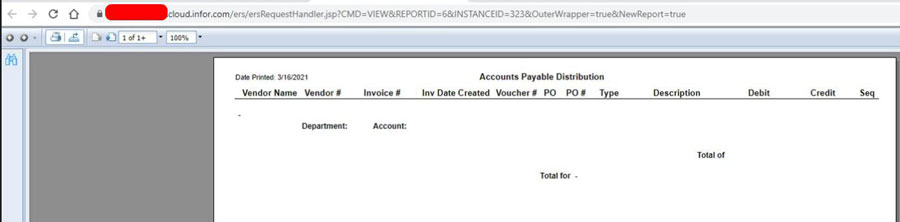
Here is an example of a report a user was viewing that contains no bursting data for that user because it has the incorrect parameters:
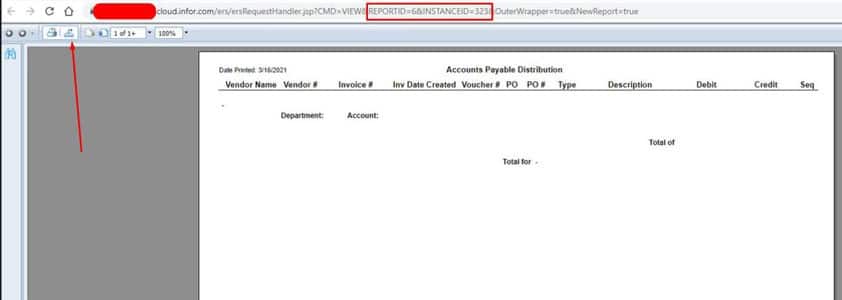
First thing to note is the Report ID and Instanced ID as highlighted below.

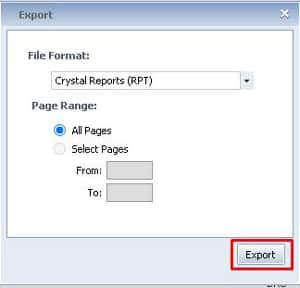
Let’s now export the report as a Crystal report as shown by the arrow below.
Open the exported report in Crystal and press F5 >> Prompt for new parameter values >> OK

This should pull up the incorrect saved parameters. Change it to the proper values and press OK to generated the report with data. (you may be prompted for credentials, you’ll need some sort of db read access).

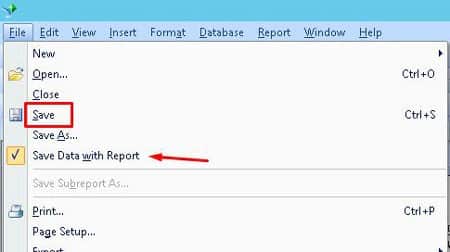
After the data is generated go to File >> Save and make sure “Save Data with Report” is highlighted:
Now go to the report instance that you exported this from and click details:
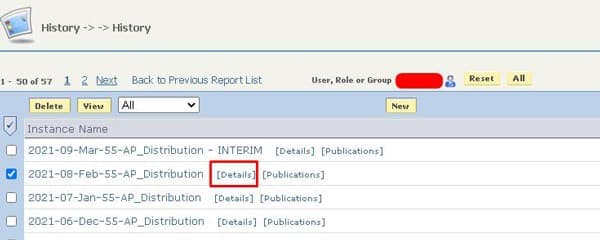
Under Report Actions >> Republish >> Choose File >> Find the updated crystal report, select >> Save

Now view the report again and see if it shows the correct data. Do this for the rest of the reports.

Numerous organizations choose to leverage Lawson consultant teams to oversee their Lawson Security and LBI systems. These expert teams provide managed services at a predictable monthly rate, offering extensive knowledge and specialized expertise. This solution is ideal for larger organizations, while smaller entities seeking efficient management without the need for full-time on-site staff can also benefit. Nogalis delivers these services, and additional details can be obtained by contacting us through our dedicated contact page.


Enterprise resource planning (ERP) systems, when implemented and utilized correctly, can significantly impact your business processes. While not every ERP system is the same – many include customizations or are catered to specific industries – there is still great value in their out-of-the-box forms. So how do you know how much customizations or if you need any customizations? Is the out-of-the-box system set up already good enough for your company? Radhika Ojha, Senior Editor at ERP Today & WIS – SCM/EAM Analyst, shares an informative article to help determine if you should customize your ERP system or keep the system defaults. Ojha highlights that while customization can offer tailored solutions to fit specific business processes, it can also introduce complexities and challenges. Businesses must assess their unique needs against the potential drawbacks of customization, such as increased costs and extended implementation times. One key point made is that excessive customization can lead to difficulties in maintaining and upgrading the ERP system. Additionally, Ojha notes that companies often struggle with the balance between adapting the ERP to their needs versus adapting their processes to the ERP’s capabilities. The author discusses how customizing an ERP can result in vendor lock-in, making future migrations and updates more complicated. Furthermore, the article suggests that businesses should adopt a strategic approach to customization, determining which aspects of the ERP can be modified without compromising its integrity. Companies are encouraged to involve stakeholders early in the decision-making process to align the ERP system with business goals effectively. The implications of customization on data integrity and reporting capabilities are also explored. Ojha concludes that the choice to customize an ERP system should not be taken lightly, highlighting the importance of long-term planning and flexibility in the decision-making process.


For Full Article, Click Here

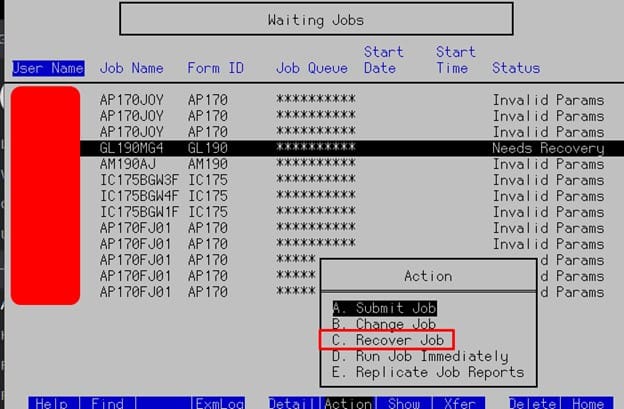
In Lawson, your users may be experiencing a GL190 job in recovery.


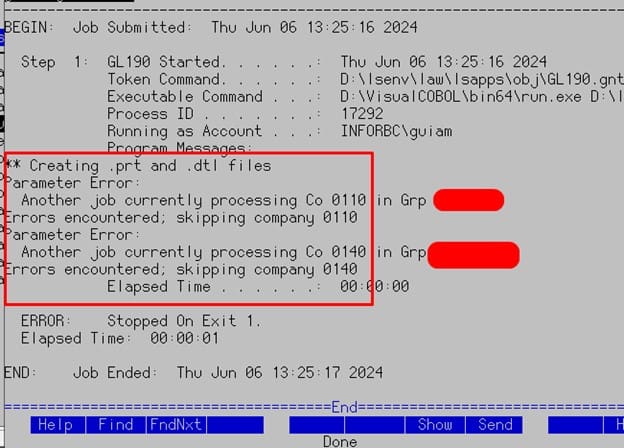
You may be getting this error:

This is due to the GL190 job being ran when another GL190 job is running in the same jobqueue.


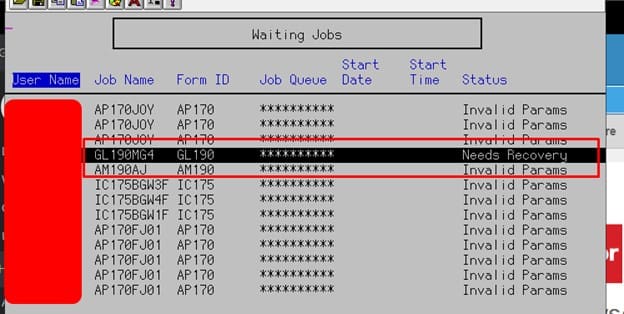
Locate the job in recovery (notice the Job Queue below *********):

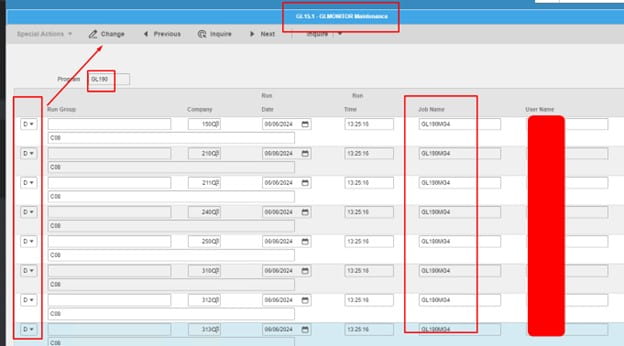
Go to GLMONITOR, inquire on GL190 program. This will bring back all jobs in recovery here, only delete the one you plan on recovering, then do so for the remaining.

Once the GLMONITOR is cleared of that specific job, lets recover it and see if it completes (make sure no other GL190 jobs are active).


That’s it, hopefully this helped resolve your issue!

Implementing a new enterprise resource planning (ERP) system is a huge project to undertake. When done right, an ERP system could positively boost your business processes. When done wrong – which unfortunately happens more often than not – additional time, money and resources hit you hard. You should be fully prepared for any roadblocks and obstacles that occur during an ERP project. Chris Lewis, Vice President of Solution Consulting, shares an article on ERP Today that discusses the common pitfalls associated with enterprise resource planning (ERP) implementations. It begins by highlighting that many organizations view ERP projects as a necessary step, often without fully understanding the implications. Lewis argues that instead of rushing into a comprehensive ERP overhaul, companies should assess their unique needs and address specific issues first. Organizations frequently underestimate the complexity involved in ERP projects, which can lead to failures and budget overruns. It emphasizes that companies must prioritize clear communication and alignment among stakeholders before initiating any ERP project. The importance of defining measurable goals and outcomes is underscored, as is the need to ensure that all employees understand the changes and their roles within the new system. Lewis suggests that organizations should consider alternative solutions, such as modular or smaller-scale implementations, that can be more easily managed and adapted over time. This approach allows businesses to remain flexible and responsive to changing market demands without becoming overwhelmed by a large-scale implementation. Additionally, Lewis advises companies to invest in change management strategies, providing training and support to users to facilitate smoother transitions. Involving end-users early in the process can help identify potential resistance and address concerns proactively. The article also highlights the importance of choosing the right technology partner, as their experience can significantly impact the project’s success. Lewis underscores the need for continuous evaluation and adaptation throughout the ERP implementation process. Rather than viewing ERP as a one-time project, organizations should adopt a mindset of ongoing improvement. By doing so, they can enhance their operational efficiencies and ultimately achieve better business outcomes. The conclusion reiterates that a strategic, focused approach is crucial for ERP success, rather than a blanket implementation of new systems.


For Full Article, Click Here

We recently had an issue with a new install where all batch jobs were going into recovery with the error “Unable to log in <username>”.  The can often be attributed to an incorrect password in the BATCH privileged identity, but in this case it was due to a typo in lajs.cfg.  The “RUNUSERKEY” field was misspelled.  So, if you ever encounter this issue, you can save yourself some time and get a couple of sets of eyes on the lajs.cfg file!  After making the change, reboot the Lawson server or stop/start services. You should now be able to log in.


Ron Teegarden, Regional Manager at Rimini Street, shares an article on SDCEXEC.com exploring the emerging trends in manufacturing ERP (Enterprise Resource Planning) systems, highlighting their benefits for businesses. Manufacturers are increasingly turning to advanced ERP solutions to enhance operational efficiency and agility. The shift towards cloud-based ERP systems allows for greater flexibility and scalability, accommodating the ever-changing needs of manufacturing environments. Integrating Artificial Intelligence (AI) and machine learning into ERP systems is also gaining traction, facilitating smarter data analysis and improved decision-making processes. This integration enables manufacturers to predict trends, optimize inventory levels, and enhance supply chain management. Moreover, ERP systems are becoming more user-friendly, incorporating intuitive interfaces that improve user experience and reduce training time. Mobile accessibility is another significant trend, allowing employees to access systems remotely, thereby increasing productivity. Data security is a crucial consideration, prompting manufacturers to adopt robust cybersecurity measures within their ERP frameworks. Additionally, sustainability is becoming a key focus, with ERP systems helping manufacturers track and manage their environmental impact. Teegarden emphasizes the importance of choosing an ERP solution that aligns with a company’s specific needs and goals. Companies are encouraged to adopt ERP systems that facilitate real-time data sharing and collaboration across departments. Lastly, the transition towards digital transformation in manufacturing underscores the necessity of ERP systems in maintaining competitive advantage. Overall, the article showcases how embracing these trends can lead to improved efficiency, better decision-making, and enhanced overall performance for manufacturers.


For Full Article, Click Here

Infor recently announced that Gartner® Inc. has positioned the tech giant, for the fourth consecutive time, as a Leader in the 2024 Gartner Magic Quadrant™ for Cloud ERP for Product-Centric Enterprises. Infor’s position as one of the Leaders in this Gartner Magic Quadrant is based on the Gartner evaluation of Infor’s ability to execute and completeness of vision. Soma Somasundaram, Infor president and CTO, comments, “We’re honored to be recognized by Gartner as a Leader in the Magic Quadrant for the fourth consecutive year. We feel that this placement reaffirms our role as a leading provider in the enterprise software market, driven by our commitment to a platform-first approach layered with industry-specific cloud applications. Infor’s consistent positioning reflects our dedication not only to future-focused innovation but also to delivering tangible, industry-specific advancements that empower our customers to operate more efficiently and achieve their goals faster. Per the press release, in its 2024 Magic Quadrant for Cloud ERP for Product-Centric Enterprises, Gartner notes that, AI and GenAI are at the forefront of the more significant innovation in ERP. These capabilities allow organizations a new way to consume applications. “The embedded intelligence found in packaged ERPs are evolving to the point where the solutions can act with autonomy. The embedded intelligence will become more pervasive to augment or automate work and create more intuitive user experiences.”


For Full Article, Click Here

When it comes to IPA security access, you can assign the following Lawson delivered roles to IPA users:


Delivered role Intended for use by Contains these security classes
InbasketUser_ST Normal end-users who receive work items in the Inbasket BasicProductLineAccess_ST

ProductLineAccess_ST

InbasketUser_ST

Lpa_ST

ProcessSchedulingAllAccess_ST

JobQueueServer_ST Users who must perform actions on the Landmark job queue. BasicProductLineAccess_ST

ProductLineAccess_ST

JobQueueAccess_ST

ProcessDesigner_ST Process developers BasicProductLineAccess_ST

ProductLineAccess_ST

Lpa_ST

ProcessDesigner_ST

ProcessSchedulingAllAccess_ST

ProcessServerAllAccess_ST IPA system administrators BasicProductLineAccess_ST

ProductLineAccess_ST

Lpa_ST

LpaAdmin_ST

ProcessServerAllAccess_ST

ProcessSchedulingAllAccess_ST

ScheduledActionsAccess_ST

ProcessServerReadAccess_ST IPA assistant administrators, power users, developers ProductLineAccess_ST

ProcessServerReadAccess_ST


These days, business processes get more and more complicated in both the hardware and software level. Simon Quicke, Microscope Editor – TechTarget, shares an article about the benefits that managed service providers (MSPs) are capitalizing on due to the increasing demand for security services among their customers. There has been a marked rise in interest in cybersecurity solutions, driven by growing threats and regulatory pressures. Customers are now seeking comprehensive security offerings, and MSPs are strategically positioning themselves to meet these needs. The shift towards hybrid work environments has also heightened awareness of security vulnerabilities, prompting organizations to reinforce their defenses. Quickes notes that MSPs are responding to this demand by expanding their security portfolios and enhancing their capabilities. This includes investing in advanced tools and technologies to better protect client data and systems. Many MSPs are forming partnerships with cybersecurity vendors to offer robust solutions. Education and awareness campaigns are becoming common as MSPs aim to guide clients through the complexities of cybersecurity. Customer trust is crucial and MSPs are striving to build long-lasting relationships by delivering reliable security services. Additionally, the integration of security into the overall managed service approach is becoming standard practice. The growth in cybersecurity demand is also reflected in the financial performance of many MSPs. However, the increasing complexity of security challenges requires MSPs to continually innovate and adapt. This often translates to scalability and flexibility in their service offerings. As security becomes a key differentiator in the market, MSPs that can effectively address these demands are likely to thrive. The article concludes by stressing the importance of certifications and ongoing training for MSP staff to stay updated on the latest threats and solutions. Overall, the current landscape presents significant opportunities for MSPs to enhance their services and grow their business in the security domain.


For Full Article, Click Here

Searching JXplorer can be cumbersome when you have thousands of Lawson users and possible issues with “rogue” or “orphaned” identities being stored when trying to update identity information.

Below we are going to show how you can easily search for this information vs manually scanning thousands of users.


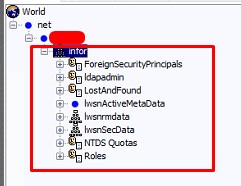
First Select the part of the LDAP tree to search from:

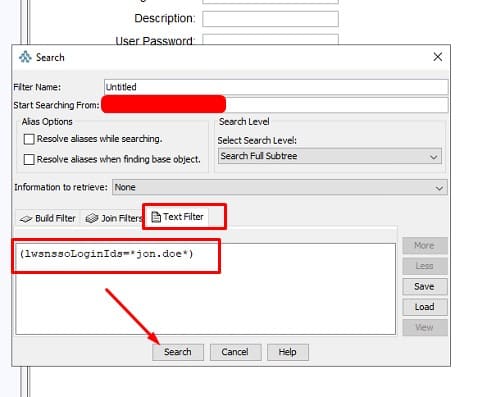
CTRL + F


Notice the “Starting Searching From” field, this search will search all trees below this.

Now go into your Text Filter tab and type in parenthesis the field and value you want, click search


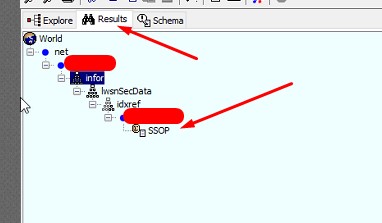
It will automatically switch to the Results field and show your results:

You can then do another search within these results or go back to Explorer tab and CTRL+F again and it will bring your previous search up.

You can also get creative and search multiple fields and values with an “OR” search:

(|(cn=*jon.doe*)(mail=*jon.doe*)(uid=*jon.doe*)(lwsnssoListOfIDs=*jon.doe*))

This is an AND search:

(&(cn=*jon.doe*)(mail=*jon.doe*)(uid=*jon.doe*)(lwsnssoListOfIDs=*jon.doe*))


The | means OR, & means AND. So each field cn, mail, uid etc. have to all bring back a result for it to work. It’s best to use an OR search on average.

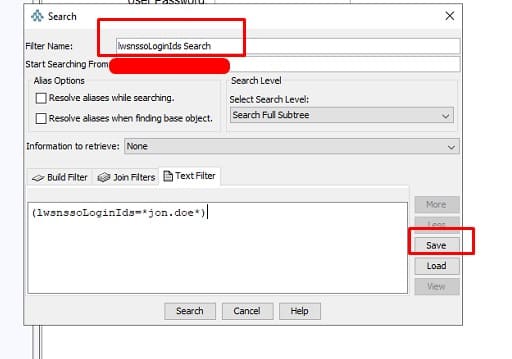
Remember, you can also save your searches:

As mentioned above, this is especially useful when finding users in JXplorer to remove any duplicate or “orphaned” RMIDs and Identities not showing up in Lawson Security.


Good luck!