Identifying performance issues and improving performance for Lawson applications in a Windows Environment can sometimes be tricky.

This article provides some ways to improve performance specifically when batch jobs are running more slowly than expected.

  1. Update bpm.properties to assist the performance batch jobs that call services in IPA
    1. On the Lawson server, navigate to LAWDIR/system/bpm.properties
    2. Remove the lines lpxMaxHeap=XXXXX and lpsMinHeap=XXXXX
    3. Add a line “useLPSBridgeSocket=true” (check if the line exists already)
    4. Restart Lawson services
  2. Set Windows page file to 32Gb
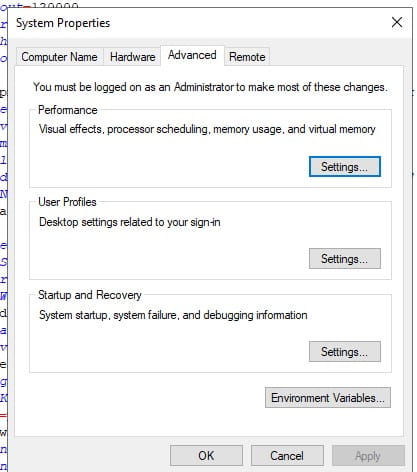
    1. On the LSF server, search for “Advanced System Settings”
    2. Go to the Advanced tab
    3. Under “Performance”, select “Settings…”
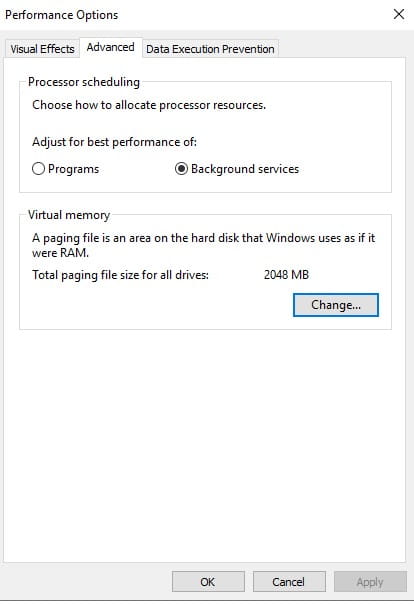
    4. Select the Advanced tab
    5. Under Virtual memory, select “Change…”
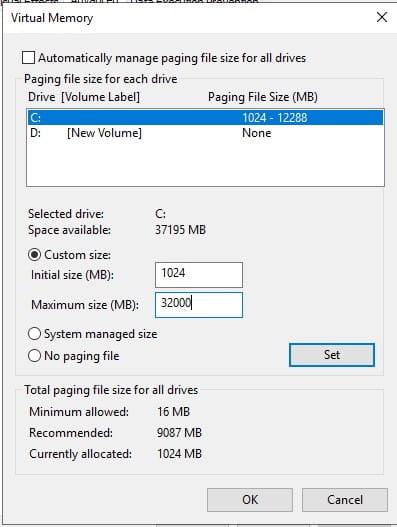
    6. Unchecked “Automatically manage…”
    7. Select the drive where Lawson is installed
    8. Select “Custom size” and set the max to 32000
    9. Click “Set” then “OK”
    10. Reboot the server


Infor recently announced that it has achieved Amazon Web Services (AWS) Consumer Goods Competency status. By leveraging deep industry knowledge and proven AWS solutions, Infor empowers clients to streamline their operating models and achieve greater efficiency at scale. Per the press release, Infor has achieved the AWS Consumer Goods Competency, distinguishing itself as a provider that has demonstrated technical proficiency and proven customer success. “This competency showcases Infor’s ability to support customers in reinventing how they develop, manufacture, distribute, and market their products to manage changing consumer demands and heightened competition. Infor is well-equipped to handle challenges for its customers by providing curated solutions that drive innovation and transform operating models,” the press release states. By leveraging Infor’s expertise and solutions, consumer goods brands can streamline their operations, enhance efficiency, and stay ahead of the competition in the dynamic consumer goods industry. Andrew Dalziel, vice president of Industry & Solution Strategy at Infor, says of the newly achieved status, “Infor is honored to be one of the first AWS Partners to achieve Consumer Goods Competency status. At Infor we are constantly innovating within our own product suite, especially retail, as needs change and supply chains evolve for our customers across the globe. As an AWS Partner, we are uniquely positioned to help leading organizations achieve their business transformation goals by leveraging the agility, breadth of services, and pace of innovation that AWS provides.”


For Full Article, Click Here

There are many challenges faced by Chief Information Security Officers (CISOs) and cybersecurity teams in today’s rapidly evolving digital landscape. One major challenge is the increasing sophistication of cyber threats, which require constant adaptation and updated strategies. Cyber security expert and PA Consultant Elliot Rose shares an article on Computer Weekly about how CISOs often struggle with resource constraints, including limited budgets and personnel, making it difficult to implement comprehensive security measures. Additionally, the growing complexity of IT environments, including cloud services and remote work, complicates security management. The article highlights the importance of fostering a security-aware culture within organizations, as human error remains a significant vulnerability. Compliance with regulations and standards can also be a burden, requiring ongoing attention and resources. Another pressing issue is the shortage of skilled cybersecurity professionals, which hampers the ability to effectively address security concerns. Rose emphasizes the need for effective communication between CISOs, executive teams, and the board to ensure alignment on security priorities. It also underscores the necessity of continuous training and development for cybersecurity staff to keep pace with evolving threats. Ultimately, he calls for a proactive and strategic approach to cybersecurity to address these multifaceted challenges.


For Full Article, Click Here

Error occurring: Batch Job failed: execjob(laStartProcess): Unable to log in Domain\user


What’s happening before this error:

When logged in as the lawson user and running a user defined batch job (defined within tokendef) which calls the importdb command. In our example, we run importdb as the command but this can happen for any user defined token that either runs a command or a script such as a perl script or bat file, etc.


This is an example of an log text (joblog) with this error in it:

User: domain\UserName Job: JobNameHere Queue:

BEGIN: Job Submitted: Tue Jan 13 15:51:36 2020


Step 1: importdb Started . . . .: Tue Jan 13 15:51:36 2020

Token Command. . . . . .: CommandNameHere

execjob(laStartProcess): Unable to log in domain\UserName

StartStep failed: The operation completed successfully.


Elapsed Time: 00:00:01


END: Job Ended: Tue Jan 13 15:51:37 2020


How can this issue be resolved?

These steps are for experienced “Lawson” security admins  (Nogalis provides Managed Service support if needed):

INFOR Single Tenant CLOUDSUITE CUSTOMERS ONLY: 

If you are an Infor Single Tenant CloudSuite customer running the Infor Lawson products, if you do not know the user’s INFORBC account password, you need to do the following:

  1. Go to the CloudSuite Self Service Portal:

https://concierge.infor.com/ then find and select the cloudsuite app (open an infor ticket if you don’t have it)

  1. You will go under service requests, choose the password change option. Change the password for this user that is having the issue.
  2. After that is done, have the user test running the script again.


For all On-Premises customers or CloudSuite customers that do know their INFORBC account password:

IMPORTANT As of Oct of 2020, Infor found a bug in the ISS User interface (/scwebadminapp) that when changing just the password, the UID value for the user would be changed and cause the user to no longer see their jobs and reports. JT-1492340. The fix for that requires a combination of ISS version 11.0.9.1627 and then the LSF version needs to be one of the following:

– 10.0.9.2 or higher

– 10.0.10.3 or higher

– 10.0.11.5 or higher


If you are on the proper versions, you can use ISS to make the change to the password, if you are not on the proper versions, you should only do the update via the LSA tool in the steps below.

Use the Infor Security Service (ISS) web page (context root is usually /scwebadminapp) if your Lawson System Foundation (LSF) environment is federated with Landmark. Alternately, if you are not federated (uncommon) then log into the Lawson Security Administrator (LSA). If you’re not sure if you are federated with Landmark you should review your LAWDIR/system/lsservice.properties file to check for fed. lines as well as this line; isprimary=true . If these are present, then you are federated.

  1. Search for the user for whom the batch job failed.
  2. Navigate to Manage Identities
  3. Click on the environment identity from the list of Services on the left of the ISS web page or the screen in LSA
  4. That password must be the actual user’s domain (Windows customers) or (Unix, IBM i – OS user) password in order to use user tokens/scripts. Double click within the ‘password and ‘password confirm’ attributes to type (DO NOT USE COPY and PASTE) in the correct domain password for this user. Save the change in ISS by clicking on the “Diskette”/save icon or, if you are in the LSA tool, choose Edit then Change.


IMPORTANT: DO NOT DELETE AND RE-ADD THE USER’S ENVIRONMENT IDENTITY OR THEY WILL NO LONGER BE ABLE TO SEE THEIR JOBS AND REPORTS IN THIS ENVIRONMENT.


Good luck and again, if you need experienced Lawson Security Admins to complete this task, reach out to us at https://www.nogalis.com/

 

In an ERP today article featuring an interview with Darryl Sackett, CEO of ERP transformation firm, Codestone, he emphasizes the critical role of Enterprise Resource Planning (ERP) systems in organizations. Sackett describes ERP as the “beating heart” of a business, essential for integrating various functions and enabling data-driven decision-making. He highlights the importance of real-time data access and how ERP systems can streamline processes, enhance efficiency, and support growth. Sackett points out that a well-implemented ERP system can enhance operational efficiency and decision-making. The article also discusses the challenges companies face when transitioning to an ERP system, including resistance to change and the need for proper training. Ongoing support and engagement from leadership are vital for successful ERP adoption. Additionally, the article outlines future trends in ERP, such as increased automation and the integration of artificial intelligence. Ultimately, Sackett believes that ERP is essential for organizations looking to remain competitive in a rapidly changing business landscape. Companies need to remember to prioritize their ERP strategies to harness its full potential.

When migrating or copying custom COBOL programs, it is often necessary to also migrate messages and work file definitions (aka metadata).

First, dump the messages and work file definitions using the following syntax:

metadumpmsg <productline> <messagecategory>

metadumpwrk <productline> <programcode> <workfilename>


For example, metadumpmsg prod ZC186 and metadumpwrk prod ZC186 ZC186_ERROR-RPT

The messages will be dumped to a file <messagecategory>.msg.

The work files will be dumped to a file <program_workfile>.wrk.  Work file names can be found in workdef.


After all the metadata elements are dumped, copy them to the other server/productline.  Using a command line utility or LID, navigate to the location where you placed the files, then run the commands to load them.


Loading messages syntax is metaloadmsg <productline> <filename>.msg

Loading work syntax is metaloadwork <productline> <filename>.wrk

In an increasingly connected world, data protection is more critical than ever due to the rise in cybercrime and the complexity of network access. In 2023, cyber attacks surged by 72%, with the average data breach costing nearly $4.88 million. To mitigate these risks, the Lookout Cloud Security Platform team shares an article on MSSPAlert.com highlighting 7 best practices in data security to crush bad actors and adopt robust data security within your organization.

Key practices include:

  1. Encryption: Protects data by limiting access through real-time encryption, ensuring that only authorized users can access sensitive information.
  2. Data Loss Prevention (DLP): Involves monitoring and controlling sensitive data to prevent unauthorized access or loss, helping organizations comply with regulations like GDPR and HIPAA.
  3. Data Backups: Regularly backing up data offsite ensures recovery in the case of breaches or disasters.
  4. Data Masking: Generates fake but usable data for testing purposes, protecting sensitive information from exposure.
  5. Multi-Factor Authentication (MFA): Adds an extra layer of security by requiring multiple forms of verification before granting access.
  6. Zero-Trust Adoption: Emphasizes continuous verification of user identities and limiting access to necessary permissions, countering traditional security assumptions.
  7. User Activity Monitoring: Utilizes behavior analytics to detect unusual activity, helping identify potential threats from both external actors and internal users.

By following these practices, organizations can significantly reduce their risk of data breaches and enhance overall security.


For Full Article, Click Here

Business strategies are continuously realigned and adjusted based on influences and changes in technology. In enterprise resource planning (ERP), there are many advancements and changes each year. Kevin Beasley, Forbes Council Member and CIO at VAI, shares an article highlighting the emerging ERP trends to note as we enter 2025.

Industry-Specific Functionality. “An ERP system is no longer a one-size-fits-all solution. Food, healthcare and manufacturing are just a few examples of the industries that need specific solutions to address their unique challenges. Industry-specific ERP is necessary for the healthcare sector to manage patient data, ensure HIPAA compliance and simplify revenue cycle management. Inventory control and tracking are essential for food and beverage businesses to adhere to food safety laws. There are numerous moving parts in manufacturing since they must manage production, acquire supplies and complete orders. ERP serves as a single hub to link all these aspects of the company and thereby acts in service and betterment of whole industries.”

An Integration With The Internet of Things. “The Internet of Things (IoT) has many potential uses and is expected to become more significant in influencing our world as the number of devices linked to the internet rises by utilizing later technologies in existing 5G and future 6G telecommunications and changing the ways in which we work, live and communicate with one another.”

Powering Industrial ERP With AI. “AI is expected to see an annual growth rate of 36.6% from 2023 to 2030, and it is inevitable that AI and machine learning will be integrated deep into ERP systems as they develop. AI-driven ERP deployments will completely transform how companies run in 2025 and beyond. These technologies facilitate enhanced decision-making processes, advanced predictive analytics and the automation of repetitive jobs by integrating robotics. The massive volumes of data produced by ERP systems today require data scientist expertise and can take a long time to be analyzed. Using AI to analyze the data will yield insightful information that can enhance business results in dramatically reduced time.”

Cybersecurity. “The realization that security is essential to tech-driven success will push businesses to aggressively fortify their cybersecurity posture. Partnerships with managed service providers will be essential in navigating this environment to develop and sustain resilience against cyber risks, particularly as the application of AI in operations continues to advance. AI-driven cybersecurity solutions, able to anticipate and eliminate cyber threats before they have a chance to inflict damage, will become standard. Proactive defense mechanisms will become the focus, with AI constantly learning and adjusting to new threats.”

Cloud ERP. “Unlike traditional systems that are installed on on-premises servers and data centers, cloud ERP is provided online and shares power consumption, cooling requirements, security and operations functions with all the tenets of the cloud. This reduces each cloud tenet’s carbon footprint by sharing these resources. Businesses can adapt to their evolving needs thanks to their nearly unlimited scalability and anytime, anywhere access. Cloud ERP also reduces expenses by eliminating upfront hardware purchases and IT maintenance. Rather, these companies receive a reliable subscription service that maintains the security and modernity of the system. All things considered, cloud ERP is a major development in modern business management since it offers businesses a scalable, cost-effective and secure alternative.”


For Full Article, Click Here

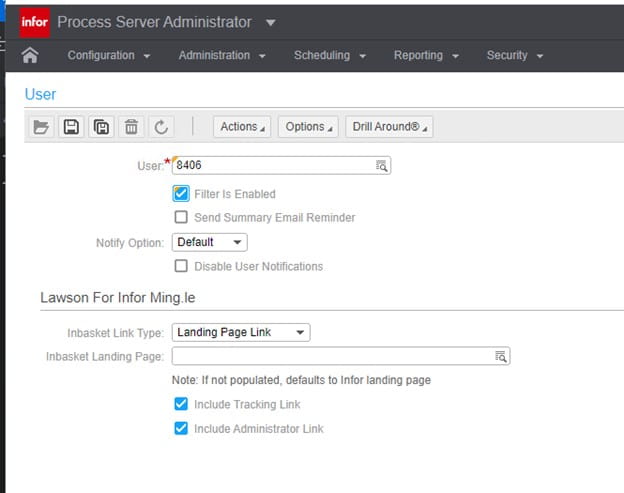
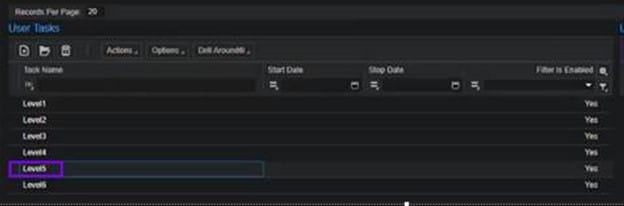
If you want to use filters with a user, you can enable filtering when you create a user. Follow these steps below:


Enabling users for filtering

  1. Open a user and then select the “Is Filter Enabled” check box.
  2. Click Save.


Enabling tasks for filtering

  1. Open a Task and select a User Task.
  2. Select the “Is Filter Enabled” check box when you link a task to a user.

Note that a user must also be filter-enabled to use filtering associated with tasks.


These days office technology is mainly run through enterprise resource planning (ERP) systems that handles critical functions such as inventory management, customer service, billing, and financial reporting. While it’s important to have an ERP system in place, it is a risk to have an outdated or wrong system running for your particular business. Josh McHugh-Cullen, Regional Account Executive at ECI Software Solutions, share an article on IT Brief Australia on how organizations can upgrade their ERP systems to one that works better for their business. The article discusses strategies for organizations looking to upgrade or replace an ineffective ERP (Enterprise Resource Planning) system. It emphasizes the importance of assessing current business needs and evaluating the limitations of the existing system. Below, McHugh-Cullen shares what businesses should look for when selecting the right ERP solution:
  1. Cloud-based flexibility. “Cloud-based ERP systems offer flexibility that traditional on-premises systems can’t match. These systems provide remote access, which is particularly valuable for office technology providers with distributed workforces or multiple locations. In addition, cloud-based solutions offer scalability without the need for costly infrastructure.”
  2. Industry-specific features. “Office technology providers should look for ERP systems to meet their sector’s needs. Key functionalities include equipment leasing management, service scheduling, and consumables tracking. A tailored ERP solution reduces the need for custom development so that industry-specific workflows are handled efficiently.”
  3. Intuitive and user-friendly interface. “A complex and hard-to-use ERP system can result in low user adoption and employee resistance. Businesses can minimize risk by choosing a system with an intuitive interface that reduces training time and encourages more significant usage across the organization.”
  4. Strong vendor support and customization options. “Vendor support can determine the success of an ERP system. Businesses should seek a vendor that provides strong post-implementation support, regular updates, and comprehensive staff training. Additionally, the ERP should be customizable to meet the business’s specific needs without requiring heavy coding or IT intervention.”
  5. Automation as an efficiency driver. “ERP systems with built-in automation can streamline inventory replenishment, billing, and service dispatching processes. Automated systems can collect and validate meter readings, generate invoices, and handle financial reporting, reducing the time spent on repetitive tasks.”


For Full Article, Click Here