Infor recently announced a new reseller agreement with Deloitte that will further expand and strengthen their strategic relationship. Jeanne Newberry, Senior Vice President, Ecosystem and Business Development, Infor, says of the new agreement, “We are excited to expand our collaboration with Deloitte, as it provides our shared customers greater flexibility to procure our industry leading solutions. This relationship also enhances our ability to collectively serve a wider customer base worldwide, as we look to expand our resell agreement in other countries in the future.” Per the press release, this new agreement further enriches the ability for companies to leverage the strengths of both organizations, combining Deloitte’s deep industry knowledge and experience on critical applications with Infor’s business cloud software products for industry-specific markets. Moreover, joint customers will accelerate their transformation projects by drawing on Deloitte’s leading practices around how to manage change, address and mitigate risks, and increase time to value. “Clients embarking on transformation journeys routinely must assemble numerous data points across multiple organizations with short deadlines.  This new agreement allows us to streamline the licensing and implementation process thereby driving faster decision making and shorter time to value,” comments Chris Verheuvel, Managing Director, Deloitte Consulting LLP.

 

For Full Article, Click Here

When running a report, you may intermittently get this error: “Max processing time or Max records limit reached… Error code 0”

Screenshot of error:

This one is an easy fix. Go to your LBI server, open Central Configuration Manager.

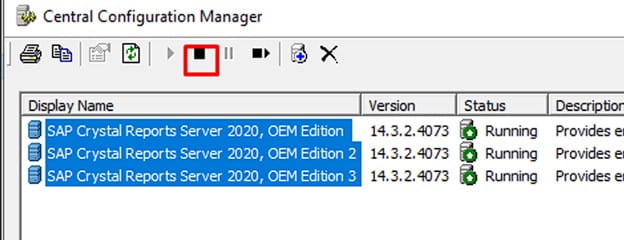
Highlight and stop all SAP Crystal Reports Server processes as shown below:

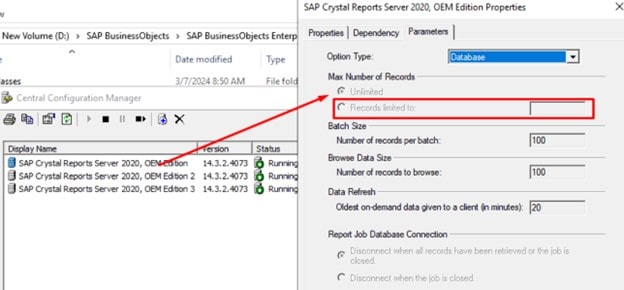
After waiting for the processes to stop, double click on each one, go to Parameters Tab, under Max Number of Records, select Unlimited (NOTE: in my screenshot below, I could not turn off process for this demonstration so it’s greyed out).

Once you update each of these processes (you may only have one or two), start the SAP Crystal Reports server processes again, then test the LBI report once more and make sure you’re generating enough report data that surpasses the previous record limit (usually greater than 10k records).


Good luck and hopefully this helped resolve your issue!

Many businesses still rely on legacy systems over cloud based platforms due to their critical role in daily operations. However, the risk of maintaining such systems is highlighted, including issues like increased operational costs, inefficiencies, and security vulnerabilities. Organizations face challenges when trying to modernize these systems, primarily due to the fear of disruption. Siddharth Gawshinde, IT expert and CTO at Consultadd, shares an article on Forbes that emphasizes the importance of assessing whether modernization is truly needed. Key indicators include high maintenance costs, lack of support, and inability to integrate with newer technologies. Businesses conduct a thorough analysis of their current systems to understand the risks of inaction. He points out that modernization can enhance efficiency, improve security, and provide better user experiences. Businesses should also develop a strategic plan that aligns with their goals as well as prioritizing the need for stakeholder buy-in to ensure a smooth transition.

Investing in training for staff is also crucial, as new systems may require different skill sets. Modernization can be resource-intensive but emphasizes the long-term benefits. Gawshinde also discusses the potential for cloud solutions to replace legacy systems, offering scalability and flexibility. Furthermore, he points out the importance of choosing the right technology partners during the modernization process. A successful modernization strategy can lead to increased competitiveness and innovation. Organizations need to embrace change and not view legacy systems as untouchable. Ultimately, Gawshinde concludes that while modernizing legacy systems can be daunting, it is essential for long-term success. Organizations must weigh the costs of modernization against the risks of maintaining outdated systems. By being proactive and strategic, businesses can position themselves for future growth and adaptability.


For Full Article, Click Here

As we approach the end of 2024 and the start of the new year, many experts are submitting their predictions for 2025. In the cybersecurity space, the landscape sees technological innovation, digital threats and some complexity. Artificial Intelligence (AI) and cyber expert Kristian McCann shares an article on Cyber Magazine of his 10 predictions, outlines anticipated developments in the cybersecurity landscape over the next few years.

10. Cybersecurity mesh architecture
9. Regulatory changes around ransomware
8. Gen AI in cybersecurity
7. Quantum computing and cryptography
6. Increased focus on IoT security
5. Vulnerabilities in 5G networks
4. State-sponsored cyber warfare
3. Advanced ransomware techniques
2. Zero trust architecture
1. AI-powered cyber attacks

Overall, McCann emphasizes the need for proactive measures and collaboration to address the evolving cybersecurity landscape by 2025.


For Full Article, Click Here

Ensuring your browser is correctly set up for compatibility with Infor OS Portal (or Infor Ming.le) is essential for a smooth user experience. Here’s a step-by-step guide to help you modify the browser compatibility view setting.

Step 1: Launch and Log In

First, open your web browser and navigate to the Infor OS Portal (or Infor Ming.le) website. Enter your credentials and log in to access your dashboard.

Step 2: Access My Settings

Once logged in, look at the toolbar on the top of the page. Click on your username, which should be located towards the top-right corner, and select “My Settings” from the dropdown menu. This will open the Personal Settings window.

Step 3: Edit Personal Settings

In the Personal Settings window, find and click on the “Edit Item” button. This action will open the Edit Personal Settings dialog window.

Step 4: Adjust Browser Compatibility Mode

Within the Edit Personal Settings dialog, locate the “Browser Compatibility Mode to Use” setting. Here, you will see a dropdown menu where you can select the value that matches the browser version you are using. Choose the appropriate option and click “Save” to apply the changes.

Step 5: Save and Close

After saving the changes, you will be returned to the Personal Settings page. To complete the process, click the “Close” button to exit the settings.

By following these steps, you can ensure that your browser is correctly configured for optimal performance with Infor OS Portal (or Infor Ming.le). This simple adjustment can help prevent compatibility issues and improve your overall user experience.


Infor recently announced that Hunterdon Health recently launched Infor cloud-based applications for financials and supply chain management to support its digital transformation journey. Per the press release, with a growing network of more than 30 primary and specialty practices throughout Hunterdon, Somerset, Mercer, Morris and Warren counties plus a 178-bed, Five Star Center for Medicare & Medicaid Services (CMS), and Leapfrog rated “A” hospital in New Jersey, Hunterdon Health continues to evolve and grow to meet the needs of its community and patients. Hunterdon Health wanted to replace its aging platforms and manual processes for a single streamlined platform as a goal to minimize time allocated managing disparate systems, eliminate silos between departments, and automate tasks to free up teams to focus on more value-add projects. Additionally, as part of the Infor Healthcare CloudSuite suite of solutions, Hunterdon Heath will benefit from cloud-based applications for supply chain and enterprise financial management, which will allow users to make better business decisions, and better align operations. They will also benefit from Infor’s ability to seamlessly connect to third-party applications. Infor’s ERP Platform was built specifically for healthcare allowing clinical connection to an organization’s EMR and out-of-the-box best practice capabilities.


For Full Article, Click Here

A user can on behalf of another user use a proxy to assign a task that the user would typically perform to another user so that the other user can take action for them. For example, Mary is going on vacation and will need someone to take actions in her absence. You can assign a proxy for that task. You could also assign a proxy permanently to one of a user’s tasks.

Proxied work items are routed to the Personal Task of the user who has been assigned as a proxy. A Personal Task is the task that all users have which is named with their username. User Josh Denver may have task named, depending on your site’s naming conventions, “jdenver”.

Users who had been given the required access rights can assign proxies for themselves. Infor Process Automation administrators can also assign proxies for users.

As organizations become more reliant on digital infrastructures, the demand for robust data security solutions has surged. Dux Raymond Sy, Chief Brand Officer at AvePoint, shares an article on ChannelFutures.com discussing the evolving landscape of data security in the context of managed services and the increasing role of artificial intelligence (AI). Managed service providers (MSPs) are positioned to offer these solutions, leveraging AI to enhance their security offerings. The use of AI in data security allows for advanced threat detection and response, enabling quicker reactions to potential breaches. Moreover, the article points out the challenges MSPs face, including the need for continuous adaptation to emerging threats and the skills gap in the workforce. It emphasizes the importance of building trust with clients, as data security is a critical concern for businesses. The integration of AI tools can help MSPs not only in protecting data but also in providing insights that drive proactive security measures. Additionally, Sy suggests that collaboration between MSPs and technology vendors is essential for developing effective security strategies. As the age of AI progresses, MSPs must innovate and evolve their data security approaches to meet the growing demands of their clients and stay ahead of cyber threats.


For Full Article, Click Here

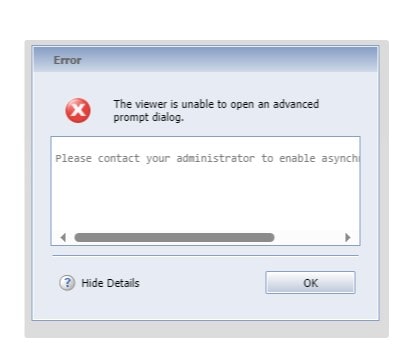
When on LBI (Lawson Business Intelligence), sometimes your users may receive the following error: “The viewer is unable to open an advanced prompt dialog” when they are trying to adjust the parameters on a crystal report running through LBI (see screenshot). To resolve this error, follow the steps below.

First, navigate to the ERS install validator at https://<lbi-server>:<lbi-port>/ers/installvalidator.jsp?

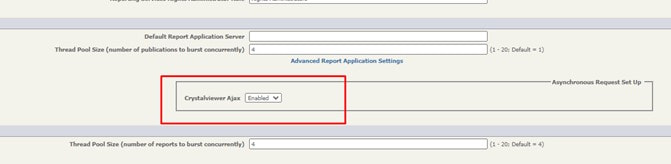
Next, log in as an administrator.  On the System Settings, set “Crystalviewer Ajax” to “Enabled”.

Finally, save the install validator configuration.  The changes are instantaneous, and do not require a restart. You should no longer receive the error!


Enterprise Resource Planning (ERP) systems are the key to business growth. Not only do ERPs streamline your operations and improve efficiency, they also provide valuable insights for decision-making. Forbes Council Member Katana Cloud Inventory CEO Kristjan Vilosius shares an article on how to navigate your ERP systems to properly grow your business. As businesses expand, the complexity of managing various functions increases, making ERP solutions essential. The article suggests that organizations should assess their specific needs and select an ERP system that aligns with their growth strategy. Vilosius highlights the need for proper implementation and training to maximize the benefits of the ERP system. Businesses are encouraged to involve stakeholders early in the process to ensure a smooth transition. Additionally, the article points out the significance of scalability, as a good ERP system should adapt to the changing needs of a growing business. It stresses the importance of data security and compliance within ERP systems to protect sensitive information. Vilosius concludes by urging businesses to stay informed about emerging ERP technologies and trends, which can further enhance efficiency and competitiveness. Overall, investing in a suitable ERP system is portrayed as a strategic move for future growth and operational success.


For Full Article, Click Here