In a context of uncertainty, IT modernization—driven by cloud, generative AI, and process mining—is becoming the key to agility, performance, and resilience in 2025. An article on Informatique France by Jean-Roland Brisard discusses why 2025 is a key year for businesses, especially in France. Economic uncertainty is forcing companies to rethink how they operate. Many are shifting toward a model called servitization, where they offer services alongside their physical products. This helps generate new revenue and supports sustainability. For example, manufacturers might offer maintenance or repair services for their products. This aligns with new European laws like the right to repair directive. These changes push companies to be more environmentally responsible. To stay competitive, businesses must also modernize their IT systems. Moving to the cloud and using generative AI are essential steps. These technologies improve productivity, flexibility, and innovation. Companies like Michelin are already seeing benefits from this shift. Cloud-based platforms make it easier to access data and collaborate. Generative AI can help automate tasks and create new solutions quickly. Modern tools also help companies respond faster to market changes. 2025 is a turning point because the pace of change is accelerating. Companies that don’t adapt risk falling behind. Leaders must act now to update their infrastructure and rethink their strategies. It’s not just about technology—it’s about staying relevant. In short, modernization is no longer optional. It’s a strategic move to survive and thrive in the future. Businesses that embrace this shift in 2025 will be better prepared for the challenges ahead.

For Full Article, Click Here

A common ED501 message is “WARNING: SUBSTITUTION TABLE ENTRY NOT FOUND”.  This substitution table is maintained in screen ED40.1, and if the key values passed to ED501 are missing, you will receive this error.  Simply update your ED40.1 and recover the job.

If this message causes your job to go into recovery, that is because you have not set up notifications for EDI.  Here is a simple solution to troubleshoot this message: If you set up notifications, then this message will cause an email to be sent about the warning, but the job will continue to process the remaining files.  Notifications are configured on ED00.1, as well as the configuration file located in the EDI directory.

These days, CIOs (chief technology officers) are reconsidering their ERP (enterprise resource planning) strategies because traditional systems often lack the flexibility, real-time data capabilities, and AI integration needed to compete in today’s fast-paced, omnichannel retail environment. Adopting a more agile, composable, and cloud-ready ERP approach enables retailers to drive innovation, improve customer experiences, and stay ahead in a highly competitive market. Han-Tiong Law, regional chief technology officer for Asean and Greater China at Rimini Street, shares an article on The Manila Times  emphasizing the importance for CIOs to rethink ERP strategies in the evolving retail landscape, especially in the APAC (Asia-Pacific) region projected to lead global retail growth. Despite promising growth, retailers face challenges such as declining foot traffic, e-commerce competition, supply chain issues, and rising operational costs, all impacting margins. Artificial intelligence (AI), particularly generative AI, is seen as a crucial tool to enhance customer loyalty, operational efficiency, and market competitiveness through real-time sentiment analysis, inventory management, personalized marketing, and supply chain visibility. A 2024 Nvidia report highlights that 98% of retailers plan to invest in AI, viewing it as a market differentiator. However, outdated IT infrastructure and vendor-dependent ERP systems hinder AI integration, as siloed systems and inflexibility limit innovation. CIOs are advised to adopt a composable ERP approach for flexibility, prepare for hidden costs of cloud migration, and shift IT from a cost center to a profit enabler. Moving away from vendor-driven, one-size-fits-all ERP solutions allows retailers to better customize, innovate, and improve customer experiences. Transitioning to AI-powered systems requires hybrid models and partner support to avoid vendor lock-in. Ultimately, embracing AI and modernized ERP strategies is essential for retailers to thrive in a competitive, digital-first market.


For Full Article, Click Here

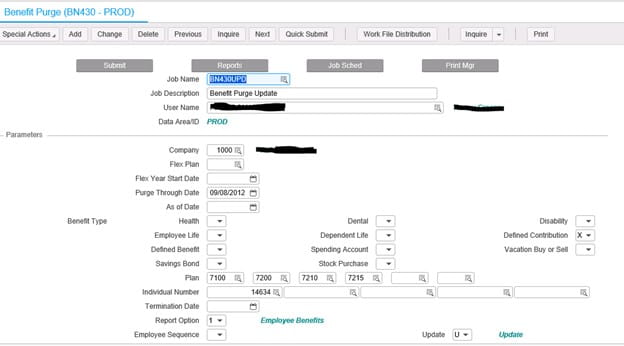
Every time an employee makes a benefits change, a new record is stored in the benefits table.  Additionally, a new record is stored in the employee’s deduction master table for each deduction related to that benefit.  If these records are allowed to accumulate unchecked, this can slow down payroll processing and even cause errors.  The larger the benefits and deductions table become, the slower payroll batch jobs will run.  These batch jobs, such as PR140, loop through each record in these benefits and deductions tables so that the correct deductions are applied.  Some of these batch jobs have a limit of the number of records allowed, so if an employee has deductions that exceed that limit, the job will error out.  Also, traversing through these records can greatly slow down processing.

To help alleviate these issues, we recommend running the BN430 benefits purge program periodically.  When you are processing payroll, if you see an error similar to “26 20591 PRDED-DED-TABLE must be increased; Cur size 0500”, chances are you have an employee with too many benefits changes, and need to run the BN430.  But, before you receive this error, you should make the benefits purge part of a normal maintenance process.  Ideally, payroll users would make this part of the payroll process each pay period, and choose a “Purge Through Date” corresponding to your company’s record retention period.

Forbes predicts that “in 2025, the landscape of enterprise resource planning (ERP) is set for a thrilling transformation,” led by a shift to cloud-native solutions. A recent article public on Morgan Lewis explores key considerations in adopting cloud-native ERP—beyond standard contracting issues like risk allocation, data protection, cybersecurity, and termination rights. It highlights that organizations are increasingly shifting from on-premises to cloud-based ERP solutions to enhance flexibility, scalability, and cost-efficiency. Cloud ERP offers quicker deployment times and easier updates, reducing maintenance burdens for companies. Many firms are opting for hybrid models, combining on-premises and cloud systems, to balance control and flexibility. The trend is driven by advancements in cloud security, compliance, and data management, alleviating concerns about data privacy. Vendors are developing more industry-specific cloud ERP solutions to meet unique sector needs. The move to the cloud also supports digital transformation initiatives, integrating ERP with other cloud-based applications like CRM (customer relationship management) and analytics tools. Companies are prioritizing vendor stability, support, and a strong roadmap when choosing cloud ERP providers. Migration strategies vary, with some opting for phased approaches to minimize disruption. Data migration and integration remain significant challenges, requiring careful planning and expert execution. The article emphasizes the importance of change management and training to ensure successful adoption. It notes that regulatory compliance and data security are critical considerations in cloud ERP implementation. Cloud ERP enables better real-time data access, improving decision-making processes. Overall, the trend reflects a broader shift towards cloud-first strategies in enterprise IT. Organizations are increasingly viewing cloud ERP as essential for remaining competitive in a digital economy. The article concludes that staying informed about evolving cloud capabilities and vendor offerings is vital for successful ERP migration.


For Full Article, Click Here

Enterprise resource planning (ERP) systems protect vital financial data essential for Financial Planning & Analysis (FP&A) teams, who increasingly depend on advanced analytics platforms like Databricks and Snowflake, yet face ongoing challenges in efficiently transferring data from traditional ERPs to these modern cloud environments. Senior editor Radhika Ojha wrote an article on ERP Today that discusses how advanced data integration solutions are bridging ERP systems with modern analytics platforms like Databricks and Snowflake. ERP systems hold vital financial data for FP&A teams, but extracting and utilizing this data in cloud environments presents challenges. A major issue is the lack of out-of-the-box connectors, often requiring custom coding and API management, which strains IT resources. Financial data is usually spread across multiple systems such as customer relationship management systems (CRMs) and accounting software, complicating the creation of a unified view. Additionally, delivering real-time or near-real-time data from traditional ERPs to cloud platforms is technically demanding. Providers like CData offer solutions that simplify integration through extensive connectors, real-time change data capture (CDC), and data harmonization, enhancing data consistency and timeliness. These tools support secure, enterprise-grade data transfer with predictable pricing, reducing complexity and costs. Integration methods include data replication into centralized data warehouses or direct querying via JDBC drivers for real-time analysis. Overcoming data silos enables FP&A teams to access up-to-date, consolidated information, improving forecasting, decision-making, and strategic agility. For ERP teams, these solutions boost operational efficiency by minimizing manual coding and maintenance. For finance, they facilitate more accurate, timely insights, supporting proactive management. Security and compliance are prioritized, with features like encryption, access controls, and audit trails ensuring data protection. Overall, advanced data integration accelerates digital transformation, empowering organizations with faster, more reliable financial analytics.


For Full Article, Click Here

Problem:

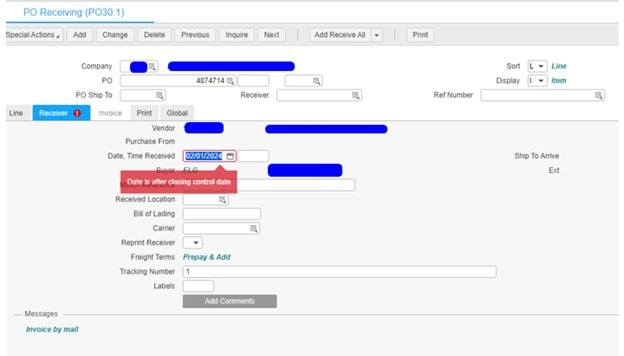
User is getting the error “Date is after/before closing control date” when trying to release PO’s.


Solution:

This message indicates that the transaction post date on the record you are working with falls outside of the date range allowed by the System Control Closing Control Valid Entry Dates (GL01).  You will need to review this record to obtain the Valid Entry Dates and then correct the transaction post Date on the record to fall inside this range.

The GL01 Valid Entry Dates can be changed, but this record is used to ensure that transactions are created for a certain period, or range of periods only. You should work with your accounting staff if you feel the dates are incorrect.


Selecting the appropriate enterprise resource planning (ERP) deployment model—whether on-premises, public cloud, private cloud, or hybrid—is crucial for balancing performance, security, compliance, and cost, directly impacting your organization’s agility and innovation. In an article from NTT Data, enterprise application expert Deon du Preez explores the evolving landscape of ERP systems as organizations approach 2025. It highlights that traditional on-premises ERP solutions are increasingly being complemented or replaced by cloud and hybrid models. Cloud-based ERP offers benefits such as scalability, flexibility, and reduced IT overhead, making it attractive for many businesses. Hybrid ERP combines on-premises and cloud components, allowing companies to retain control over sensitive data while leveraging cloud advantages. The transition to cloud ERP is driven by digital transformation initiatives, changing customer expectations, and the need for real-time data insights. Despite the benefits, some organizations remain cautious due to concerns over security, compliance, and data sovereignty. The article emphasizes that the choice between on-premises, cloud, or hybrid ERP depends on factors like industry requirements, company size, and strategic goals. It predicts that by 2025, most enterprises will adopt a hybrid approach, blending different deployment models to optimize operations. Integration and interoperability will be critical, requiring advanced middleware and APIs. The importance of change management and employee training is underscored to ensure smooth transitions. Vendors are likely to offer more flexible, modular ERP solutions tailored to specific business needs. The rise of AI and automation within ERP systems will further enhance decision-making processes. Data security and privacy remain top priorities, influencing deployment choices. The article advises organizations to assess their long-term strategy, IT infrastructure, and compliance obligations carefully. It also notes that cloud ERP can facilitate innovation through faster deployment and updates. Overall, the future of ERP lies in adaptable, integrated solutions that support agility and growth. The article concludes that embracing these technological shifts is essential for organizations aiming to stay competitive in a rapidly changing digital landscape.


For Full Article, Click Here

This guide explains how to modify settings for Lawson Portal options, affecting how applications display on your computer.

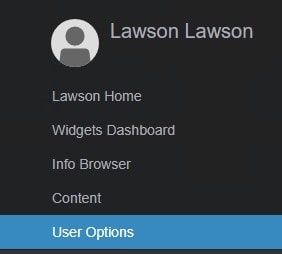
  1. Open the Navigation Menu and from the General group, select User Options.

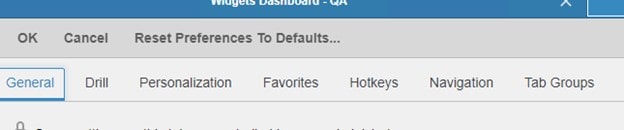
  2. From the General tab, make the following selections:
    Option Meaning
    Locale The language that Lawson Portal uses. Default is U.S. English.
    Note: After changing the Locale, you must refresh the page for the change to take effect.
    Note: This option is not available to privileged online-only users.
    Data Area A defined storage place within a Lawson product line.
    A product line can have one or more data areas, allowing you to separate access to different sets of data within the product line. If you have more than one and are unsure which to select, consult your system administrator.
    Note: After changing the Data Area, you must refresh the page for the change to take effect.
    Value Separator Defines the character used to separate values in CSV files. The options are comma, tab, or semicolon.
    Default Report Type Select the default report format for Lawson system reports. Options include Text, PDF, and LSR.
    Note: For correct rendering of all data, only the LSR output format is enabled on the Arabic platform.
    See: Enabling Infor Lawson Smart Reports (Optional) in Lawson Administration: Jobs and Reports.
    Default Printer The default printer for Lawson system reports. Available printer names and locations are created by your system administrator. The selected printer name will be shown on the right of the drop-down list.
    Note: This option is not available to privileged online-only users.
    Tab Recovery Controls how tabs from your previous session are recovered: Ask (default): Lawson will prompt you to recover or start fresh when the system loads. Always: Automatically recover tabs from the last session. Never: Always start fresh without recovering tabs. Note: Tab Recovery saves the last session per browser, but data from the session is not saved.
    Show Product Line in Page Header Displays the current product line after the tab title. This option is disabled by default.
    Auto Select Required Fields Automatically prompts available data when processing a record.
    Display Field Help Shows help for a field when it is in focus. Useful for new users unfamiliar with the applications.
    Allow Logging to Console Logs browser console information related to Lawson Portal requests, including context messages and workstation state.
    Use Data Entry Field Advance Automatically moves the cursor to the next field without needing to click or press Tab.
    Note: Form customizations can affect the behavior. For example, if fields have been reordered in Design Studio, Lawson follows the original order when moving to the next field.
    Lawson Portal advances the cursor based on field type: Text and non-decimal numeric fields: Cursor advances when the maximum number of characters is reached.  Signed fields: For decimal signed fields, the cursor moves when the maximum number of decimal places is entered.
    Advance on 6-Digit Date Entry Indicates that a date entry is complete after typing six digits (e.g., “093024” for 09/30/2024). This option is only available if Use Data Entry Field Advance is enabled.
    Enable Accessibility Behaviors Enables various usability features designed for assistive technologies.
    Use Client Machine Time Zone When enabled, Lawson Portal uses the time zone of the client machine when submitting jobs and displaying timestamps in Print Manager and Job Schedule.
    Frequent and Recent Forms Enables the use of frequent and recent forms on the Lawson Portal homepage and navigation menu.
    Click Clear data to reset the data.
    Default Token View Selects the default view for applications: Form View: Full field layout, requiring a key field search for data display. Ideal for frequent data entry. List View: Displays application records in a list. You can apply filters, create custom views, and select records for inquiry. List Mode: A wizard-based mode that guides you through required fields to locate and display records.
    List View Configure settings for List View: Number of Records: Maximum number of records displayed in List View. Maximum List View Edits: Maximum records that can be edited in a single transaction.
    Note: This option is not available to users without edit permissions. You can also exclude forms from List View by entering form tokens, separated by a semicolon.
    List Mode Sets the maximum number of records displayed in List Mode.
    Highlight Key and Required Fields Highlights required or key fields with a color swatch, matching the user’s accent color.
    Shrink Forms to Fit on Screen Shrinks forms to fit the screen without scrolling. Supported on Chrome, Firefox, Safari, and Microsoft Edge browsers.
  3. After making your selections, click OK to save your changes.


While enterprise resource planning (ERP) and financial applications are essential to modern business operations, they often contain hidden vulnerabilities—such as misconfigured roles, excessive access rights, and outdated controls—that pose significant security risks. In ERP Today, tech writer Jennifer Lawinski outlines how these issues persist even in mature IT environments and become more pronounced as organizations scale or transition to the cloud. Internal mismanagement of user access is a major concern, with the 2024 Ponemon Institute reporting it as the cause of over 60% of enterprise data breaches. Common risks include privilege creep, weak segregation of duties (SoD), and a lack of real-time oversight, all of which can lead to fraud, compliance violations, and operational disruptions. ERP platforms like SAP, Oracle, and Workday are especially vulnerable when access controls fail. To address these challenges, Lawinski emphasizes the need for automation and continuous monitoring. Technology leaders are urged to audit existing access, enforce SoD policies, deploy privileged access management (PAM) solutions, and replace manual compliance processes with automated governance. Shifting from periodic audits to proactive, real-time controls is essential in today’s interconnected enterprise environments. Ultimately, ERP security is a business issue, not just an IT concern. Investing in PAM and access governance tools reduces risk, improves compliance, boosts operational efficiency, and supports secure digital transformation. By addressing these gaps, organizations can turn ERP systems into enablers of resilience rather than sources of risk.


For Full Article, Click Here