
How to make an HTTP request from command line
There are many instances where you are making HTTP(s) requests from within your code or IPA flow to a Web Service or alike but you cannot RDP to the server to make sure HTTP requests will actually work once they run there. It would also be really nice to see the response code and return message in case you’re doing something wrong. This is of course almost always the case with the Infor Cloud as you are not able to remote to the server and test your request on a browser. But luckily you still have access to LID or IPA. Turns out there is a clean and easy way to run a command from LID that will simulate the HTTP request and bring back the header and body information. One such way is by using PowerShell. The following powershell command retrieves the content of the Infor website for example:
powershell -c “Invoke-WebRequest -UseBasicParsing -Uri https://www.infor.com” | lashow
You can type that command on your LID command prompt and you should see the response from Infor.com as shown below:
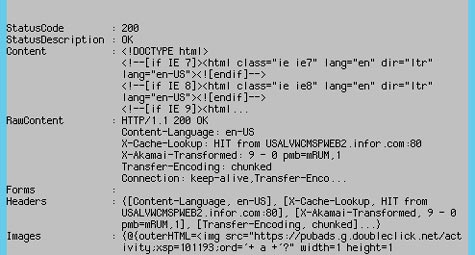
Notice: In the command below I have piped the output to lashow for easier viewing
Alternative, if you do not have access to LID, you can use and IPA flow System node to run the command, and subsequently write the output of the command to a file that you can then view.
This is how we determined an issue we were having with making calls to the ExpenseWire web service from Infor Cloud. The server could not create SSL/TLS secure channel to ExpenseWire via https and resulted in this error in LID:
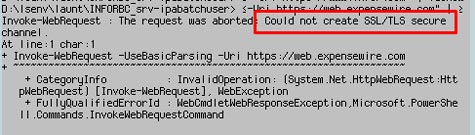
This was especially useful because the IPA flow that was making the Web Service call was simply returning the message:
“Received fatal alert: handshake_failure Message=Could not send Message.”
Retiring Lawson, PeopleSoft, or Oracle? APIX archives the entire application — every table, every year, attachments and security included — into your own AWS account in about 30 days, so you can decommission the legacy system and keep full access to the history.

