

844-NOGALIS (844-664-2547)
Nogalis, Inc.
  • Link to Facebook
  • Link to X
  • Link to LinkedIn
  • Link to Mail
  • Company
    • News, Events and Articles
    • About Us
  • Products
    • Infor Lawson Data Archive
    • PeopleSoft Data Archive
    • Oracle Data Archive
  • Services
    • Infor Lawson Support
    • Infor Lawson / CloudSuite Consulting
  • Education & Training
  • Support
  • Contact Us
  • Click to open the search input field Click to open the search input field Search
  • Menu Menu
News, Events and Articles
You are here: Home1 / News, Events and Articles2 / Articles3 / Batch Error

Batch Error

Articles, News

When Lawson batch jobs are not running, they return the following error:

——————————————————————————–

User: lawson Job: C Queue: **********

——————————————————————————–

BEGIN: Job Submitted: Wed Dec 6 11:30:01 2017

Step 1: CU201 Started. . . . . .: Wed Dec 6 11:30:01 2017

Token Command. . . . . .: D:\lsfprod\law\prod\obj\CU201.gnt

Executable Command . . .: D:\COBOL\bin64\run.exe D:\lsfprod\law\prod\obj\CU201.gnt prod NT00000002 C 1 Process ID . . . . . . .: 11996

Running as Account . . .: \lawson

Program Messages:

Load error : file ‘lacobrts.dll’

error code: 173, pc=0, call=1, seg=0

173 Called program file not found in drive/directory

Elapsed Time . . . . . .: 00:00:00

ERROR: Stopped On Exit 32. Elapsed Time: 00:00:01

END: Job Ended: Wed Dec 6 11:30:02 2017 

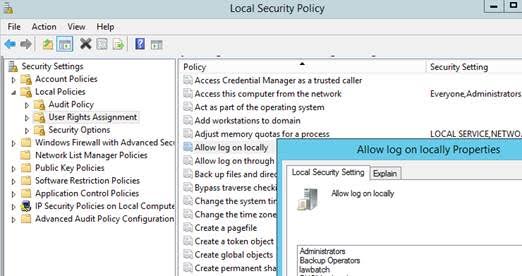
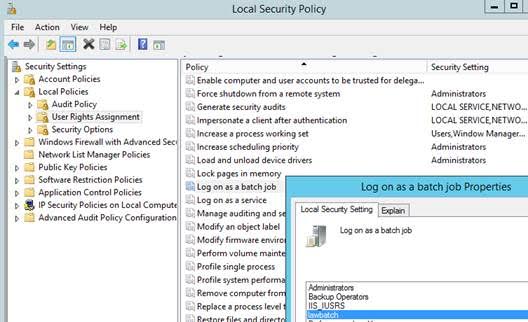
The error message from the job log indicated a problem with lacobrts.dll.  The actual problem was related to the local security policy.  This error was resolved by reviewing the setup for the lawbatch id.  The LSF system in this example had a secured ldapbind.  The domain lawbatch id should be added to the Local Security Policy under User Rights Assignment for “Log on as a batch job” and “Allow log on locally.”
12/27/2017
Share this entry
  • Share on Facebook
  • Share on X
  • Share on WhatsApp
  • Share on LinkedIn
  • Share on Reddit
  • Share by Mail
https://www.nogalis.com/wp-content/uploads/2017/12/Batch-Error.jpg 665 732 Angeli Menta https://www.nogalis.com/wp-content/uploads/2013/04/logo-with-slogan-good.png Angeli Menta2017-12-27 07:44:422019-05-20 13:23:43Batch Error

LEGACY ERP DATA ARCHIVE SOLUTION


Discover how our clients are leveraging AWS services to archive their Legacy ERP data and provide ubiquitous access to users via a light-weight, secure, and read-only web interface. Secure, Fast, Reliable, and Cost Effective. That is the promise of APIX. Follow the link below to find out more and book a discovery call with our data archive specialist.

BOOK DEMO

© Copyright - Nogalis, Inc. 2024
  • Legal
  • Privacy
  • Contact Us
Link to: Attitude Hotels Combines Sunshine and the Cloud with Infor Link to: Attitude Hotels Combines Sunshine and the Cloud with Infor Attitude Hotels Combines Sunshine and the Cloud with Infor Link to: How to perform a cyclic update for BSI TaxFactory 10 Link to: How to perform a cyclic update for BSI TaxFactory 10 How to perform a cyclic update for BSI TaxFactory 10
Scroll to top Scroll to top Scroll to top