
844-NOGALIS (844-664-2547)
Nogalis, Inc.
  • Link to Facebook
  • Link to X
  • Link to LinkedIn
  • Link to Mail
  • Company
    • News, Events and Articles
    • About Us
  • Products
    • Infor Lawson Data Archive
    • PeopleSoft Data Archive
    • Oracle Data Archive
  • Services
    • Infor Lawson Support
    • Infor Lawson / CloudSuite Consulting
  • Education & Training
  • Support
  • Contact Us
  • Click to open the search input field Click to open the search input field Search
  • Menu Menu

Increase Security Employee Search Limit in Lawson Portal

Articles, News

While using Previous/Next on a record in Lawson portal, you may eventually stumble upon a pesky error message of:

“Security search limit of X employees exceeded” (X being anywhere from 1-100+)

 Commonly this could happen when restricting user access via process level, department, etc.

What happens when you click next or previous while inquiring on employees is that Lawson is searching in blocks of records based on your specified search limit.

For example:

If the Employee Security Search limit is set to 10 and we click next to inquire on the next employee record in HR11.
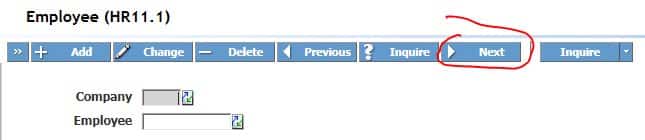
Lawson searches the next 10 employee records to see if the user has access to them.  If they do not, you will get the error message: “Security search limit of 10 employees exceeded”.

When we get the error, we should be on employee record number 10 – meaning if we click next again, we will be on employee number 20 if we do not have access the next 10 records again.


Ideally we’d like to reduce clicking next 10+ times by increasing the search limit.

Solution:

HR00.1
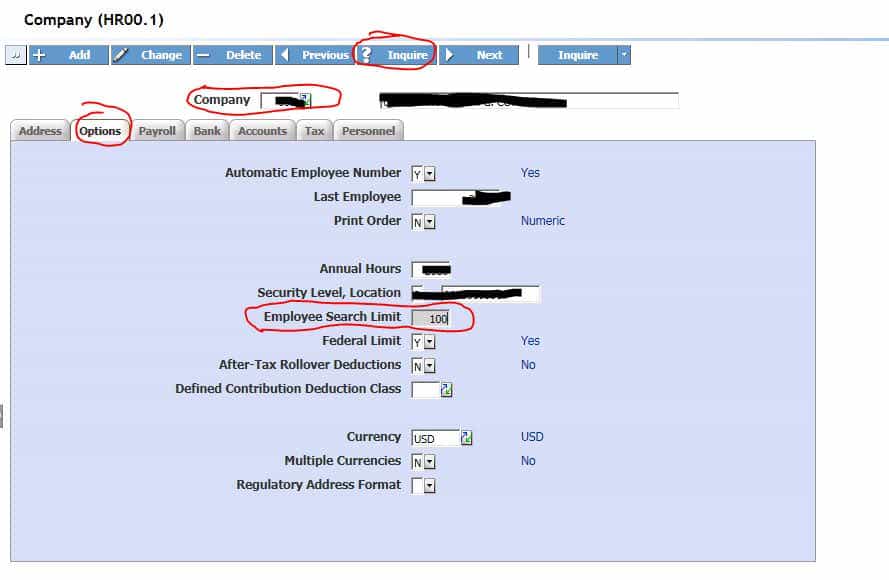
Don’t forget to click CHANGE after adjusting Employee Search Limit

As seen above, changing the search limit to something higher like 100 or more can dramatically reduce the amount of clicks to get to the next record that the user has access to.

If we change it to 100 and the next employee record is #200, it will only take 2 NEXT clicks to get to that record.

Retiring Lawson, PeopleSoft, or Oracle? APIX archives the entire application — every table, every year, attachments and security included — into your own AWS account in about 30 days, so you can decommission the legacy system and keep full access to the history.

See how the APIX ERP archive works →

03/29/2017
Share this entry
  • Share on Facebook
  • Share on X
  • Share on WhatsApp
  • Share on LinkedIn
  • Share on Reddit
  • Share by Mail
https://www.nogalis.com/wp-content/uploads/2017/03/Increase-Security-Employee-Search-Limit-in-Lawson-Portal-e1490841515459.jpg 541 600 Angeli Menta https://www.nogalis.com/wp-content/uploads/2013/04/logo-with-slogan-good.png Angeli Menta2017-03-29 13:36:172017-03-29 19:38:53Increase Security Employee Search Limit in Lawson Portal

LEGACY ERP DATA ARCHIVE SOLUTION


Discover how our clients are leveraging AWS services to archive their Legacy ERP data and provide ubiquitous access to users via a light-weight, secure, and read-only web interface. Secure, Fast, Reliable, and Cost Effective. That is the promise of APIX. Follow the link below to find out more and book a discovery call with our data archive specialist.

BOOK DEMO

© Copyright - Nogalis, Inc. 2026
  • Legal
  • Privacy
  • Contact Us
Link to: How to Apply, Stage, and Revert Application Patches (CTPs) in Lawson S3 Link to: How to Apply, Stage, and Revert Application Patches (CTPs) in Lawson S3 How to Apply, Stage, and Revert Application Patches (CTPs) in Lawson S3 Link to: Configure WebSphere profile to use a different version of Java Link to: Configure WebSphere profile to use a different version of Java Configure WebSphere profile to use a different version of Java
Scroll to top Scroll to top Scroll to top