844-NOGALIS (844-664-2547)
Nogalis, Inc.
  • Link to Facebook
  • Link to X
  • Link to LinkedIn
  • Link to Mail
  • Company
    • News, Events and Articles
    • About Us
  • Products
    • Infor Lawson Data Archive
    • PeopleSoft Data Archive
    • Oracle Data Archive
  • Services
    • Infor Lawson Support
    • Infor Lawson / CloudSuite Consulting
  • Education & Training
  • Support
  • Contact Us
  • Click to open the search input field Click to open the search input field Search
  • Menu Menu

Configure WebSphere profile to use a different version of Java

Articles, News

There may be a time where you need to update your WebSphere profile to use a later version of Java.  One indication of this would be if you are installing an app in WebSphere, and you come across the error “The major.minor version ‘51.0’ is too recent for this tool to understand.”  This means that your application expects a newer Java SDK.

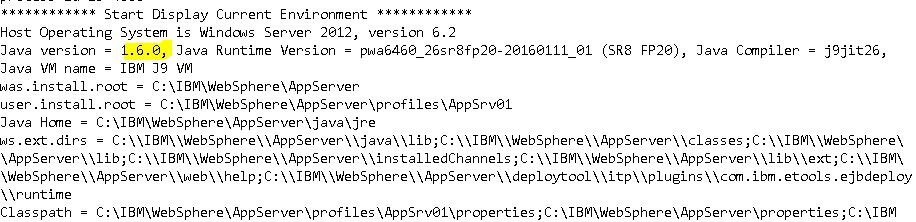
To determine which SDK your application is currently using,

  1. Open <WAS_HOME>/profiles/<profile>/logs/startServer.log
  2. Find the last server start entry
  3. Make not of the Java version

To update the SDK used by your WebSphere profile,

  1. Open a command prompt as administrator
  2. Navigate to <WAS_HOME>/profiles/<profile>/bin
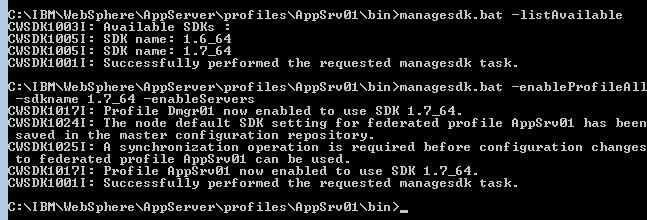
  3. Type bat –listAvailable (managesdk.sh for Unix) to list the Java SDKs that are available for this profile (note the name of the SDK that you want to use)
  4. Type bat –enableProfileAll –sdkname <the name you noted earlier> -enableServers
  5. Syncrhonize the WebSphere nodes
  6. Restart the WebSphere application server
  7. Check the startServer.log to see that the java version has changed

For example:
WebSphere Application Server, update java sdk version, The major.minor version ‘51.0’ is too recent for this tool to understand

Retiring Lawson, PeopleSoft, or Oracle? APIX archives the entire application — every table, every year, attachments and security included — into your own AWS account in about 30 days, so you can decommission the legacy system and keep full access to the history.

See how the APIX ERP archive works →

04/12/2017
Share this entry
  • Share on Facebook
  • Share on X
  • Share on WhatsApp
  • Share on LinkedIn
  • Share on Reddit
  • Share by Mail
https://www.nogalis.com/wp-content/uploads/2017/04/Configure-WebSphere-profile-to-use-a-different-version-of-Java.jpg 517 595 Angeli Menta https://www.nogalis.com/wp-content/uploads/2013/04/logo-with-slogan-good.png Angeli Menta2017-04-12 11:30:442017-04-13 16:31:02Configure WebSphere profile to use a different version of Java

LEGACY ERP DATA ARCHIVE SOLUTION


Discover how our clients are leveraging AWS services to archive their Legacy ERP data and provide ubiquitous access to users via a light-weight, secure, and read-only web interface. Secure, Fast, Reliable, and Cost Effective. That is the promise of APIX. Follow the link below to find out more and book a discovery call with our data archive specialist.

BOOK DEMO

© Copyright - Nogalis, Inc. 2026
  • Legal
  • Privacy
  • Contact Us
Link to: Increase Security Employee Search Limit in Lawson Portal Link to: Increase Security Employee Search Limit in Lawson Portal Increase Security Employee Search Limit in Lawson Portal Link to: IP Designer Series – The Wait Node Link to: IP Designer Series – The Wait Node IP Designer Series – The Wait Node
Scroll to top Scroll to top Scroll to top