
OT Pay Rate displaying incorrectly
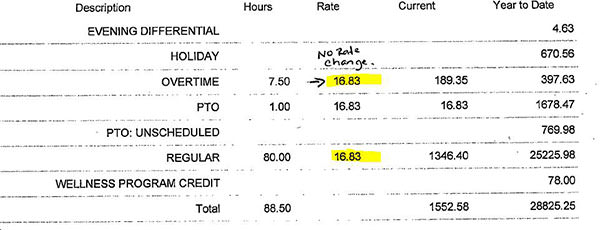
After upgrading to Infor 10 with Employee Self Service, when users view their Printable Pay Stub the Overtime Rate was displaying Regular Rate (see screen print #2).
Screen Print #2
To resolve this issue:
- in emss_config.xml change “calc_hourly_rate” = “true” (location: lawdir\web\lawson\xhrnet\xml\config)
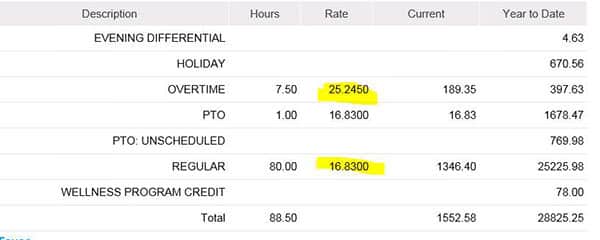
- The user requires access to their data. Through Lawson Security Administrator grant access to EMPLOYEE table fields: EXEMPT-EMP, SALARY-CLASS, TAX-STATE, WORK-STATE (see screen print #3 for “Printable Pay Stub” displaying correctly).
Screen Print #3
Retiring Lawson, PeopleSoft, or Oracle? APIX archives the entire application — every table, every year, attachments and security included — into your own AWS account in about 30 days, so you can decommission the legacy system and keep full access to the history.

