
Controlling Athena Query Output Filenames in S3
When working with Amazon Athena and Python, a common requirement is to save query results to Amazon S3. While Athena provides the OutputLocation parameter to specify where results are stored, there’s an important nuance: you can specify the folder (prefix) in S3, but not the exact filename.
How Athena Handles Output Files
When you run a query in Athena:
- The OutputLocation is the S3 folder where the results will be stored.
- Athena automatically generates a filename based on the query execution ID, such as:
- <query-execution-id>.csv
- This filename cannot be directly controlled through the Athena API.
So even if you set OutputLocation=’s3://my-bucket/athena-results/’, Athena will still generate something like s3://my-bucket/athena-results/<query-execution-id>.csv.
Workaround: Renaming the File After Query Execution
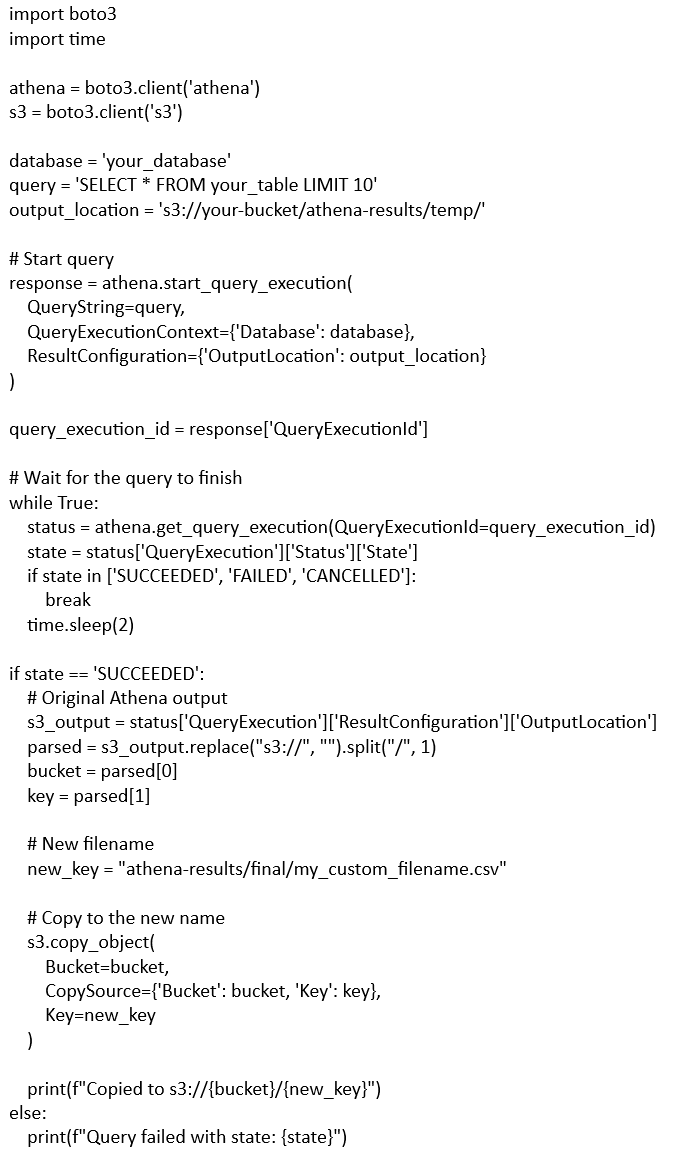
To control the filename, you can copy or move the generated file after the query completes. Here’s a Python example using boto3:
Key Takeaways
- OutputLocation specifies a folder, not a filename. Athena always generates a CSV named after the query execution ID.
- To use a custom filename, copy or move the file after the query finishes.
- Using this method, you can organize your Athena query results in S3 with predictable filenames for downstream processing or automation.
This approach provides a simple and reliable way to control filenames for Athena query results without needing to rely on Athena to handle naming.
Retiring Lawson, PeopleSoft, or Oracle? APIX archives the entire application — every table, every year, attachments and security included — into your own AWS account in about 30 days, so you can decommission the legacy system and keep full access to the history.
