
Lawson Landmark – ‘Error 1069: the service did not start due to a logon failure’ Resolution
Summary: Lawson Process Server Administrator will not start or your Infor ION Grid Bootstrap service won’t start.
To resolve this, follow these steps:
This is an error when the service won’t start (see the screenshot below)
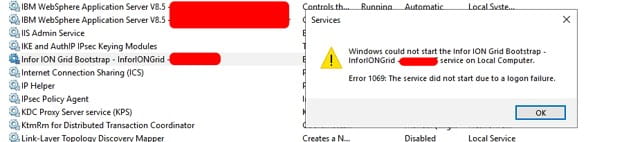
Or when trying to access Process Server Admin web portal:

- To fix this Login to your Landmark server (on-prem)
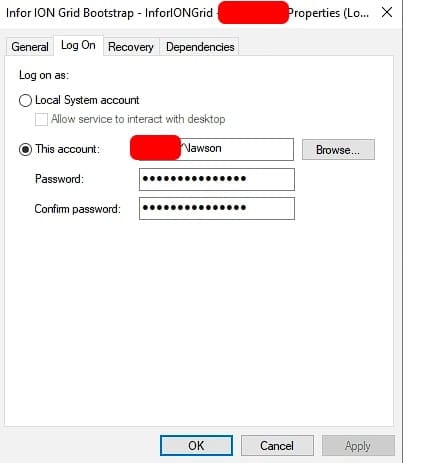
- Open Services >> Double-click on the Infor ION Grid Bootstrap service
- Select Log On >> Update the credentials with correct password

- Click okay and try to start the service again
The error should now be resolved and you be able to start Lawson Process Server Administrator normally.
Retiring Lawson, PeopleSoft, or Oracle? APIX archives the entire application — every table, every year, attachments and security included — into your own AWS account in about 30 days, so you can decommission the legacy system and keep full access to the history.
